Buzz puts LinkedIn outreach, cold email, phone dialing, voicemail drops, video messaging, and prospect data into a single subscription. For sales teams tired of managing five or six disconnected tools, that consolidation is the appeal. But with plans starting at $225/month and annual contracts as the only option, Buzz asks for a real commitment before you’ve sent your first campaign.
After analyzing the platform, we believe Buzz is a strong choice if:
- You want multichannel outreach (LinkedIn, email, phone, voicemail, video) in one platform
- You need a built-in prospect database without subscribing to a separate data provider
- You’re an agency looking for white-label outreach technology to resell under your own brand
- You run lean sales teams and want to cut the overhead of managing multiple tools
- You value dedicated onboarding support and account management
However, Buzz might not be the best choice if:
- You need reliable, bidirectional CRM integration with Salesforce or HubSpot
- You can’t commit to annual billing starting at $225/month for three seats
- You need an API-first platform for custom workflow integrations
- You want month-to-month billing or easy self-serve cancellation
- Your outreach strategy is email-only and you don’t need LinkedIn or phone channels
This review covers what Buzz does well, where it falls short, how its pricing plays out in practice, and who should consider it before committing.
If you’re ready to try it, you can get started with Buzz here. Otherwise, keep reading for the full breakdown.
What is Buzz?
Buzz is a B2B sales engagement platform founded in 2020 and headquartered in Toronto, Ontario, Canada. Mitchell Conery (CEO), George Petrov (CTO), and Tristan Lefler (Director of Strategic Partnerships) started the company after years in B2B sales for logistics and courier services. They’d lived the pain of juggling disconnected outreach tools and wanted to build one that replaced them all.
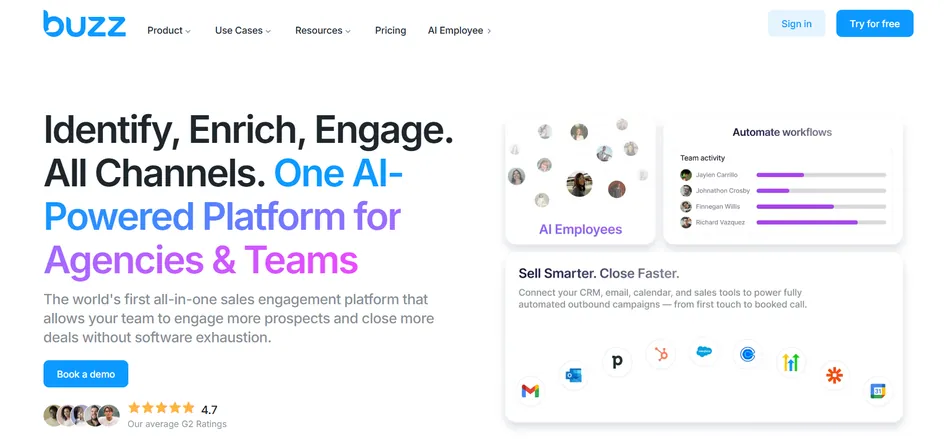
The platform has grown to $10.9M in annual revenue with around 99 employees, all without external funding. It serves over 6,500 sales professionals from solopreneurs to Fortune 500 companies, with published case studies from Thomson Reuters and Royal Bank of Canada.
Buzz bundles six outreach channels: LinkedIn social outreach, email sequencing with built-in warmup, a browser-based dialer, voicemail drops, video messaging, and a 250M+ prospect database with data enrichment. The platform also includes AI features for message personalization, inbox sentiment detection, and campaign generation, plus a newer AI Employee product that automates outreach entirely.
Buzz holds a 4.7-star average on G2 with 151+ verified reviews and seven G2 badges.
Buzz Pros & Cons
| Pros | Cons |
|---|---|
| ✅ All-in-one: LinkedIn, email, dialer, voicemail, video in one subscription | ❌ Plans start at $225/month with annual billing only |
| ✅ Built-in prospect database with 696M+ enriched profiles | ❌ CRM integrations (HubSpot, Salesforce) draw reliability complaints |
| ✅ Cloud-based LinkedIn automation with no Chrome extension required | ❌ No self-serve cancellation; 31-day written notice required |
| ✅ White-label program for agencies | ❌ Steep learning curve for campaign building |
| ✅ Credits only charged on successful data enrichment | ❌ Additional costs for mailbox slots, domains, and dialer minutes add up |
| ✅ AI Employee for autonomous prospecting (in beta) | ❌ AI struggles when conversations deviate from planned sequences |
| ✅ Responsive customer support (most-cited strength on G2) | ❌ Salesforce integration gated to Team Accelerate ($450/month) and above |
Who is Buzz Best For?
Buzz’s feature set and pricing point it at outbound-first teams that want multiple channels without managing separate tools. It fits best for:
- Small-to-mid-size B2B sales teams (1–200 employees) running outbound as their primary growth channel. The combination of LinkedIn automation, email sequencing, and a built-in dialer lets a lean team run coordinated multichannel campaigns without subscribing to three or four separate platforms. The SMB-focused page positions this as competing with larger players on a smaller budget.
- Recruiting and staffing firms using outbound to source candidates and win new job orders. Northbound Executive Search is the flagship case study, reaching ROI within two months. The LinkedIn-first workflow and prospect database suit recruiters who prospect both candidates and hiring managers.
- Marketing and lead-generation agencies wanting to offer outreach as a managed service. Buzz’s white-label program lets agencies resell the platform under their own brand, with partner-level admin access and support. Agency partners have generated $23M+ in aggregate client results.
- Solopreneurs and one-person sales operations who need the full outreach stack without managing multiple vendors. The solopreneur page emphasizes quick setup and the ability to get campaigns live on day one. Magic Campaigns generates multichannel playbooks in minutes.
- Business consulting and professional services firms selling through discovery conversations. For firms whose sales motion centers on booking qualified meetings, Buzz’s multichannel approach and AI-powered meeting booking fit the workflow.
Source: Buzz
Enterprise buyers exist in Buzz’s case study portfolio, but the platform pulls hardest for teams that need to do more with less. If you’re running a complex enterprise sales operation with CRM dependencies and custom workflow requirements, Buzz may be stretching beyond its core strength.
Buzz Review: How it Works & Key Features
Social Outreach: Buzz automates LinkedIn prospecting from its own servers, with no browser extension required.
LinkedIn outreach was Buzz’s entry point, and it remains one of the platform’s strongest features. Buzz’s Social Outreach module lets sales teams find, target, and engage prospects on LinkedIn at scale from within the platform.
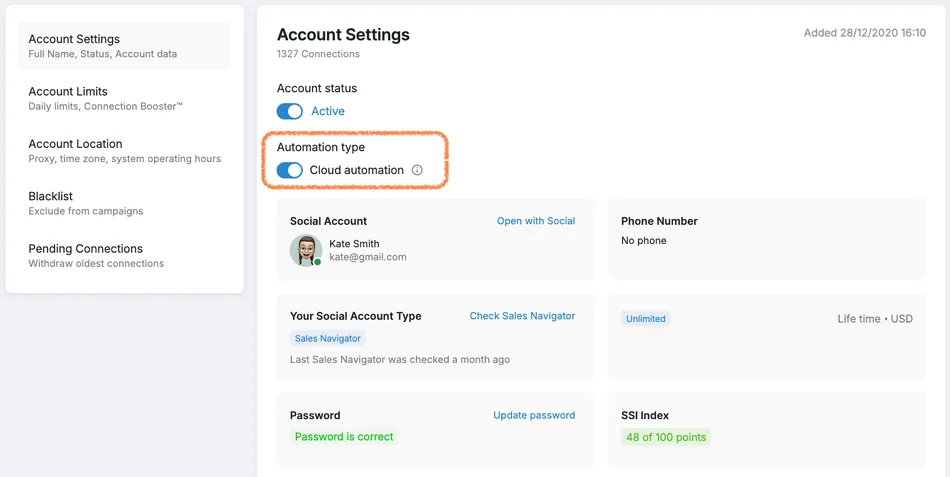
Setup begins by connecting a LinkedIn account through a 5-step onboarding process: selecting a geographic location (which determines the proxy used), setting timezone and working hours, and entering LinkedIn credentials. From there, all LinkedIn actions run through Cloud Automation, a server-side execution layer that operates 24/7 without requiring a Chrome extension. This is a real architectural difference from competitors that rely on browser-based automation.
Source: Buzz
Lead sourcing is flexible. Buzz supports imports from Sales Navigator filter searches and lists, Recruiter Projects, LinkedIn Posts, Events, Groups, and CSV uploads. You can target people who engaged with a specific post, attended a specific event, or belong to a specific group, not just profiles matching a standard search filter.
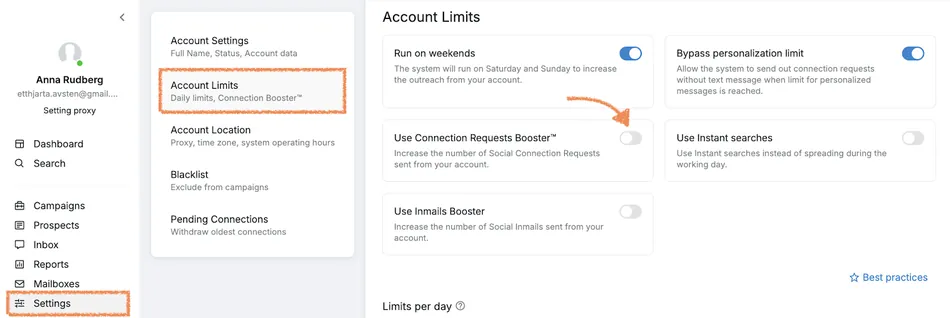
Campaign sequences can include profile views, connection requests (with optional personalized notes), direct messages, InMail sends, and wait timers. The Connection Request Booster sends connection requests without visiting each profile first, preserving the daily profile view quota. This matters when you send more than 30 connection requests per day.
Source: Buzz
Buzz operates within defined safety thresholds: up to 100 connection requests per week (80 recommended for free LinkedIn accounts), 100–150 messages per week depending on subscription tier, and profile views capped at 500/day for free accounts or 2,000/day with Sales Navigator. Team Starter plans and above include a residential proxy for additional account protection.
Email Outreach & Deliverability: Buzz handles mailbox provisioning, warmup, rotation, and sending from a single workspace.
Buzz’s Email Outreach module connects to existing email providers (Gmail, Outlook, AWS, SMTP, or SendGrid) and manages them from one interface with unlimited mailboxes across all plans.
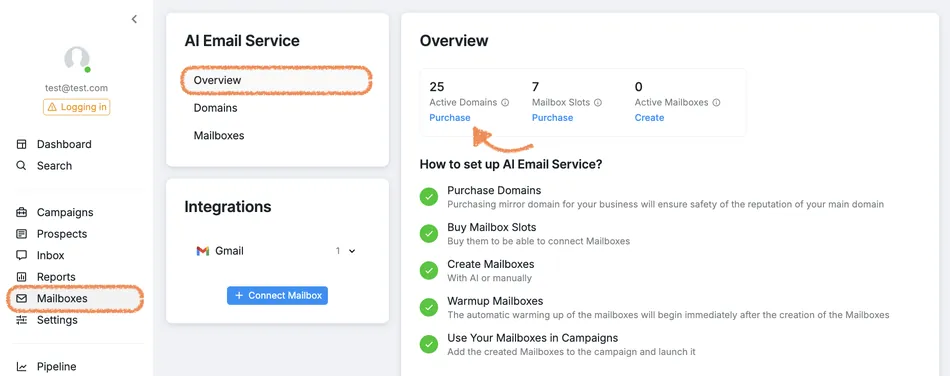
The most notable capability is the AI Email Service. Instead of buying domains from a separate registrar, configuring DNS records manually, and setting up mailboxes through a third-party provider, Buzz handles the entire chain in-platform. You can purchase custom .com mirror domains, generate AI-suggested domain names, and create up to three mailboxes per domain, with warmup starting automatically at creation. For teams scaling to dozens of inboxes, this removes real operational work.
Source: Buzz
Email warmup is native to the platform, not a bolted-on third-party integration. For SMTP mailboxes, you configure warmup manually with three parameters: daily warmup email volume (recommended: 20), ramp-up increment per day (minimum: 5), and reply rate percentage (recommended: 30%). AI Email Service mailboxes warm up automatically with no manual configuration.
Smart mailbox rotation distributes first-contact sends evenly across selected mailboxes, then locks ongoing conversations to the originating mailbox to maintain thread continuity. This happens automatically.
You can configure campaigns as Multichannel (Social + Email combined) or Email Only. A typical multichannel sequence might look like: Day 1 cold email, Day 3 LinkedIn connection, Day 6 follow-up email referencing the LinkedIn request, Day 10 voicemail drop. Personalization tools include placeholders and spintax for variable-level customization per recipient, plus AI-generated message drafts.
Data Enrichment: Buzz includes a prospect database with 696M+ profiles, replacing the need for a separate data provider.
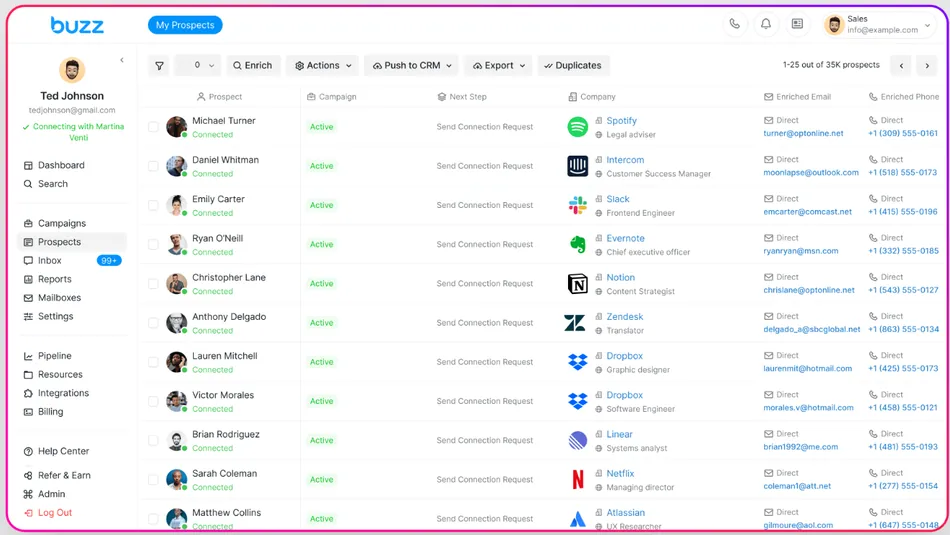
Buzz Data Enrichment is built into the platform rather than requiring a third-party subscription. The database includes 696M+ enriched B2B contact profiles with 225M+ verified emails, 80M+ phone numbers, and 11M+ company profiles covering firmographic attributes like company size, revenue, funding, and industry.
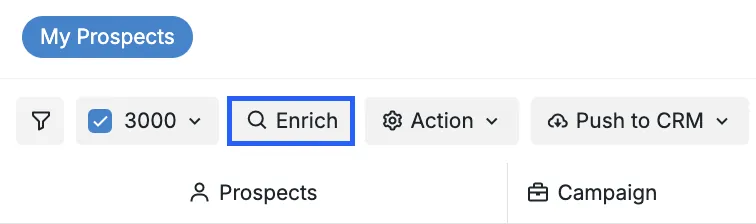
Enrichment works three ways. You can run manual mass-enrichment from the Prospects tab, trigger enrichment for individual contacts, or add an “Enrich Profile” step directly into a campaign sequence so contacts are enriched automatically as they enter the workflow. The campaign-embedded approach is particularly useful: contacts get enriched in real time as the sequence progresses, without manual queuing.
Source: Buzz
An important detail in the credit model: credits are only deducted on successful enrichment. If Buzz queries its database and finds no match, you pay nothing. This reduces the financial risk of enriching large or uncertain lists.
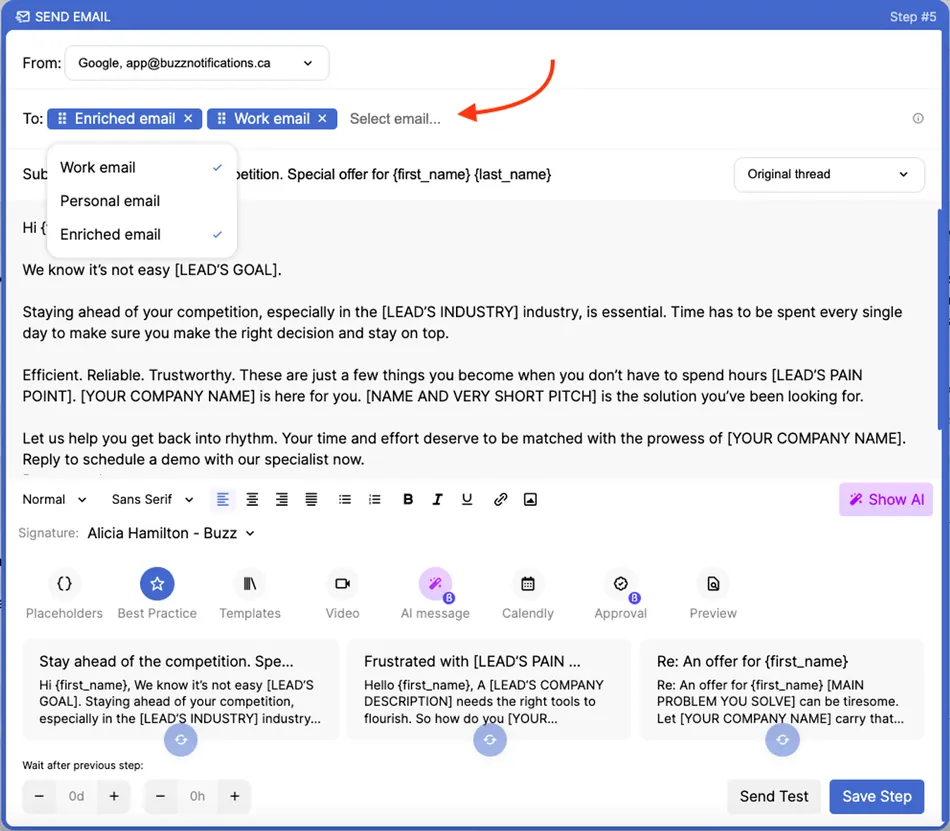
The Best Email Available feature solves a common problem. Instead of requiring one email type per campaign (which causes prospects to be skipped when that type is absent), Buzz selects among personal, work, and enriched addresses per prospect, increasing reach across mixed lists.
Source: Buzz
Before sending, emails pass through a three-stage verification process: format validation, a check against historical delivery failures, and external validation via Emailable. Only emails passing all three checks are sent. Buzz caches results per address to avoid repeated verification costs.
AI Features & AI Employee: Buzz applies AI to campaign creation, message personalization, and inbox management, with an autonomous prospecting agent in beta.
Buzz’s AI Features suite covers several parts of the outreach workflow:
- Magic Campaigns generates multichannel campaign sequences from minimal input, creating outbound steps, messages, and follow-ups across Social and Email channels.
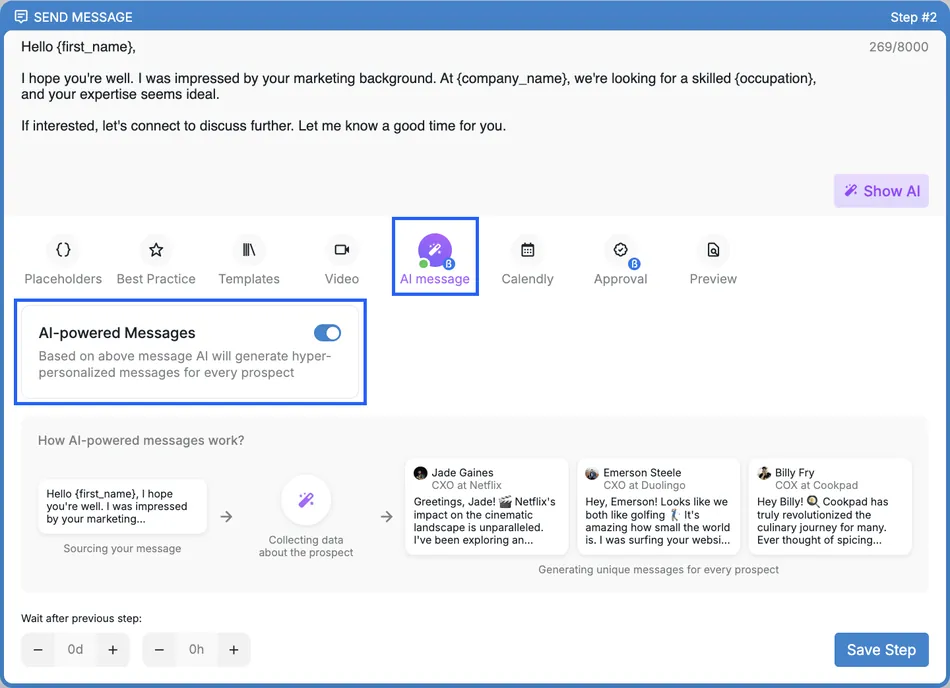
- AI-Powered Messages pulls each prospect’s social profile data and generates a personalized message variant per contact. You can toggle this on for any text-based campaign step.
- AI-Powered Labels classifies prospect responses into eight sentiment categories (Interested, Neutral, Not Interested, Hard No, Wrong Contact, Making an Introduction, Out of Office) using OpenAI-powered sentiment analysis.
- One-click Reply Generation reads conversation history and drafts contextually aware responses.
- AI-Powered Comments generates personalized social comments in seconds, guided by a selected sentiment tone.
Source: Buzz
The most ambitious AI product is the AI Employee, currently in beta. It’s an autonomous prospecting agent that handles the pipeline from prospect identification through meeting booking. Setup starts at x.buzz.ai, where you supply your company’s website URL and the AI scrapes and synthesizes information about your business within 30–45 seconds. It populates a knowledge base covering objectives, Q&A responses, case studies (up to 3), and value propositions.
After setup, the AI Employee generates five multichannel outreach campaigns. It starts with 600 emails per day using 4 monitored domains and 12 warmed mailboxes. You can run it in fully autonomous mode or in Manual Approval mode where it drafts responses for human review. You can also assign it to individual conversations from the Inbox sidebar, activating it mid-conversation on a warm lead without rebuilding a campaign.
The AI Employee starts at $350/month and is separate from the core platform subscription. It supports English, Chinese, French, Spanish, German, and Arabic.
Dialer, Voicemail Drops & Video: Buzz adds phone and video channels to round out multichannel outreach.
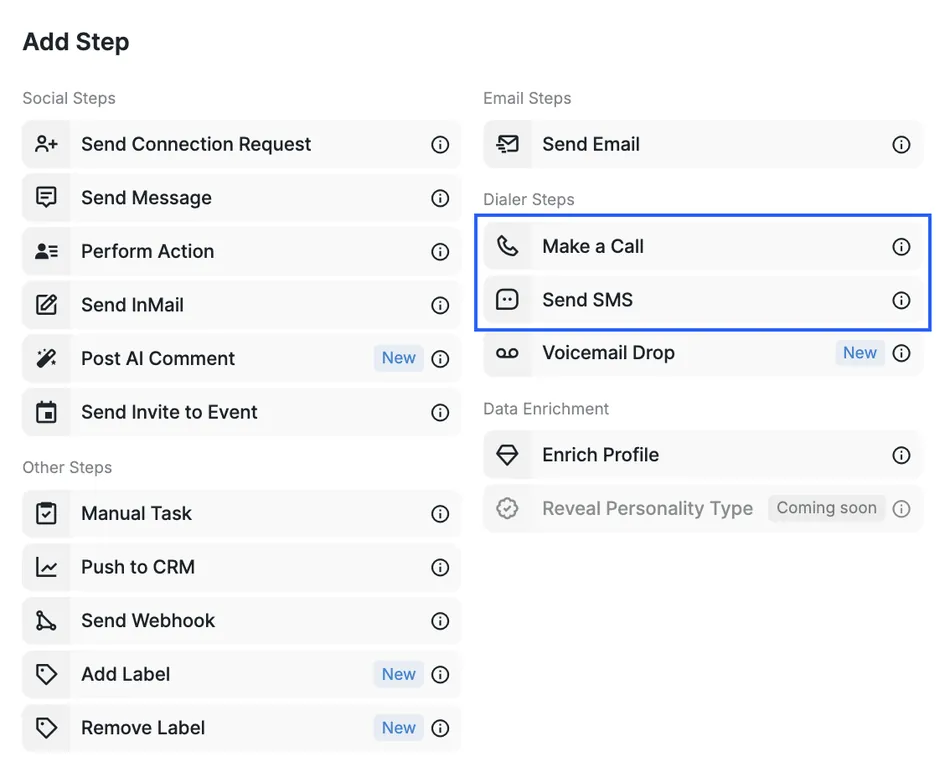
The Buzz Dialer is a browser-based calling tool built into the platform. Reps purchase a phone number through Buzz (available in multiple countries), add a Make a Call step inside any campaign, and the system pauses the prospect at that step until the rep completes the call. Buzz records and stores all calls, with the Call Recordings tab showing date, duration, prospect name, and campaign details. Buzz charges calls per minute from a credit balance, with unlimited calling reserved for Enterprise plans.
Source: Buzz
Voicemail Drops (currently in beta) let reps pre-record or upload voice messages that land in a prospect’s voicemail without the phone ringing. They’re capped at 70 per day per connected account and currently limited to US and Canada recipients.
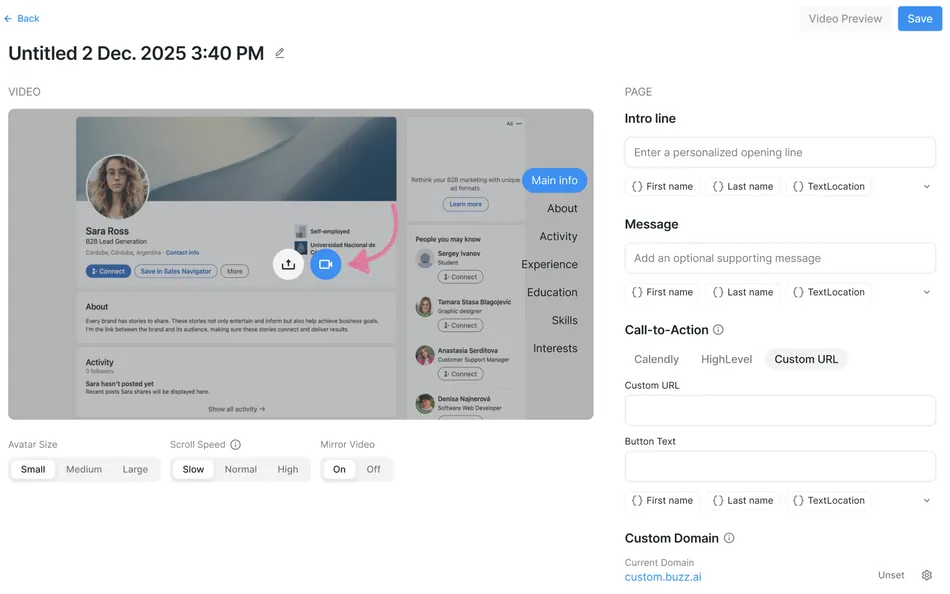
Buzz Video takes a different approach to video prospecting. Reps record one video where their camera feed appears as a selfie bubble while the background displays a prospect’s social profile. Buzz records the video once, then renders it personalized for each prospect in a campaign. You can insert videos into connection requests, messages, emails, and InMails, with a CTA button or embedded Calendly calendar on the landing page. Buzz Video is only available for campaigns that include Social Outreach, not email-only campaigns.
Source: Buzz
Pricing
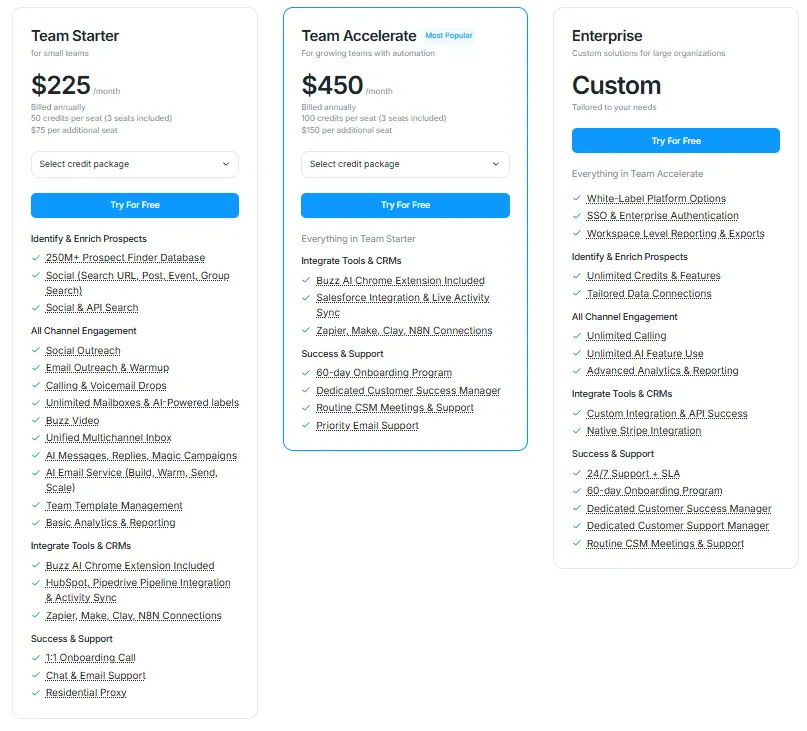
Buzz uses a per-seat, annual-commitment model with a bundled-seat minimum. All published prices are billed annually. Monthly billing is not offered on the public pricing page.
Team Starter ($225/month, billed annually):
3 seats included; additional seats at $75/seat/month
50 credits per seat per month
Social outreach, email outreach with AI warmup, unlimited mailboxes
Calling, voicemail drops, Buzz Video
AI messages, replies, and Magic Campaigns
AI Email Service
HubSpot and Pipedrive integration
Zapier, Make, Clay, and N8N connections
1:1 onboarding call, chat and email support
Team Accelerate ($450/month, billed annually), marked “Most Popular”:
- 3 seats included; additional seats at $150/seat/month
- 100 credits per seat per month
- Everything in Starter, plus Salesforce integration
- 60-day onboarding program
- Dedicated Customer Success Manager with routine meetings
- Priority email support
Enterprise (custom pricing):
- Unlimited seats and credits
- White-label platform options, SSO
- Unlimited calling
- Custom API integrations and advanced reporting
- 24/7 support with SLA
AI Employee ($350/month), separate product, currently in beta:
- Autonomous prospecting from identification through meeting booking
- 600 emails/day, 4 domains, 12 warmed mailboxes
- Available as a white-label option for agencies
All plans include free 4-week Buzz Academy digital onboarding, and annual subscribers receive a 6-week onboarding experience. Teams of five or more on annual plans get dedicated onboarding with biweekly 1-on-1 strategy sessions.
Costs that aren’t on the pricing page. Buzz applies a 3% transaction fee to all credit card purchases per its Terms of Service. AI Email Service mailbox slots cost $5 each, sending domains cost a minimum of $15 to purchase and $20 to renew, and voicemail drop numbers cost $1/month or $12/year. Dialer calls are charged per minute from the credit pool. All fees are non-refundable.
Limitations & Considerations
Buzz’s design choices create trade-offs worth understanding before you commit. These aren’t failures; they’re consequences of the platform’s all-in-one ambition and its pricing model.
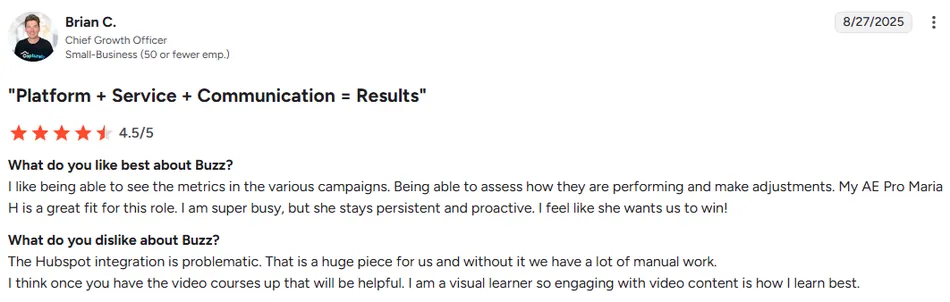
CRM integration friction. Users report integration problems with Salesforce and HubSpot that create extra manual work. Multiple G2 reviewers single out the HubSpot integration as problematic. For teams that rely on their CRM as the system of record, needing to work around sync issues undercuts the efficiency gains Buzz promises elsewhere. Salesforce integration isn’t available on the Starter plan; it requires the $450/month Accelerate tier.
Source: G2
Cancellation and contract terms. Buzz requires a 31-day written cancellation notice submitted to billing@buzz.ai before the renewal date. There’s no self-serve cancellation inside the platform. Customers mid-contract cannot cancel early and remain liable for the full contracted period. Downgrades require the same 31-day written notice. This is more rigid than most SaaS competitors, and multiple G2 reviews flag the process as a friction point.
Pricing that escalates beyond the base subscription. The $225/month headline includes three seats and 50 credits per seat per month, but credits are consumed by data enrichment, AI features, and dialer usage. Once you factor in additional seats, AI Email Service domains and mailbox slots, voicemail numbers, and the 3% credit card surcharge, effective costs can climb well above the published plan price.
Campaign complexity. Reviews note difficulty in building campaigns and diagnosing what works, with users reporting it takes about a week to get comfortable with the platform. The breadth of options (multiple channels, campaign types, AI toggles, enrichment steps) creates a learning curve that simpler single-channel tools don’t have.
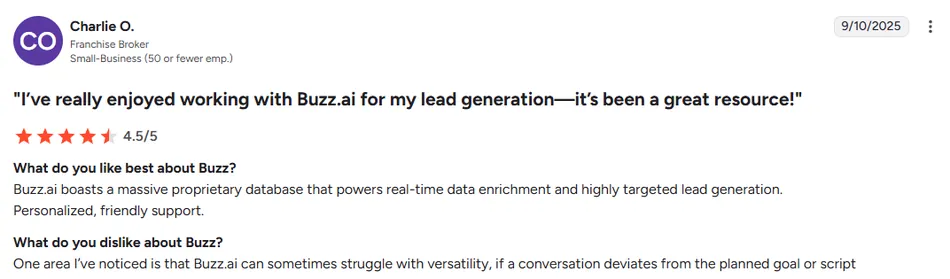
AI limitations with unscripted conversations. Buzz’s AI can struggle when a prospect conversation deviates from the planned goal or script. For the AI Employee and reply-generation features, human oversight is still necessary for conversations that go off the expected path.
Source: G2
Limited API access for custom integrations. Reviewers note the absence of a full developer-facing API as a blocker for custom workflow integrations. Buzz does expose a public REST API with documented endpoints for adding prospects to campaigns, but the API surface is narrower than what teams with complex technical requirements typically need.
Who Should Use Buzz?
Buzz works best when the buyer fits a specific profile:
- Outbound-first B2B teams currently paying for 3–5 separate tools. If you manage separate subscriptions for LinkedIn automation, email sequencing, data enrichment, and calling, Buzz’s consolidation pitch holds up. A single workspace replacing multiple logins and billing relationships is a real operational win.
- Sales agencies that want to offer outreach as a branded service. The white-label program is thorough for a platform at this price point. Agencies get partner-level admin access, white-label hosting, and customer support under their own brand.
- Recruiting firms doing high-volume outbound to both candidates and hiring managers. The LinkedIn-first architecture, prospect database, and multichannel sequencing align well with recruiting workflows where LinkedIn is the primary sourcing channel and email and phone are follow-up channels.
- Teams that value hands-on onboarding and support. Buzz’s structured onboarding (4-week academy, 6-week program for annual subscribers, dedicated CSM on Accelerate) and consistently praised customer support make it a reasonable choice for teams that want guidance through setup.
Who Should Look Elsewhere?
- Teams whose workflows depend on bidirectional CRM sync. If Salesforce or HubSpot is your system of record and you need reliable two-way data flow without manual workarounds, Buzz’s integration quality is a known weak point.
- Budget-conscious buyers who aren’t ready for a $225/month annual commitment. The entry price assumes three seats and annual billing. Solo operators or small teams testing the waters will find more affordable starting points with competitors that offer monthly billing and lower minimums.
- Technical teams that need API-first extensibility. If your sales operations rely on custom integrations, webhooks, and programmatic access to build workflows, Buzz’s API surface is too limited for complex use cases.
- Teams doing email-only outreach with no LinkedIn or phone component. Buzz’s pricing reflects its multichannel breadth. If you only need cold email, you’re paying for channels you won’t use. A dedicated cold email tool will deliver more value per dollar.
- Buyers who want contract flexibility. The annual-only billing, 31-day written cancellation notice, and non-refundable policy make Buzz a poor fit for anyone who values the ability to start and stop on short notice.
Final Verdict: Is Buzz Worth It?
For outbound teams that use multiple channels, yes, with conditions.
Buzz solves a real problem. Running LinkedIn outreach, cold email, phone calls, voicemail drops, and prospect research from one platform eliminates real operational friction. The cloud-based LinkedIn automation, built-in prospect database, and AI Email Service are differentiators that reduce the number of tools, logins, and subscriptions a sales team manages. The published case studies show credible results: Certa added $200K+ in pipeline in under four months, Thomson Reuters saved 20 hours per rep per month, and Kara Renninger Consulting scaled to $500K in six months.
The conditions matter, though. The $225/month floor, annual-only billing, and rigid cancellation terms mean you’re committing before you’ve had time to fully evaluate fit. CRM integration issues create manual work for teams that rely on Salesforce or HubSpot. The learning curve is steeper than single-channel alternatives. And the total cost of ownership, once you add extra seats, AI Email Service infrastructure, and dialer credits, can climb well past the advertised plan price.
If your outreach strategy is multichannel, your team values consolidation over best-of-breed tooling for each channel, and you’re comfortable with the pricing structure, Buzz delivers on its promise. If any of those conditions don’t apply, the alternatives section of your research is worth your time.
Buzz FAQ
What channels does Buzz support for outreach?
Buzz supports five outreach channels in one platform: LinkedIn social outreach (connection requests, messages, InMail), cold email with built-in warmup, a browser-based phone dialer, voicemail drops (currently in beta, US and Canada only), and personalized video messaging. All channels can be combined in a single multichannel campaign sequence.
How much does Buzz cost?
Buzz’s Team Starter plan costs $225/month (billed annually) and includes three seats. Additional seats cost $75/seat/month. The Team Accelerate plan runs $450/month with three seats and adds Salesforce integration, a dedicated Customer Success Manager, and a 60-day onboarding program. Enterprise pricing is custom. Additional costs include AI Email Service domains, mailbox slots, voicemail numbers, dialer minutes, and a 3% credit card surcharge.
Does Buzz require Sales Navigator?
No. Sales Navigator is not required. Free LinkedIn accounts work with social outreach features, though Sales Navigator and Recruiter subscriptions unlock higher profile view limits (2,000/day vs. 500/day) and additional InMail capabilities.
Does Buzz integrate with CRMs?
Buzz offers native integrations with HubSpot, Pipedrive, GoHighLevel, and ConvergeHub on all plans. Salesforce integration requires the Team Accelerate plan ($450/month) or higher. The platform also connects with Zapier, Make, Clay, and N8N for broader automation workflows. Multiple user reviews note that CRM sync quality, particularly with HubSpot and Salesforce, can require manual workarounds.
What is Buzz’s AI Employee?
The AI Employee is a separate product (starting at $350/month, currently in beta) that acts as an autonomous prospecting agent. It onboards in about 8 minutes by scraping your company website, then generates five multichannel campaigns with managed email infrastructure (600 emails/day, 4 domains, 12 warmed mailboxes). It can run fully autonomously or in a manual approval mode where it drafts responses for human review.
Can I cancel my Buzz subscription at any time?
Cancellation requires written notice submitted to billing@buzz.ai at least 31 days before the renewal date. There is no self-serve cancellation inside the platform. Customers with time remaining on annual or multi-period contracts cannot cancel early and remain liable for the full contracted term. All fees are non-refundable.
How big is Buzz’s prospect database?
Buzz provides access to 696M+ enriched B2B contact profiles, 225M+ verified emails, 80M+ phone numbers, and 11M+ company profiles. The database is supplemented by integrations with ZoomInfo and Crunchbase. Credits are only deducted when enrichment returns a successful match; failed lookups cost nothing.
What onboarding support does Buzz offer?
All plans include a free 4-week Buzz Academy digital onboarding program. Annual subscribers receive a 6-week onboarding experience. Team Starter plans include a 1:1 onboarding call with chat and email support. Team Accelerate adds a 60-day onboarding program with a dedicated Customer Success Manager and routine meetings. Annual teams of five or more get biweekly 1-on-1 strategy sessions.