If you’ve tried to make sense of Salesforge’s pricing page (will 100 personalization credits last the week or the month? does “unlimited mailboxes” mean unlimited? what happens when you add Agent Frank on top of your base plan?), you already know: outbound platform pricing gets complicated when the product is six products in a trench coat.
Salesforge built an outbound sales platform out of Tallinn, Estonia, growing to $3 million ARR within 11 months of its 2023 launch and earning a 4.6-star rating on G2. The platform bundles cold email sequencing, LinkedIn outreach, AI personalization, email warm-up, and a reply inbox into what it calls the Forge Stack.
For teams tired of duct-taping Instantly, Apollo, a warm-up tool, and a LinkedIn automation tool into one workflow, that consolidation is the pitch. But the pricing model brings its own complexity: two plan tiers with credit-based limits, a separately priced AI SDR product, and an ecosystem of companion tools that each carry their own subscription.
We analyzed Salesforge’s pricing tiers, credit system, and ecosystem costs. Salesforge’s pricing is a good fit if:
- You run multi-channel outbound (email + LinkedIn) and want both channels under one roof without per-seat charges
- Your monthly send volume fits within 50,000 emails, where the Growth plan’s flat $80/month is hard to beat per email
- You want unlimited mailboxes and warm-up included in your base subscription, eliminating two common line items from your outbound budget
- You want one platform for sequencing, warm-up, and reply management instead of paying for three separate tools
- Your team has multiple users who need access, since the Growth plan includes unlimited seats at no extra cost
Salesforge’s pricing may not fit if:
- You need heavy AI personalization at volume, where the credit limits (100 on Pro, 1,000 on Growth) could become a recurring add-on expense
- You want the AI SDR (Agent Frank) included in a self-serve plan, not priced separately through a sales call
- Your send volume falls between the two plans (more than 5,000 emails but less than 50,000), forcing you into the higher tier
- You need phone dialing or SMS in your sequences, since Salesforge covers email and LinkedIn only
- You prefer transparent pricing across the entire product suite without needing a demo call for key products
Want to see the plans yourself? Check Salesforge’s pricing here. Otherwise, read on for our full breakdown.
Salesforge Pricing Summary
| Salesforge | |
|---|---|
| Free Trial | 14 days 50 active contacts 100 emails 50 personalization credits |
| Pro Plan | $40/month 1,000 active contacts 5,000 emails Email only |
| Growth Plan | $80/month 10,000 active contacts 50,000 emails Email + LinkedIn |
| Agent Frank | Custom pricing Demo required AI SDR with autonomous prospecting |
| Best For | B2B sales teams and agencies combining email + LinkedIn outreach in one platform with unlimited mailboxes and built-in warm-up |
Salesforge Pricing: In-Depth Overview
Salesforge uses a subscription model with two public tiers, split by contact limits, email volume, credit allocations, and whether LinkedIn outreach is included. Both plans include unlimited mailboxes and unlimited email warm-up via Warmforge, removing two costs that competitors often charge separately.
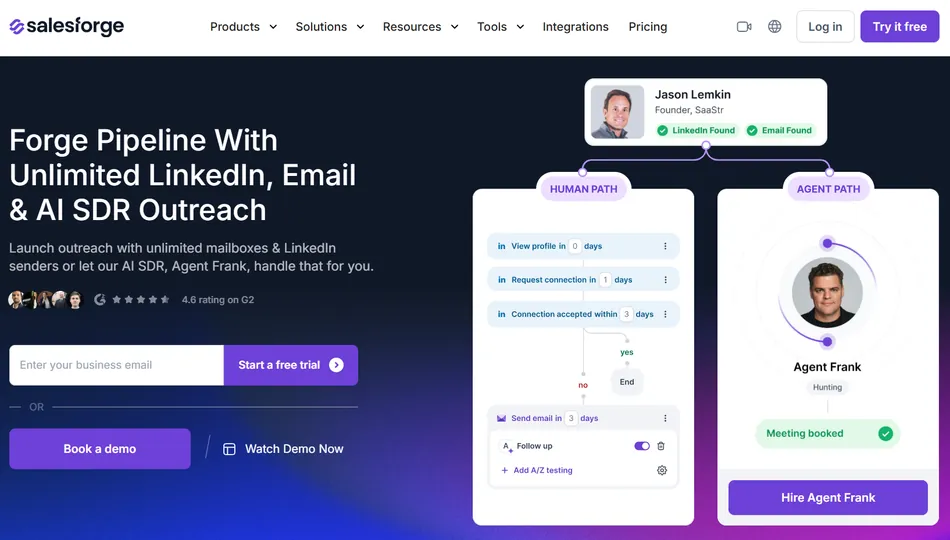
Credits for AI personalization and email validation are capped per tier, creating the main scaling constraint. Beyond the two base plans, Salesforge’s AI SDR product (Agent Frank) requires a separate subscription with custom pricing, and the broader Forge Stack ecosystem includes additional products with their own billing. Here’s what each tier costs at different scales.
Salesforge Free Trial: 14 Days
| Feature | Details |
|---|---|
| Duration | 14 days |
| Active Contacts | 50 |
| Emails | 100 total |
| Email Validation Credits | 50 |
| Personalization Credits | 50 |
| Social Action Credits | 100 |
| Mailboxes | Unlimited |
| Warm-up | Full access |
The 14-day free trial gives access to core features with tight volume limits. You can connect unlimited mailboxes and start warm-up immediately, but the 100-email cap and 50-contact limit mean you’re testing the interface and workflow, not running a real campaign.
Salesforge recommends 14 days of warm-up before sending cold emails, so the trial period gets consumed by inbox preparation, not outreach.
| Free Trial Pros | Free Trial Cons |
|---|---|
| Unlimited mailbox connections | Only 100 emails total |
| Full warm-up access from day one | 50-contact limit too small for real testing |
| Includes social action credits | 14-day window spent mostly on warm-up |
| No credit card requirement disclosed | Not enough volume to test deliverability at scale |
The Bottom Line 👉 The trial lets you evaluate the interface and set up infrastructure, but the volume limits and warm-up timeline mean you won’t see campaign results before committing to a paid plan.
Salesforge Pro Plan: $40/month
| Feature | Details |
|---|---|
| Price | $40/month (monthly billing) |
| Active Contacts in Sequence | 1,000 |
| Emails/Month | 5,000 |
| Email Validation Credits | 100/month |
| Personalization Credits | 100/month |
| Users | 1 |
| Mailboxes | Unlimited |
| Warm-up | Unlimited |
| LinkedIn Senders | Not included |
The Pro plan is Salesforge’s entry point for live outreach. At $40/month, it supports 1,000 active contacts in sequence and 5,000 emails per month, with unlimited mailboxes and warm-up included. The key constraints are the credit limits: 100 personalization credits and 100 email validation credits per month.
If you’re using AI-generated unique emails for each contact, 100 personalization credits cover just 10% of your active contact limit. The plan is restricted to one user and email-only outreach (no LinkedIn senders).
One important limitation: Pro plan users cannot purchase additional credits in-app. Using the credit add-on slider on the Pro plan triggers an automatic upgrade to Growth, so there’s no way to top up credits without jumping to the next tier.
| Pro Plan Pros | Pro Plan Cons |
|---|---|
| Unlimited mailboxes at $40/month | Only 1 user seat |
| Unlimited warm-up included | No LinkedIn outreach |
| 5,000 emails/month is decent volume | 100 personalization credits limit AI features |
| Unlimited workspaces | Cannot buy additional credits without upgrading |
The Bottom Line 👉 Pro suits solo operators running email-only campaigns at moderate volume. The unlimited mailboxes and warm-up make it competitive at $40/month, but the credit ceiling and single-user restriction push growing teams toward Growth quickly.
Salesforge Growth Plan: $80/month
| Feature | Details | Increase from Pro |
|---|---|---|
| Price | $80/month | +100% |
| Active Contacts | 10,000 | +900% |
| Emails/Month | 50,000 | +900% |
| Email Validation Credits | 1,000/month | +900% |
| Personalization Credits | 1,000/month | +900% |
| Users | Unlimited | New |
| LinkedIn Senders | Unlimited | New |
| In-App Credit Add-Ons | Yes | New |
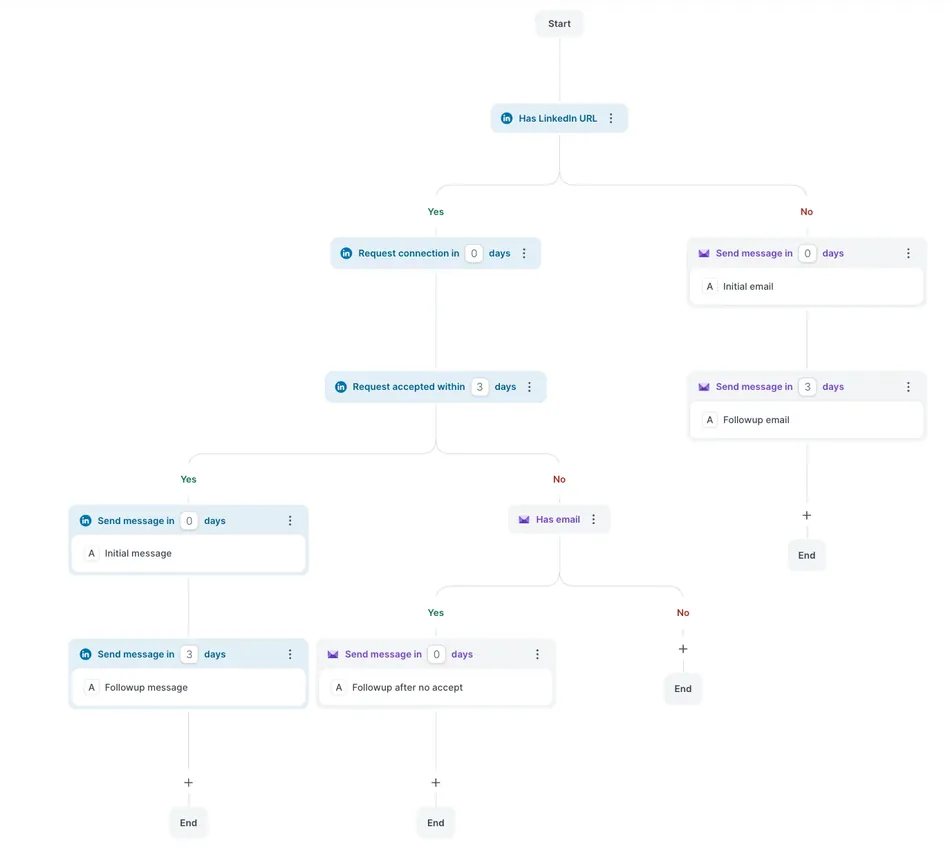
The Growth plan at $80/month is where Salesforge’s pricing gets competitive. For double the price of Pro, you get 10x the contacts, 10x the emails, 10x the credits, unlimited users, and unlimited LinkedIn senders. The jump from 1 user to unlimited users alone makes this the obvious choice for any team larger than one.
LinkedIn outreach (connection requests, direct messages, and InMails through multi-channel sequences) is exclusive to this tier.
Source: Salesforge
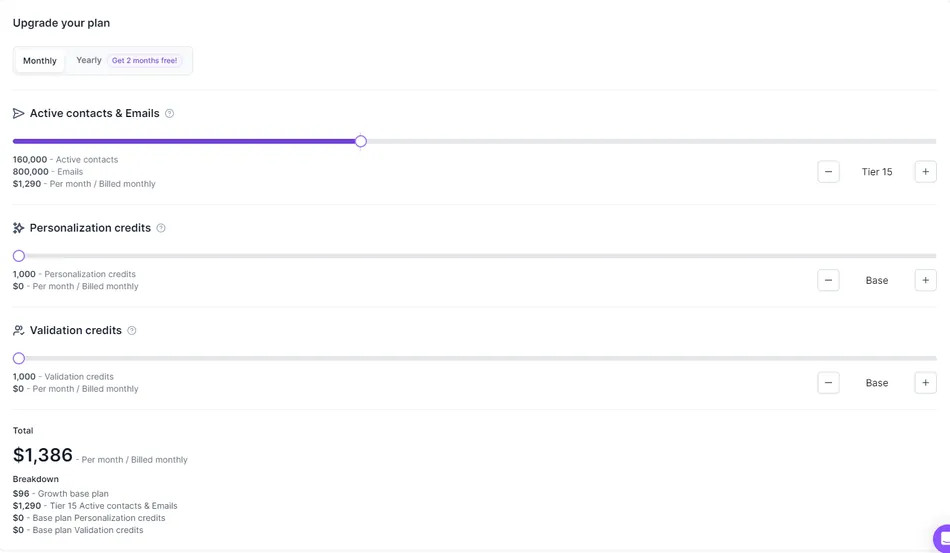
Growth also unlocks in-app credit add-ons, letting you buy additional personalization and validation credits without contacting support. At 1,000 personalization credits per month, you can AI-personalize about 10% of your active contact capacity, or 20% if you run standard single-source mode (1 credit per contact) instead of Overdrive mode (2 credits per contact).
Source: Salesforge
| Growth Plan Pros | Growth Plan Cons |
|---|---|
| 10x volume jump for 2x the price | No mid-tier option between Pro and Growth |
| Unlimited users and LinkedIn senders | 1,000 personalization credits may still limit heavy AI users |
| In-app credit purchasing available | Agent Frank still requires separate subscription |
| Smart mailbox rotation with dynamic IPs | Add-on credit pricing only visible after subscribing |
The Bottom Line 👉 Growth is the plan most teams should pick. The per-contact and per-email economics are solid, unlimited users eliminates seat math, and LinkedIn outreach is included. The question is whether your personalization needs will push you into frequent add-on purchases.
Agent Frank (AI SDR): Custom Pricing
| Feature | Details |
|---|---|
| Price | Custom (demo required) |
| Mode | Auto-Pilot or Co-Pilot |
| Channels | Email + LinkedIn |
| Languages | 20+ |
| Support | Dedicated account manager + shared Slack channel |
| Infrastructure | Built on Forge Stack (Mailforge, Warmforge, Leadsforge) |
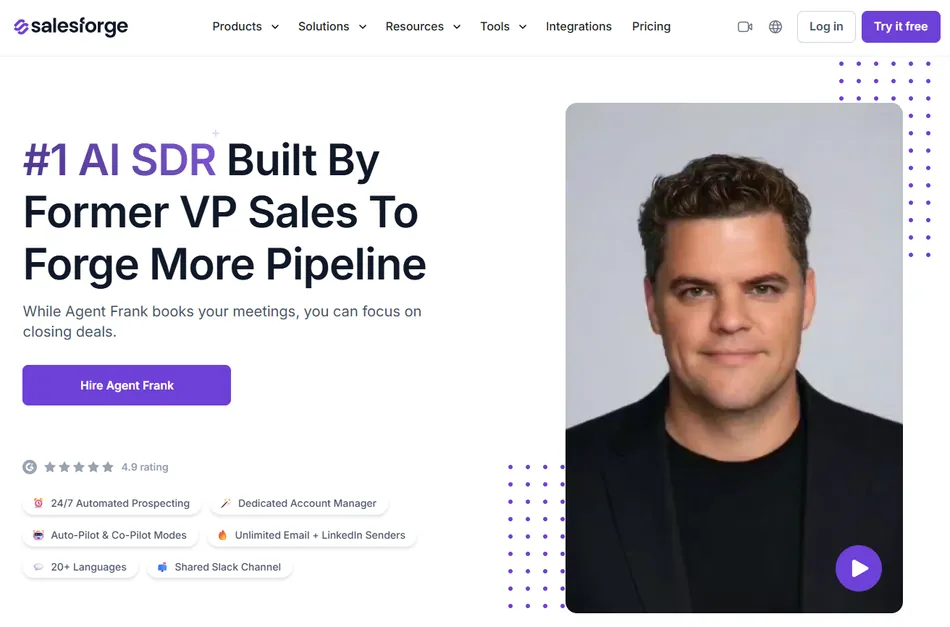
Agent Frank is Salesforge’s AI SDR product. It prospects, personalizes outreach, and books meetings across email and LinkedIn autonomously. It runs around the clock in either Auto-Pilot mode or Co-Pilot mode, where a human reviews actions before they execute.
Source: Salesforge
Agent Frank is a separate subscription from the base Salesforge plans. Pricing is not public and requires booking a demo. The product includes a dedicated account manager and a shared Slack channel for onboarding and support.
It runs on the same Forge Stack infrastructure, using Leadsforge for lead sourcing, Warmforge for deliverability, and Mailforge/Infraforge for sending.
| Agent Frank Pros | Agent Frank Cons |
|---|---|
| Autonomous prospecting and outreach | No public pricing |
| Built on native Forge infrastructure | Requires separate subscription from base plans |
| Dedicated account manager included | Demo-gated, slowing evaluation |
| 20+ language support | Setup includes a recommended 2-week warm-up period |
The Bottom Line 👉 Agent Frank is positioned as an SDR replacement, not a feature add-on. If you’re comparing the cost of a human SDR against an AI alternative, the custom pricing model makes sense. But for teams that just want to add automation to their existing workflow, the lack of transparent pricing creates friction.
Annual Billing Discount
Salesforge offers annual billing with 2 months free, roughly a 17% discount:
| Plan | Monthly Billing | Annual Billing (effective monthly) | Annual Savings |
|---|---|---|---|
| Pro | $40/month | ~$33/month | ~$80/year |
| Growth | $80/month | ~$67/month | ~$160/year |
Annual billing lowers the effective monthly cost but requires a 12-month commitment. No long-term contract is required beyond the billing cycle you choose, and plans can be changed or upgraded at any point with pro-rata billing.
Where Salesforge’s Pricing Falls Short
Salesforge’s pricing has strengths: unlimited mailboxes, unlimited warm-up, and unlimited users on the Growth plan make the base economics attractive. But three areas create friction for buyers trying to forecast total cost of ownership:
Credit Limits Cap AI Features
The Pro plan’s 100 personalization credits cover only 10% of its 1,000-contact capacity, making AI personalization feel more like a preview than a working feature at this tier
Growth’s 1,000 credits improve the ratio, but teams running Overdrive mode (2 credits per contact) exhaust credits at 500 contacts
Credit add-on pricing is only visible inside the app after subscribing, so you can’t model total costs before committing
Pro plan users cannot buy add-ons at all without triggering a plan upgrade
Fragmented Ecosystem Pricing
The Forge Stack includes six separate products (Salesforge, Agent Frank, Leadsforge, Primeforge, Infraforge, Mailforge), each with its own subscription
The pricing FAQ confirms “you will need to subscribe to each product you want to use separately”
A team wanting AI SDR capabilities, dedicated email infrastructure, and lead sourcing alongside the base sequencer faces multiple billing relationships with no published bundle pricing
Only Warmforge warm-up and Primebox (unified inbox) are included in base Salesforge plans at no extra cost
Mailbox Slot Billing Ambiguity
Salesforge bills by mailbox slots rather than active mailboxes, meaning you pay for capacity whether or not you use it
The plans list “Unlimited Mailboxes,” but the help documentation describes slots as a purchasable unit, raising questions about whether extra costs apply at high mailbox volumes
The pricing page does not explain the distinction between slots and mailboxes
If any of these are deal-breakers, several alternatives in the same category are worth considering.
Salesforge Free Trial: Is It Enough?
The 14-day free trial provides access to core sequencing features with 50 active contacts, 100 emails, 50 personalization credits, 50 validation credits, and 100 social action credits. Unlimited mailbox connections and full warm-up access are included.
In practice, the trial timeline creates a problem. Salesforge’s own onboarding guide recommends a minimum 15-day warm-up period before active outreach. The trial is almost entirely consumed by infrastructure preparation.
You can evaluate the interface, connect mailboxes, and begin warming inboxes, but you won’t have warm-enough mailboxes to run a test campaign before the 14 days expire.
The 100-email cap also limits what you can learn. At that volume, you can’t test deliverability patterns, A/B test subject lines, or evaluate reply rates with statistical significance. The trial works best for assessing the platform’s workflow and UX, not for measuring outbound performance.
Pricing for Different Team Sizes
- Solo Operators (1 person, under 5,000 emails/month)
The Pro plan at $40/month covers this profile. You get 1,000 active contacts, 5,000 emails, unlimited mailboxes, and unlimited warm-up. The limitation is email-only outreach (no LinkedIn) and one user seat. For a solo founder or freelance SDR running email campaigns, the economics are straightforward.
The 100 personalization credits per month are tight but workable if you reserve AI-written emails for your highest-priority prospects and use Spintax-based templates for the rest.
- Small Teams (2-5 people, 10,000-50,000 emails/month)
Growth at $80/month is the only option, since Pro is limited to 1 user. Unlimited users and LinkedIn senders make Growth’s per-person cost drop fast: $80 split across 3 team members is about $27/person/month for email sequencing, LinkedIn outreach, warm-up, and a unified inbox.
At this team size, 1,000 personalization credits become the shared bottleneck, and add-on credit purchases will likely be a recurring cost.
- Agencies (Multiple clients, high mailbox count)
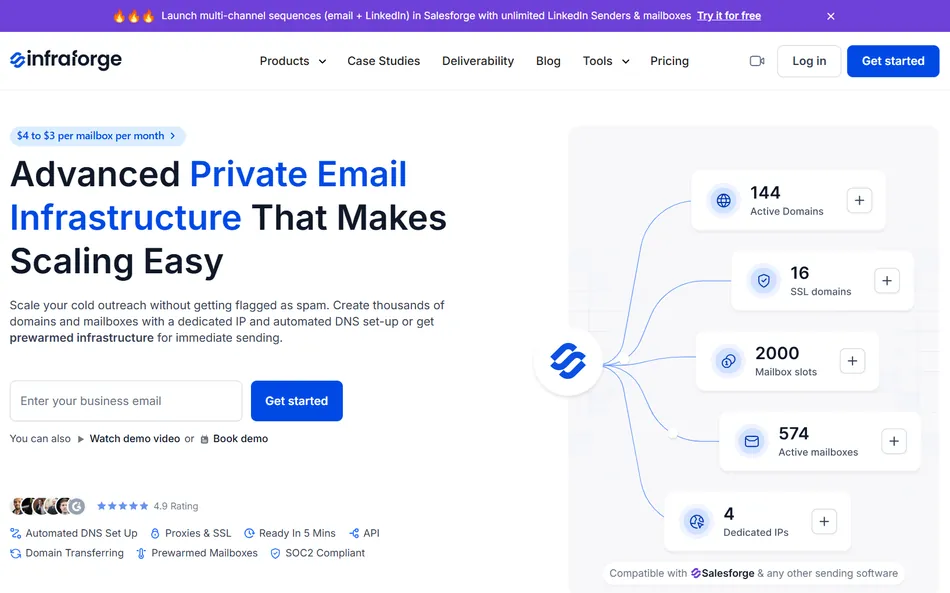
Growth’s unlimited mailboxes, workspaces, and users make it suited for agencies. At $80/month base, the per-client cost stays low. However, agencies running dedicated email infrastructure per client will likely need Infraforge or Mailforge for isolated sending domains and IPs, which carry separate subscriptions.
Source: Salesforge
The whitelabel option adds another cost layer for agencies wanting to resell under their own brand. Total agency cost depends on which Forge Stack products you adopt beyond the base plan.
- Mid-Market Teams (10+ people, enterprise needs)
Salesforge acknowledges it is not designed for companies targeting Fortune 500 accounts or running long RFP-based sales cycles. Teams with ACVs above $100K or complex procurement requirements will find the platform sits below their needs.
Agent Frank’s custom pricing and dedicated account manager are the closest thing to an enterprise tier, but without published pricing or feature details, mid-market evaluation requires a sales conversation.
Is Salesforge Worth the Price?
At $80/month for the Growth plan, Salesforge bundles capabilities that would cost $200-$400/month assembled from separate tools: a cold email sequencer, LinkedIn automation, email warm-up, a unified inbox, and AI personalization.
Unlimited mailboxes and unlimited users on Growth make it cost-effective for teams, where competitors charge per seat or per mailbox.
The value calculation shifts depending on how heavily you use credits. A team sending 50,000 emails per month with minimal AI personalization gets good value from Growth. A team wanting AI-unique emails for every contact will burn through 1,000 personalization credits quickly and face recurring add-on costs that are hard to forecast before subscribing.
The Forge Stack ecosystem is both a strength and a cost multiplier. If you only need sequencing and warm-up, the base Salesforge plan delivers.
If you want the AI SDR, dedicated infrastructure, and lead sourcing, each adds a separate subscription. The integration across Salesforge’s product suite is real, but the pricing is more app-store than all-inclusive.
Compared to seat-based competitors like Outreach or Salesloft, Salesforge’s per-user economics are better for teams larger than one. Compared to volume-based competitors like Instantly or Smartlead, the value depends on how much of the Forge Stack you adopt and whether LinkedIn outreach (included on Growth) matters to your workflow.
Salesforge Alternatives
If Salesforge’s credit-based AI limits, fragmented ecosystem pricing, or email-plus-LinkedIn-only channel coverage don’t fit your situation, several other outbound platforms cover overlapping territory with different strengths:
- Instantly. A fit for teams wanting simple, high-volume cold email with straightforward pricing. Instantly focuses on email-only outreach with warmup and rotation features. Its pricing model is volume-oriented with fewer credit-based constraints.
A good alternative if you don’t need LinkedIn outreach and want fewer moving parts in your billing.
- Smartlead**.** Built for agencies running multi-client cold email at scale. Smartlead’s flat-rate pricing includes unlimited mailboxes and focuses on deliverability controls, inbox rotation, and client workspace separation.
If your primary need is high-volume email infrastructure with agency-level controls, Smartlead is the most direct competitor. → Try Smartlead on a special offer!
- Apollo. A combined prospecting database, enrichment engine, and sequencing platform. Apollo’s strength is its built-in contact database and intent signals, which reduce the need for separate lead sourcing tools.
If you’re considering Salesforge plus Leadsforge for prospecting, Apollo bundles data and outreach in one subscription.
- Lemlist. Focuses on creative, multichannel sequences with personalization features including image and video personalization in emails. Lemlist supports email, LinkedIn, and phone steps in its sequences.
A good fit for teams where message creativity matters more than volume.
- Woodpecker. Designed for agencies and B2B companies running cold email with a focus on deliverability and team collaboration. Woodpecker’s pricing is contact-based rather than credit-based, which simplifies cost forecasting for teams with predictable outreach volumes. → Try Woodpecker on a special offer!
Each is worth a closer look depending on your channel requirements, whether you need a built-in prospecting database, and how predictable you want your monthly costs to be.
Final Verdict: Salesforge Pricing
Salesforge is a multi-channel outbound platform built for B2B teams who want email and LinkedIn outreach, unlimited mailboxes, and built-in warm-up under one subscription.
At $40/month for solo email users and $80/month for teams running both channels, the base plans offer good value compared to assembling the same capabilities from separate tools.
The pricing model works best for teams with 2+ users (where unlimited seats on Growth eliminate per-person costs), predictable monthly volumes under 50,000 emails, and outbound workflows that benefit from LinkedIn and email in one sequence builder.
The trade-off is credit-based constraints on AI personalization and email validation, ecosystem costs that grow as you adopt more Forge Stack products, and an AI SDR product (Agent Frank) that sits behind a sales conversation rather than a self-serve checkout.
If your outbound operation is email-only at modest volume, the Pro plan delivers the essentials at a fair price.
If you’re running multichannel outreach with a team, Growth is where the economics make the most sense. And if your primary interest is the AI SDR, expect a pricing conversation before you can model the full cost.
Get started with Salesforge here.
Salesforge Pricing FAQ
Does Salesforge have a free plan?
No. Salesforge offers a 14-day free trial with 50 active contacts and 100 emails, but no permanent free tier. The trial includes unlimited mailbox connections and full warm-up access, so you can begin infrastructure setup immediately. However, the recommended 14-day warm-up period means most of the trial goes to inbox preparation, not active outreach.
What’s the difference between the Pro and Growth plans?
Pro ($40/month) supports 1 user, 1,000 active contacts, 5,000 emails, and email-only outreach with 100 personalization credits. Growth ($80/month) jumps to unlimited users, 10,000 active contacts, 50,000 emails, email plus LinkedIn outreach, and 1,000 personalization credits. Growth also unlocks the ability to purchase additional credits in-app, which Pro does not support.
How much does Agent Frank cost?
Agent Frank does not have published pricing. It requires booking a demo call for a custom quote. Agent Frank is a separate subscription from the base Salesforge plans and includes a dedicated account manager and shared Slack channel for onboarding and support.
What are personalization credits and how quickly do they run out?
Each personalization credit generates one AI-written unique email for a single contact. In standard mode, one credit equals one personalized email. In Overdrive mode (which pulls from multiple data sources for deeper personalization), it costs 2 credits per contact. On Pro, 100 credits per month covers about 10% of the 1,000-contact limit. On Growth, 1,000 credits covers about 10% of the 10,000-contact capacity. You can purchase additional credits in-app on the Growth plan only.
Does Salesforge offer annual discounts?
Yes. Annual billing includes 2 months free, roughly a 17% discount. Pro drops from $40/month to about $33/month effective rate, and Growth drops from $80/month to about $67/month. No long-term contract is required beyond the billing cycle you choose, and plans can be changed at any point with pro-rata adjustments.
Are there hidden fees beyond the base subscription?
The main additional costs are credit add-ons for personalization and email validation (Growth plan only, pricing visible in-app after subscribing) and separate subscriptions for other Forge Stack products. Salesforge, Agent Frank, Leadsforge, Primeforge, Infraforge, and Mailforge each carry their own billing. Warmforge warm-up and Primebox (unified inbox) are the two products included free with every Salesforge plan. The mailbox slots billing model may also carry costs beyond the “unlimited mailboxes” label, though the pricing page does not clarify this.
Can I use Salesforge for LinkedIn outreach?
LinkedIn outreach is only available on the Growth plan ($80/month) and above. Growth includes unlimited LinkedIn senders, supporting connection requests, direct messages, and InMails within the same sequence builder used for email. Pro is email-only.
What payment and billing options does Salesforge accept?
Salesforge supports both monthly and annual billing with no long-term contract required. Plans can be upgraded or changed at any time, with mid-cycle changes billed on a pro-rata basis. Invoices generate automatically after each payment and can be accessed and edited in-app.