Cold email remains one of the most effective ways to start B2B sales conversations, but the landscape has shifted. Spam filters are tighter, inboxes are crowded, and prospects recognize templated pitches instantly. Manual sending and basic automation no longer work.
AI cold email tools now find verified contacts, write personalized messages, warm up mailboxes, and manage replies across channels. The right tool turns a one-person sales team into an outbound operation. The wrong one lands your domain in spam and wastes months of effort.
We tested and researched the top platforms and narrowed the field to seven best AI cold email tools, each suited for a different team and use case:
- Scaling email volume without deliverability issues,
- Consolidating your sales stack into one platform,
- Running multichannel outreach across email, LinkedIn, SMS, and phone,
- Improving inbox placement for agency clients,
- Getting started quickly with minimal technical setup,
- Testing cold email at zero cost before committing budget,
- And deploying an autonomous AI sales agent to run outbound for you.
Here’s how they compare.
Not sure which AI cold email tool fits your workflow? Keep reading for a breakdown of each platform’s strengths, pricing, and ideal use case.
What Is an AI Cold Email Tool?
An AI cold email tool is a platform that uses artificial intelligence to automate and improve cold email outreach. These tools go beyond basic mail merge: AI generates unique copy for each recipient, optimizes send times, warms up mailboxes to protect sender reputation, and analyzes replies to surface the most promising leads.
Most modern AI cold email tools also include contact databases, email verification, deliverability monitoring, and CRM integrations, giving teams a complete outbound workflow in one platform.
| Best AI Cold Email Tools | |
|---|---|
 | Instantly Best for teams that need to scale cold email volume across unlimited sending accounts without sacrificing inbox placement. |
 | Apollo Best all-in-one platform combining a 270M+ contact database, multichannel sequencing, a built-in dialer, and intent data in a single subscription. |
 | Reply.io Best for enterprise teams running coordinated outreach across email, LinkedIn, SMS, WhatsApp, and phone with an autonomous AI SDR agent. |
 | Smartlead Best deliverability-focused platform with dedicated IP infrastructure and white-label agency dashboards for multi-client management. |
 | Woodpecker Best for small teams and solo founders who want reliable deliverability and simple campaign setup with no technical configuration. |
 | Snov.io Best free cold email tool with a complete sales toolkit: email finding, verification, drip campaigns, and a built-in CRM. |
 | Salesforge Best AI-first platform with Agent Frank, an autonomous sales agent that prospects, writes personalized emails, and books meetings around the clock. |
How To Choose the Best AI Cold Email Tool
Here’s a short checklist for finding the right platform:
- Deliverability First: The most feature-rich tool is useless if your emails land in spam. Prioritize platforms with built-in warmup, email verification, and sender reputation monitoring.
- Match Your Team Size: Solo founders and small teams need simplicity and fast setup. Large teams and agencies need multi-client management, API access, and scalable infrastructure.
- Channels You Actually Use: If your outreach is email-only, don’t pay for multichannel features you won’t use. If you rely on LinkedIn or phone alongside email, look for platforms with native support for those channels.
- Data Needs: Some tools include contact databases so you can find and email prospects without a separate data provider. Others require you to bring your own lists.
- Pricing Structure: Pay attention to what drives costs: per seat, per email account, per contact, or per email sent. Unlimited email accounts matter if you rotate across many sending addresses.
- AI Depth: Some platforms use AI only for writing subject lines. Others deploy autonomous agents that prospect, send, follow up, and book meetings without human involvement. Know how much automation you want.
How We Picked the Platforms
We started with a broad list of AI cold email tools based on user reviews, community feedback, and our own experience. We then tested each platform’s core workflow, from account setup and campaign creation to deliverability monitoring and reply management.
We evaluated each tool against four criteria:
- Deliverability: How well does the platform protect sender reputation and land emails in primary inboxes?
- Ease of Use: How quickly can a new user go from signup to first campaign?
- AI Capabilities: How does the platform use AI beyond basic personalization, and does it save time?
- Value for Money: What do you get at each price point, and are there hidden costs?
These four factors narrowed the field to seven platforms, each strong in a distinct area. Let’s get into it.
1. Instantly (Best for Scaling Cold Email Volume Without Sacrificing Deliverability)
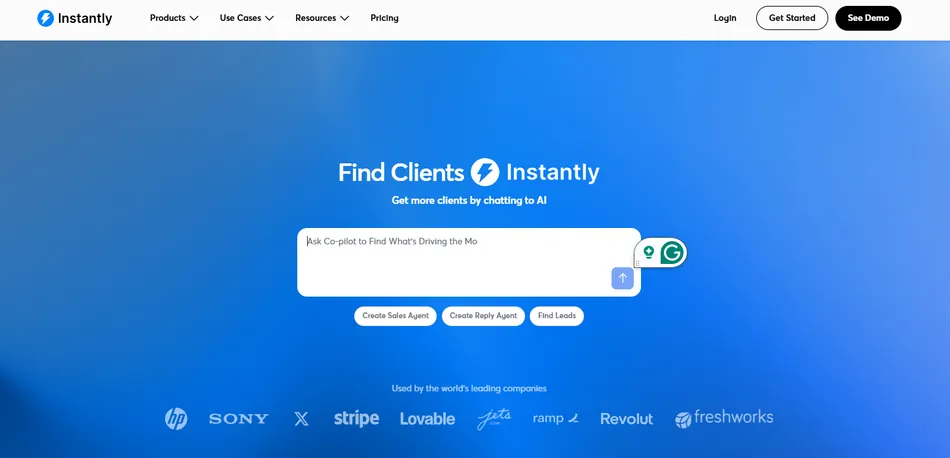
Most cold email platforms charge per email account, so scaling outbound means scaling costs in lockstep. Instantly solves that.
Instantly is a sales engagement and lead intelligence platform where every paid plan includes unlimited email accounts and unlimited email warmup, backed by a warmup network of over 1,000,000 real email accounts. For teams and agencies connecting dozens or hundreds of sending addresses, this pricing model costs far less at scale than per-account competitors.
| Instantly Pros | Instantly Cons |
|---|---|
| ✅ Unlimited email accounts and warmup on every plan | ❌ Modular pricing can add up quickly |
| ✅ 1M+ account warmup network for inbox placement | ❌ Lifetime contact cap on lower plans (not monthly) |
| ✅ AI Copilot for end-to-end campaign generation | ❌ Multichannel personalization is not a core strength |
| ✅ 450M+ B2B contact database with waterfall enrichment |
Instantly: Top 3 Unique Features
- Largest warmup network in the category with 1M+ real accounts
- AI Copilot with persistent memory, WARP Mode, and autonomous reply handling
- Flat-rate unlimited email accounts that remove the scale-cost tradeoff
The warmup network is Instantly’s core infrastructure advantage. Over 1,000,000 real email accounts exchange AI-generated emails that get automatically opened and replied to with positive sentiment, warming both SMTP sending and IMAP receiving servers. A network of headless browsers makes these interactions mimic human behavior. Teams on the Light Speed plan get the SISR System with dedicated private server and IP blocks, plus Inbox Placement testing against 94 blacklists with automated pause triggers.
The AI Copilot goes beyond writing assistance. According to Instantly, a manual workflow takes 6 to 13+ hours from ICP definition to campaign launch; Copilot cuts that to 45 to 80 minutes. It draws from three persistent data layers (Memory, ICPs, and Guidance rules) to keep outputs consistent across sessions. The AI Reply Agent responds to interested leads in under 5 minutes, handles objections, and books meetings via Calendly integration in autonomous mode.
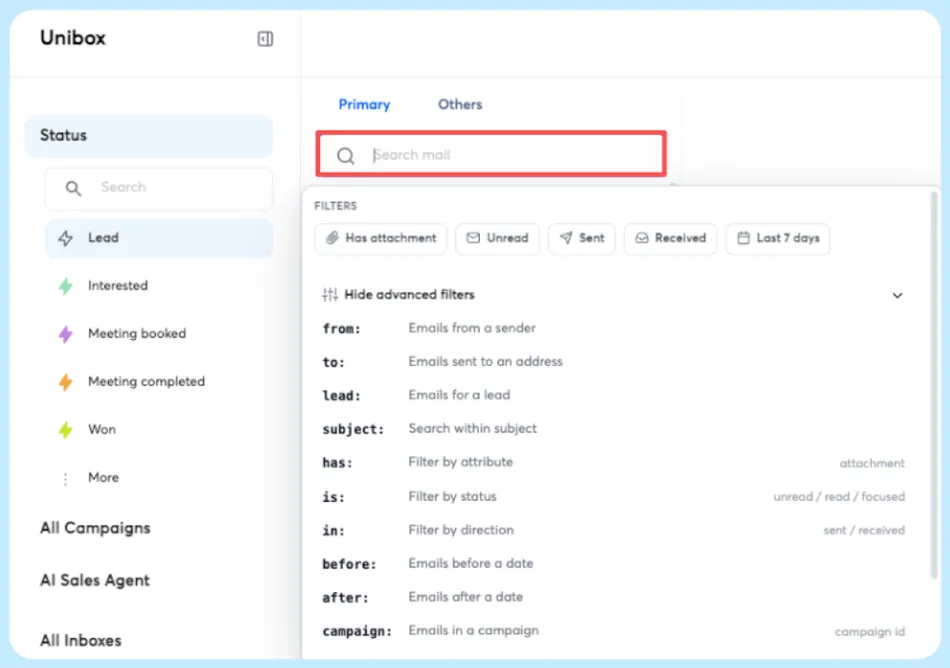
The Unibox funnels replies from every connected inbox into a single dashboard where AI sentiment analysis categorizes responses across 50+ languages. The native 450M+ B2B contact database with waterfall enrichment querying 5+ providers lets you find and verify prospects without a separate data subscription.
Source: Instantly
Instantly: Pricing
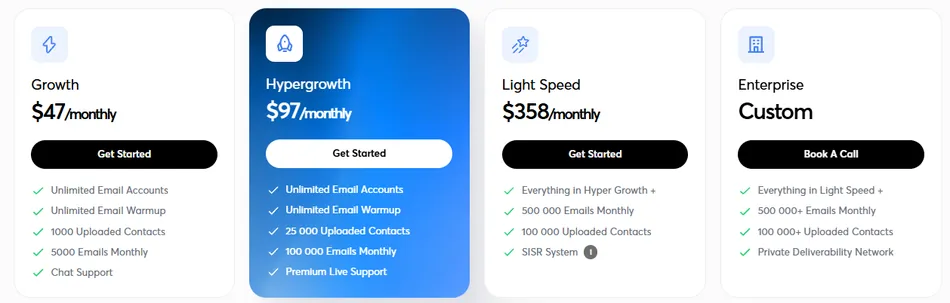
Instantly uses a modular pricing structure where Outreach, Credits (lead database + AI), CRM, and other modules are billed separately.
- Growth: $47/month ($37.60/month annual). 1,000 uploaded contacts, 5,000 emails/month, unlimited accounts and warmup.
- Hypergrowth: $97/month ($77.60/month annual). 25,000 contacts, 125,000 emails/month, adds Unibox, subsequences, and priority support.
- Light Speed: $358/month ($286.30/month annual). 100,000 contacts, 500,000 emails/month, adds SISR dedicated IP system.
Credits for the lead database start at $47/month for 1,500 credits, and the CRM is a separate $47/month subscription. The minimum stack for outreach with lead sourcing is $94/month.
Note: the uploaded contacts limit is a lifetime cap, not monthly. Deleting old campaigns frees contact slots.
Use Instantly if:
- You need to scale from dozens to hundreds of sending accounts without deliverability degrading
- You’re a lead generation agency where unlimited mailbox pricing removes per-client cost friction
- You want AI to handle campaign creation, reply management, and meeting booking autonomously
2. Apollo (Best All-in-One Platform for Prospecting, Intelligence, and Outreach)
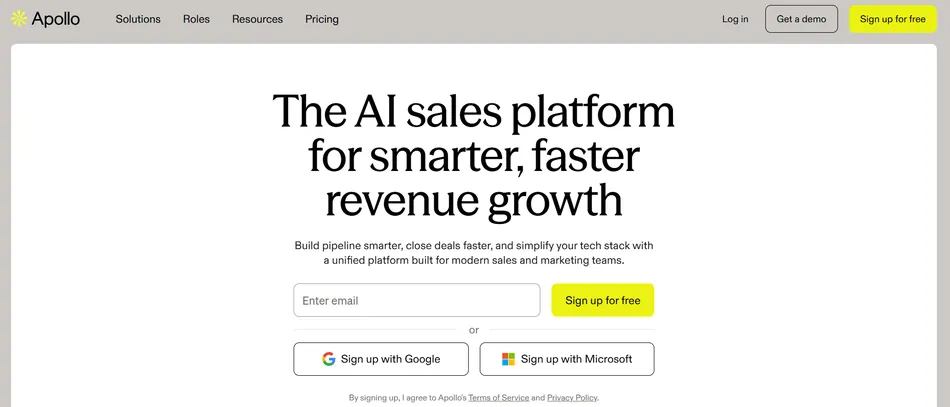
Most teams build their outbound stack from five to ten separate tools: a data provider, outreach platform, dialer, enrichment service, and CRM. Apollo collapses all of that into one product.
Apollo is a B2B sales platform with a 270M+ contact database spanning 70M companies, built-in multichannel sequencing, a parallel dialer, intent data, and conversation intelligence. It gives sales teams what they need to find prospects, engage them across channels, and manage deals without leaving the platform.
| Apollo Pros | Apollo Cons |
|---|---|
| ✅ 270M+ contact database with 65+ search filters | ❌ More expensive per seat than dedicated cold email tools |
| ✅ Intent data included on every plan, including free | ❌ Credit consumption model can be hard to predict |
| ✅ Built-in parallel dialer for phone outreach | ❌ Advanced dialer is a paid add-on ($119-$149/month) |
| ✅ Waterfall enrichment across multiple data providers |
Apollo: Top 3 Unique Features
- Largest accessible B2B database with continuous crowdsourced verification
- Buying intent data covering 1,600+ topics on every plan
- Multichannel sequences combining email, LinkedIn, and phone in one workflow
Apollo’s database draws from a network of over 2 million data contributor sources including connected inboxes, CRMs, and CSV uploads that feed continuous crowdsourced verification. The platform validates email addresses in real time using reply and bounce data from campaigns running through Apollo, resulting in 72 million emails verified monthly with a claimed 97% email accuracy rate.
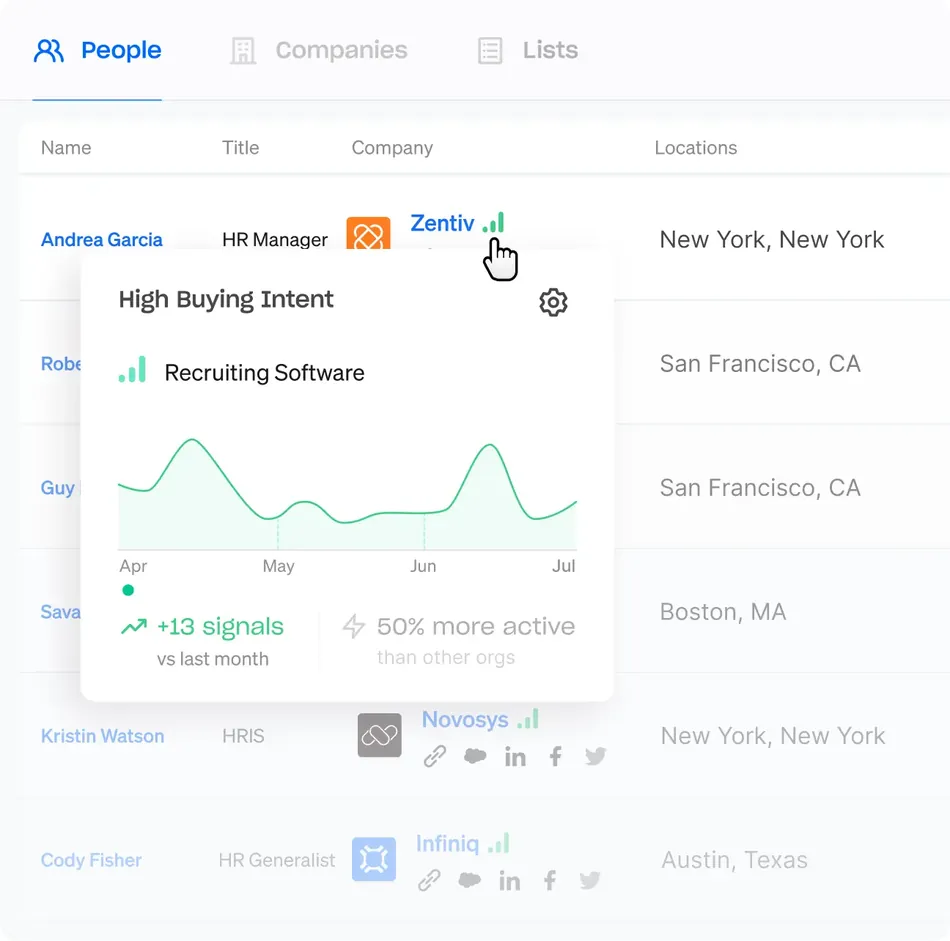
Intent data is where Apollo pulls ahead of most competitors. Buying Intent data is included on every plan, including the free tier, covering over 1,600 intent topics through a partnership with LeadSift (Foundry). The data refreshes weekly, letting you identify which companies are researching solutions in your category and time outreach accordingly.
Source: Apollo
The Sequences feature supports automatic and manual emails, phone call tasks, LinkedIn actions, and custom tasks with A/B testing and condition-based branching. The Parallel Dialer dials multiple numbers at once, with Apollo claiming reps can connect with 100+ prospects per hour. Built-in email deliverability infrastructure handles domain purchase, SPF/DKIM/DMARC authentication, and mailbox warm-up without third-party tools.
One customer documented cutting from $18,000 for Outreach + $15,000 for ZoomInfo to $12,000 total by migrating to Apollo.
Apollo: Pricing
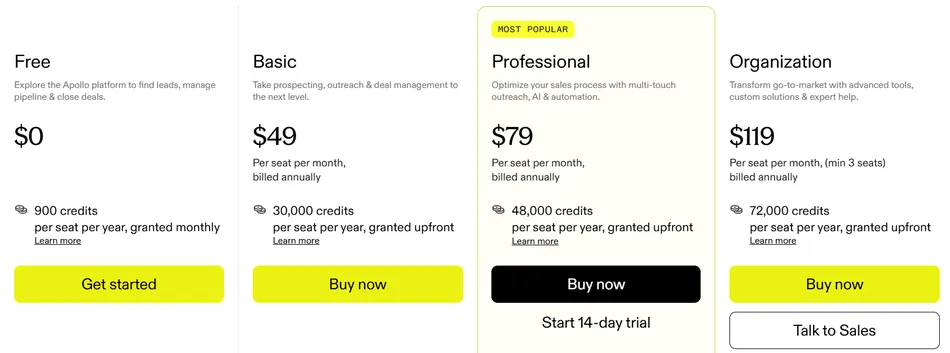
Apollo uses a hybrid per-seat plus credit-consumption model where all four pillars (Outbound, Inbound, Data Enrichment, Deal Execution) are included in every tier.
- Free: $0. 75 credits/month, 2 active sequences, Gmail only, intent data included.
- Basic: $49/seat/mo (annual), $59/seat/mo (monthly). 30,000 credits/year, multiple seats, Microsoft Office supported.
- Professional: $79/seat/mo (annual), $99/seat/mo (monthly). 48,000 credits/year, unlimited sequences, CRM enrichment.
- Organization: $119/seat/mo (annual only). Minimum 3 seats, SSO, custom reporting.
For startups with fewer than 20 employees, Apollo for Startups offers 50% off for one year on Basic or Professional (up to 5 seats).
Use Apollo if:
- You want to eliminate tool sprawl by consolidating data, outreach, dialer, and CRM into one platform
- Intent data is important to your outreach strategy and you don’t want a separate subscription
- Phone outreach is part of your sales motion and you need a built-in parallel dialer
3. Reply.io (Best for Enterprise Multichannel Outreach at Scale)
When cold email alone doesn’t break through, teams need coordinated outreach across every channel their prospects use. Reply.io is built for that.
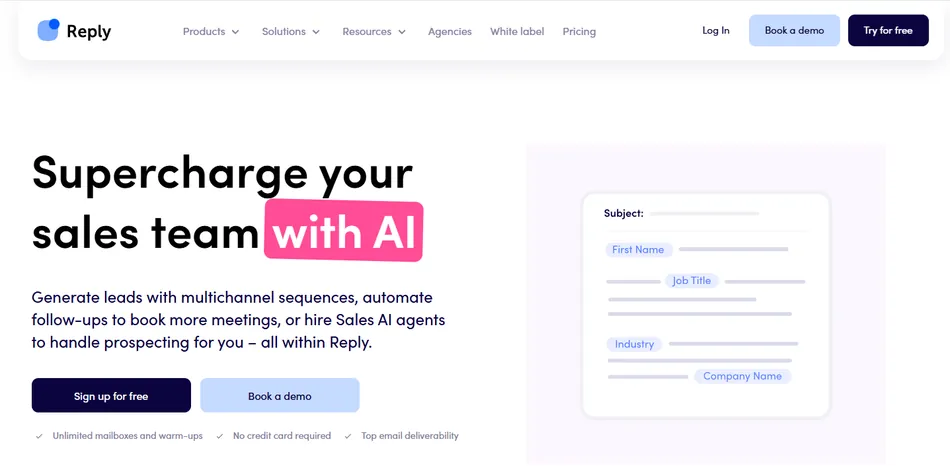
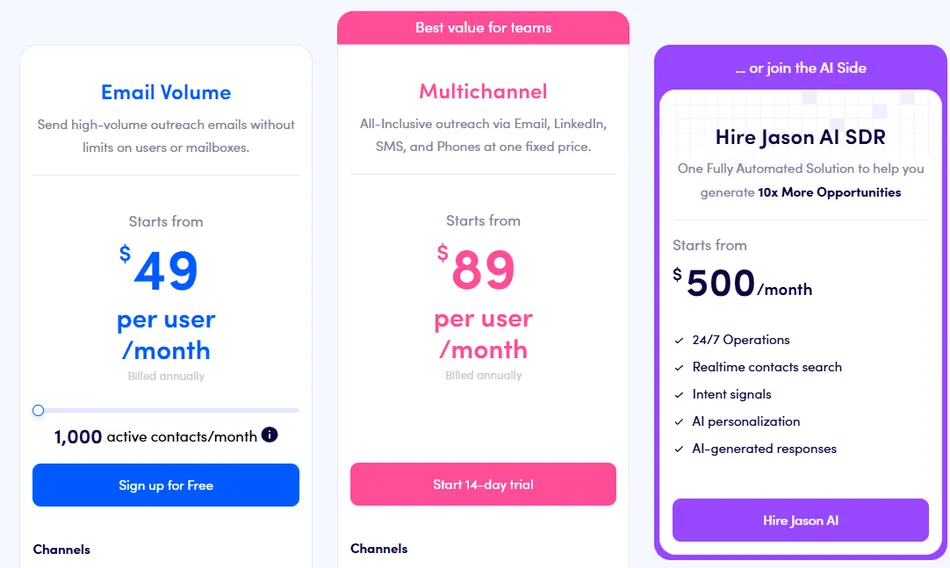
Reply.io is a sales engagement platform that automates outreach across email, LinkedIn, WhatsApp, SMS, and phone calls from a single sequence. Its five-channel sequencing engine, combined with Jason AI (an autonomous SDR agent), makes it the most comprehensive multichannel option on this list.
| Reply.io Pros | Reply.io Cons |
|---|---|
| ✅ Five-channel sequencing with conditional branching | ❌ LinkedIn and calling are paid add-ons on top of base price |
| ✅ Jason AI autonomous SDR agent | ❌ Mandatory 3-month minimum commitment |
| ✅ Social Warming for LinkedIn pre-engagement | ❌ Full multichannel cost per rep reaches ~$147/month |
| ✅ 1B+ contact database with real-time verification |
Reply.io: Top 3 Unique Features
- Five-channel sequencing across email, LinkedIn, SMS, WhatsApp, and phone
- Jason AI autonomous SDR that prospects, personalizes, sends, and books meetings
- Social Warming and AI voice messages for LinkedIn outreach
Reply.io treats all five channels as equals inside a single sequence builder. You can combine email, LinkedIn actions, calls, WhatsApp, and SMS touches in one campaign, with conditional branching that checks prospect behavior every 10 minutes and routes them to the next step based on opens, clicks, replies, or connection acceptances.
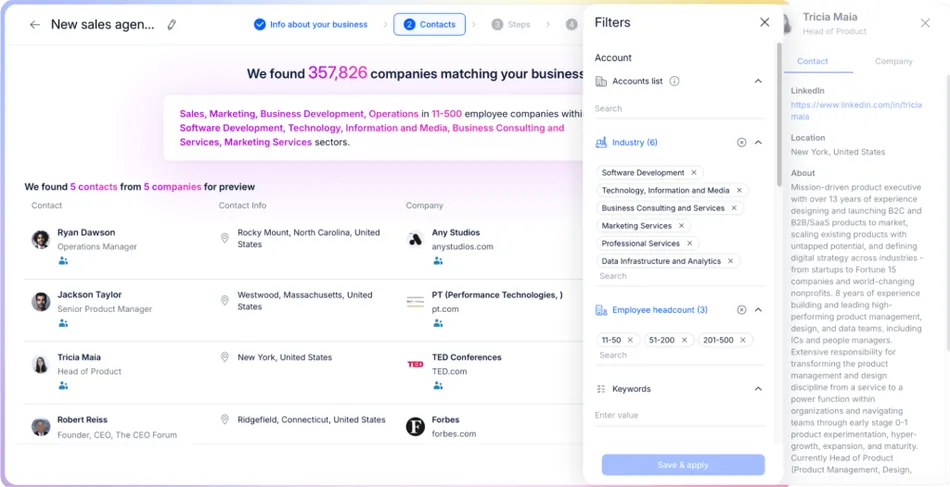
Jason AI works as a virtual SDR that handles the entire prospecting-to-meeting pipeline. You onboard it by uploading PDFs, sales scripts, and playbooks so it learns your tone and approach. From there, Jason sources leads from a 1+ billion contact database, researches prospects, builds personalized multichannel sequences, handles replies, and books meetings based on calendar availability. A three-level validation system checks every message against your brand voice, playbook rules, and personalization accuracy before sending.
Source: Reply.io
Social Warming automatically engages with prospects’ LinkedIn profiles (liking posts, viewing profiles) before outreach fires, reportedly lifting connection acceptance rates from 15 to 20% cold to 35 to 45% post-warming. Reply.io also supports AI-generated voice messages through LinkedIn, a channel almost no competing platform offers.
The platform includes access to over 1 billion contacts across 150+ countries with verified emails at bounce rates below 3%.
Reply.io: Pricing
- Email Volume: $49/user/month (annual). 1,000 active contacts, email-only automation.
- Multichannel: $89/user/month (annual). All channels, but LinkedIn adds $69/account/month and Calls/SMS adds $29/account/month.
- AI SDR (Jason AI): $500/month for 1,000 active contacts. Full autonomous SDR, unlimited users and mailboxes.
- Agency: $210/month. Unlimited clients and users.
A 14-day free trial is available with no credit card required.
Use Reply.io if:
- Your outreach spans email, LinkedIn, SMS, WhatsApp, and calls and you want them coordinated in one sequence
- You want an autonomous AI SDR to scale outbound without proportionally growing headcount
- LinkedIn is a critical outreach channel and you need social warming and voice messages to stand out
4. Smartlead (Best for Cold Email Deliverability and Agency Infrastructure)
If your emails don’t land in primary inboxes, nothing else matters. Smartlead was built around that principle.
Smartlead is an outbound platform that has scaled to 100,000+ businesses since its 2022 launch by solving the biggest problem in cold email: getting messages into primary inboxes at scale without one campaign’s reputation bleeding into another. Its integrated deliverability stack and white-label agency dashboard make it a strong choice for agencies and high-volume teams.
| Smartlead Pros | Smartlead Cons |
|---|---|
| ✅ Dedicated IP servers with ESP matching per campaign | ❌ Customer support quality varies by plan tier |
| ✅ White-label dashboard with client workspace isolation | ❌ Analytics have a 30 to 60 minute reporting lag |
| ✅ Unlimited email accounts and warmup on every plan | ❌ Native CRM integrations are limited |
| ✅ 300M+ verified lead database on higher tiers |
Smartlead: Top 3 Unique Features
- Full deliverability stack from infrastructure to inbox
- White-label agency dashboard with client workspace isolation
- Volume-based pricing with unlimited mailboxes at flat rates
Smartlead owns the entire deliverability stack. SmartInfra provides dedicated-tenant servers with siloed IP pools at 99.98% uptime, so your sending reputation is never contaminated by another customer. ESP matching (sending Gmail-to-Gmail, Outlook-to-Outlook) reportedly improves inbox placement by 10 to 16 percent. The Ultra Premium Warmup pool is a private, invite-only network of vetted senders with adaptive volume scaling and automatic pause-and-recovery. SmartDelivery runs inbox placement tests across Gmail, Outlook, and Yahoo seed lists and monitors 400+ blacklists before a single campaign email goes out.
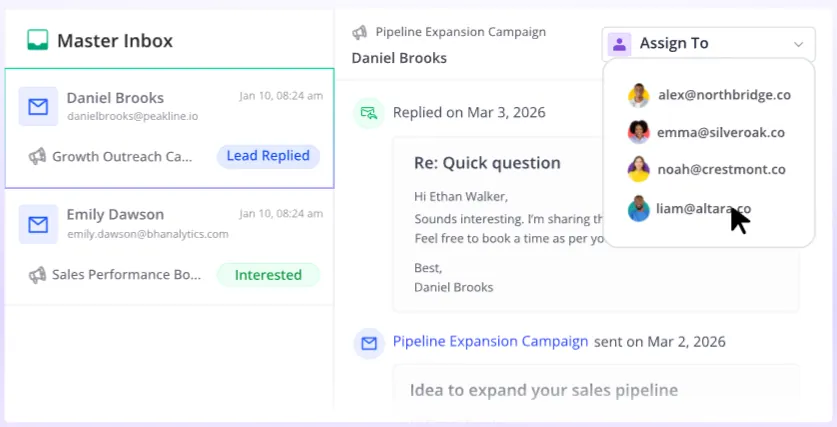
For agencies, the white-label capability lets you brand the platform under your own logo and domain so clients see what appears to be your proprietary platform. Client workspaces are fully isolated, preventing data leakage between accounts. The Unified Master Inbox aggregates replies from every mailbox across every client campaign into one interface. AvoraGrowth connected Smartlead to Go High Level via the API, pushing every interested lead to client pipelines without manual routing.
Source: Smartlead
Recent additions include SmartAgents (no-code AI operators for GTM workflows), SmartDialer with AI-assisted calling, and a CLI tool with 116+ MCP tools for building custom automation.
Smartlead: Pricing
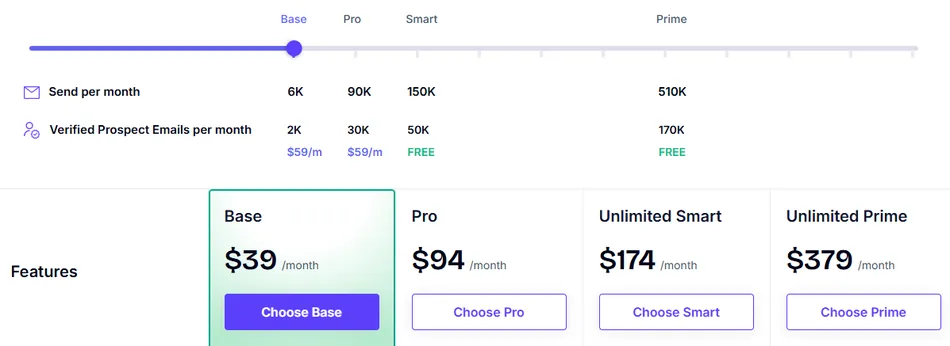
Smartlead uses volume-based pricing. You pay for emails sent per month, not per mailbox or seat. All plans include unlimited email accounts and warmup.
- Base: $39/month ($32/month annual). 6,000 emails/month, 2,000 contacts.
- Pro: $94/month ($78/month annual). 90,000 emails/month, 30,000 contacts, CRM included.
- Smart: $174/month ($144/month annual). 150,000 emails/month, unlimited contacts, SmartProspect 300M+ leads included.
- Prime: $379/month ($315/month annual). 500,000 emails/month, dedicated manager, private Slack.
SmartDelivery (inbox placement testing) is a separate add-on starting at $49/month.
Use Smartlead if:
- You run a cold email agency and need white-label dashboards with client workspace isolation
- Inbox placement is your most important metric and you want dedicated IPs with ESP matching
- You need API-driven automation at scale with REST API, CLI, and MCP tool access
5. Woodpecker (Best for Small Teams That Want Simplicity and Reliable Deliverability)
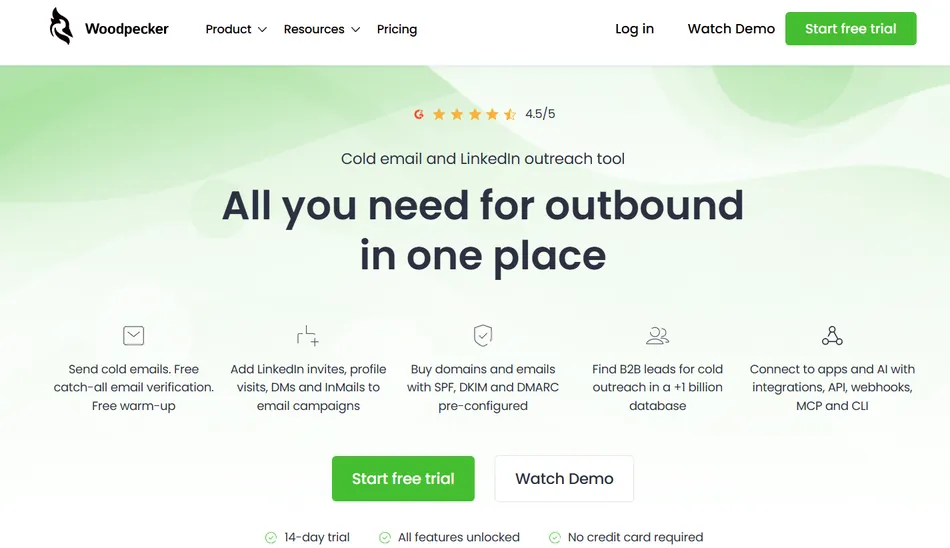
Not every team needs a complex outbound platform with dozens of features. Some just need cold email that works reliably without a dedicated ops person managing deliverability.
Woodpecker is a cold email platform built for B2B professionals who need automated, deliverability-safe outreach without spending weeks learning a complex interface. Founded in 2015 in Poland, Woodpecker serves 4,500+ B2B clients across 110 countries, sending 9 million emails per month.
| Woodpecker Pros | Woodpecker Cons |
|---|---|
| ✅ Adaptive Sending reduces inbox blocks by 2.4x | ❌ Analytics are adequate but not sophisticated |
| ✅ Free built-in catch-all email verification via Bouncer | ❌ No native phone dialer |
| ✅ Unlimited team members and email accounts on every plan | ❌ Add-ons for LinkedIn and lead finding increase cost |
| ✅ Campaign setup in under 5 minutes |
Woodpecker: Top 3 Unique Features
- Adaptive Sending algorithm that throttles volume automatically to avoid provider blocks
- Free unlimited email verification (including catch-all) built into every send
- 3-step campaign builder designed for non-technical users
The centerpiece is Adaptive Sending, an algorithm that monitors real-time outbound volume per mailbox and throttles sending when it detects you approaching a provider’s daily quota. Woodpecker’s data, comparing 1,300 inboxes with Adaptive Sending against 1,600+ without it, shows the feature produces 2.4 times fewer provider-imposed blocks. Accounts with Adaptive Sending delivered more total emails (15,910 vs. 14,440 in a 15-day comparison) by avoiding multi-day sending freezes.
Every time you click “Send,” Woodpecker runs each prospect’s email through Bouncer verification before dispatching. This includes catch-all email verification at no extra cost on any plan, eliminating the need for a separate verification service.
The campaign editor follows a 3-step flow: Path, Prospects, Summary. DevsData CEO Tom Potanski noted: “When we first started using Woodpecker, we had no problems understanding how it works.” Layered on top are ESP Matching, inbox rotation across up to 100 mailboxes, a Spamword Finder, and free email warm-up that can seed actual campaign copy into warm-up traffic. Woodpecker is headquartered in Poland, hosted on ISO 27001-certified OVH servers in France, with formal GDPR compliance since May 2018.
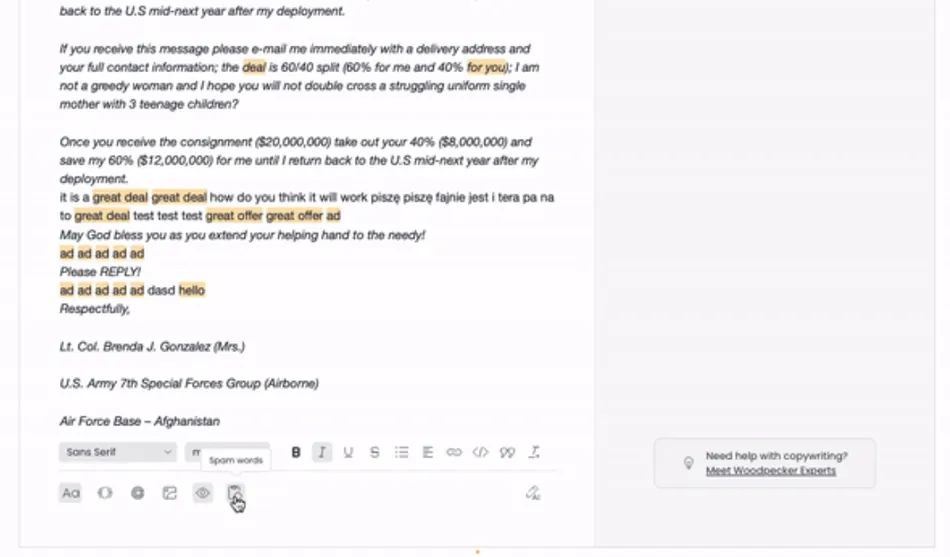
Source: Woodpecker
Woodpecker: Pricing
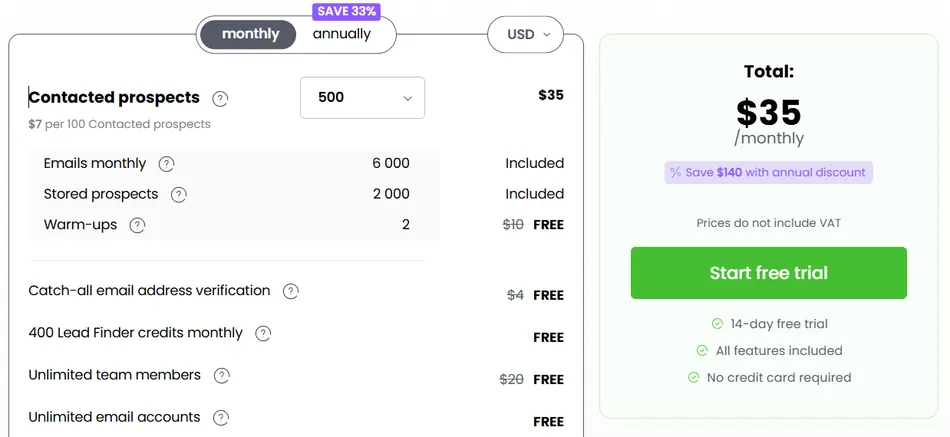
Woodpecker uses a contact-based pricing model. All plans include unlimited team members, unlimited email accounts, catch-all verification, and adaptive sending.
- Free: $0/month. 500 contacted prospects/month, 6,000 emails/month, 2 email warm-ups, unlimited team members.
- Paid plans start at $35/month for 500 contacted prospects, scaling to 1,000,000+.
- Annual plans save 33% (pay for 8 months, get 12).
Add-ons: LinkedIn outreach at $29/month per LinkedIn account, additional warm-up slots at $5/month per account, Lead Finder credits starting at $28/month for 2,000 credits.
Use Woodpecker if:
- You’re a small sales team or solo founder who wants deliverability on autopilot with no configuration
- You want to be sending campaigns within your first hour of signup
- You don’t want to pay per seat or per email account, and you value GDPR compliance
6. Snov.io (Best Free Cold Email Tool With a Complete Sales Toolkit)
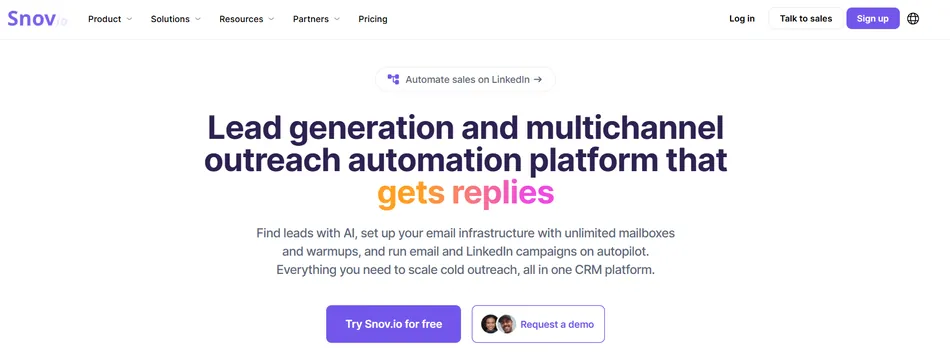
The first question many teams ask about cold email is simple: does it work for our business? Snov.io lets you answer that at zero cost.
Snov.io is a lead generation and outreach automation platform that gives you a complete cold email workflow (prospecting, verification, sequencing, and pipeline management) starting at nothing. Unlike most competitors that gate core functionality behind paid plans, Snov.io’s free tier includes email finding, 7-tier email verification, drip campaigns, and a built-in CRM.
| Snov.io Pros | Snov.io Cons |
|---|---|
| ✅ Most complete free plan in the category | ❌ Free plan limited to 50 credits and 100 recipients/month |
| ✅ 7-tier email verification claiming 98% accuracy | ❌ Higher-tier pricing not publicly listed |
| ✅ Built-in Sales CRM included on every plan | ❌ LinkedIn automation is a paid add-on ($69/month per account) |
| ✅ Unlimited team seats on all paid plans |
Snov.io: Top 3 Unique Features
- The most complete free plan in cold email (email finding, verification, drip campaigns, and CRM at zero cost)
- 7-tier email verification with 98% claimed accuracy
- Built-in Sales CRM with up to 20 pipelines included on every plan
Snov.io’s Trial plan is genuinely usable: you get 50 credits per month that renew every billing cycle, 100 recipients, access to the email finder, verifier, drip campaigns with unlimited follow-ups, and the full Sales CRM, all without entering a credit card. No other platform in this category gives you email finding, multi-step verification, sequencing, and CRM at zero cost.
Every email address passes through seven validation checks: syntax validation, gibberish detection, domain verification, MX record checking, email server validation, mailbox existence confirmation, and catch-all detection. Snov.io claims 98% accuracy and targets less than 1% bounce rate for verified lists. Belkins, running 80,000+ leads per month through the platform, achieved 99% deliverability.
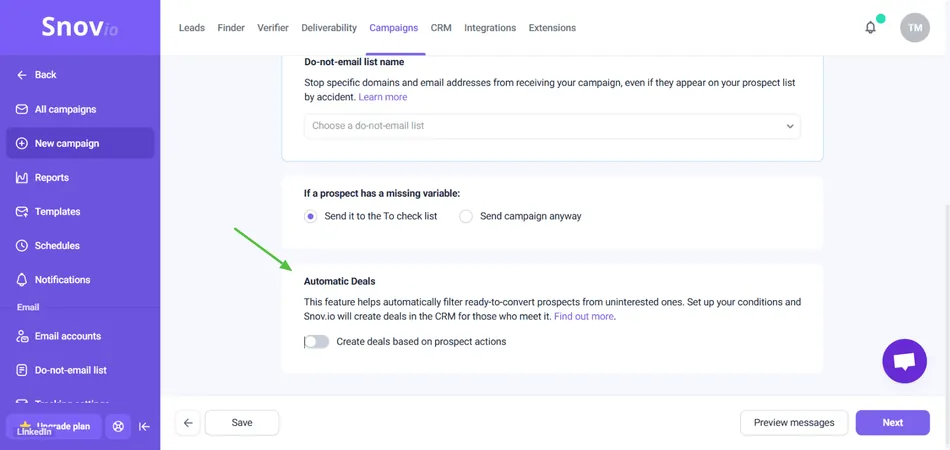
The Sales CRM included on every plan supports up to 20 pipelines with 100 stages each and 10,000 active deals. The Automatic Deals feature creates a CRM deal when a prospect takes a qualifying action, so opportunities don’t slip between outreach and pipeline management.
Source: Snov.io
The visual drip campaign builder supports drag-and-drop sequencing with behavioral branching, mailbox rotation, and provider matching (Gmail to Gmail, Outlook to Outlook). Snov.io’s Magic Pixel open-tracking avoids the “suspicious email” banners that standard tracking pixels trigger.
Snov.io: Pricing
All paid plans include unlimited team seats.
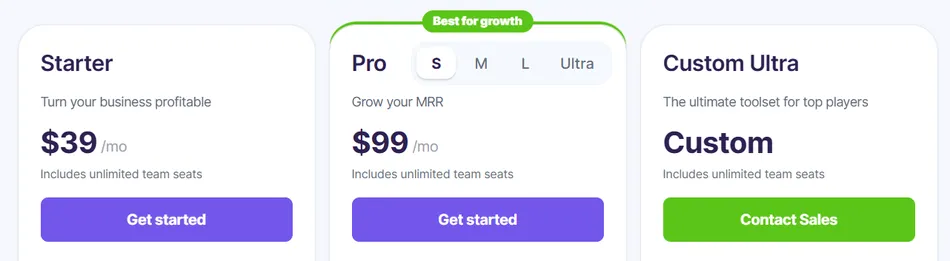
- Trial (Free Forever): $0/month. 50 credits/month, 100 recipients, email finder, verifier, drip campaigns, CRM.
- Starter: $39/month ($29.25/month annual). 1,000 credits, 5,000 recipients, adds bulk search, API, integrations, credit rollover.
- Pro S: $99/month ($74.25/month annual). 5,000 credits, 25,000 recipients, unlimited warm-up slots, A/B testing, Spintax.
Higher volume tiers (Pro M, Pro L, Ultra) are available on snov.io/pricing. LinkedIn automation is an add-on at $62/month per account.
Use Snov.io if:
- You want to test cold email before spending anything, with a free plan that covers the full workflow
- You need one platform for email finding, verification, sequencing, and pipeline management instead of three or four
- Data quality is your top priority and you want the most thorough verification process in the category
7. Salesforge (Best AI-First Platform With an Autonomous Sales Agent)
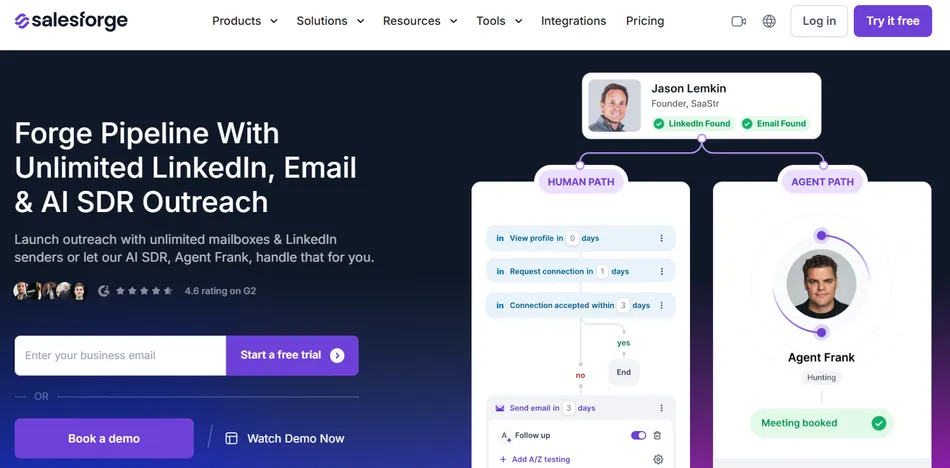
Most cold email tools treat AI as an add-on. Salesforge was built around AI from the start, with its flagship product, Agent Frank, operating as an autonomous sales development representative.
Salesforge is an outbound sales platform that replaces a fragmented stack of tools with a single system covering cold email sequencing, LinkedIn outreach, email warm-up, private email infrastructure, lead sourcing, and an autonomous AI SDR. It’s designed for teams ready to experiment with AI-led prospecting as an alternative to (or supplement for) traditional SDR headcount.
| Salesforge Pros | Salesforge Cons |
|---|---|
| ✅ Agent Frank autonomous AI SDR with auto-pilot and co-pilot modes | ❌ Agent Frank pricing requires a demo (not publicly listed) |
| ✅ Per-contact unique AI emails in 20+ languages | ❌ Email + LinkedIn only, no native phone dialing |
| ✅ Unlimited mailboxes and warm-up on Growth plan | ❌ Not optimized for Fortune 500 or long RFP sales cycles |
| ✅ Integrated Forge Stack infrastructure |
Salesforge: Top 3 Unique Features
- Agent Frank autonomous AI SDR that prospects, personalizes, sends, and books meetings around the clock
- Per-contact unique AI-written emails (not template swaps) in 20+ languages
- Integrated Forge Stack that replaces 4 to 6 separate outbound tools
Agent Frank finds prospects based on your ICP criteria, writes personalized messages using your first-party data (uploaded pitch decks, product manuals, company briefings), manages the follow-up cadence, and books meetings by sending calendar links. The auto-pilot/co-pilot toggle gives teams control: companies comfortable with full AI autonomy let Frank run unattended, while teams with compliance requirements use co-pilot mode to review and approve each action. VAI Consulting used Agent Frank to run outbound on auto-pilot during rapid growth, describing the support team as “an extended part of our team.”
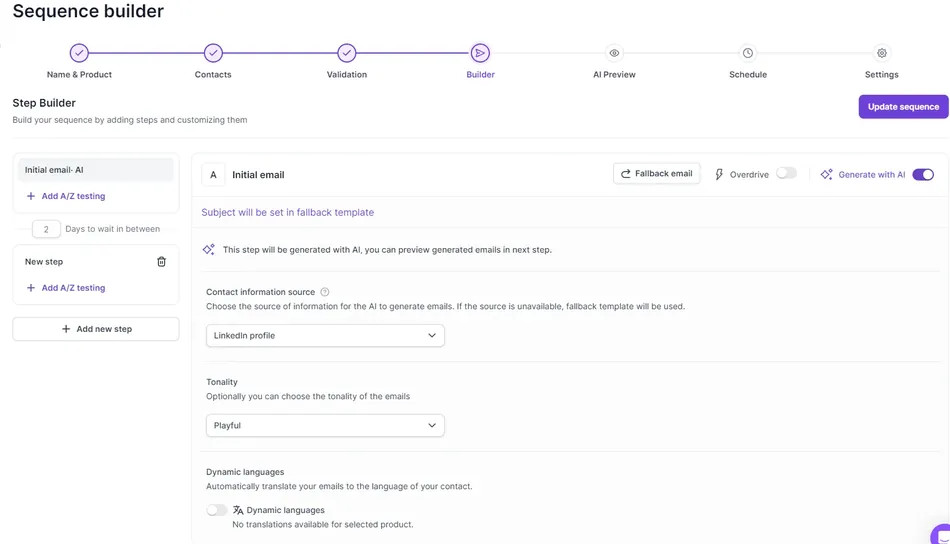
Rather than inserting dynamic fields into a shared template, Salesforge’s Personalization Credit model generates a distinct email for each lead. The AI reads the recipient’s LinkedIn profile at send time, selects the right language from 20+ options via Dynamic Languages, and structures the message around your product profile. This approach directly addresses ESP penalties for repetitive content that template-based tools cannot solve.
Source: Salesforge
The Forge Stack consolidates sequencing (Salesforge), shared email infrastructure (Mailforge), private infrastructure (Infraforge), warm-up (Warmforge), lead sourcing (Leadsforge), and a unified inbox (Primebox) under one ecosystem. Warm-up is restricted to Google Workspace and Microsoft 365 mailboxes. Case study results: AKOOL reached over 214,000 prospects with a 16%+ positive reply rate, and UniteSync achieved an 85.26% positive reply rate.
Salesforge: Pricing
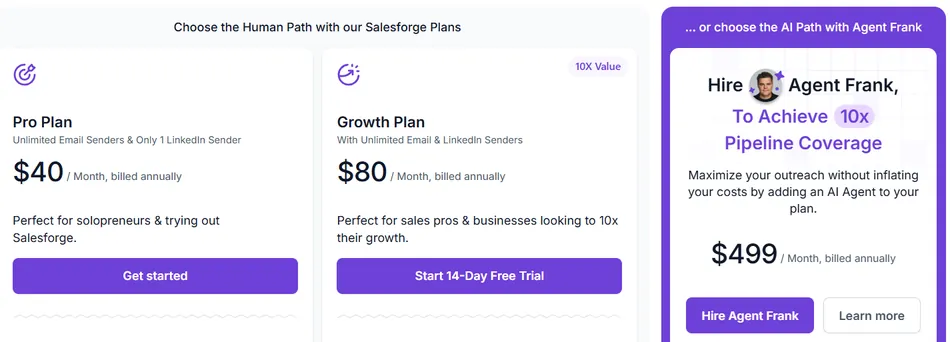
Pro: $40/month. 1,000 active contacts, 5,000 emails/month, 100 personalization credits, 1 user, email-only.
Growth: $80/month. 10,000 active contacts, 50,000 emails/month, 1,000 personalization credits, unlimited users, unlimited mailboxes, unlimited LinkedIn senders.
Agent Frank: Pricing requires booking a demo. Includes a dedicated account manager and shared Slack channel. Operates as a separate subscription from base plans.
Annual billing saves approximately 17%. A 14-day free trial is available with limited credits.
Use Salesforge if:
- You want to deploy an AI SDR rather than hire one, with both autonomous and supervised modes
- You run outbound in multiple languages and need automatic language detection per contact
- You’re tired of duct-taping 4 to 6 separate outbound tools and want a single integrated stack
Final Verdict
Each tool on this list solves a different problem. The best choice depends on what matters most to your team.
Here are our top picks for the most common use cases:
Instantly: Scale cold email volume across unlimited sending accounts with the largest warmup network in the category and AI campaign automation. Try Instantly!
Apollo: Consolidate your outbound stack (data, outreach, dialer, CRM) into one platform with intent data on every plan. Try Apollo!
Reply.io: Run multichannel campaigns across email, LinkedIn, SMS, WhatsApp, and phone with an autonomous AI SDR handling prospecting and follow-ups. Try Reply.io!
Smartlead: Prioritize inbox placement with agency-grade infrastructure: dedicated IPs, ESP matching, and white-label dashboards. Try Smartlead!
Woodpecker: Get deliverability on autopilot with a simple interface, no per-seat pricing, and campaigns running in under an hour. Try Woodpecker!
Snov.io: Test cold email before spending anything with the most complete free plan in the category, covering finding, verification, sequencing, and CRM. Try Snov.io!
Salesforge: Deploy an autonomous AI sales agent with per-contact unique emails in 20+ languages on an integrated infrastructure stack. Try Salesforge!
The key is matching the platform to your outreach motion. A solo founder sending 500 emails a month has different needs than an agency managing 30 client accounts. Start with the problem you’re solving, and the right tool follows.
Best AI Cold Email Tool FAQ
What is the best AI cold email tool for beginners?
Woodpecker. Its 3-step campaign builder, automatic deliverability features (Adaptive Sending, built-in verification, free warm-up), and free plan with 500 contacted prospects per month mean you can go from signup to first campaign in under an hour with no technical setup.
Is there a free AI cold email tool worth using?
Snov.io offers the most complete free plan in the category. You get 50 credits per month, 100 recipients, email finding, 7-tier email verification, drip campaigns with unlimited follow-ups, and a full Sales CRM, all without entering a credit card. Woodpecker also offers a free plan with 500 contacted prospects and 6,000 emails per month. Apollo’s free tier includes database access and 75 credits per month with intent data.
Which AI cold email tool is best for agencies?
Smartlead and Instantly are both strong choices. Smartlead offers white-label dashboards, client workspace isolation, dedicated IP infrastructure, and a unified master inbox for managing multiple client accounts. Instantly’s unlimited email accounts model means onboarding a new client’s sending domains adds zero incremental cost, and its Done-For-You service handles domain and inbox setup within 24 to 72 hours.
What is the best all-in-one cold email platform?
Apollo offers the broadest feature set in a single subscription: a 270M+ contact database, multichannel sequencing (email, LinkedIn, phone), a built-in parallel dialer, intent data covering 1,600+ topics, waterfall enrichment, and deal management. Reply.io is the strongest alternative if you need five-channel coordination including SMS and WhatsApp alongside an autonomous AI SDR.
How much do AI cold email tools cost?
Pricing varies widely. Woodpecker starts at $35/month (contact-based), Snov.io’s Starter is $39/month (credit-based), Smartlead’s Base is $39/month (volume-based), Salesforge’s Pro is $40/month (contact-based), Instantly’s Outreach starts at $47/month (flat-rate with unlimited accounts), Apollo’s Basic is $49/seat/month, and Reply.io’s Email Volume plan is $49/user/month. Many platforms have modular pricing where add-ons for LinkedIn, phone, or lead databases increase the total cost.
Which tool has the best email deliverability features?
Smartlead and Instantly lead the category. Smartlead’s integrated stack includes dedicated IP servers, ESP matching, a private warmup pool, inbox placement testing against 400+ blacklists, and built-in verification. Instantly’s warmup network of over 1,000,000 real accounts is the largest in the category, with tiered warmup pools and the SISR dedicated IP system on higher plans. Woodpecker’s Adaptive Sending also deserves mention for small teams, producing 2.4x fewer inbox blocks with zero manual configuration.
Can AI cold email tools really replace human SDRs?
Reply.io (Jason AI) and Salesforge (Agent Frank) offer autonomous AI SDR agents that prospect, personalize, send, handle replies, and book meetings without human involvement. These work best for volume-driven SMB-to-mid-market outbound. They are not a full replacement for human reps in complex enterprise sales cycles, high-touch relationship selling, or situations requiring nuanced judgment. Most teams use them to augment SDR capacity rather than replace headcount entirely.
What should I look for when choosing an AI cold email tool?
Start with deliverability, because the most feature-rich tool is worthless if your emails land in spam. Then consider your team size (solo founders need simplicity; agencies need multi-client infrastructure), the channels you use (email-only vs. multichannel), whether you need a built-in contact database or can bring your own lists, and how pricing scales as you grow. Pay attention to what drives costs: per seat, per contact, per email sent, or per mailbox.