Running a lead generation agency means juggling multiple client campaigns, dozens of sending accounts, and a deliverability reputation that can make or break your business. The wrong cold email tool turns that into a daily firefight. The right one turns it into a system.
With so many platforms competing for your subscription dollars, finding the one that fits your agency’s workflow, budget, and client count is harder than it should be.
We tested and researched the top cold email platforms and narrowed the list to seven that solve real agency problems:
- Scaling outreach without per-inbox cost creep,
- Managing multiple client campaigns from one dashboard,
- Keeping emails out of spam folders at high volume,
- Prospecting and sending from the same platform,
- Testing cold email as a channel before committing budget,
- Running multichannel outreach across email, phone, and LinkedIn,
- And deploying AI to handle outreach autonomously.
Here are the best cold email software options for agencies in 2026 and beyond.
Looking for the right cold email platform for your agency? Keep reading for a full breakdown of each tool, including pricing, features, and which type of agency each one fits best.
What Is Cold Email Software for Agencies?
Cold email software for agencies refers to platforms that let lead generation and sales agencies send personalized outbound email campaigns at scale on behalf of their clients.
These tools typically include automated email sequences, inbox warm-up, deliverability monitoring, and multi-client management, all designed to help agencies run outreach across many accounts without burning sending domains or losing track of campaigns.
| Best Cold Email Software for Agencies | |
|---|---|
 | Instantly Best for agencies that need unlimited email accounts at a flat monthly fee to scale across dozens of client inboxes without per-seat costs. |
 | Smartlead Best for enterprise agencies that need white-label client portals, dedicated IP infrastructure, and API access to build custom workflows. |
 | Saleshandy Best for budget-conscious agencies that want cold email infrastructure starting at $25 per month with unlimited email accounts. |
 | Apollo.io Best for agencies that want to consolidate prospecting, email outreach, phone dialing, and CRM into a single platform. |
 | Woodpecker Best for agencies that prioritize email deliverability above all else and need a dedicated agency management panel. |
 | GMass Best for agencies testing cold email on a zero budget using Gmail, with a free tier that never expires. |
 | Salesforge Best for agencies that want to deploy an autonomous AI sales agent to handle prospecting, outreach, and meeting booking without human involvement. |
How to Choose the Best Cold Email Software for Agencies
A short checklist to help you find the right platform:
- Sending Infrastructure: Does the platform include inbox warm-up, sender rotation, and deliverability monitoring? Agencies live and die by inbox placement, so this should be standard, not an upsell.
- Client Management: Can you manage multiple client accounts from one dashboard without sharing passwords or juggling separate logins? Look for dedicated agency panels or workspace features.
- Pricing Model: Does the platform charge per inbox, per user, per contact, or a flat fee? Understand how costs scale as you add clients and sending accounts, not just the starting price.
- Prospecting Access: Does the tool include a built-in lead database, or will you need a separate subscription for contact data? Consolidating prospecting and sending saves time and money.
- Deliverability Controls: Look for adaptive sending, bounce protection, ESP matching, and inbox placement testing. The best platforms handle these automatically rather than making you configure them by hand.
- Integration Depth: Does the platform connect with your CRM, project management tools, and client reporting stack? API access matters for agencies building custom workflows.
How We Curated Our List of Platforms
We started by identifying the most widely used cold email platforms among lead generation agencies, drawing from user reviews on G2 and Capterra, agency community discussions, and our own testing.
We then evaluated each platform on four criteria:
- Scalability: Can the platform handle dozens of client accounts and hundreds of sending inboxes without costs spiraling?
- Deliverability: Does it include warm-up, rotation, and monitoring features that protect sender reputation at volume?
- Agency Features: Does it offer multi-client management, white-labeling, or a dedicated agency panel?
- Value for Money: What does the agency actually pay when running campaigns at realistic scale, including add-ons and credits?
These four filters narrowed the field to seven platforms that serve the range of agency sizes, budgets, and workflows in the market today.
1. Instantly: Best for Flat-Fee Scaling Across Dozens of Client Inboxes
The core math problem for cold email agencies is simple: most platforms charge per sending account or per user seat, so every new client domain and every new inbox eats into margins.
Instantly was built to solve this by former lead generation agency owners who lived the problem firsthand.
Every paid plan includes unlimited email account connections and unlimited automated warmup. An agency managing 15 clients with 10 inboxes each (150 total accounts) pays the same subscription as an agency with 3 clients and 5 inboxes. At the Growth tier ($47/month), that is a fraction of what competitors charging $2–5 per mailbox would cost for the same setup.
| Instantly Pros | Instantly Cons |
|---|---|
| Unlimited email accounts and warmup on every plan | Modular pricing can obscure total cost |
| 1M+ account warmup network with tiered pools | Uploaded contact caps are lifetime limits, not monthly |
| Unibox unified inbox with AI reply categorization | Lead database and CRM are separate subscriptions |
| DFY account provisioning within 24–72 hours | DFY domains locked to the platform |
Instantly: Top 3 Unique Features
- Unlimited email accounts and warmup at every pricing tier
- 1M+ warmup pool with automated inbox placement testing
- Done-for-you account provisioning with pre-warmed inboxes ready from day one
Instantly operates a warmup pool of over 1,000,000 real email accounts, the largest disclosed pool in the cold email category.
The pool splits into Standard, Premium (aged Google and Microsoft accounts delivering 9% more replies than standard), and Private tiers. The system uses headless browsers for authentic open and reply interactions, gradually increasing volume over time.
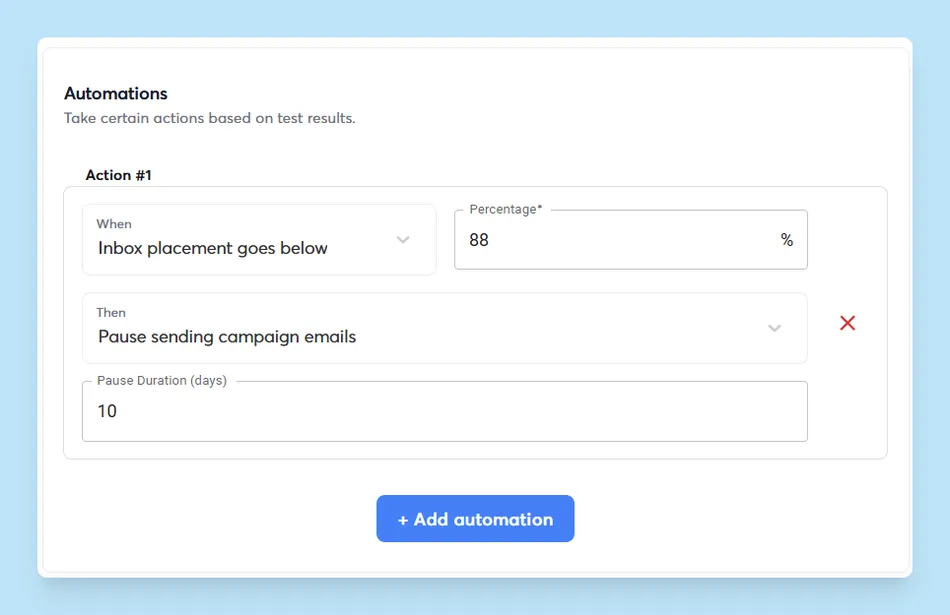
Instantly also includes Inbox Placement testing that sends to seed addresses at Gmail, Outlook, and Yahoo, checks against 94 blacklists, and can automatically pause sending when inbox placement drops below a threshold.
Source: Instantly
For fast client onboarding, the Done-For-You (DFY) service handles domain purchase, DNS configuration, and inbox creation within 24–72 hours at $5/month per account and $15/year per domain. Pre-Warmed Accounts cost $10/month per account for campaigns that need to launch immediately.
The platform includes a built-in lead database of 450M+ B2B contacts with waterfall enrichment from 5+ providers and AI-powered natural language search, though this is billed separately from the outreach plans.
Instantly: Pricing
Instantly uses a modular structure where Email Outreach, Lead Database, and CRM are billed separately.
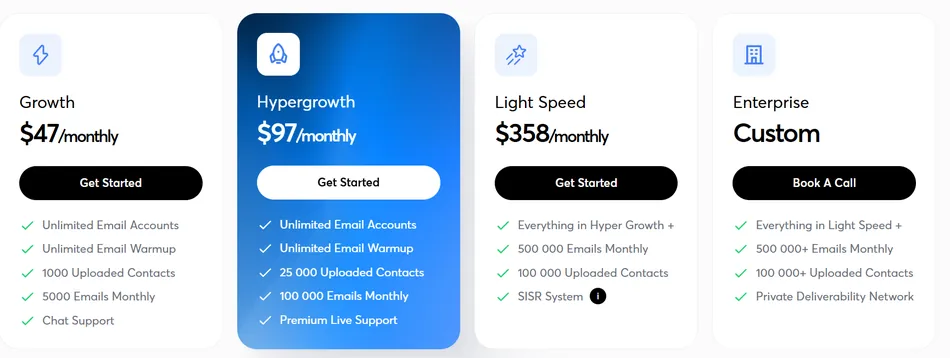
- Growth: $47/month ($37.60/month annual), unlimited accounts, 5,000 emails/month, 1,000 uploaded contacts
- Hypergrowth: $97/month ($77.60/month annual), 125,000 emails/month, 25,000 uploaded contacts, Agency View, priority support
- Light Speed: $358/month ($286.30/month annual), 500,000 emails/month, 100,000 uploaded contacts, dedicated IPs
Lead Database credits start at $47/month for 1,500 credits. CRM plans start at $47/month. Annual billing saves 20%.
Use Instantly if:
- You need unlimited inboxes without per-account fees across multiple client campaigns
- Deliverability is your top priority and you want warmup and monitoring built in
- You want fast client onboarding with done-for-you account provisioning and pre-warmed inboxes
Try Instantly free with unlimited email accounts.
2. Smartlead: Best for White-Label Infrastructure for Enterprise Agencies
For agencies whose clients log into a dashboard to check campaign results, brand perception matters. If prospects see a third-party tool’s branding, the agency looks less valuable.
Smartlead solves this with a white-labeled client portal, dedicated sending infrastructure, and an API-first architecture that lets agencies connect outbound directly to their existing tech stack.
| Smartlead Pros | Smartlead Cons |
|---|---|
| White-label client portal with custom domain and branding | Analytics reporting has a 30-minute to one-hour lag |
| Dedicated single-tenant IP pools via SmartInfra | Client workspaces cost $29/month each on top of base plan |
| Full REST API with 116+ MCP tools and CLI access | No native Salesforce integration |
| Unlimited mailbox connections on every plan | Rapid feature shipping can introduce occasional bugs |
Smartlead: Top 3 Unique Features
- White-label client portal that turns Smartlead into your agency’s branded platform
- Deliverability stack with dedicated IPs, tiered warmup pools, and inbox placement testing
- Full REST API, MCP server with 116+ tools, and CLI for programmable outbound
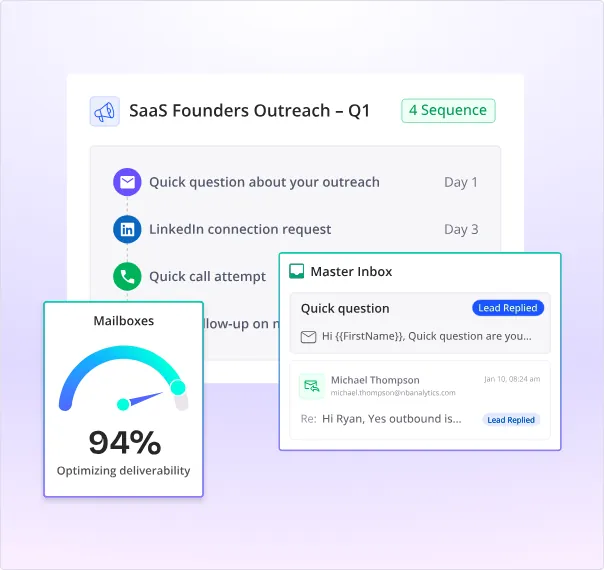
Smartlead runs five interlocking deliverability layers: SmartInfra (dedicated single-tenant servers with siloed IP pools), SmartSenders (done-for-you domain and DNS setup), Ultra Premium Warmup (a private, invite-only warmup pool of vetted senders), SmartDelivery (inbox placement testing with 400+ blacklist monitoring), and Email Verification (99% accuracy on invalid and catch-all detection).
AvoraGrowth’s founder called Smartlead’s warmup pools “the best he has tested,” while Unlock Management reported they “have never dealt with a deliverability crisis” since switching to the platform.
The white-label feature lets agencies rebrand the platform under their own domain, logo, and colors. Wyngman Agency chose Smartlead for this reason, wanting a branded experience for their clients. Client workspaces cost $29 per client per month on Pro plans and above.
For technical agencies, the full REST API covers campaign creation, lead management, sequence configuration, and real-time webhooks. AvoraGrowth connected Smartlead to Go High Level via the API so every interested lead pushes straight to the client’s pipeline. An MCP server with 116+ tools and a CLI tool add further programmatic control.
Source: Smartlead
Smartlead: Pricing
- Base: $39/month ($32/month annual), 6,000 emails/month, 2,000 contacts, unlimited email accounts
- Pro: $94/month ($78/month annual), 90,000 emails/month, 30,000 contacts, CRM access, 1 free client workspace
- Smart: $174/month ($144/month annual), 150,000 emails/month, unlimited contacts, SmartProspect included free
- Prime: $379/month ($315/month annual), 500,000 emails/month, 3 SmartServers, dedicated manager

Additional client workspaces cost $29/month each. SmartDelivery starts at $49/month. Annual billing saves roughly 17%.
Use Smartlead if:
- You need white-label presentation so clients see your agency brand, not a third-party tool
- API access is essential for connecting outbound to your CRM or custom tech stack
- You run high-volume campaigns and need dedicated IP infrastructure with tiered warmup pools
Explore Smartlead’s agency plans.
3. Saleshandy: Best Budget-Friendly Agency Cold Email Starting at $25 per Month
Not every agency can afford a $100+/month cold email subscription from day one.
Saleshandy gives agencies unlimited email accounts, a built-in prospecting database of 800M+ contacts, and dedicated client management features starting at $25 per month on the annual plan.
It is one of the few platforms where small agencies can run campaigns without per-seat or per-inbox pricing.
| Saleshandy Pros | Saleshandy Cons |
|---|---|
| Lowest entry price in the category at $25/month | Lead Finder credits billed separately from outreach plan |
| Unlimited email accounts on every paid plan | Warmup quality may be insufficient for 50+ inboxes at once |
| 800M+ lead database with AI-powered natural language search | Starter plan lacks CRM integrations and team member access |
| Unlimited clients and white-label on Scale plan ($139/month) | Full agency setup costs more than the $25 headline price |
Saleshandy: Top 3 Unique Features
- A/Z testing with up to 26 email variants per step for message optimization
- 800M+ B2B Lead Finder with AI search and one-click push to sequences
- Unlimited client workspaces with white-label branding on the Scale plan
Saleshandy’s pricing advantage is that all paid plans include unlimited connected email accounts with no per-inbox surcharges.
Reviewers on G2 and Capterra confirm this as the primary reason users choose the platform.
The Lead Finder gives agencies access to over 800 million B2B contacts and 60 million companies with 75+ filters and an AI Search feature that translates natural language descriptions into structured prospect queries. Prospects push directly into email sequences with a single click.
The Lead Finder uses a Waterfall Enrichment model that queries multiple data providers, and 50% of unused credits roll over each billing cycle.
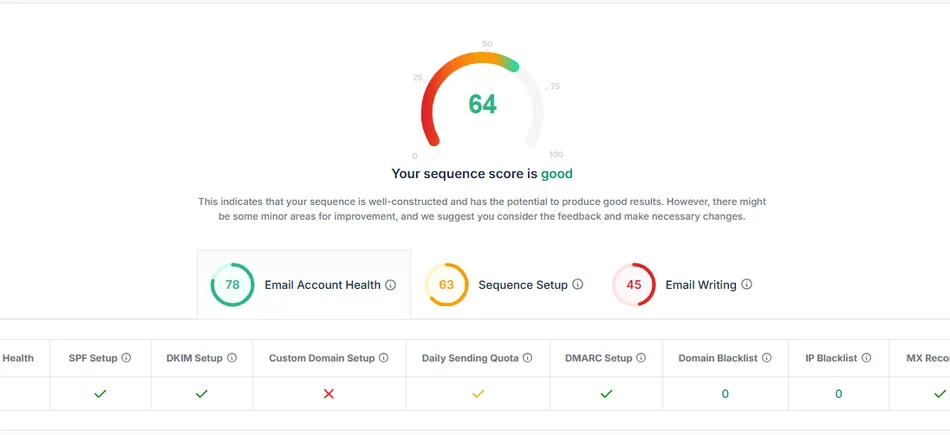
For testing, Saleshandy supports up to 26 A/Z variants per step in a single campaign. The Sequence Score feature evaluates each sequence across 17 factors before a single email is sent.
Source: Saleshandy
The Outreach Scale plan at $139/month includes unlimited clients, unlimited team members, and a white-label solution. The LeadRoad case study shows an agency sending 75,000 emails per month and booking 25–35 meetings per client at 40–45% open rates, while hotLead doubled revenue in a year using the platform.
Saleshandy: Pricing
- Outreach Starter: $25/month (annual) or $36/month (monthly), 2,000 active prospects, 6,000 emails/month, unlimited email accounts
- Outreach Pro: $69/month (annual) or $99/month (monthly), 30,000 active prospects, 150,000 emails/month, CRM integrations, unlimited team members
- Outreach Scale: $139/month (annual) or $199/month (monthly), 60,000 active prospects, 240,000 emails/month, unlimited clients, white-label, SSO
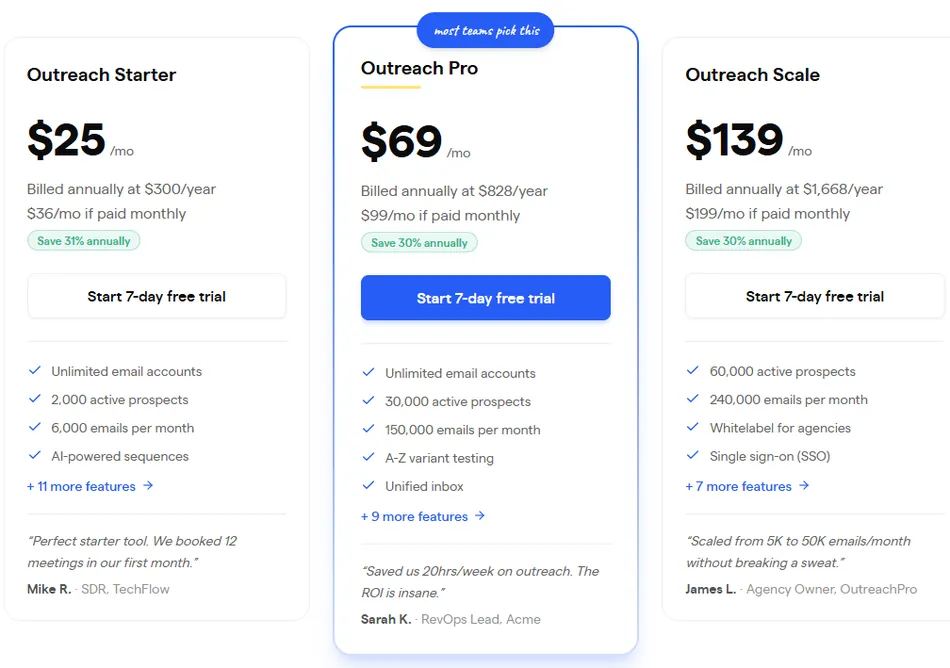
Lead Finder plans start at $49/month for 2,500 credits. Mailboxes cost $4/account/month and domains $14/domain/year. A 7-day free trial is available with no credit card required.
Use Saleshandy if:
- You’re a small agency that needs unlimited email accounts without enterprise pricing
- You want prospecting and outreach in one platform to skip the CSV import cycle
- You’re scaling past 5–10 clients and need unlimited client management at a flat rate
Start a free Saleshandy trial.
4. Apollo.io: Best for All-in-One Prospecting, Outreach, and CRM
Most agency tech stacks stitch together a data provider, email sequencer, phone dialer, and CRM from separate vendors with separate billing and no native data flow between them.
Apollo.io folds all four into one platform, giving agencies one subscription, one dashboard, and one dataset from prospecting through deal close.
| Apollo.io Pros | Apollo.io Cons |
|---|---|
| 275M+ contact database eliminates separate data subscriptions | Credit system adds complexity to pricing |
| Multichannel sequences across email, phone, and LinkedIn | Advanced dialer costs $119–$149/month on top of seat fee |
| Built-in CRM with deal boards and conversation intelligence | CRM less mature than Salesforce or HubSpot for complex workflows |
| Free plan with real database access and 2 active sequences | API access restricted to Organization plan |
Apollo.io: Top 3 Unique Features
- 275M+ B2B contact database with 65+ filters and buying intent data across 1,600+ topics
- Multichannel sequences combining email, phone (parallel dialer), and LinkedIn in one workflow
- Native CRM with deal boards, conversation intelligence, and AI-generated call coaching
Apollo sits on a 270M+ contact, 70M company database with 65+ filterable attributes and buying intent data across 1,600+ topics powered by LeadSift (a Foundry company).
Apollo reports a 91% email accuracy rate backed by a 7-step verification process with 72 million emails verified monthly. For agencies running outreach across multiple client verticals, this means building prospect lists for a SaaS client, logistics client, and healthcare client from the same database.
Where most tools on this list treat email as the primary channel, Apollo treats it as one part of a multichannel approach. Sequences support emails, phone calls via the built-in parallel dialer, and LinkedIn steps (connection requests, messages, post engagement). The dialer lets reps reach 100+ prospects per hour and includes voicemail drops, local presence dialing, and call recording.
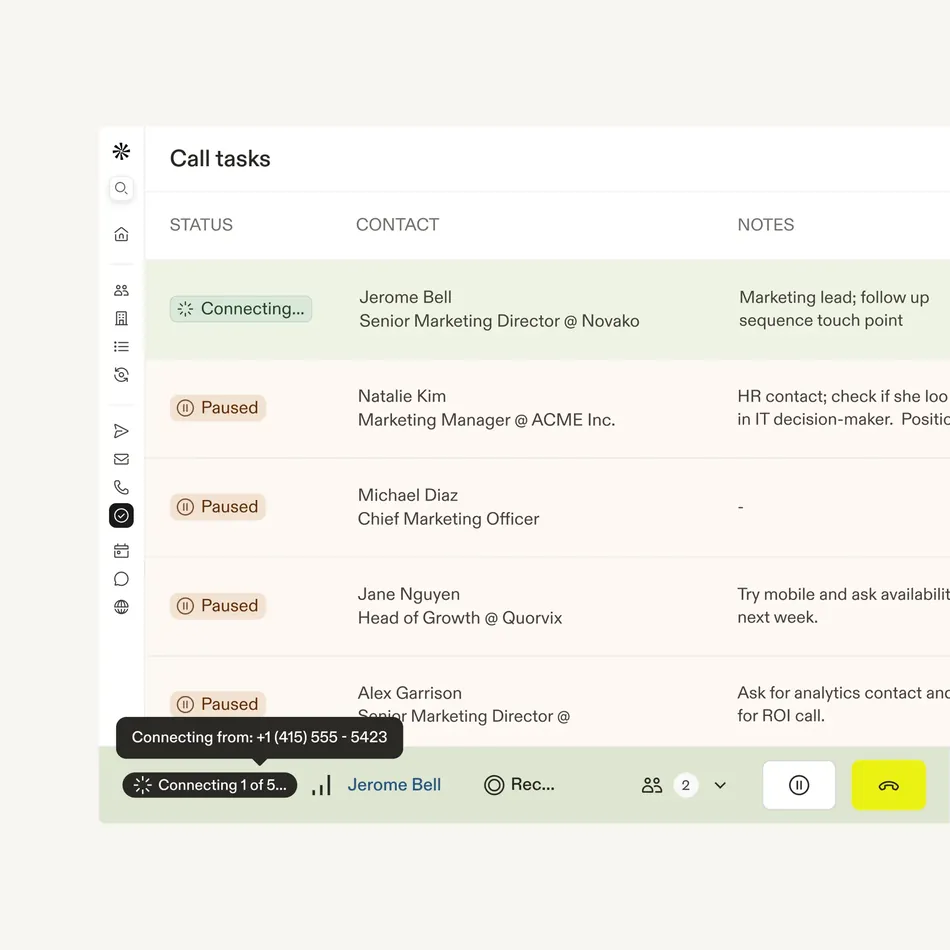
Source: Apollo.io
The built-in CRM includes kanban deal boards, deal stall alerts, and conversation intelligence with AI-generated call summaries and coaching insights. One customer reported cutting from $18,000 for Outreach plus $15,000 for ZoomInfo to $12,000 total by migrating to Apollo.
Apollo also includes domain purchase, automatic SPF/DKIM/DMARC authentication, mailbox warm-up, and a Deliverability Suite dashboard natively.
Apollo.io: Pricing
Apollo uses a hybrid per-seat plus credit model.
All pillars (Outbound, Inbound, Data Enrichment, Deal Execution) are included at every tier.
- Free (Starter): $0/seat, 75 credits/month, 2 active sequences, Gmail-only
- Basic: $49/seat/month (annual) or $59/seat/month (monthly), 30,000 credits/year
- Professional: $79/seat/month (annual) or $99/seat/month (monthly), 48,000 credits/year, unlimited sequences
- Organization: $119/seat/month (annual only, minimum 3 seats), 72,000 credits/year, SSO, custom reporting
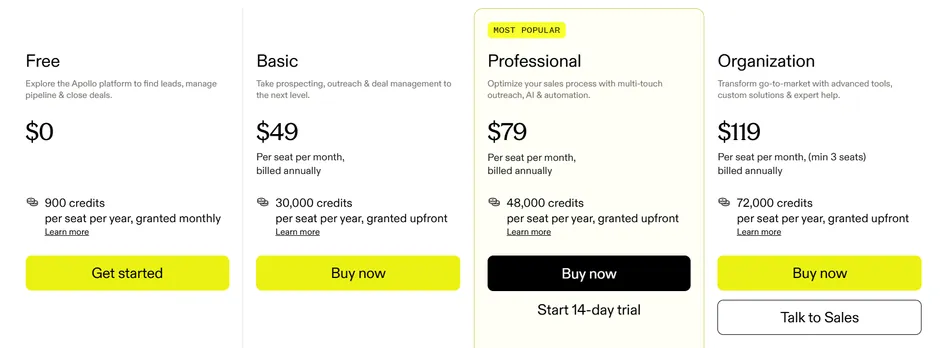
Credits do not roll over. The advanced dialer costs an additional $119–$149/month. A 50% startup discount is available for companies with fewer than 20 employees.
Use Apollo.io if:
- You want to replace separate data, email, dialer, and CRM subscriptions with one platform
- Your agency runs multichannel campaigns that include phone and LinkedIn alongside cold email
- You manage the full sales cycle for clients, not just top-of-funnel lead generation
Get started with Apollo.io’s free plan.
5. Woodpecker: Best for Deliverability-First Cold Email With a Dedicated Agency Panel
Every cold email agency knows the sinking feeling of a burned domain. One deliverability mistake can take a client’s sending reputation weeks to recover.
Woodpecker was built to prevent exactly that, with an always-on adaptive sending engine, automatic bounce protection, and ESP matching that runs in the background without manual configuration.
| Woodpecker Pros | Woodpecker Cons |
|---|---|
| Adaptive Sending reduces account blocks by 2.4x automatically | Narrower feature set than all-in-one platforms |
| Dedicated Agency Panel with guest viewer access and white-label | Per-client costs add up for agencies with 15+ clients |
| Condition-based campaign branching built into the sequence editor | No built-in parallel phone dialer |
| Free email verification via Bouncer runs automatically on every send | Lead database smaller than competitors |
Woodpecker: Top 3 Unique Features
- Adaptive Sending that automatically throttles and ramps volume based on real-time provider signals
- A dedicated Agency Panel with per-client workspaces, global blacklists, and deliverability monitoring
- Condition-based (If-campaign) branching that adapts sequences based on prospect behavior
Woodpecker’s Adaptive Sending engine runs by default and requires no configuration.
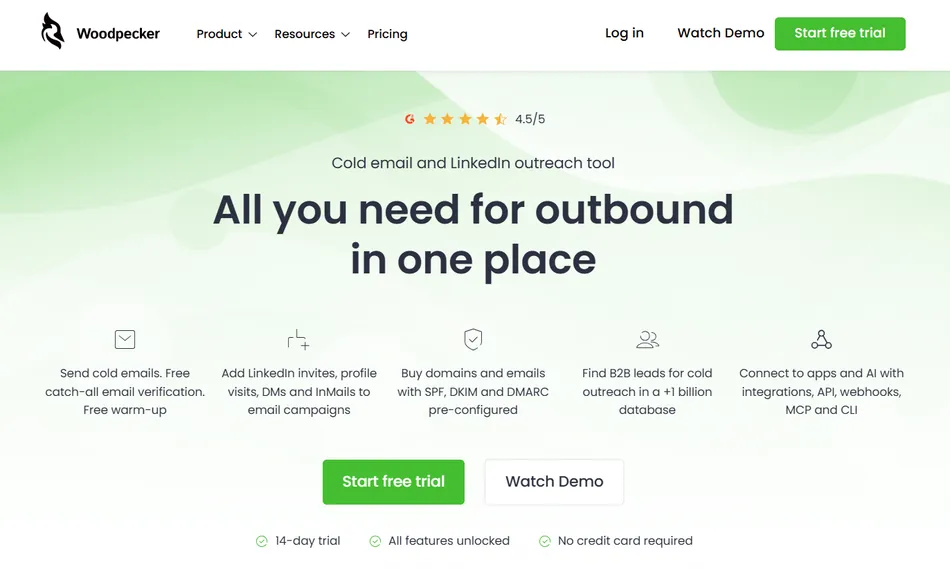
It monitors outbound volume per mailbox and automatically reduces sending when a provider’s daily quota approaches. Based on Woodpecker’s comparison of 2,900+ inboxes, accounts using Adaptive Sending experience 2.4 times fewer provider-imposed blocks and a 59% reduction in shutdown risk.
The throttled accounts actually sent more total email over a 15-day window (15,910 vs. 14,440) because they never lost full sending days to blocks.
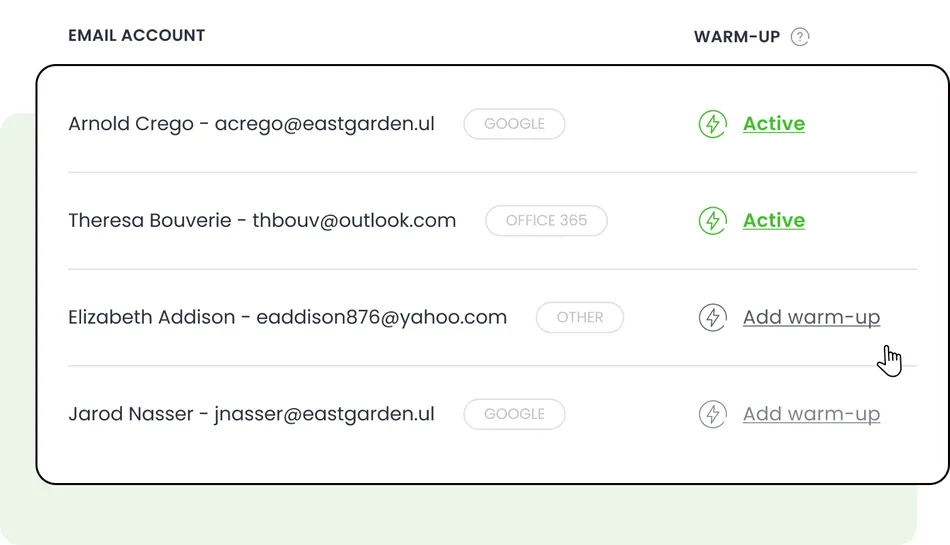
The Agency Panel uses a two-layer system: the Agency HQ (master account for billing, global safety settings, and notification templates) and the Client Panel (per-client workspaces with isolated campaigns, sending accounts, and analytics).
Clients connect their own mailboxes via an invitation link with no password sharing. Global domain blacklists cascade across every client account to prevent cross-client contamination. User Doug Puccetti summed it up: “No other tool has such a clear and explicit agency panel!”
Source: Woodpecker
Condition-based campaigns let agencies build branching logic inside the sequence editor using open-based, click-based, snippet-based, and task-based conditions. A prospect who opened but didn’t click gets a different follow-up than a non-opener, all within one campaign rather than requiring separate parallel sequences.
Woodpecker: Pricing
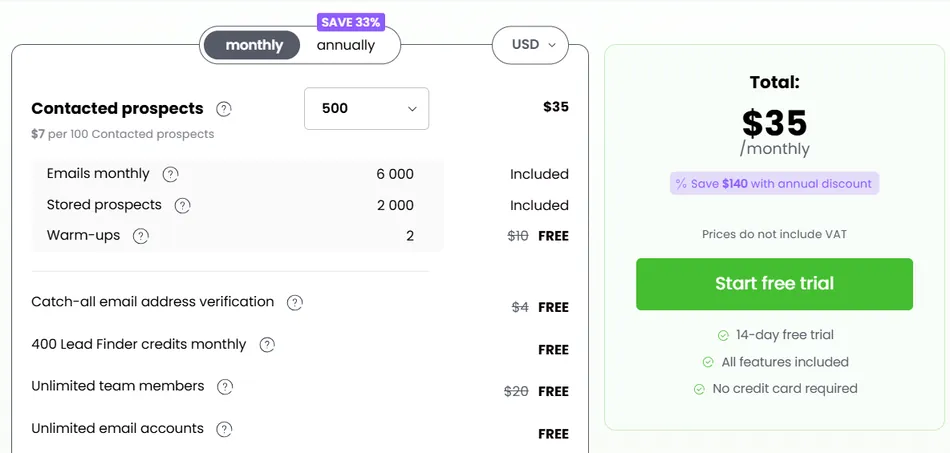
Woodpecker uses a contact-based pricing model.
Team members, email accounts, and A/B tests are all unlimited and free on every plan.
- Free: $0/month, 500 contacted prospects/month, 6,000 emails/month, 2 warm-up slots, 400 Lead Finder credits
- Paid plans: Start at $35/month for 500 contacted prospects, scaling up to 1,000,000+
- Annual plans save 33% (pay for 8 months, get 12)
Agency add-ons: Agency Panel at $27/month per active client, White Label at $5/month per active client, LinkedIn outreach at $29/month per LinkedIn account.
Use Woodpecker if:
- Deliverability is your primary concern and you want it handled automatically, not manually configured
- You need a dedicated agency panel with per-client workspaces, white-label reporting, and global safety controls
- GDPR compliance matters, as Woodpecker is headquartered in Poland with EU data residency
Start with Woodpecker’s free plan.
6. GMass: Best for Free Cold Email Inside Gmail on a Zero Budget
Before committing to a $50–$200/month cold email subscription, many agencies want proof that the channel works for their clients.
GMass is a Gmail-native Chrome extension that turns the compose window into a cold email tool, with a free tier that never expires and core outreach features included at no cost.
| GMass Pros | GMass Cons |
|---|---|
| Free tier with no expiration (50 emails/day) | Free tier limited to 50 emails/day |
| Runs entirely inside Gmail with no learning curve | No multichannel capabilities (email only) |
| Mail merge from Google Sheets with bi-directional data sync | No built-in lead database |
| AI personalization and Spam Solver included on all plans | Not designed for managing multiple client accounts at scale |
GMass: Top 3 Unique Features
- A usable free plan with no expiration date, including mail merge, follow-ups, and tracking
- Google Sheets integration that functions as a lightweight CRM for multi-client agency workflows
- Spam Solver that tests campaigns against 20 seed accounts, including enterprise-grade filters
GMass’s free plan has no expiration date, letting agencies send up to 50 emails per day indefinitely.
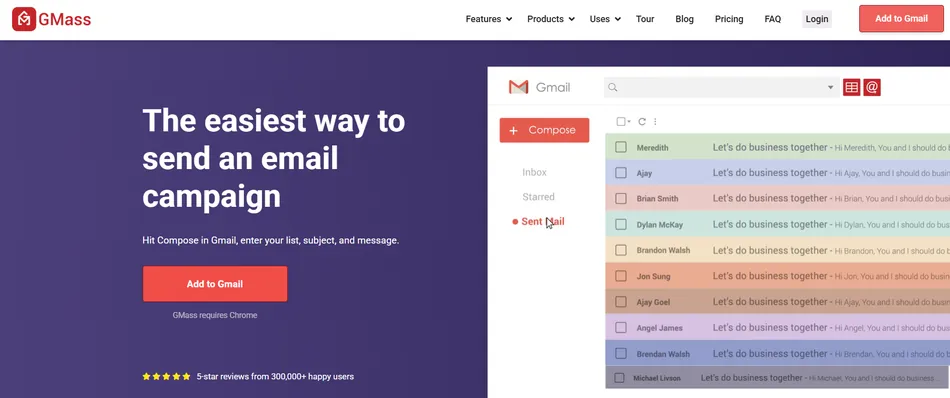
The free tier includes mail merge from Google Sheets, automated follow-up sequences, email verification, and open/click/reply tracking. For an agency testing cold outreach with a small prospect list, 50 emails per day is enough to run A/B tests, validate messaging, and generate initial replies before deciding to scale.
The platform reads directly from any Google Sheet, where every column becomes a merge field. After campaigns send, GMass writes engagement data (opened, clicked, replied, bounced) back to the originating sheet. Agencies can segment sends using filter notation, use dynamic lists that update automatically as contacts change, and share sheets with clients for real-time visibility.
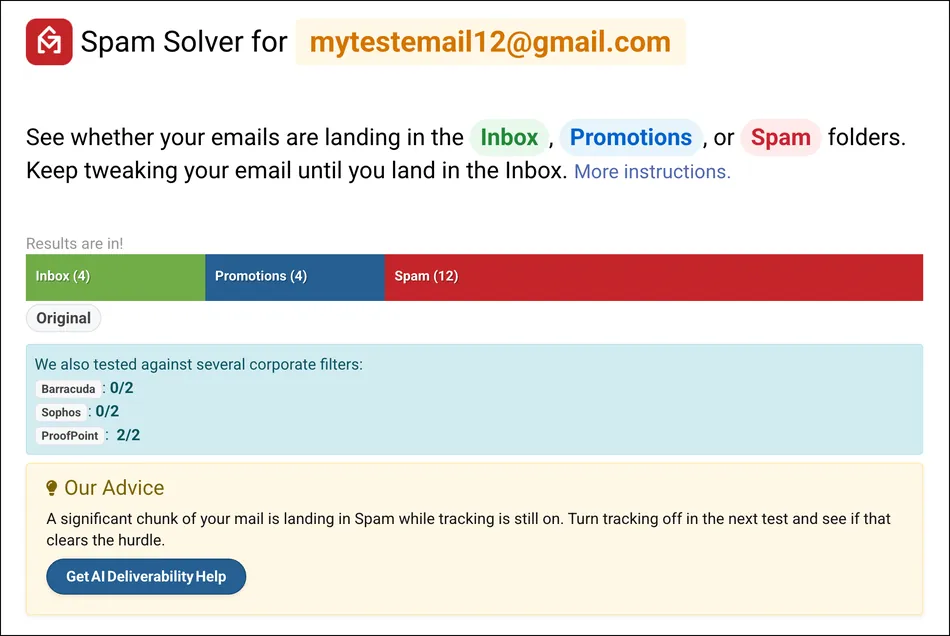
Emails route through Google’s own servers by default, which helps deliverability. The Spam Solver tests campaigns against 20 Gmail and Google Workspace seed accounts (including enterprise-grade filters from Barracuda, Sophos, and ProofPoint) and generates AI-powered suggestions for improvement.
Source: GMass
For AI features, SpinMax generates wording variations across every email with a single checkbox. The ChatGPT campaign builder creates subject lines, body copy, and follow-up emails from a one-sentence description. GMass covers the OpenAI API cost for all AI features with no API key required.
GMass: Pricing
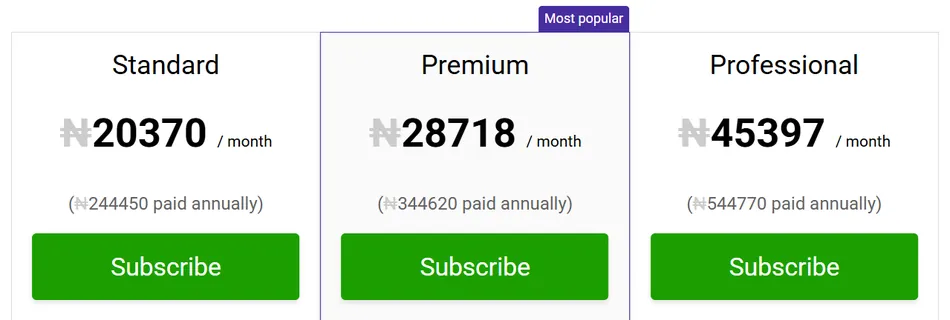
GMass uses flat-fee per-seat pricing with no email volume charges.
All plans include unlimited emails, contacts, and campaigns.
- Standard: $29.95/month ($20.75/month annual)
- Premium: $39.95/month ($29.08/month annual)
- Professional: $59.95/month ($49.92/month annual)
Team plans offer per-user discounts: 5 users at $35/user/month down to 100 users at $22/user/month. SMTP sends include 10,000 free per billing period, then $5 per additional 10,000.
Use GMass if:
- You want to test cold email as a channel before committing any budget
- Your team lives in Gmail and you want no onboarding friction
- You manage prospect lists in Google Sheets and don’t need a separate CRM
Install GMass free from the Chrome Web Store.
7. Salesforge: Best for AI-First Autonomous Outreach
Most cold email tools help humans send emails faster.
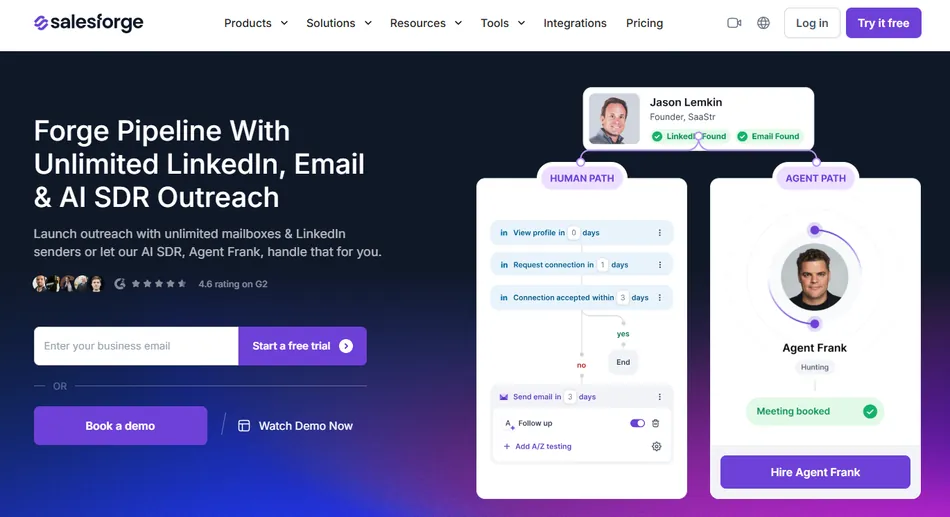
Salesforge takes a different approach: its Agent Frank is an AI sales development representative that autonomously finds prospects, writes personalized outreach, sends follow-ups, and books meetings without a human touching individual emails.
| Salesforge Pros | Salesforge Cons |
|---|---|
| Agent Frank runs 24/7 prospecting and outreach autonomously | Agent Frank pricing requires a demo call (not publicly listed) |
| Unlimited mailboxes, LinkedIn senders, and users on Growth plan | Forge Stack products billed separately |
| AI writes unique emails per prospect, not filled-in templates | Newer platform with less market presence than established players |
| Built-in Warmforge warmup included free on all plans | Ecosystem lock-in once running multiple Forge Stack products |
Salesforge: Top 3 Unique Features
- Agent Frank: an autonomous AI SDR that handles prospecting, outreach, and meeting booking in 20+ languages
- Forge Stack replacing 5–6 separate outbound tools under one platform
- AI personalization that generates unique email copy per prospect from uploaded product documentation
Agent Frank operates in two modes: auto-pilot (runs autonomously 24/7) and co-pilot (drafts messages for human approval). The agent trains on a proprietary dataset modeled after the top 1% of sales reps and pulls from the user’s uploaded product documentation to write individualized messages.
VAI Consulting used Agent Frank to run outbound on auto-pilot during rapid growth, describing the support team as feeling like “an extended part of our team.”
The Forge Stack includes Salesforge (sequencing), Warmforge (warm-up), Mailforge (shared email infrastructure starting at $33/month for 10 mailboxes), Infraforge (private infrastructure), Leadsforge (lead search), Primeforge (mailbox provisioning), and Primebox (unified inbox). All components share one data layer and login.
The $80/month Growth plan includes unlimited mailboxes, LinkedIn senders, and users, eliminating per-seat scaling costs.
The AI personalization engine generates a unique email for each prospect using seller-defined product profiles and recipient LinkedIn data. Dynamic language selection reads LinkedIn profile language and routes contacts to the right language variant, supporting 20+ languages without separate campaigns.
Agency results back this up: AKOOL reached 214,000+ prospects with a 16%+ positive reply rate, and UniteSync achieved an 85.26% positive reply rate with a $2.86 customer acquisition cost.
Salesforge: Pricing
- Pro: $40/month, 1,000 active contacts, 5,000 emails/month, 100 personalization credits, 1 user, email only
- Growth: $80/month, 10,000 active contacts, 50,000 emails/month, 1,000 personalization credits, unlimited users and senders
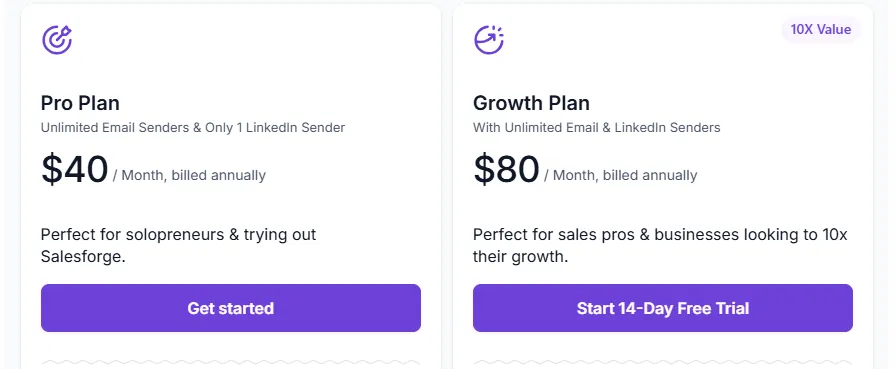
Annual billing includes 2 months free. Agent Frank pricing is custom and requires booking a demo. Infrastructure add-ons (Mailforge, Infraforge, Primeforge) are billed separately.
Use Salesforge if:
- You want to deploy an autonomous AI SDR rather than hire human SDRs for prospecting and outreach
- You need an integrated outbound stack under one roof instead of stitching together 5–6 separate tools
- You serve international clients and need multilingual outreach in 20+ languages
Explore Salesforge’s AI-first outreach platform.
Final Verdict
Every agency on this list faces the same core challenge: running high-volume outreach for multiple clients without deliverability failures, runaway costs, or operational chaos. The right platform depends on where your agency sits today and where it’s heading.
Our top picks for the most common agency scenarios:
- Instantly: If you need to scale across dozens of client inboxes at a flat monthly fee with strong deliverability and fast onboarding. The unlimited email account model is built for agency economics.
- Smartlead: If you run an enterprise agency that needs white-label client portals, dedicated IP infrastructure, and API access to build custom workflows around your outbound operations.
Explore Smartlead’s agency plans.
- Saleshandy: If you’re a smaller agency that needs cold email infrastructure at the lowest entry price, with room to scale into unlimited client management as you grow.
Try Saleshandy free for 7 days.
- Apollo.io: If your agency manages the full sales cycle and wants to consolidate data, email, phone, and CRM into one platform instead of paying for four separate subscriptions.
Start with Apollo.io’s free plan.
- Woodpecker: If deliverability is your top priority and you want a mature agency panel with automatic sending protection, ESP matching, and per-client workspaces.
Start with Woodpecker’s free plan.
- GMass: If you want to validate cold email as a channel before spending anything, using a free tier that runs inside Gmail with no expiration date.
- Salesforge: If you want AI-first outreach with an autonomous SDR that handles prospecting, personalization, and meeting booking across email and LinkedIn.
No matter which platform you choose, the best cold email software is the one that matches your agency’s size, budget, and client management needs today, while giving you room to grow tomorrow.
Best Cold Email Software for Agencies FAQ
Which cold email software is best for agencies managing many clients?
Instantly and Smartlead are the strongest choices for multi-client agencies. Instantly offers unlimited email accounts at a flat fee on every plan, making it cost-effective for agencies running dozens of inboxes. Smartlead adds white-label client portals and dedicated IP infrastructure for agencies that need branded dashboards and enterprise-level deliverability control.
Is there a free cold email tool for agencies?
Yes. GMass provides a free plan with no expiration that sends up to 50 emails per day inside Gmail, including mail merge and follow-ups. Woodpecker’s free plan covers 500 contacted prospects per month with 6,000 emails. Apollo.io’s free tier includes access to its 275M+ contact database with 2 active sequences. These are solid starting points for agencies testing the channel.
How much does cold email software cost for agencies?
Entry prices range widely. Saleshandy starts at $25/month (annual) for unlimited email accounts. Woodpecker’s paid plans start at $35/month based on contacts. Instantly’s Growth plan is $47/month with unlimited inboxes.
Smartlead’s Pro plan runs $94/month with one client workspace included. Apollo.io charges $49–$119/seat/month depending on the tier. Add-ons for lead databases, client workspaces, and infrastructure can push the total cost well beyond headline prices.
Which platform has the best email deliverability for agencies?
Woodpecker and Instantly both excel at deliverability but take different approaches. Woodpecker’s Adaptive Sending automatically throttles volume based on real-time provider signals, reducing account blocks by 2.4x. Instantly operates a warmup pool of over 1,000,000 real accounts with tiered pools and automated inbox placement testing.
Smartlead’s integrated infrastructure with dedicated IPs and an invite-only warmup pool is another strong option for agencies focused on inbox landing rates.
Do I need a separate lead database if I use cold email software?
Not necessarily. Several platforms include built-in prospecting. Instantly offers a 450M+ contact database, Apollo.io provides 275M+ contacts with buying intent data, and Saleshandy’s Lead Finder covers 800M+ contacts. These can replace a standalone data subscription for most agency needs, though database access is typically billed separately from outreach plans.
Which cold email platform is best for a solo agency just starting out?
GMass is the safest starting point since its free tier lets you validate cold email at zero cost. Once you’re ready to scale, Saleshandy’s $25/month Starter plan offers unlimited email accounts at the lowest paid entry price in the category. Apollo.io’s free plan is also worth considering if you need contact data and multichannel outreach from the start.
Can cold email software handle LinkedIn and phone outreach too?
Apollo.io is the strongest multichannel option, combining email sequences with a built-in parallel dialer and LinkedIn steps in one workflow. Salesforge supports email and LinkedIn automation with its Agent Frank AI SDR. Smartlead has added SmartDialer and LinkedIn capabilities.
Most other platforms on this list (Instantly, Saleshandy, GMass) focus on email, though Woodpecker offers LinkedIn outreach as a paid add-on.
What should I look for in cold email software as an agency?
Focus on four things: sending infrastructure (unlimited inboxes and built-in warmup prevent costs from scaling with client count), deliverability controls (automated bounce protection, ESP matching, and inbox placement testing protect client domains), client management (dedicated workspaces, white-labeling, and centralized dashboards keep operations organized), and pricing transparency (understand how add-ons for lead databases, client workspaces, and infrastructure affect total cost beyond the base subscription).