Cold email remains one of the most effective ways to generate pipeline and book meetings, but the tooling landscape has shifted. What used to require a patchwork of data providers, verification services, warmup tools, and sending platforms can now run from a single dashboard.
The challenge is picking the right one.
Some platforms help agencies manage dozens of client accounts. Others serve solo founders who need to send a few hundred personalized emails a week from their Gmail inbox. A few try to do everything: prospecting, outreach, CRM, and analytics under one roof.
We researched and tested the leading cold email platforms and narrowed the list to seven that cover the most common use cases:
- Scaling outreach without per-inbox costs,
- Running your entire outbound operation from one platform,
- Unifying prospecting, outreach, and CRM,
- Managing high-volume agency campaigns across client accounts,
- Getting dependable deliverability without complexity,
- Finding verified emails and running targeted sequences,
- And sending cold email for free, directly from Gmail.
Here is a quick summary of these platforms in 2026.
Looking for the right cold email tool for your team? Keep reading to see how each platform stacks up across pricing, features, and use cases.
| Best Cold Email Tools | |
|---|---|
 | Instantly.ai Best for scaling outreach without per-inbox costs. Unlimited email accounts on every plan for teams that need to grow sending volume. |
 | Saleshandy Best all-in-one cold email platform with built-in lead sourcing. One subscription covers prospecting, sequencing, deliverability, and reply management. |
 | Apollo.io Best for teams unifying prospecting, outreach, and CRM. A single platform replacing five or more separate tools. |
 | Smartlead Best for agencies managing high-volume campaigns across client accounts. White-label dashboards, sub-accounts, and API-first architecture. |
 | Woodpecker Best for small teams that want dependable deliverability without complexity. Always-on safety features that require zero configuration. |
 | Hunter.io Best for finding verified emails and running targeted sequences. Transparent, public-web data sourcing with an eight-step verification pipeline. |
 | GMass Best free cold email tool for Gmail users. Runs inside your inbox with a usable free tier. |
What Are Cold Email Tools?
Cold email tools are software platforms that help sales teams, marketers, agencies, and founders send personalized outreach emails to prospects who have not interacted with their business before. These platforms automate sequence building, message personalization at scale, behavior-based follow-ups, and sender reputation protection through warmup and deliverability features.
Modern cold email tools go beyond simple mail merge. Most now include some combination of B2B contact databases for prospecting, email verification to reduce bounces, inbox rotation to distribute sending volume, and analytics to track opens, replies, and conversions. Some also offer multichannel capabilities like phone dialing and LinkedIn automation alongside email.
How To Choose the Best Cold Email Tool
Here’s a short checklist to help you find the right cold email platform:
- Deliverability First: The best email copy in the world is useless if it lands in spam. Prioritize tools that include email warmup, verification, and inbox placement monitoring, ideally built in rather than requiring separate subscriptions.
- Matches Your Sending Volume: Solo founders sending 50 emails a day have different needs than agencies sending 500,000 a month. Choose a platform whose pricing and infrastructure match where you are now and where you plan to be in six months.
- Data Access: Some platforms include built-in B2B contact databases, while others require you to source leads elsewhere. Decide whether you want prospecting and sending in one place or are comfortable using separate tools.
- Ease of Use: A tool your team won’t actually use is a wasted investment. Look for platforms with intuitive campaign builders, clear onboarding, and low setup friction.
- Integrations: Your cold email tool should fit into your existing stack. Check for native CRM integrations (Salesforce, HubSpot, Pipedrive) and automation connectors (Zapier, Make, webhooks).
- Pricing Model: Cold email pricing varies widely: per seat, per inbox, per contact, or flat rate. Understand the total cost (including add-ons like lead database credits, extra warmup slots, or agency features) before committing.
How We Picked the Platforms
We started with a broad list of cold email tools drawn from user reviews, community recommendations, and our own testing. We evaluated each one through hands-on use, product demos, documentation reviews, and published case studies, scoring them on four criteria:
- Deliverability: How well does the platform protect sender reputation and ensure emails reach the primary inbox?
- Ease of Use: How quickly can a team go from signup to sending their first campaign?
- Feature Depth: Does the platform cover the full outbound workflow, or does it require supplementary tools?
- Pricing Transparency: What does the total cost look like once you factor in add-ons, credits, and scaling?
These factors narrowed the list to seven platforms that serve distinct use cases.
1. Instantly.ai — Best Cold Email Tool for Scaling Outreach Without Per-Inbox Costs
You’ve built a list of 5,000 prospects, written solid email copy, and set up your sending domains. Then you realize: to distribute volume safely across enough inboxes, you’ll need 20 or 30 email accounts. And your current tool charges per mailbox.
Suddenly, your $50/month cold email subscription is looking more like $500.
That is the problem Instantly.ai was built to solve.
Instantly is a sales engagement platform built around outbound cold email. Its founding differentiator, unlimited email account connections on every paid plan, makes it the default choice for anyone who needs to scale sending volume without watching costs climb with every new inbox. The four co-founders, all former lead generation agency operators, built Instantly for their own agency when per-account costs became unsustainable.
| Instantly.ai Pros | Instantly.ai Cons |
|---|---|
| ✅ Unlimited email accounts and warmup on every plan | ❌ Modular pricing means total cost can exceed the headline figure |
| ✅ 1M+ account warmup network with tiered pools | ❌ Uploaded contact caps are lifetime limits, not monthly resets |
| ✅ AI Copilot with autonomous reply handling | ❌ Website Visitors feature is US-only |
| ✅ Done-For-You email infrastructure setup | ❌ Analytics depth lags behind enterprise tools |
| ✅ 450M+ verified B2B contact database |
Instantly.ai: Top 3 Unique Features
- Unlimited email accounts on every paid plan with zero per-inbox fees
- Automated warmup via a 1,000,000+ real account Deliverability Network with Standard, Premium, and Private pool tiers
- AI Copilot that generates full campaigns from a prompt, with a reply agent that books meetings through Calendly
Instantly’s unlimited accounts model changes the economics of cold email at scale. A team running 50 sending accounts pays the same base subscription as a team running 5. The company reached $20M ARR within roughly two years, entirely bootstrapped, largely because this pricing structure gave high-volume senders a clear reason to switch.
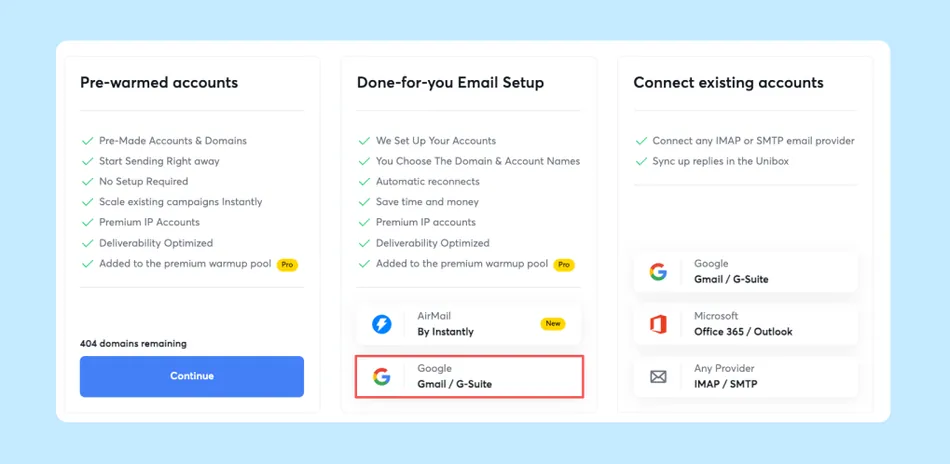
The platform extends beyond campaigns into infrastructure provisioning. The Done-For-You email setup service handles domain purchase, DNS configuration, and inbox creation within 24-72 hours. Pre-Warmed Accounts can send campaigns from day one. The Inbox Placement tool checks against 94 blacklists and can automatically pause mailboxes when placement drops below a threshold.
Source: Instantly
On the AI side, the AI Reply Agent operates in two modes: Human-in-the-Loop (drafts for your review) and Autopilot (responds in under 5 minutes, handles objections, and books meetings via Calendly). The SuperSearch database provides access to over 450 million verified B2B contacts with waterfall enrichment across 5+ providers.
Instantly.ai: Pricing
Instantly uses a modular, multi-subscription architecture where Outreach, Credits, CRM, and other modules are billed separately.
Email Outreach (core module):
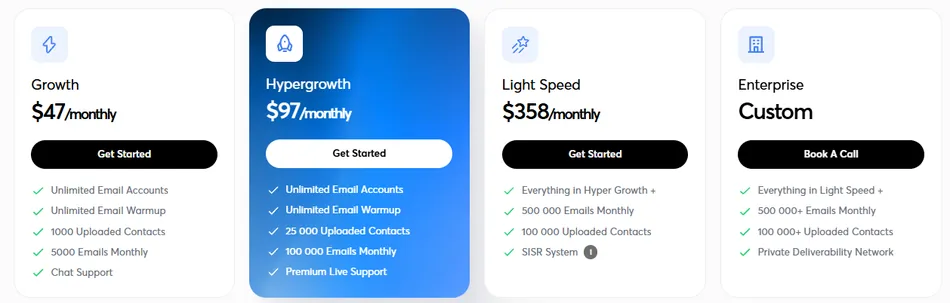
- Growth — $47/month ($37.60 annually): Unlimited accounts and warmup, 1,000 uploaded contacts, 5,000 emails/month
- Hypergrowth — $97/month ($77.60 annually): 25,000 contacts, 125,000 emails/month, Agency View, priority support
- Light Speed — $358/month ($286.30 annually): 100,000 contacts, 500,000 emails/month, dedicated private infrastructure
The Credits module for lead sourcing and AI features starts at $9/month (150 credits) with the Growth Credits plan at $47/month providing 1,500 credits. Teams wanting both outreach and lead sourcing should budget for both modules.
Use Instantly.ai if:
- You’re a lead generation agency managing multiple client campaigns and need unlimited inboxes without escalating costs
- You want to go from zero infrastructure to live campaigns without leaving the platform
- You need AI automation that handles replies and books meetings on its own
- Your primary growth channel is cold email and you measure success in meetings booked
2. Saleshandy — Best All-in-One Cold Email Platform with Built-in Lead Sourcing
Most cold email workflows look something like this: buy contacts from one provider, verify them with another service, import them into your outreach tool, set up warmup through a third-party integration, and manage replies across scattered inboxes. Each handoff introduces friction, data decay, and another monthly bill.
Saleshandy collapses that entire chain into one platform.
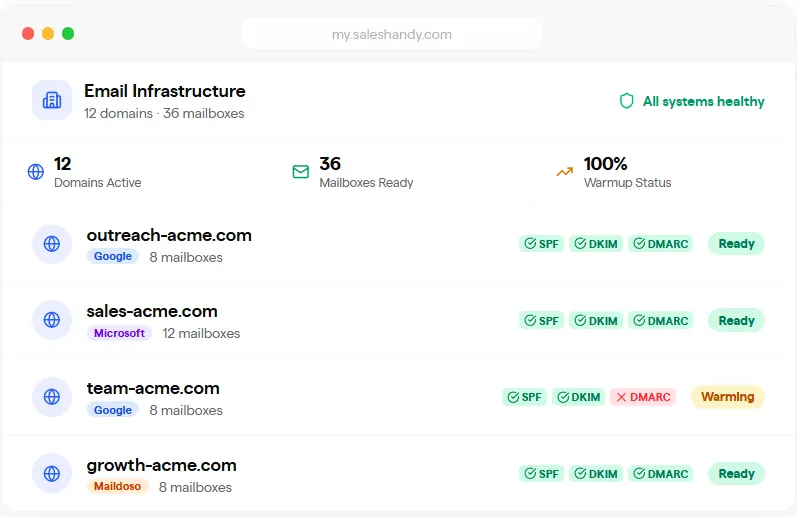
Saleshandy is a cold email outreach platform that consolidates prospecting, sequencing, deliverability management, and reply handling into a single subscription. Prospects discovered in its Lead Finder can be pushed directly into email sequences with a single click, verified at the point of reveal, warmed through the integrated TrulyInbox partnership, and managed through the Unified Inbox.
| Saleshandy Pros | Saleshandy Cons |
|---|---|
| ✅ 800M+ contact database with 75+ filters | ❌ Lead Finder requires a separate subscription |
| ✅ Unlimited email accounts on every plan | ❌ Analytics and custom dashboards are limited |
| ✅ Agency-ready with white-label and unlimited clients | ❌ CRM integrations gated to Pro plan ($69/month) |
| ✅ Lowest entry price at $25/month (annual) | ❌ Warmup may struggle at extreme scale (50+ simultaneous inboxes) |
| ✅ A/Z testing with up to 26 variants per step |
Saleshandy: Top 3 Unique Features
- Native B2B Lead Finder with 852M+ contacts and 42M+ companies, searchable through 75+ filters or natural-language AI
- Sender Rotation distributing volume across up to 1,000 accounts per sequence on the Scale plan
- Integrated deliverability stack: TrulyInbox warmup, Bounce Guard, ESP Matching, and Inbox Radar placement testing
Saleshandy’s core value is eliminating tool sprawl. The LeadRoad case study documents an agency sending 75,000 emails monthly while booking 25-35 meetings per client per month at 40-45% open rates, all from one platform. The hotLead case study documents an agency that doubled revenue in a year, while BraevenSolutions improved meetings per BDR by 40%.
The deliverability toolkit covers the full sending lifecycle: ESP Matching automatically routes mail through Google accounts to Google-hosted prospects and Microsoft accounts to Microsoft-hosted prospects. The Sequence Score system evaluates campaigns across 17 factors before sending, catching issues before they damage your reputation. For teams that need sending infrastructure, Saleshandy offers in-app domain and mailbox purchasing at $14/domain/year and $4/account/month with DNS pre-configured.
Source: Saleshandy
Saleshandy: Pricing
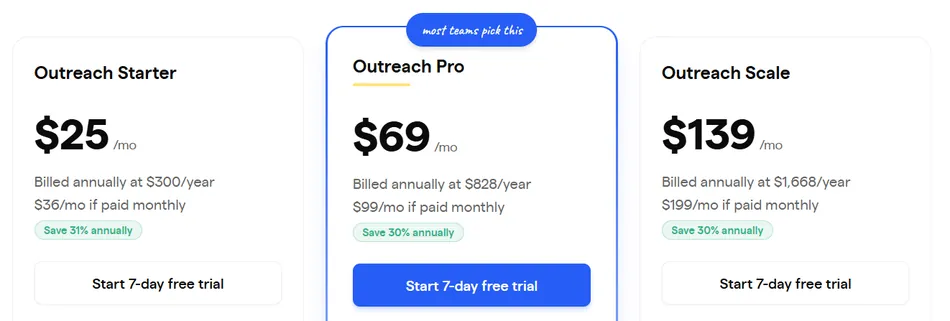
Saleshandy prices around active prospect limits rather than per-seat charges. Annual billing saves 31% across all tiers. All plans include unlimited email accounts and warmup.
- Outreach Starter — $25/month (annual) or $36/month (monthly): 2,000 active prospects, 6,000 emails/month, 10 email accounts per sequence
- Outreach Pro — $69/month (annual) or $99/month (monthly): 30,000 active prospects, 150,000 emails/month, unlimited team members, native CRM integrations
- Outreach Scale — $139/month (annual) or $199/month (monthly): 60,000 active prospects, 240,000 emails/month, 1,000 accounts per sequence, white-label, SSO
The B2B Lead Finder starts at $49/month (annual) for 2,500 credits/month with 50% unused credit rollover.
Use Saleshandy if:
- You want to prospect and send from the same platform rather than juggling separate subscriptions for data and outreach
- You run an agency and need unlimited client workspaces with white-label capabilities at a flat rate
- You are a bootstrapped founder or small team that needs full outreach capabilities at the lowest entry price
- Your outreach is email-first and you want one tool handling everything from lead sourcing to reply management
3. Apollo.io — Best for Enterprise Teams Unifying Prospecting, Outreach, and CRM
Some teams don’t just need a cold email tool. They need to replace an entire stack.
Apollo.io is an all-in-one B2B sales platform that collapses what historically required five or more separate tools (data provider, outreach platform, dialer, enrichment service, and CRM) into a single product. With a 275M+ contact database spanning 70M companies, searchable with 65+ filters, Apollo serves sales organizations that want deep prospecting, multichannel engagement, and pipeline management without paying separately across multiple vendors.
| Apollo.io Pros | Apollo.io Cons |
|---|---|
| ✅ 275M+ contact database built into the platform | ❌ Credit system adds complexity (credits don’t roll over) |
| ✅ True multichannel sequences (email, phone, LinkedIn) | ❌ Advanced Dialer is a $149/month add-on |
| ✅ Native CRM with Salesforce and HubSpot sync | ❌ API access gated to Organization tier |
| ✅ Free plan with genuine access for evaluation | ❌ Native CRM not as deep as dedicated enterprise CRMs |
| ✅ Documented 53% average cost savings from consolidation |
Apollo.io: Top 3 Unique Features
The largest first-party B2B database built into an outreach platform, with a claimed 97% email accuracy rate backed by a 7-step verification process
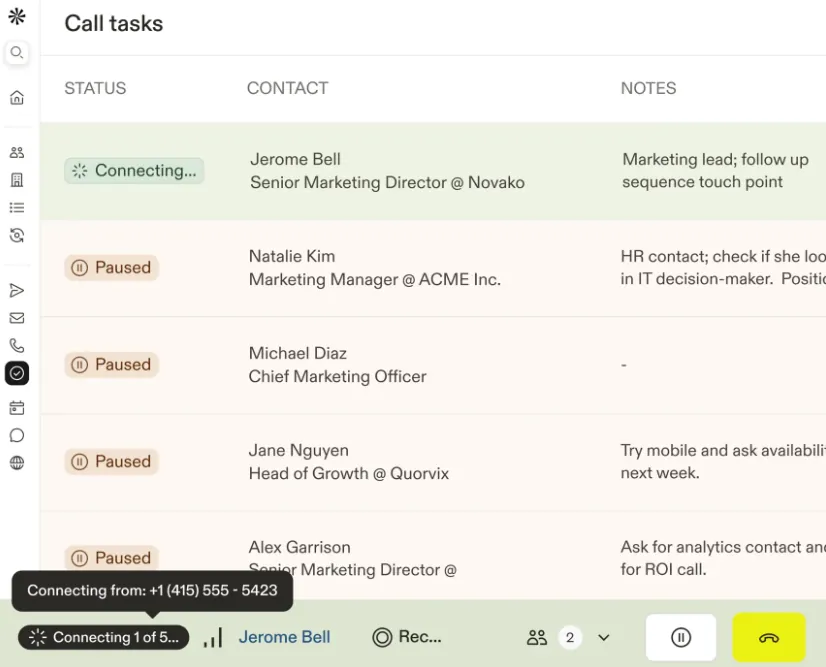
Multichannel sequences combining automated emails, phone tasks, and LinkedIn steps, with a Power and Parallel Dialer connecting reps with 100+ prospects per hour
Platform consolidation delivering measurable savings: one customer migrated from $18,000 for Outreach plus $15,000 for ZoomInfo down to $12,000 total on Apollo
Source: Apollo
Where most cold email tools require you to source contact data elsewhere, Apollo eliminates that step. The database draws from a contributor network of over 2 million sources, third-party providers processing over 230 million records monthly, and real-time bounce validation. You can go from search to sequence in seconds rather than juggling exports and imports between systems.
Apollo also bundles email deliverability infrastructure into the platform (domain purchase, automatic SPF/DKIM/DMARC authentication, and mailbox warm-up). The Conversation Intelligence module records, transcribes, and analyzes sales calls with AI summaries. Intent data covering over 1,600 topics via a LeadSift (Foundry) partnership is included on all plans at no extra charge.
Apollo.io: Pricing
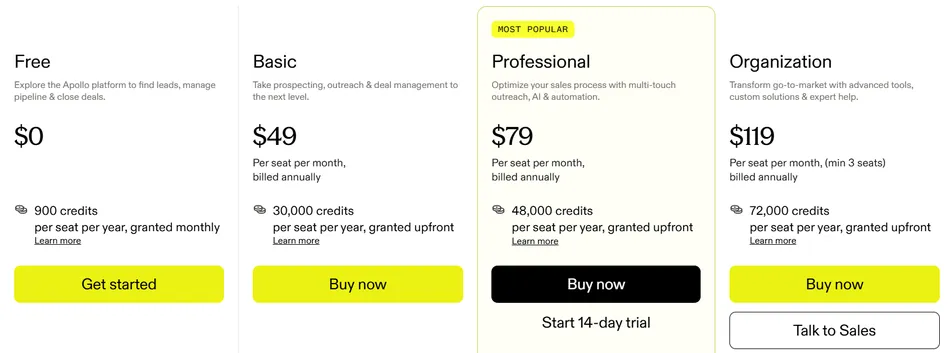
Apollo uses a per-seat subscription plus a credit-based consumption model. Credits cover data retrieval, AI features, and enrichment.
Free — $0 per seat: 75 credits/month, 2 active sequences, Gmail only
Basic — $49/seat/month (annual) or $59 monthly: 30,000 credits/year upfront, Microsoft Office support, 14-day free trial
Professional — $79/seat/month (annual) or $99 monthly: 48,000 credits/year, unlimited sequences, CRM enrichment
Organization — $119/seat/month (annual only, minimum 3 seats): 72,000 credits/year, SSO, custom reporting, used by Ernst & Young, Oracle, and Lyft
Startups with fewer than 20 employees can access 50% off for one year on Basic or Professional, up to 5 seats.
Use Apollo.io if:
- You want to replace a fragmented multi-tool stack with a single platform covering data, outreach, dialer, and CRM
- Your team runs multichannel outreach beyond just email, coordinating email, phone, and LinkedIn touches from a shared task queue
- You need deep prospecting with 65+ filters including technographic data, hiring signals, and buying intent
- You are scaling a sales team but want to avoid paying enterprise prices across multiple vendors
4. Smartlead — Best for Agencies Managing High-Volume Campaigns Across Client Accounts
Running cold email for one company is straightforward. Running it for 20 simultaneous clients, each with their own domains, prospect lists, and performance expectations, is a different problem.
Smartlead is a cold email platform that grew from a 2022 launch to serving 100,000+ businesses by building the most agency-focused sending infrastructure in the space. Founded in Sydney, Australia and bootstrapped to $20M+ ARR, the platform was designed around the specific problems agencies face when managing outbound across dozens of client accounts.
| Smartlead Pros | Smartlead Cons |
|---|---|
| ✅ White-label dashboard with full agency branding | ❌ No direct Salesforce integration (requires workarounds) |
| ✅ Ultra Premium invite-only warmup pools | ❌ Analytics dashboard has a reported 30-minute+ lag |
| ✅ API-first architecture with REST API, webhooks, and MCP server | ❌ Some reviewers cite platform bugs during rapid feature releases |
| ✅ Sub-accounts with isolated client workspaces | ❌ SmartDelivery and SmartProspect are add-on costs on lower plans |
| ✅ Unlimited email accounts and warmup on every plan |
Smartlead: Top 3 Unique Features
- Multi-tiered warmup architecture topped by an Ultra Premium pool: a private, invite-only network where only vetted senders are admitted with auto-pause and cool-down when issues are detected
- SmartInfra dedicated single-tenant servers with siloed IP pools, 99.98% uptime, and multi-server clusters across US and EU grids
- API-first platform with REST API, webhooks, CLI tool, and an MCP server with 116+ tools for AI agent integration
Smartlead’s agency credentials are backed by case studies: AvoraGrowth’s founder called Smartlead’s warmup pools “the best he has tested, not just better than some tools, but better than all of them”, protecting reputation across 20+ active client accounts. Unlock Management reported that from day one, emails landed in the inbox and they “have never dealt with a deliverability crisis.” Wyngman Agency chose Smartlead over competitors for its “superior API integration capabilities.”
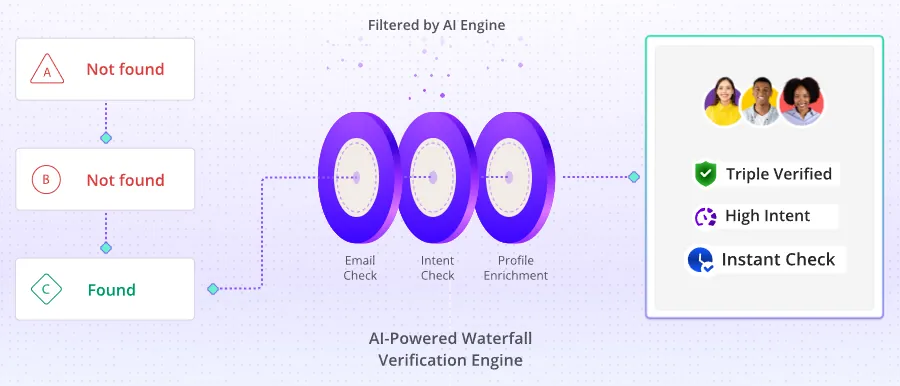
The platform has also been expanding beyond email. SmartAgents are AI operators that run email and LinkedIn outreach, handle replies, sync CRM, and monitor performance on their own. SmartDialer adds AI-assisted calling with full email history context. SmartProspect offers a 300M+ verified contact database at a flat monthly fee.
Source: Smartlead
Smartlead: Pricing
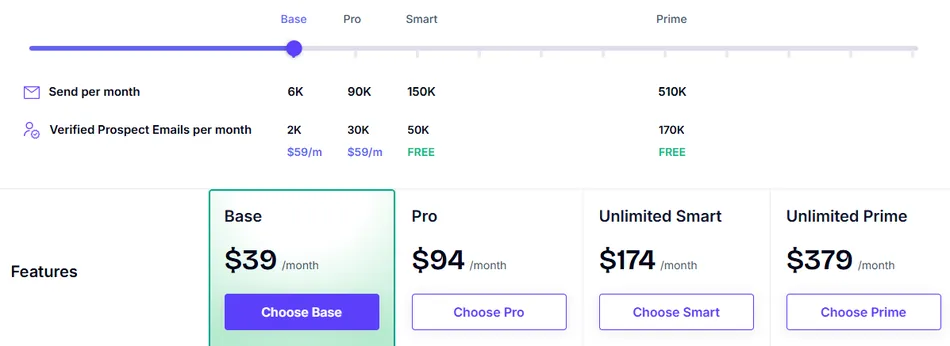
Smartlead uses a usage-based subscription with no per-seat charges. All plans include unlimited email accounts and warmup. Annual billing saves 17%.
- Base — $39/month ($32 annually): 6,000 emails/month, 2,000 verified prospect emails, unlimited email accounts
- Pro — $94/month ($78 annually): 90,000 emails/month, CRM access, one free client workspace; additional clients at $29/month each
- Smart — $174/month ($144 annually): 150,000 emails/month, SmartProspect included free, premium warmup pool
- Prime — $379/month ($315 annually): 500,000 emails/month, 3 SmartServers, 3+ client workspaces, dedicated manager, private Slack channel
SmartProspect is $59/month extra on Base and Pro but included free on Smart and Prime. SmartDelivery starts at $49/month as a separate add-on.
Use Smartlead if:
- You’re a cold email agency managing 5-30+ simultaneous client accounts and need white-label dashboards with isolated sub-accounts
- You need API-driven automation connecting cold email to your clients’ CRM and pipeline tools
- Deliverability at high volume is your core business outcome and you want dedicated infrastructure with tiered warmup pools
- You want a platform expanding beyond email into full-stack outbound (AI agents, dialer, LinkedIn)
5. Woodpecker — Best for Small Teams That Want Dependable Deliverability Without Complexity
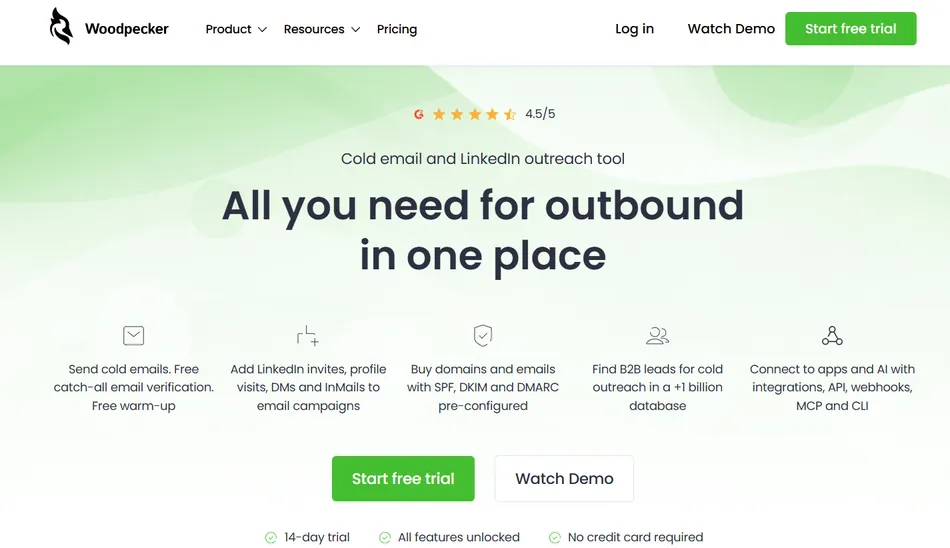
Not every team needs 500,000 emails a month, an AI agent that books meetings on its own, or a 300-million-contact database. Some teams just need their cold emails to land in the inbox, reliably, without becoming deliverability experts.
Woodpecker is a cold email platform built in Poland and publicly traded on the Warsaw Stock Exchange. It helps small B2B sales teams, agencies, and solo founders launch automated outreach that reaches the primary inbox, without needing to understand the technical plumbing behind email deliverability.
| Woodpecker Pros | Woodpecker Cons |
|---|---|
| ✅ Always-on Adaptive Sending reduces blocks by 59% | ❌ Reporting is adequate but shallow compared to enterprise tools |
| ✅ Free email verification (via Bouncer) on every plan | ❌ Add-ons for LinkedIn, extra warmup, and agency features increase total cost |
| ✅ Condition-based campaign branching without external tools | ❌ No built-in phone or SMS channel |
| ✅ Genuinely usable free plan (500 contacts/month) | ❌ Lead database is smaller than competitors |
| ✅ Unlimited email accounts and team members |
Woodpecker: Top 3 Unique Features
- Adaptive Sending: an always-on algorithm that monitors outbound volume per mailbox and throttles when approaching provider limits, producing 2.4x fewer provider-imposed blocks compared to accounts without it
- Condition-based campaigns (If-campaigns) that split sequences into YES/NO paths based on opens, clicks, snippets, or tasks, with no external automation required
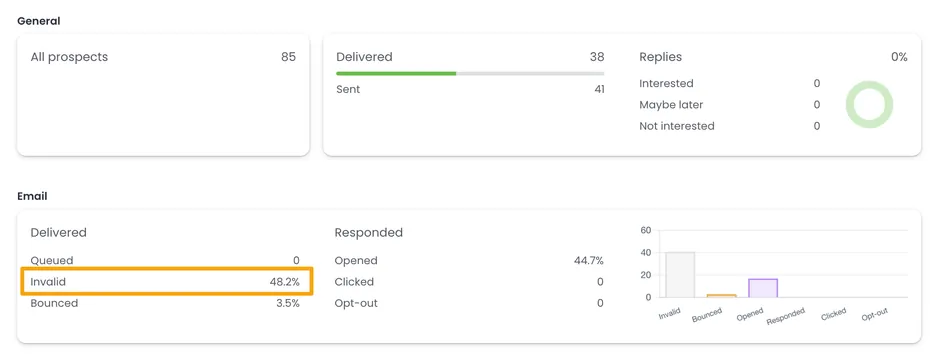
- Free email verification powered by Bouncer running automatically on every send, plus free catch-all verification and a domain check-up auditing SPF and DKIM on mailbox connection
Source: Woodpecker
Woodpecker’s Adaptive Sending data tells the story: in a comparison of 2,900+ inboxes, accounts with Adaptive Sending enabled reduced blocks by 59%. In a 15-day test, those accounts delivered more total emails (15,910 vs. 14,440) because they avoided the multi-day sending freezes that blocked accounts suffer.
The platform markets a “set up campaigns in under 5 minutes” claim, backed by customer testimonials. DevsData CEO Tom Potanski said “When we first started using Woodpecker, we had no problems understanding how it works”. Ecom Capital went from zero meetings to 2 qualified sales calls per day within 21 days of starting.
For teams that care about data protection, Woodpecker has maintained formal GDPR compliance since May 2018, with EU-based data storage on ISO 27001-certified OVH servers in France and a published Data Processing Addendum.
Woodpecker: Pricing
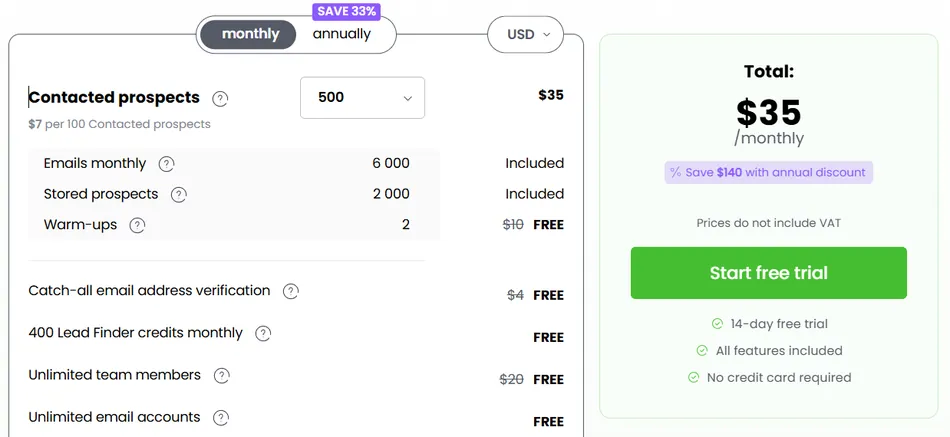
Woodpecker uses a contact-based pricing model. You pay based on how many prospects you contact per month, not per user seat or per email account.
- Free — $0/month: 500 contacted prospects/month, 6,000 emails/month, 2 warm-up slots, 400 Lead Finder credits, unlimited team members and email accounts
- Paid plans start at $35/month for 500 contacts, scaling at approximately $7 per 100 contacted prospects. Annual plans save 33% (pay for 8 months, get 12).
Key add-ons: LinkedIn automation at $29/month per LinkedIn account, additional warmup slots at $5/month per account, Agency Panel at $27/month per active client.
Use Woodpecker if:
- You are a small B2B team or solo founder who needs cold email to work without debugging DNS records or managing warmup manually
- You want condition-based follow-up logic without connecting Zapier or building CRM workflows
- You need unlimited email accounts and team members without per-seat pricing surprises
- You value GDPR compliance as a baseline and want EU-based data storage
6. Hunter.io — Best for Finding Verified Emails and Running Targeted Sequences
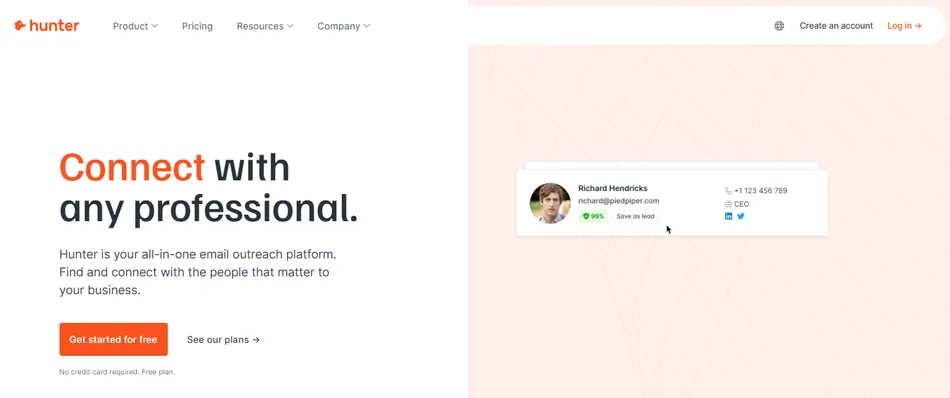
Finding someone’s email address shouldn’t require a separate tool from the one that sends the email. And verifying that address shouldn’t require yet another subscription.
Hunter.io is a B2B email finding and outreach platform built around a focused workflow: find professional email addresses from the public web, verify them before you send, and run personalized sequences, all in one place. With a database of 150 million professional email addresses indexed from 650 million public sources, Hunter serves over 6 million user accounts.
| Hunter.io Pros | Hunter.io Cons |
|---|---|
| ✅ Transparent, public-web data sourcing with clickable source URLs | ❌ No phone number data (by design) |
| ✅ Eight-step verification with proprietary accept-all resolution | ❌ No native A/B testing in campaigns |
| ✅ Free plan with 50 credits and full Sequences access | ❌ Sequences limited to 5 follow-up steps |
| ✅ Unlimited team members on all plans, including free | ❌ No formal SOC 2 or ISO 27001 certification |
| ✅ Chrome extension with 600,000+ users and 4.7 rating |
Hunter.io: Top 3 Unique Features
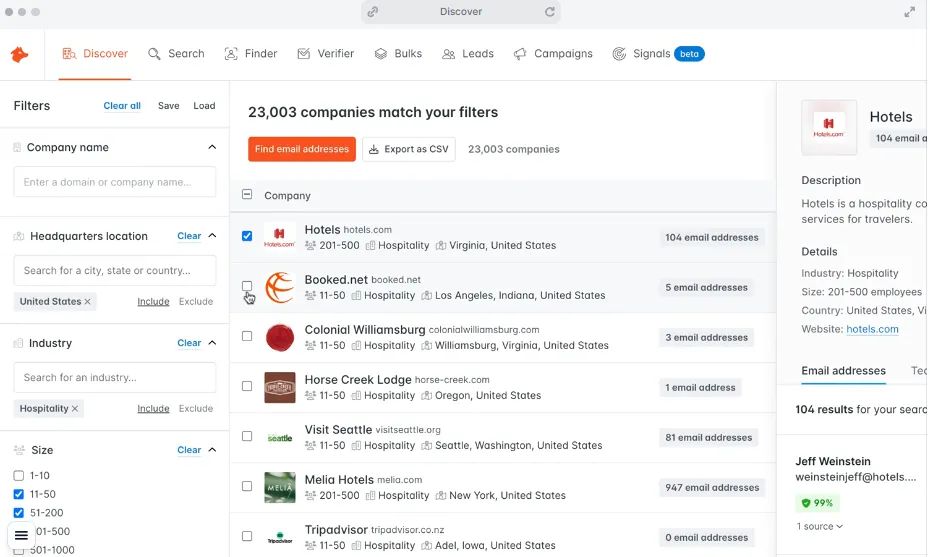
- Transparent, privacy-first data: every contact comes with clickable source URLs and discovery dates, so you can point a prospect to the exact public web page where their email appeared
- Eight-step Email Verifier with proprietary accept-all resolution that converts ambiguous catch-all results into definitive statuses, with a reported lower than 1% bounce rate for verified emails
- End-to-end find-verify-send workflow: from Domain Search or Discover (B2B database with 487 industries) to Sequences, all without exporting CSVs
Source: Hunter.io
Hunter’s data transparency is a real differentiator for compliance-conscious teams. The company publishes four explicit data principles: all contacts include disclosed public sources, data without live public sources is removed after six months, anyone can remove themselves via the claim page, and website owners can block the crawler via robots.txt. Hunter maintains a GDPR framework with both EU and UK representatives and a published Data Processing Agreement with EU Standard Contractual Clauses.
Verification quality shows in customer results: Managr’s founder reported never getting a bounce on a verified Hunter email, and Darwinbox saw a 15-20% improvement in valid vs. invalid address determination after switching to Hunter, with SQL reply rates going from 6% to 12%. Paid subscribers get automatic monthly re-verification of all saved leads at no additional credit cost.
Hunter.io: Pricing
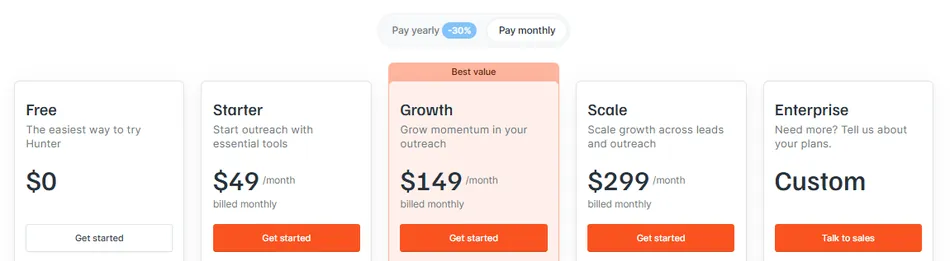
Hunter uses a unified credit system where one credit equals one email found and 0.5 credits equals one verification. All plans include unlimited team members.
- Free — $0/month: 50 credits/month, 1 email account, Sequences with 500 recipients, API access
- Starter — $49/month or $34/month billed annually: 2,000 credits/month, 3 email accounts, AI Writing Assistant
- Growth — $149/month or $104/month billed annually: 10,000 credits/month, 10 email accounts, 200 Signals for intent data
- Scale — $299/month or $209/month billed annually: 25,000 credits/month, 20 email accounts, unlimited Signals
Additional email accounts can be added at +$10/month per account on any paid plan. Annual plans receive a 30% discount. A 30% non-prof3it discount is available for registered 501(c) organizations.
Use Hunter.io if:
- Your primary outreach channel is email and you want the highest data accuracy with transparent sourcing
- You need to cite exactly where you found a prospect’s contact information for GDPR, CCPA, or internal compliance requirements
- You’re a solo prospector, small team, or agency that needs a usable free tier with unlimited team members
- You do SEO link building or digital PR outreach at scale (Canva’s SEO team and Authority Hacker both use Hunter for backlink campaigns)
7. GMass — Best Free Cold Email Tool for Gmail Users
Most cold email platforms offer free trials that expire after 7 or 14 days, or restrict features so heavily that running a real campaign is impossible.
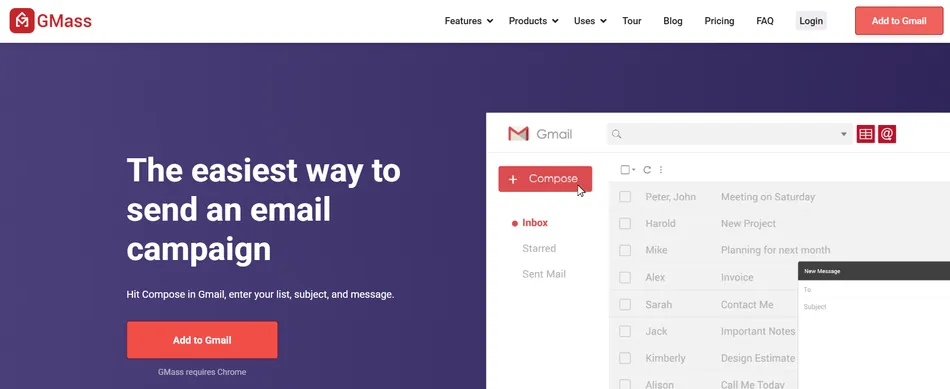
GMass takes a different approach. It is a Gmail-native email platform delivered as a Chrome extension that turns the Gmail compose window into a cold email tool, with a free tier that lets you send up to 50 emails per day indefinitely, no credit card required. It is the only platform that bridges cold email, email marketing, and mail merge from inside a user’s existing inbox.
| GMass Pros | GMass Cons |
|---|---|
| ✅ Free tier: 50 emails/day with no expiration | ❌ Requires Gmail + Chrome (no Outlook, no Firefox) |
| ✅ Zero learning curve for Gmail users | ❌ No native CRM integrations with Salesforce or HubSpot |
| ✅ Deep Google Sheets integration with bi-directional sync | ❌ No drag-and-drop email builder |
| ✅ AI features included on all plans with no API key required | ❌ No phone or live chat support | |
| ✅ 400,000+ users with 9,000+ five-star Chrome Web Store reviews |
GMass: Top 3 Unique Features
- Usable free tier with 50 emails/day, personalization, automated follow-ups, and tracking, with no trial expiration and no credit card required
- Bi-directional Google Sheets integration that writes campaign performance data (opens, clicks, replies, bounces) back to the originating sheet, turning a spreadsheet into a live outreach tracker
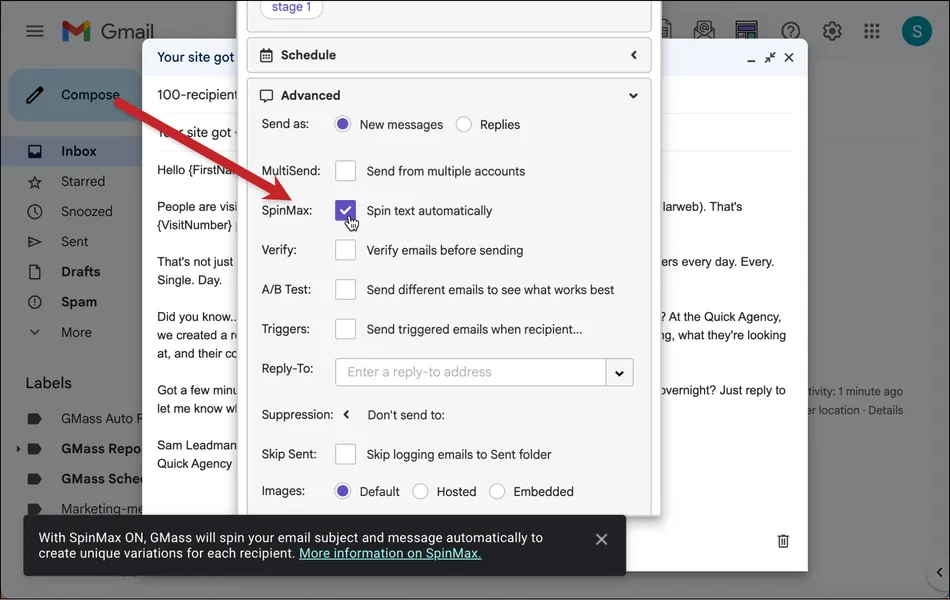
- SpinMax AI personalization that generates wording variations across every email in a campaign with a single checkbox, plus a ChatGPT campaign builder and reply assistant, all with OpenAI API cost absorbed by GMass
Source: GMass
GMass offers a different onboarding experience by living inside Gmail. Users go from install to sending their first campaign in under five minutes, composing in the Gmail interface they already know. G2 reviewers rate ease of use at 9.3/10.
For deliverability, GMass sends through the user’s own Gmail or Google Workspace account, so emails go through Google’s servers. GMass supplements this with Spam Solver (testing against 20 seed accounts including enterprise filters from Barracuda, Sophos, and ProofPoint), a free Email Analyzer for SPF/DKIM/DMARC validation, and delivery routes that adjust sending method per domain. For senders who need to exceed Gmail’s daily limits, GMass provides seven bypass mechanisms including multi-day distribution, SMTP routing, and its own ColdSMTP server.
GMass: Pricing
GMass uses a flat-fee per-seat subscription with no email volume charges. All plans include unlimited emails, contacts, and campaigns.
Individual Plans (monthly):
- Standard — $29.95/month: Full mail merge, personalization, sequences, A/B testing, Spam Solver, MultiSend inbox rotation, API and Zapier
- Premium — $39.95/month: All Standard features plus additional capabilities
- Professional — $59.95/month: Full feature set
Individual Plans (annual): Standard at $20.75/month ($249/year), Premium at $29.08/month ($349/year), Professional at $49.92/month ($599/year).
Team Plans: Range from 5 users at $35/user/month to 100 users at $22/user/month, with annual discounts down to $18.33/month per user.
SMTP sending includes 10,000 free emails per billing period, then $5 per 10,000 additional.

Use GMass if:
- You already live in Gmail and want zero context-switching between your inbox and your outreach tool
- You need a free cold email option for targeted, lower-volume outreach (50 emails/day indefinitely)
- You manage contacts in Google Sheets and don’t want to pay for a separate CRM
- You want AI personalization included on every plan without needing an API key or paying extra
Final Verdict
Cold email tooling in 2026 is not a one-size-fits-all decision. The right platform depends on your team size, sending volume, technical comfort level, and whether email is your only outreach channel or one piece of a larger sales motion.
Here are our top picks for the most common use cases:
- Instantly.ai: If you need to scale cold email volume without per-inbox costs, with full infrastructure provisioning and AI automation from lead sourcing through reply handling.
- Saleshandy: If you want to run your entire outbound operation from one platform (800M+ contact database, email sequencing, deliverability management, and reply handling) at the lowest entry price in the category.
- Apollo.io: If you need to consolidate your entire sales stack (data, outreach, dialer, CRM) into a single platform with multichannel sequences and deep prospecting filters.
- Smartlead: If you’re an agency managing many client accounts and need white-label dashboards, API-driven automation, and dedicated deliverability infrastructure.
- Woodpecker: If you’re a small team or solo founder who wants dependable inbox placement without complexity, with always-on safety features that require zero configuration.
- Hunter.io: If clean, verified email data with transparent sourcing matters more to you than volume, and you want an end-to-end find-verify-send workflow with strong compliance credentials.
- GMass: If you live in Gmail and want to run cold email campaigns directly from your inbox, with a free tier that never expires.
Every platform on this list offers a free plan or free trial. The best way to choose is to test the top two or three that match your use case and see which one fits your workflow.
Best Cold Email Tools FAQ
Which cold email tool is best for lead generation agencies?
Smartlead and Saleshandy are both strong choices for agencies. Smartlead offers white-label dashboards, isolated sub-accounts, API-first architecture, and Ultra Premium warmup pools designed for multi-client operations. Saleshandy provides unlimited client workspaces with white-label capabilities starting at $139/month. The main difference: Smartlead’s API-driven approach suits technically advanced agencies, while Saleshandy offers a more accessible all-in-one experience.
Is there a free cold email tool worth using?
Yes. GMass offers a permanently free tier with 50 emails per day, personalization, automated follow-ups, and tracking, with no credit card required and no expiration. Woodpecker’s free plan includes 500 contacted prospects per month with unlimited email accounts and team members. Hunter.io’s free plan provides 50 credits monthly with full Sequences access and unlimited team members. Apollo.io’s free plan gives access to its contact database with 75 monthly credits.
What is the cheapest cold email tool for small teams?
Saleshandy offers the lowest paid entry point at $25/month (annual billing) with unlimited email accounts, AI-generated sequences, and built-in warmup. GMass starts at $29.95/month ($20.75 annually) with unlimited emails and contacts. Woodpecker’s paid plans start at $35/month. All three include their core deliverability features without extra charges.
Which cold email tool has the best deliverability features?
Woodpecker, Instantly, and Smartlead all prioritize deliverability but approach it differently. Woodpecker’s Adaptive Sending reduces provider-imposed blocks by 59% and runs automatically with zero configuration. Instantly offers a 1M+ account warmup network with tiered pools and automated inbox placement monitoring. Smartlead provides dedicated single-tenant infrastructure and Ultra Premium warmup pools. For small teams wanting hands-off deliverability, Woodpecker is the simplest choice. For agencies needing full control, Smartlead offers the most infrastructure options.
Which cold email tool has the largest contact database?
Saleshandy leads with 800M+ contacts and 60M+ companies. Instantly’s SuperSearch database covers 450M+ verified B2B contacts. Apollo.io offers 275M+ contacts spanning 70M companies with 65+ filters. Smartlead’s SmartProspect provides 300M+ verified contacts. Hunter.io has 150 million professional email addresses indexed from public sources. Each database has different strengths: Apollo’s filters are the most granular, Hunter’s sourcing is the most transparent, and Saleshandy’s is the largest by volume.
Do I need a separate email warmup tool?
Not with any of the platforms on this list. Instantly, Saleshandy, Smartlead, and Woodpecker all include email warmup on every paid plan at no extra cost. GMass sends through Gmail’s own infrastructure, which carries its own deliverability baseline, supplemented by the Spam Solver testing tool. Hunter.io does not include warmup but sends through your own connected email account. The days of needing a separate warmup subscription are largely over for users of modern cold email platforms.
What should I look for when choosing a cold email tool?
Start with deliverability: if your emails land in spam, nothing else matters. Then consider your sending volume and whether the pricing model scales affordably. Check whether you need a built-in contact database or are comfortable sourcing leads separately. Evaluate how the tool fits your existing stack through CRM integrations and automation connectors. Finally, be honest about your team’s technical comfort level. Platforms like Smartlead and Apollo offer more power but come with steeper learning curves, while Woodpecker and GMass prioritize simplicity.
Can I use cold email tools for marketing emails or newsletters?
Cold email tools are designed for one-to-one sales outreach, not bulk marketing. They send from your personal inbox (Gmail, Outlook, Google Workspace), which means sending limits are lower and the content should be conversational and personalized. For marketing emails and newsletters, dedicated platforms like Mailchimp or ConvertKit are better suited. That said, GMass positions itself as handling both cold email and mail merge use cases from within Gmail.