Emailchaser is a cold email platform built by practitioners who got tired of stitching together four or five tools to run outbound campaigns. Founded in 2023 by George Wauchope, it bundles lead finding, email verification, sequencing, inbox management, and a sales CRM into one product. The pitch: connect unlimited email accounts, pay one flat rate, and keep your emails out of spam.
What makes Emailchaser distinct is its stance on deliverability. Rather than bundling email warm-up like most competitors, it argues that warm-up tools violate Gmail’s Terms of Service and offers alternative safeguards instead: private sending infrastructure, double email verification through two independent providers, inbox rotation, and gradual send ramp-up. It’s an opinionated choice that shapes the entire product.
After analyzing the platform, we believe Emailchaser is a good choice if:
- You want a single platform covering lead sourcing, verification, sequencing, and CRM
- You run multiple email accounts and want unlimited connections at a flat monthly rate
- You already use LinkedIn Sales Navigator for prospecting
- You value deliverability controls over warm-up features
- You’re an agency that needs white-labeled client workspaces without per-client fees
However, Emailchaser might not be the best choice if:
- You need multi-channel sequences (LinkedIn, SMS, phone steps)
- You rely on native integrations with Salesforce, HubSpot, or Pipedrive
- You want a platform with extensive third-party reviews and established market reputation
- You need email warm-up as part of your deliverability strategy
- You don’t have a LinkedIn Sales Navigator subscription for lead sourcing
If you’re ready to try it, you can get started with Emailchaser here. Otherwise, keep reading for our full breakdown.
What is Emailchaser?
Emailchaser is a cold email outreach platform founded in 2023 by George Wauchope, who built it after running cold email across multiple companies and growing frustrated with the complexity.
As he describes on the team page, the process required separate tools for domain setup, SPF/DKIM/DMARC configuration, lead finding, email verification, and sequencing. He wanted one platform that handled everything.
The product started as an email finder tool. In April 2022, Wauchope entered the original version (then emailchaser.io) into Enterprise Cayman’s Business Design Competition, where he won the “Project of the Year” top prize at age 25, earning USD $10,000 in cash plus USD $13,500 in startup support. That funding helped build the email finder tool and grow the company. Emailchaser has since expanded from a data tool into a full cold email platform.
Today, the company is bootstrapped and unfunded, run by a team of seven (two co-founders and five engineers/designers) distributed across the Cayman Islands, Puerto Rico, Brazil, Argentina, and Uruguay. Co-founder Jordan Fried, a serial entrepreneur who previously co-founded and sold Buffered VPN and was part of the founding team at Hedera Hashgraph (HBAR), serves in a board-level role. Emailchaser reports being trusted by 2,000+ businesses.
Emailchaser Pros & Cons
| Pros | Cons |
|---|---|
| ✅ Flat-rate pricing with unlimited email accounts and seats | ❌ No independent reviews on G2 or Capterra |
| ✅ Double email verification through two providers | ❌ Email verification credits charged separately (rate undisclosed) |
| ✅ Done-for-you email account provisioning with DNS setup | ❌ No multi-channel sequencing (email only) |
| ✅ Built-in Sales CRM and Master Inbox | ❌ No native CRM integrations (webhook/Zapier only) |
| ✅ LinkedIn Sales Navigator Lead Finder | ❌ Lead Finder requires a separate Sales Navigator subscription |
| ✅ White-labeled client workspaces for agencies | ❌ No email warm-up feature |
| ✅ Evergreen campaigns via Google Sheets sync | ❌ Small team (7 people), bootstrapped |
Who Is Emailchaser Best For?
Emailchaser’s design choices point toward specific users who will get the most from the platform.
Cold email agencies managing multiple client campaigns. The unlimited email accounts, white-labeled workspaces, and flat-rate pricing make Emailchaser attractive for agencies running many clients at once. The ability to let clients log in and reply to their own leads within their own workspace is something most competitors charge extra for.
SMB sales teams (5-50 people) running outbound as a primary channel. Teams that want lead sourcing, verification, sequencing, and a pipeline view in one login, without assembling a multi-vendor stack, are the core audience. Unlimited seats mean adding new reps doesn’t increase the subscription cost.
Solo founders and early-stage teams who already use LinkedIn Sales Navigator. The Lead Finder Chrome extension turns Sales Navigator searches into verified lead lists ready for campaigns. For founders who prospect on LinkedIn and want to move quickly from targeting to sending, the workflow is compact.
Practitioners who prioritize deliverability over feature breadth. The double verification, private sending infrastructure, ESP matching, and gradual send ramp-up serve users who understand that inbox placement is the foundation of cold email ROI. If spam folder issues have burned you before, Emailchaser’s approach addresses that directly.
Budget-conscious teams scaling past five email accounts. At competitors where costs increase per account or per seat, a team running 20 or more sending accounts faces steep monthly bills. Emailchaser’s flat $297/month Professional plan caps that cost regardless of how many accounts you connect.
Emailchaser is less suited for teams that need multi-channel sequences (LinkedIn touchpoints, SMS, phone), native two-way CRM syncs, or buyers who require extensive third-party reviews before committing. Enterprise buyers needing SSO, SOC 2 certification, or formal procurement processes will also find the platform lacking.
Emailchaser Review: How It Works & Key Features
Campaigns: Multi-step sequences with built-in deliverability safeguards.
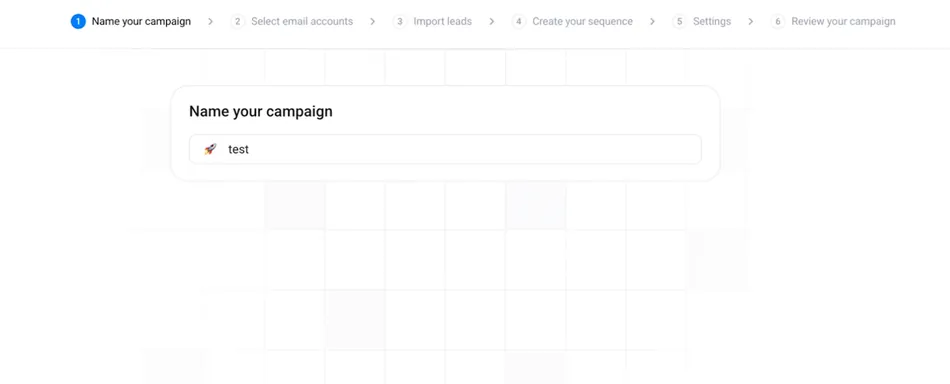
Emailchaser’s campaign builder handles the core workflow: upload leads, write your sequence, attach sending accounts, and launch. The setup follows a five-step flow: name the campaign, select sender accounts, import leads (via CSV or Google Sheets), create the email sequence with follow-ups and personalization variables, and launch.
Source: Emailchaser
What distinguishes the campaign engine is how deliverability is built into the defaults.
Inbox rotation across all attached sending accounts happens automatically. The platform gradually increases sends per day from each account rather than blasting at full volume immediately. AI spintax generates variation across subject lines, body copy, and signatures so no two emails are identical, reducing the chance of spam filter fingerprinting.
The sequencer includes several stop rules worth noting.
Follow-ups stop automatically when a lead replies. The isEnabledStopFollowUpsForSameCompany setting pauses follow-ups to other contacts at the same company once one person responds, a useful detail for account-based outreach. You can also skip leads who already responded in a previous campaign and ignore out-of-office auto-replies so they don’t interrupt the sequence.
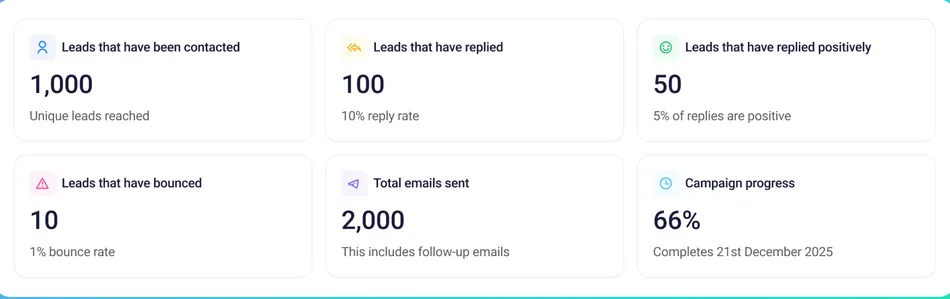
Sending controls are configurable: maximum sends per sender email (adjustable from 1 to 10,000 per the Campaigns API), daily variation ranges, and schedule windows by timezone and day of week. Campaign analytics show real-time metrics including emails sent, leads contacted, positive replies, bounces, and sender account health, all shareable via a dedicated link for client reporting.
Source: Emailchaser
For teams that want perpetual lead flow, Emailchaser supports evergreen campaigns via Google Sheets. Connect a live spreadsheet to a campaign, and any new lead added to the sheet enrolls automatically without relaunching.
Lead Finder: LinkedIn Sales Navigator extraction with built-in email enrichment.
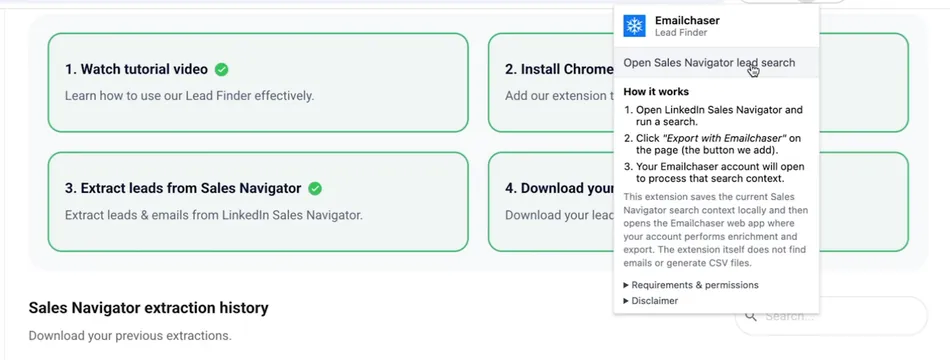
Rather than maintaining its own search database, Emailchaser’s Lead Finder works as a Chrome extension that plugs into LinkedIn Sales Navigator.
The workflow: run your target filters in Sales Navigator, click the “Export with Emailchaser” button the extension injects into the interface, and receive a CSV with email addresses attached. The enrichment pulls from a database that Emailchaser says covers 200 million verified leads.
Source: Emailchaser
This approach has a clear advantage: your lead targeting stays as fresh as LinkedIn’s own data. Job changes, new hires, and company updates reflect in real time because you’re searching LinkedIn’s live database, not a snapshot scraped months ago. Emailchaser calls Sales Navigator “the best platform for finding accurate B2B data” and offloads the search and filtering entirely to LinkedIn’s interface.
Exported leads upload directly into Emailchaser campaigns, where double email verification runs automatically before any sends occur. The Lead Finder is included on both pricing tiers, and the platform documents methods for exporting more than 2,500 leads per day from Sales Navigator.
The trade-off is dependency. You need an active LinkedIn Sales Navigator subscription to use Lead Finder at all. Teams that prospect through other databases (Apollo, ZoomInfo, Clay) must rely on CSV upload or the API, with no native integration to those sources.
Email Verification: Dual-provider validation before any email is sent.
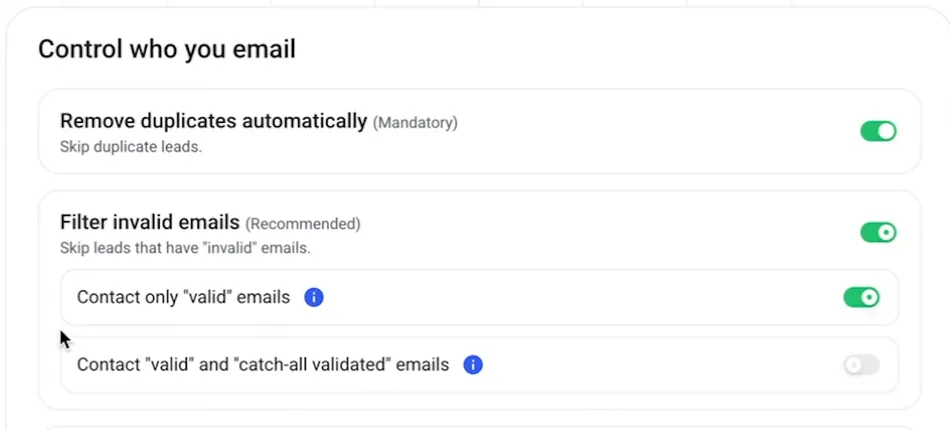
Most cold email platforms run leads through a single verification provider. Emailchaser takes a different approach: every email address passes through two independent verification providers before it reaches a campaign’s sending queue. An address counts as valid only if both providers confirm it. The sub-processors list confirms Zerobounce as one provider; the second is not publicly disclosed.
Source: Emailchaser
Verification runs automatically when leads are uploaded, whether they arrive via CSV, the Lead Finder, or the API. The platform removes invalid leads before any sends and deduplicates the list so the same contact can’t be enrolled twice. Emailchaser claims 99% email validation accuracy, and the homepage dashboard example shows a 0.31% bounce rate across sample campaign data.
The dual-provider approach addresses a real problem. Single-provider verification can miss borderline addresses or incorrectly flag valid ones. Cross-validation reduces both false positives and false negatives, which protects sender reputation at scale.
One important detail: email verification credits are charged separately from the subscription fee. The per-credit rate appears on no public page, which makes total cost harder to forecast before you start running campaigns.
Email Accounts & Provisioning: Buy, configure, and connect sending infrastructure without leaving the platform.
Setting up sending infrastructure for cold email is one of the most tedious parts of the process: purchase domains, set up Google Workspace accounts, configure SPF/DKIM/DMARC records, and manually connect each account to your sending tool.
Emailchaser handles this entire workflow in-platform.
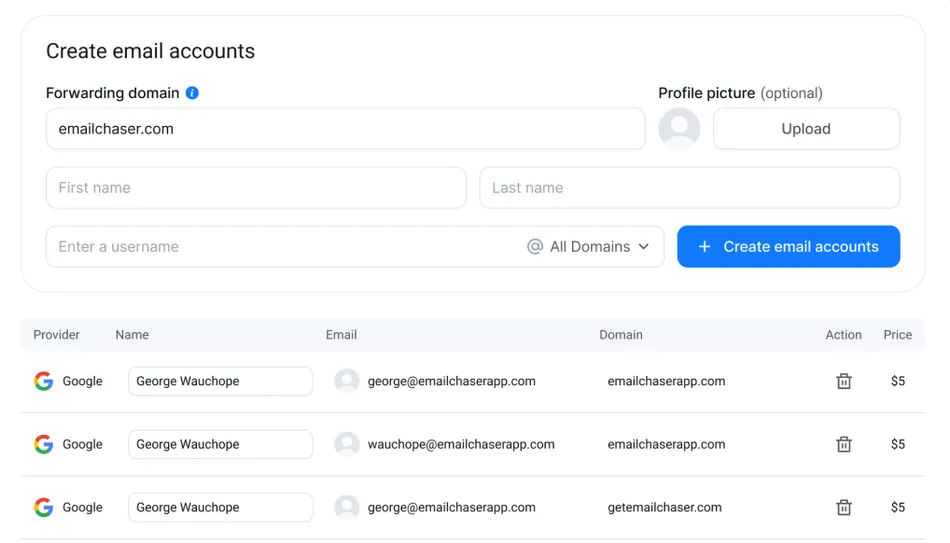
The process works in four steps. Emailchaser auto-generates secondary domain options based on your primary company domain. You select domains and purchase them inside the platform, decide how many email accounts to create per domain, configure sender names and profile pictures, and place the order.
Source: Emailchaser
Within 24 to 48 hours, the accounts are ready with SPF, DKIM, and DMARC records configured automatically. The accounts then connect to your workspace automatically, with no manual OAuth or SMTP credential entry required.
Provisioned accounts run on US-based IPs via Google Workspace, a deliberate choice for US-targeted outreach. Once connected, accounts join campaigns where inbox rotation distributes volume across them. The Professional plan allows unlimited email accounts at no additional per-account fee beyond the provisioning cost.
Sales CRM & Master Inbox: Manage replies and pipeline without a separate tool.
When you send cold emails from 10, 20, or 50 different accounts, replies scatter across every inbox. The Master Inbox consolidates all replies into a single view. You can read replies, see the full conversation history for each lead, and respond from the same account that originally contacted the prospect, all without switching between email clients.
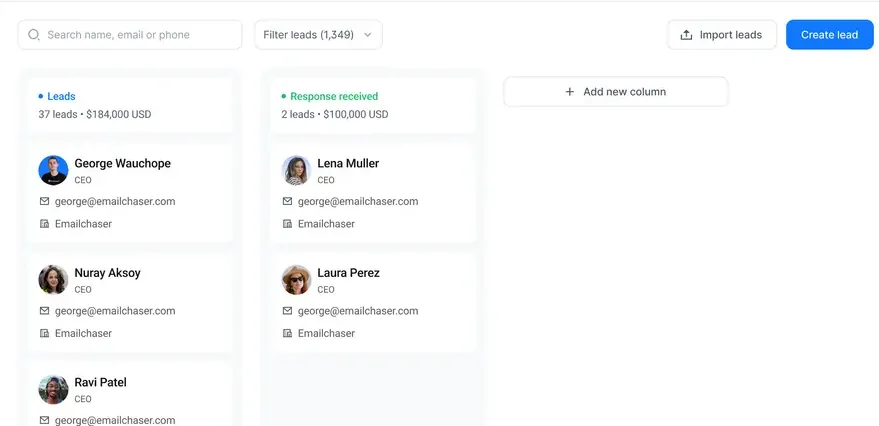
The Sales CRM adds structure to those replies. It provides a kanban-style pipeline where you drag leads between customizable columns, add notes, assign deal values, and see total forecasted pipeline revenue across open leads. Team members share the same view, which prevents multiple reps from contacting the same prospect or contradicting each other’s follow-ups.
Source: Emailchaser
For agencies, the CRM ties into the white-labeled workspace model. Clients can log in to their own workspace and reply to leads directly, and leads can be exported to external CRMs like HubSpot, Salesforce, or Pipedrive via webhooks or the API.
Both the Master Inbox and Sales CRM are included on every plan, including the $1/month Starter tier. It’s a lightweight CRM, not a Salesforce replacement, but for teams whose pipeline starts with cold email, having it in the same tool that sends the campaigns removes real integration work.
Pricing
Emailchaser uses a flat-fee model with two tiers, both billed monthly:
| Plan | Price | Email Accounts | Seats | Key Difference |
|---|---|---|---|---|
| Starter | $1/month | 1 | Unlimited | Single sending account |
| Professional | $297/month | Unlimited | Unlimited | Unlimited sending accounts |
Both plans include the same feature set: Master Inbox, Sales CRM, Lead Finder, unlimited active leads, unlimited emails, block list, double email verification, webhooks, workspaces, AI spintax, campaign analytics, Emailchaser University, and private Slack community. The only difference is the number of connected email accounts.
The Starter plan at $1/month works as a gateway. With a single email account, you can explore the platform and run small-volume campaigns, but you won’t get the inbox rotation that makes high-volume sending sustainable.
The Professional plan is the real product, as the affiliate program FAQ confirms: “Emailchaser has one plan: Professional: $297 USD / month.”
Both tiers include a 7-day free trial. Subscriptions auto-renew monthly and can be cancelled at any time, taking effect at the end of the current billing period. No refunds are provided for cancellations.
Additional costs to factor in:
- Email verification credits are charged separately when launching campaigns or running Lead Finder extractions. The per-credit rate is not published, which is a transparency gap worth noting.
- Done-for-you email account setup carries its own fee for domain purchases and Google Workspace provisioning. Per-account pricing is not listed on the public site.
- LinkedIn Sales Navigator is required to use the Lead Finder feature and is a separate subscription not included in any Emailchaser plan.
For context: an agency running 20 email accounts on Emailchaser pays $297/month total. On platforms that charge per account or per workspace, the same setup can exceed $400-500/month before adding lead data or CRM features.
Limitations & Considerations
Emailchaser makes deliberate trade-offs that serve its target audience but create friction for others. These are worth understanding before committing.
No independent review presence.
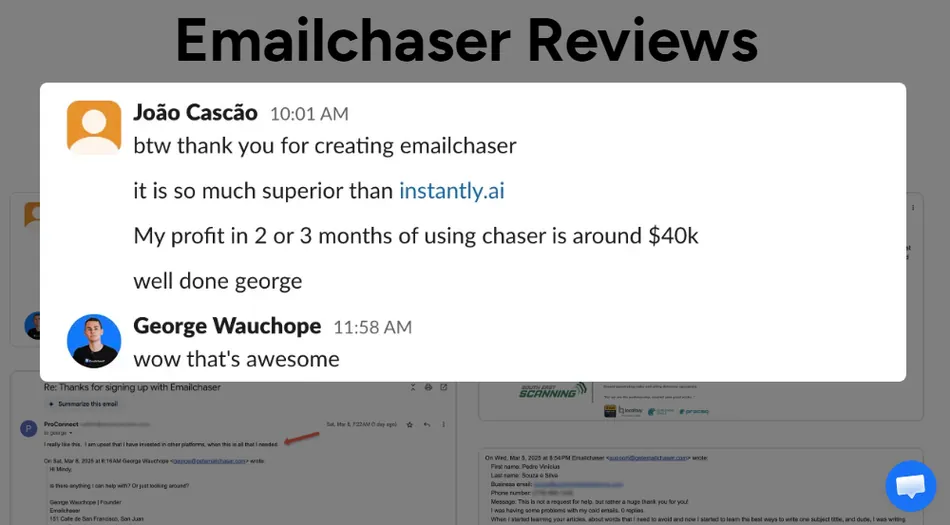
As of May 2026, Emailchaser has no verified listings on G2, Capterra, or TrustRadius. Tracxn ranks it 449th among 534 competitors in the cold email category. The reviews page on its own site uses image-based screenshot testimonials rather than indexable, independently verifiable reviews. For buyers whose procurement process requires third-party validation, this is a real barrier.
Source: Emailchaser
No email warm-up.
Emailchaser takes a documented position that warm-up tools violate Gmail’s Terms of Service and omits the feature. Instead, it relies on gradual send ramp-up, inbox rotation, and private infrastructure to build sender reputation. This is a principled stance, but it limits appeal for teams onboarding brand-new domains with zero sending history who want every available tool for establishing inbox trust.
Email verification credit pricing is opaque.
The affiliate program page confirms that verification credits are an additional charge, but the per-credit rate appears nowhere on the public site. This makes it hard to calculate total cost before committing, especially for high-volume senders verifying thousands of leads per month.
No native CRM integrations.
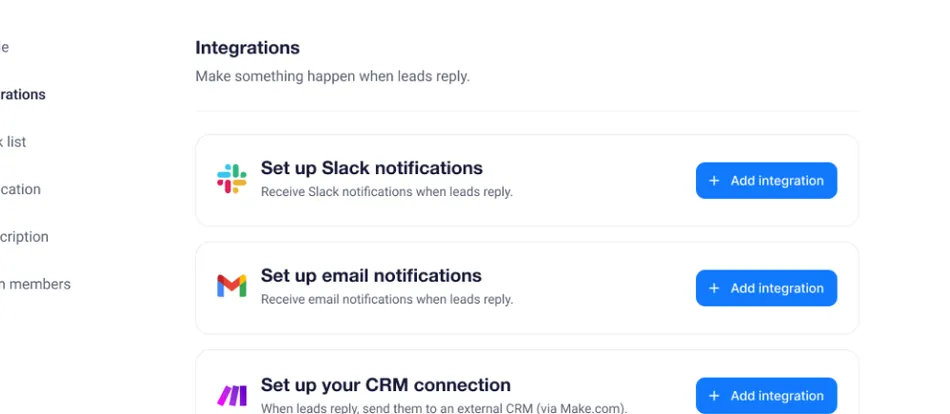
Connecting Emailchaser to Salesforce, HubSpot, or Pipedrive requires webhooks or Zapier. There are no two-way native connectors. Teams with established CRM workflows will need to build and maintain these integrations themselves, adding operational overhead.
Source: Emailchaser
Email-only sequencing.
Emailchaser does not support LinkedIn touchpoints, phone steps, SMS, or any other channel within a campaign sequence. In a market where multi-channel outreach is a common expectation, this limits the platform to teams whose outreach runs entirely through email.
Small, bootstrapped team.
Seven people, no outside funding, founded in 2023. This raises realistic questions about feature development speed, support capacity during high-demand periods, and long-term platform stability. Risk-averse buyers or teams planning to build significant operational dependency on their cold email tool should weigh this.
No A/B testing.
There is no documented support for split testing subject lines, email copy variants, or send-time optimization. Teams that rely on systematic testing to improve campaign performance will need to manage variant testing manually or use external tools.
These constraints reflect a platform that chose depth on deliverability and all-in-one simplicity over breadth of features. Whether that trade-off works depends on how central the missing features are to your workflow.
Who Should Use Emailchaser?
Emailchaser fits best when several conditions align:
- You’re an agency or team running 5+ email accounts and tired of per-account pricing eating into margins. The flat $297/month for unlimited accounts is the clearest cost advantage.
- You already use LinkedIn Sales Navigator and want lead sourcing to feed directly into your campaigns without a separate tool.
- You care more about inbox placement than feature count. The double verification, private infrastructure, and deliverability-first design are the product’s strongest differentiators.
- You want one platform instead of a stack. If managing separate subscriptions for a lead finder, verifier, sequencer, and CRM feels like overhead, Emailchaser consolidates all four.
- You’re comfortable with a newer, smaller vendor. The platform is still early-stage, and you’ll trade market-proven scale for a simpler product at a competitive price.
Who Should Look Elsewhere?
- Teams that need multi-channel sequences. If your outreach includes LinkedIn touches, phone calls, or SMS as part of the same cadence, Emailchaser can’t accommodate that. Look at Lemlist or Smartlead instead.
- Organizations with strict procurement requirements. No G2 reviews, no SOC 2 certification, no enterprise contract terms. If your buying process requires these, Emailchaser won’t pass the evaluation.
- Users who need native CRM integrations. If your sales workflow depends on bidirectional sync with Salesforce or HubSpot without building custom webhook logic, you’ll want a platform with managed connectors.
- Teams that want warm-up as an option. Even if you don’t use it daily, having warm-up available for new domains or reputation recovery is something Emailchaser intentionally doesn’t offer.
- Buyers who don’t use LinkedIn Sales Navigator. Without Sales Navigator, the Lead Finder is inaccessible, and one of the platform’s key features becomes irrelevant. You’d be limited to CSV uploads and API-based lead ingestion.
Final Verdict: Is Emailchaser Worth It?
For the right user, yes.
Emailchaser solves a specific problem well: it gives cold email practitioners one platform that handles lead sourcing, verification, sequencing, inbox management, and pipeline tracking at a flat monthly cost, with deliverability controls that go deeper than most competitors at this price point. The done-for-you email account provisioning, double verification, and unlimited accounts on one subscription are real advantages for agencies and teams running outbound at scale.
If your outreach strategy is email-first and you value simplicity over feature breadth, the product delivers on its core promises.
The caveats are real but specific.
No independent reviews means you’re taking the platform’s claims on faith until you test it yourself. The opaque verification credit pricing makes budgeting harder than it should be. No multi-channel sequencing, native CRM integrations, or warm-up tools means Emailchaser won’t replace a full sales engagement platform for teams that need those capabilities. And the small team and bootstrapped status introduce vendor risk that larger organizations may not accept.
For solo founders, SMB sales teams, and agencies whose cold email workflow runs on LinkedIn prospecting and high-volume email, Emailchaser is a focused, competitively priced option worth testing during the 7-day trial. For everyone else, compare it against the alternatives before committing.
Get started with Emailchaser here.
Emailchaser FAQ
Does Emailchaser offer a free plan?
No. Emailchaser does not have a permanent free plan. It offers a 7-day free trial on both tiers. After the trial, the Starter plan costs $1/month (limited to 1 email account) and the Professional plan costs $297/month with unlimited email accounts and seats.
How does Emailchaser’s pricing work?
Emailchaser uses flat-rate monthly pricing. The Professional plan at $297/month includes unlimited email accounts, unlimited seats, unlimited leads, and unlimited emails.
Email verification credits are charged separately, though the per-credit rate is not publicly disclosed. Done-for-you email account provisioning and LinkedIn Sales Navigator are additional costs outside the subscription.
Does Emailchaser have email warm-up?
No. Emailchaser deliberately omits email warm-up, taking a documented position that warm-up tools violate Gmail’s Terms of Service.
Instead, it relies on gradual send ramp-up, inbox rotation across multiple accounts, private sending infrastructure, and AI spintax to build and protect sender reputation.
What integrations does Emailchaser support?
Emailchaser integrates via outbound webhooks (supporting Slack, HubSpot, Salesforce, and others), Zapier, and a REST API. There are no native, two-way CRM connectors.
The API supports campaign management, bulk lead upserts (up to 1,000 per request), and email account operations. Clay and Make are documented as supported integration paths for automated lead pipelines.
Does Emailchaser require LinkedIn Sales Navigator?
The Lead Finder Chrome extension, Emailchaser’s built-in prospecting tool, only works with LinkedIn Sales Navigator. Without a Sales Navigator subscription, you cannot use Lead Finder. You can still upload leads via CSV or the API, but the integrated prospecting workflow requires Sales Navigator.
How does Emailchaser’s double email verification work?
Every email address uploaded to a campaign passes through two independent verification providers before any sends occur. An address is marked valid only if both providers confirm it. One provider is Zerobounce; the second is not publicly disclosed. Invalid addresses are removed automatically, and duplicates are filtered. Emailchaser claims 99% validation accuracy with this approach.
Is Emailchaser suitable for agencies?
Yes, agencies are one of Emailchaser’s primary target audiences.
The Professional plan includes unlimited email accounts and seats at a flat rate, white-labeled client workspaces, the ability for clients to log in and reply to their own leads, shareable campaign analytics links, and webhook-based export to external CRMs. The flat pricing model is cost-effective for agencies managing many clients compared to per-seat or per-workspace competitors.
What are the best Emailchaser alternatives?
The strongest alternatives depend on your needs.
Instantly offers a similar all-in-one cold email approach with a built-in warm-up network and a larger market presence, starting at $37/month for lower-volume plans. Smartlead supports multi-channel outreach (email, SMS, WhatsApp) with dedicated IP servers and agency features.
Lemlist is known for personalization and multi-channel sequences. Apollo.io combines a large B2B contact database with email, calling, and LinkedIn outreach. Each serves a different combination of volume, budget, and channel requirements.