ReachInbox entered the cold email market in late 2023 with a clear pitch: send more emails, land more of them in the inbox, and pay less per send than the established players. Founded by Alan D’Souza under the Outbox Labs umbrella, the platform has grown to over 30 team members and earned AppSumo’s Cold Outreach Tool of the Year for 2024.
Its appeal comes down to price per volume. It undercuts competitors like Instantly and Smartlead while offering unlimited email account connections and built-in warmup on every paid plan.
After analyzing the platform in detail, we believe ReachInbox is a strong fit if:
- You run high-volume cold email and want more sends per dollar than most competitors offer
- You need unlimited email accounts and warmup without per-inbox fees
- You want campaign setup that’s fast and doesn’t require technical expertise
- You prefer a single platform for sending, warmup, and reply management
- You’re a startup or solo founder looking for cost-effective outbound infrastructure
However, ReachInbox is not the best choice if:
- You need multichannel outreach sequences combining email with LinkedIn, SMS, or calls
- You require native CRM integrations with HubSpot, Salesforce, or Pipedrive
- You need to send file attachments inside cold email sequences
- You depend on detailed analytics and white-labeled client reporting
- You want a mature, fully stabilized platform with years of production history
This review covers what ReachInbox does well, where it falls short, how its pricing works in practice, and who should consider it before committing.
If you’re ready to try it, you can get started with ReachInbox here. Otherwise, keep reading for our full breakdown.
What is ReachInbox?
ReachInbox is a cold email outreach platform that handles the full sending workflow: finding prospects, automating campaigns, warming up mailboxes, and managing replies.
Outbox Labs, headquartered in Wilmington, Delaware, operates the platform. Alan D’Souza founded it in October 2023, bringing prior experience scaling products in adtech, gaming, and the creator economy.
The platform’s positioning is clear: cold outreach that “Actually Reaches the Inbox.” Where many cold email tools lead with feature counts or contact databases, ReachInbox leads with deliverability.
The product bundles automated warmup, domain rotation, inbox placement testing, and optimized sending patterns into the same platform used to build and run campaigns.
ReachInbox reports 500M+ emails sent, 5M+ inquiries generated, and $2.5B+ in pipeline value across its user base. It holds a 4.6 out of 5 rating on G2 and won the AppSumo Cold Outreach Tool of the Year 2024 award, which helped establish its early reputation.

Source: ReachInbox
The target audience is B2B sales teams, SDRs, founders, and agencies running cold email as a primary lead generation channel. The platform appeals most to high-volume senders who want to scale sending infrastructure without paying per mailbox.
ReachInbox Pros & Cons
| Pros | Cons |
|---|---|
| Unlimited email accounts and AI warmup on paid plans | No native multichannel outreach (LinkedIn, SMS, calls) |
| High email volume limits relative to price | No native CRM integrations (HubSpot, Salesforce, Pipedrive) |
| Fast campaign setup (5-click flow) | No file attachment support in sequences |
| Built-in inbox placement testing with SpamAssassin scoring | AI personalization quality still maturing |
| Onebox unified inbox with AI reply triage | Reporting and analytics are basic for agency use cases |
| A/Z testing with automated winner selection | Lead Finder sold as a separate add-on |
| Startup program offering up to 9 months free | “Unlimited” mailboxes subject to fair use caps |
Key Features Deep-Dive
Campaigns & Sequences: Multi-step outreach with behavior-based branching and automated optimization.
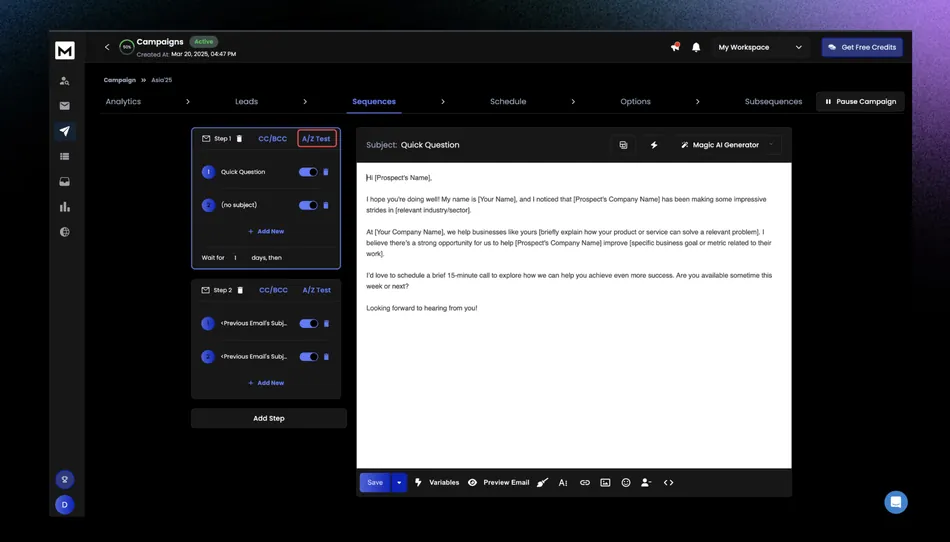
ReachInbox’s campaign builder is the core of the platform. Creating a campaign follows a 5-click flow across four configuration tabs: Sequence, Schedule, Leads, and Options. The platform claims you can launch a campaign in 2 minutes, and most users confirm this in practice.
The automation goes beyond the basics. The platform supports A/Z testing with unlimited subject line and body copy variants per sequence step, not just the two-variant A/B testing common in competing tools.
Source: ReachInbox
The system selects winning variants automatically based on reply rate, open rate, or click rate, and deactivates losing variants without requiring a manual campaign restart.
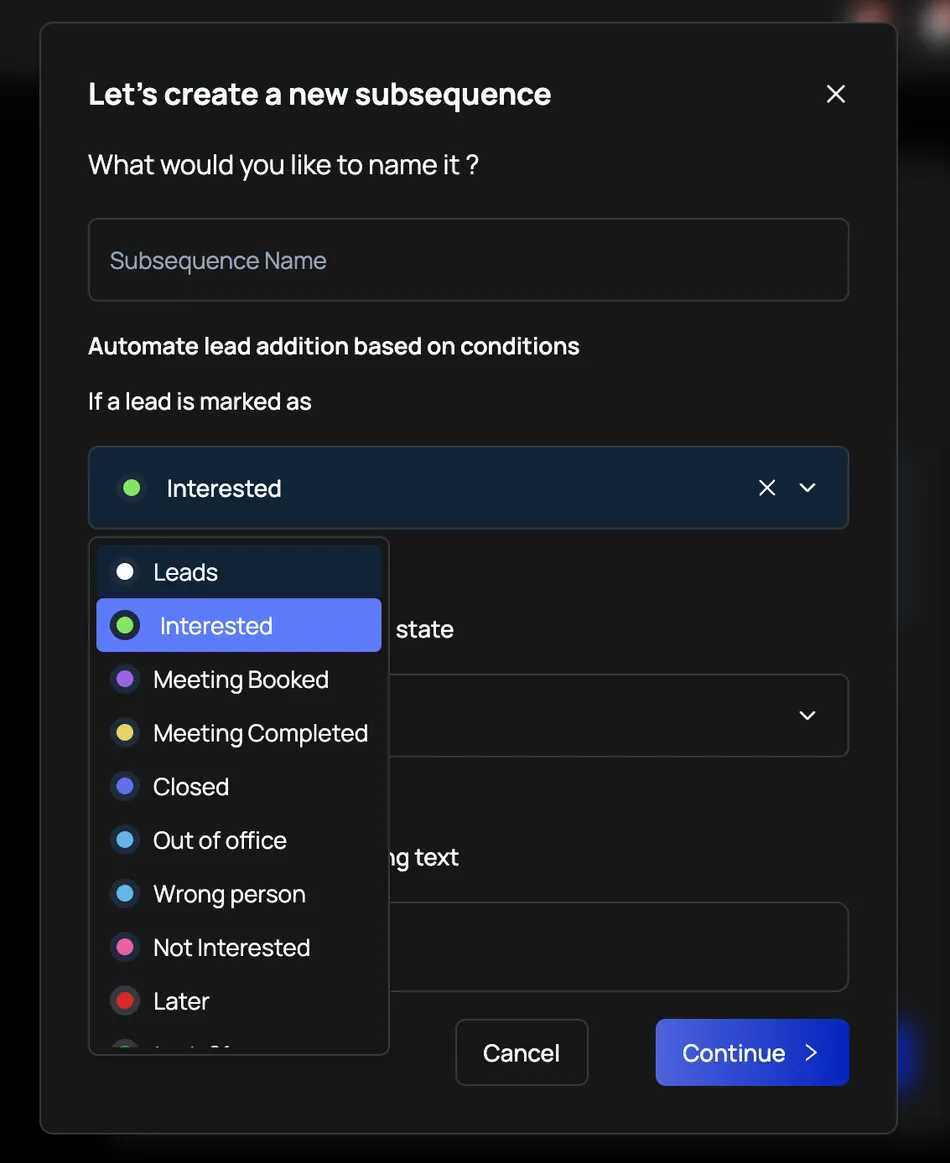
Advanced Subsequences add conditional branching beyond simple stop-on-reply logic. When a lead replies with a specific keyword (like “pricing” or “demo”), or carries a particular status tag, a targeted follow-up sequence activates within 10 minutes.
Source: ReachInbox
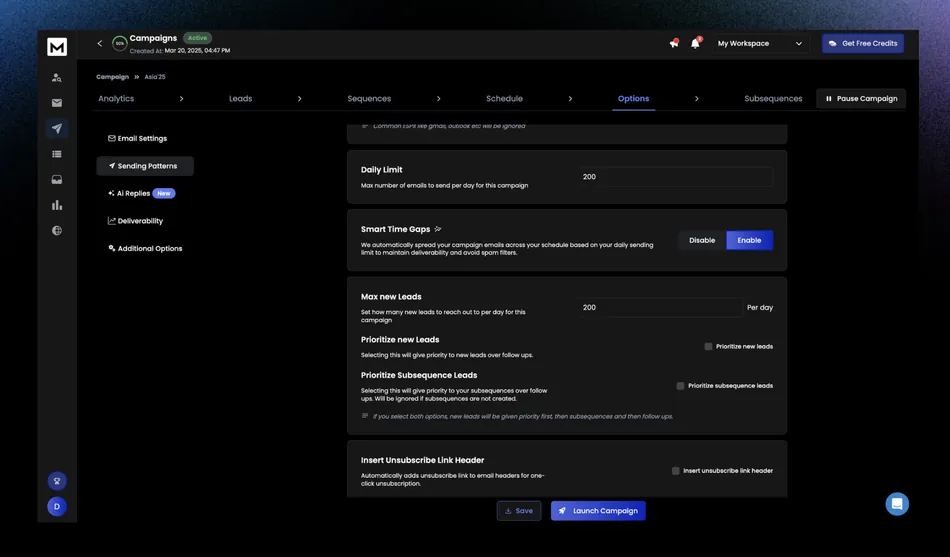
Subsequence leads can also be prioritized ahead of standard follow-up leads in the send queue.
Source: ReachInbox
On the deliverability side, each campaign offers three delivery optimization modes: text-only (no HTML or tracking), hybrid (plain text first step, HTML follow-ups), and full HTML with tracking. The hybrid mode reflects a practical understanding of spam filters: cold first touches in plain text are less likely to trigger filters, while warmer follow-ups can afford HTML formatting.
Provider matching takes this further by aligning sending accounts with recipient ESPs (Gmail accounts send to Gmail leads, Outlook to Outlook), and Dynamic Domain Rotation distributes volume across connected domains to protect sender reputation.
The Smart Adjust for Live Campaigns feature lets you change schedule, limits, delivery mode, and provider matching on already-running campaigns without pausing and recreating them.
Email Warmup & Deliverability: Built-in reputation building with granular controls and placement testing.
ReachInbox bundles warmup directly into the sending platform rather than requiring a separate tool. On all paid plans, warmup is unlimited with no cap on mailboxes or duration. The free plan limits warmup to 14 days.
The warmup process works through a peer network of ReachInbox users. When enabled, the system exchanges realistic emails with other accounts in the network, generating opens, replies, and positive engagement signals.
ReachInbox recommends starting at 2 emails per day and scaling to 10-20 per day over a 2-4 week ramp period. The system introduces random time delays and daily volume variation to simulate human sending behavior.
Source: ReachInbox
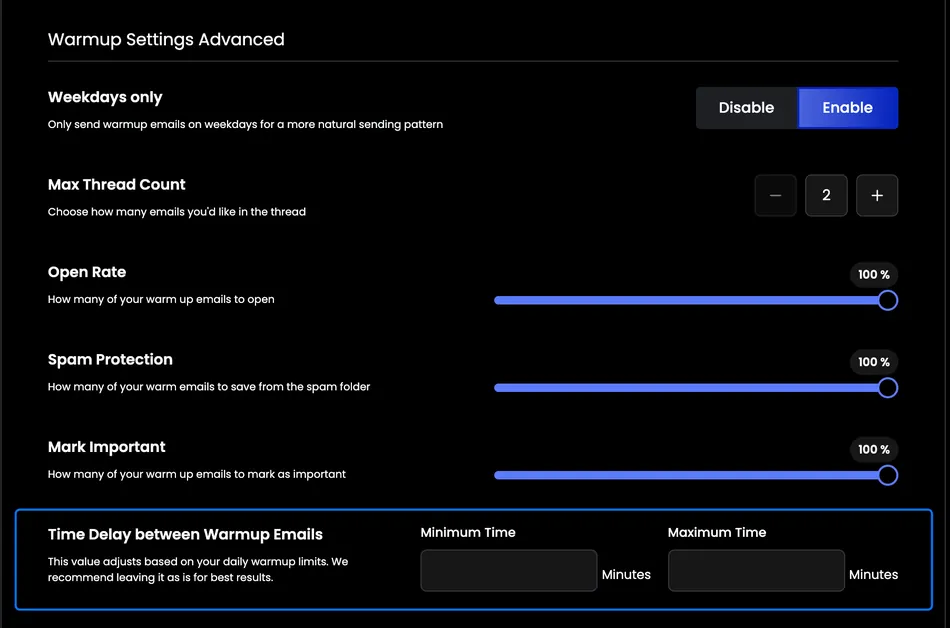
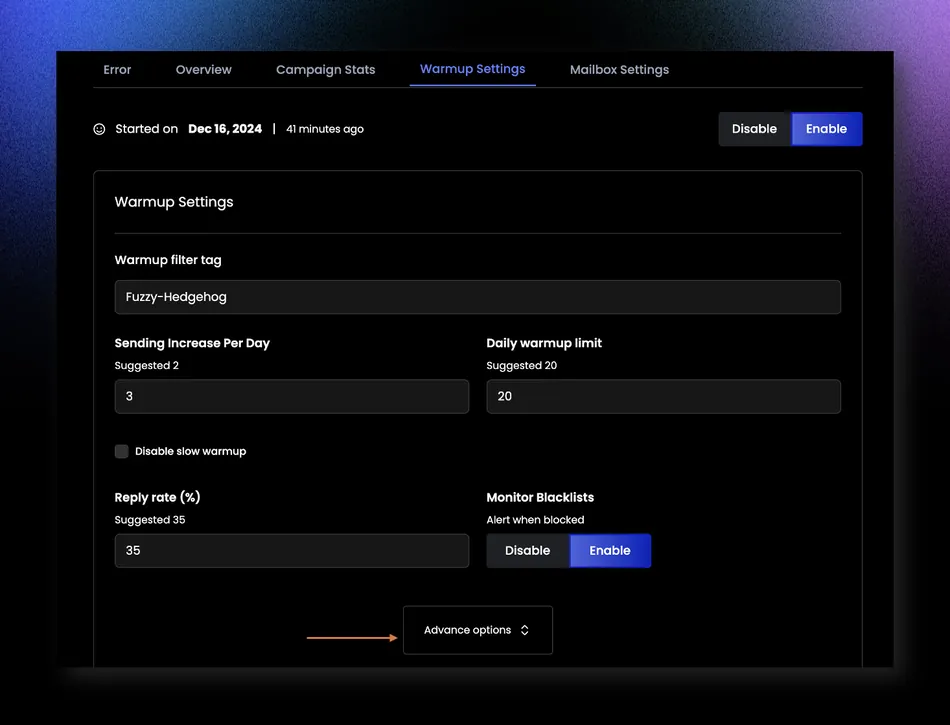
What sets the warmup apart is the level of configuration. Each mailbox can be tuned independently: sending increase per day, minimum and maximum daily limits, reply rate targets (default 35%), spam protection percentage, maximum thread depth, and weekdays-only mode.
Source: ReachInbox
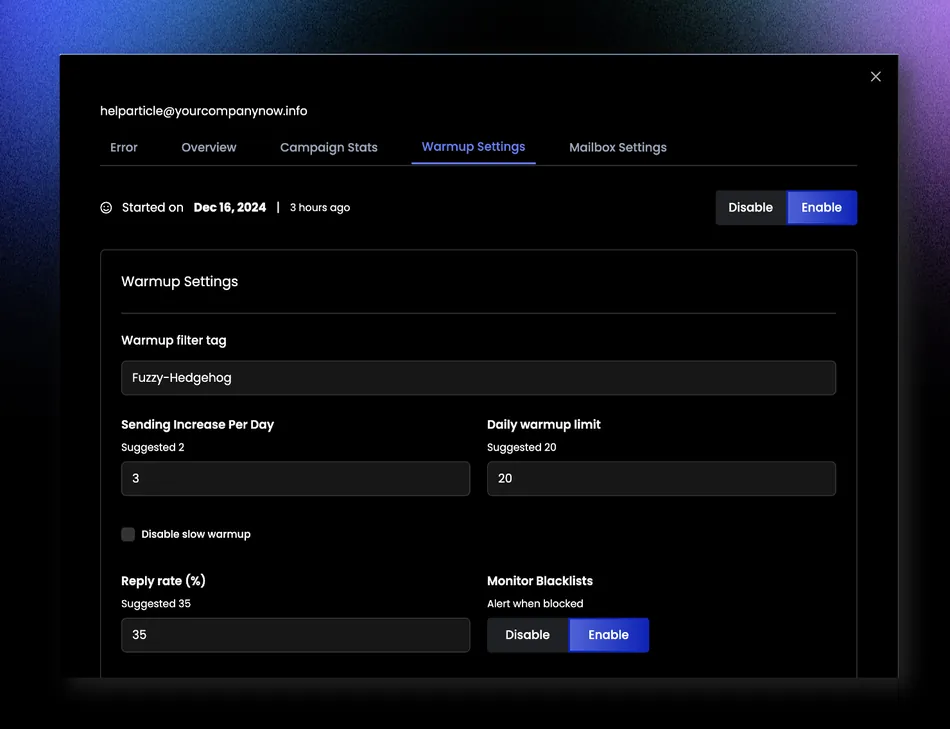
A Business Warmup Category setting ensures warmup emails match the sender’s industry, producing more authentic engagement signals than generic placeholder content.
Source: ReachInbox
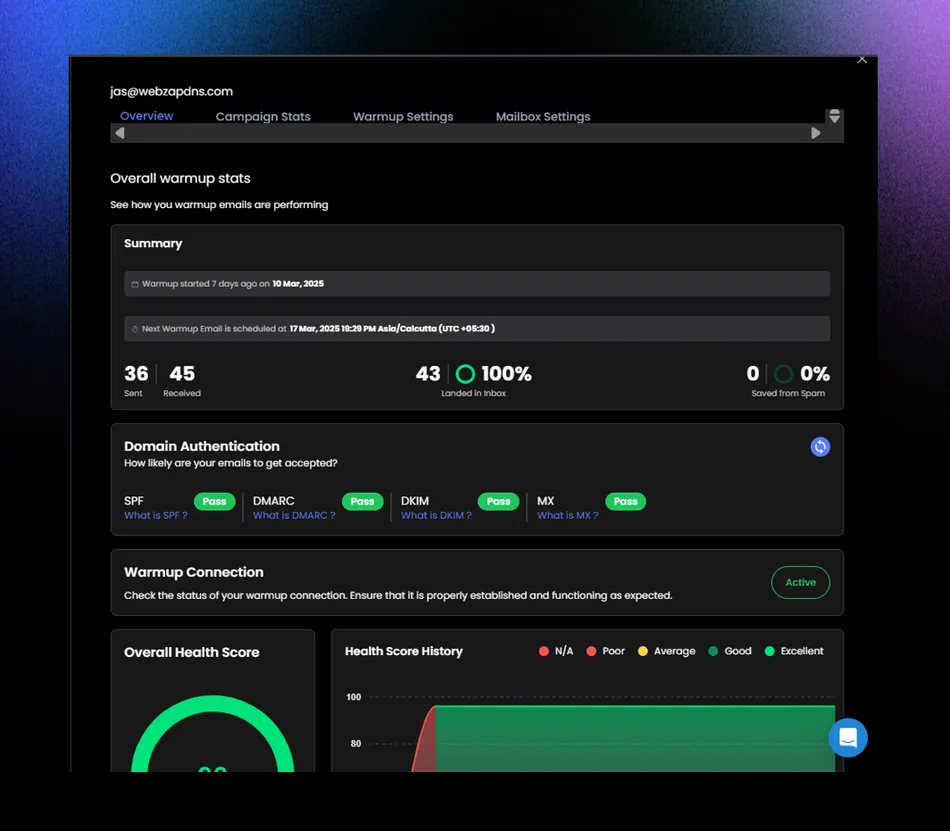
The warmup dashboard provides a health score per mailbox (available after 20 warmup emails), tracked weekly with ratings from Poor to Excellent.
It also monitors SPF, DKIM, DMARC, and MX record status with one-click refresh, and tracks “Saved from Spam” counts where the system rescues warmup emails that land in spam by moving them to the inbox.
Source: ReachInbox
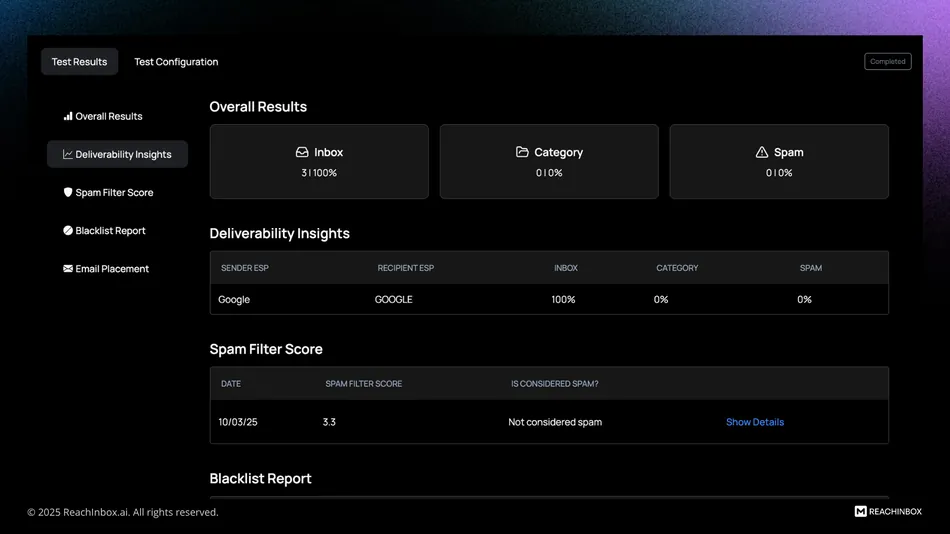
For senders who want to verify deliverability before going live, Inbox Placement Tests show where emails land across Google and Outlook (Personal and Workspace) in both US and UK regions. Tests include SpamAssassin scoring, blacklist checks, and per-provider authentication pass rates.
Source: ReachInbox
Automated recurring tests can run daily, weekly, or monthly and pause automatically if inbox rates drop below a configured threshold.
AI Personalization: Lead enrichment and copy generation from LinkedIn profiles and company websites.
Cold email personalization traditionally forces a choice between scale and quality. ReachInbox’s AI personalization suite tries to close that gap by combining lead data enrichment with automated copy generation.
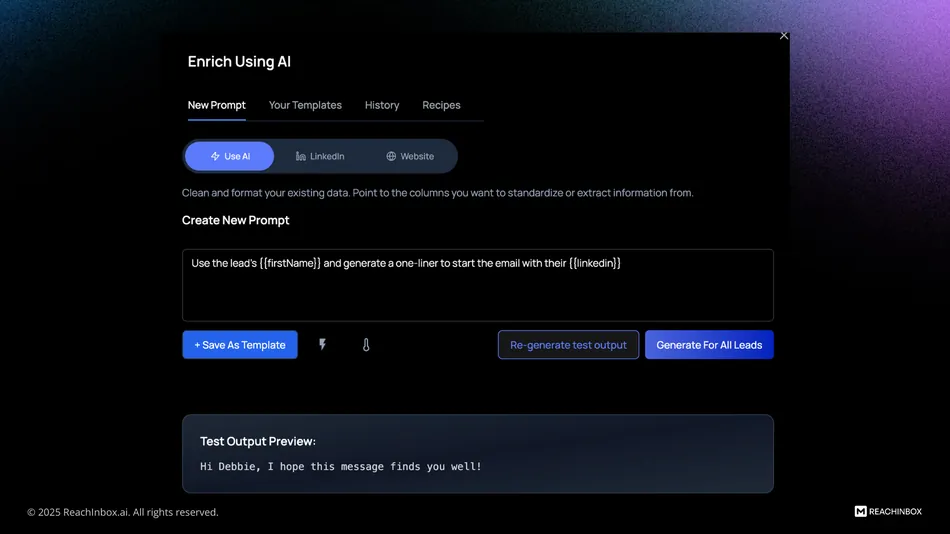
The enrichment layer operates through three methods, all accessible from a campaign’s Leads tab. “Use AI” generates personalized content from columns already in your lead list using custom or pre-built prompts.
Source: ReachInbox
“LinkedIn” reads a lead’s LinkedIn profile and generates contextual opening lines from their recent activity. “Website” crawls the lead’s company site for hooks like blog content or product announcements. LinkedIn and website enrichment each cost 5 Personalization Credits per lead.
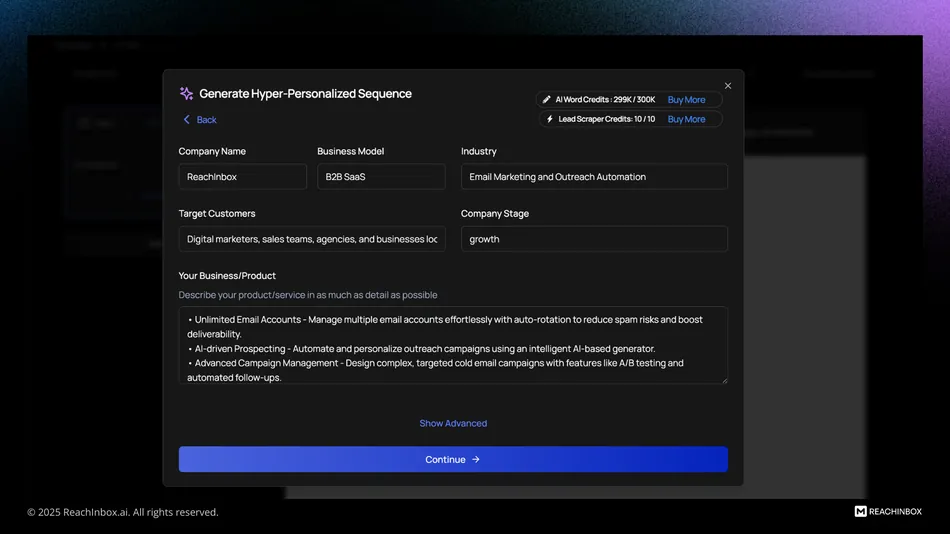
For teams that want full sequence generation (not just opening lines), Hyper Personalization produces complete multi-step email sequences tailored per prospect, drawing from LinkedIn and website data.
Source: ReachInbox
Users configure campaign objectives, tone, email length, and follow-up count, and the AI drafts the entire sequence alongside a Lead Profile Summary for review. This feature is available on Growth plans and above.
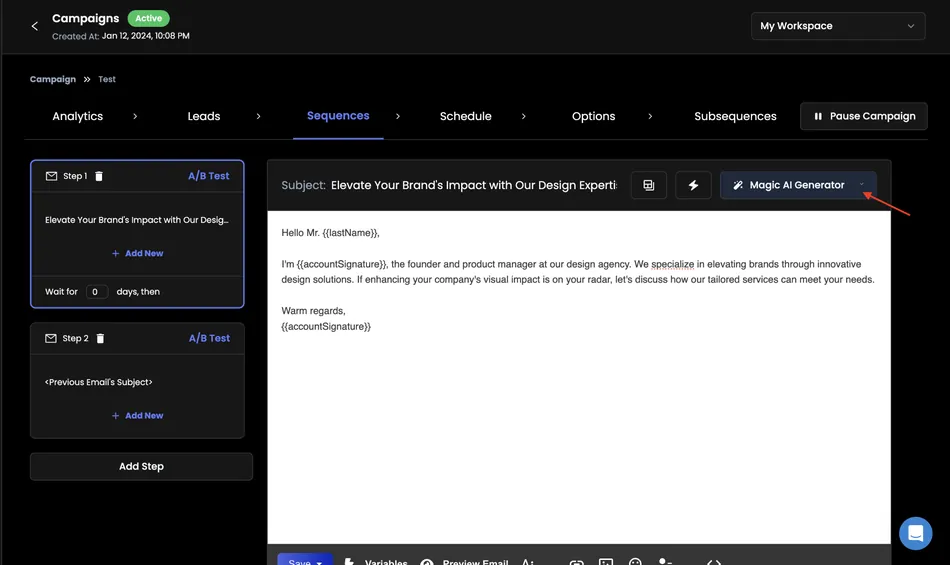
The Magic AI Generator handles copy variation at the word level, with functions to regenerate emails, improve spintax, or generate sequences from scratch within the editor.
Source: ReachInbox
Liquid syntax adds a runtime personalization layer with conditional logic for time-of-day greetings, day-of-week references, and timezone-aware phrasing.
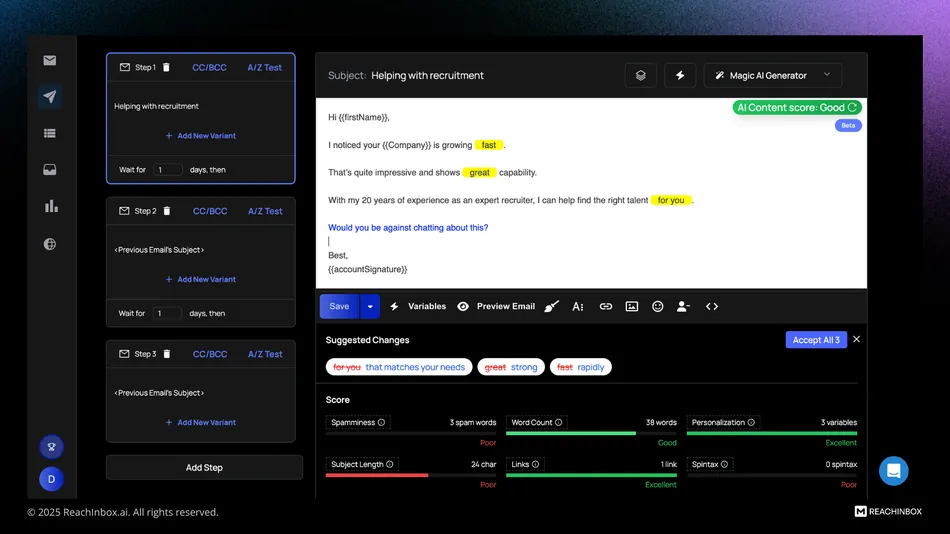
Before sending, the AI Content Score evaluates each email across spam risk, word count (50-200 words recommended), personalization tag count (2+ recommended), subject line length (30-60 characters), link count, and spintax coverage.
Source: ReachInbox
This pre-send check makes deliverability analysis a built-in step rather than an afterthought.
Worth noting: AI personalization quality is still maturing. Users on the public feature request board have flagged that AI-generated prompts aren’t consistently strong, and some have requested the ability to use their own OpenAI API keys with custom prompts. The team has marked this as in progress.
Onebox: Centralized reply management across all sending accounts with AI triage.
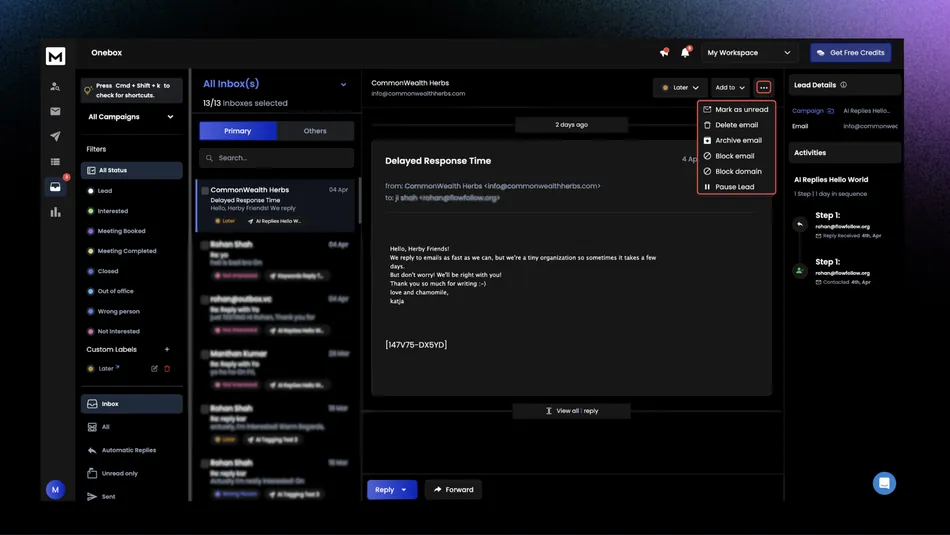
Running cold email from dozens of sending accounts creates an obvious problem: replies scatter across inboxes, and opportunities get missed. Onebox solves this by pulling all campaign replies into a single interface, regardless of which sending account received them.
The inbox organizes around conversation threads with full back-and-forth history. When replying from Onebox, the response goes from the same sending account that originally contacted the lead, preserving thread continuity and protecting deliverability.
Source: ReachInbox
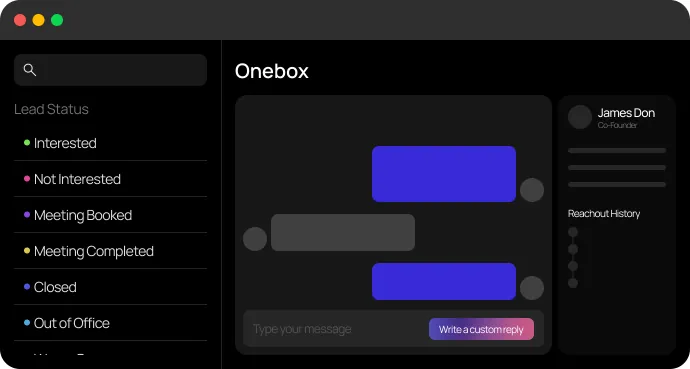
Replies sort across nine default status tabs: Lead, Interested, Meeting Booked, Meeting Completed, Closed, Out of Office, Wrong Person, and Not Interested.
 Source: ReachInbox
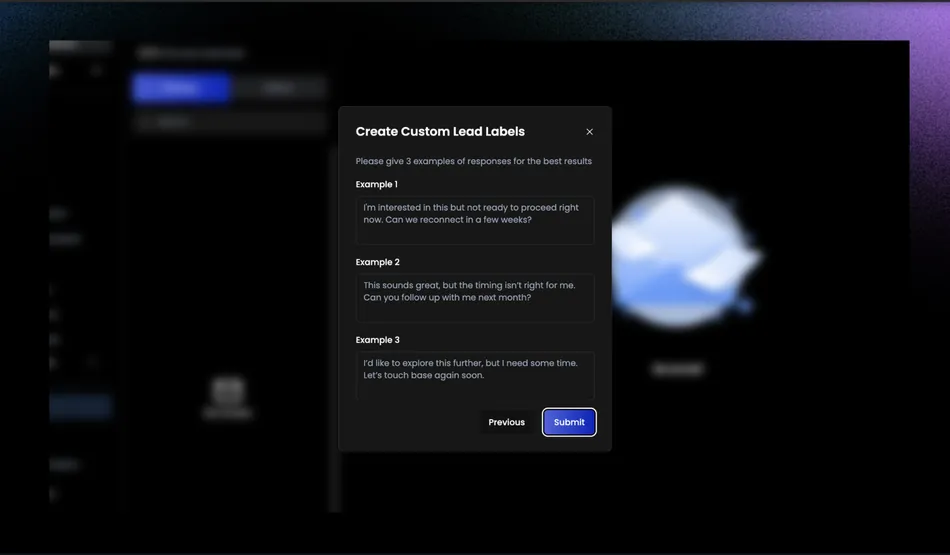
Custom AI tags create additional categories that automatically label incoming replies, letting reps build views that surface the most actionable leads first.
Source: ReachInbox
From within Onebox, reps can mark threads as unread, archive, delete, block an email or domain, pause a lead, or route a lead into a subsequence, another campaign, or a lead list without navigating away.
An AI Reply Agent (Growth and above) drafts context-aware reply suggestions based on the lead’s message and the user’s configured business context, with tone and length options.
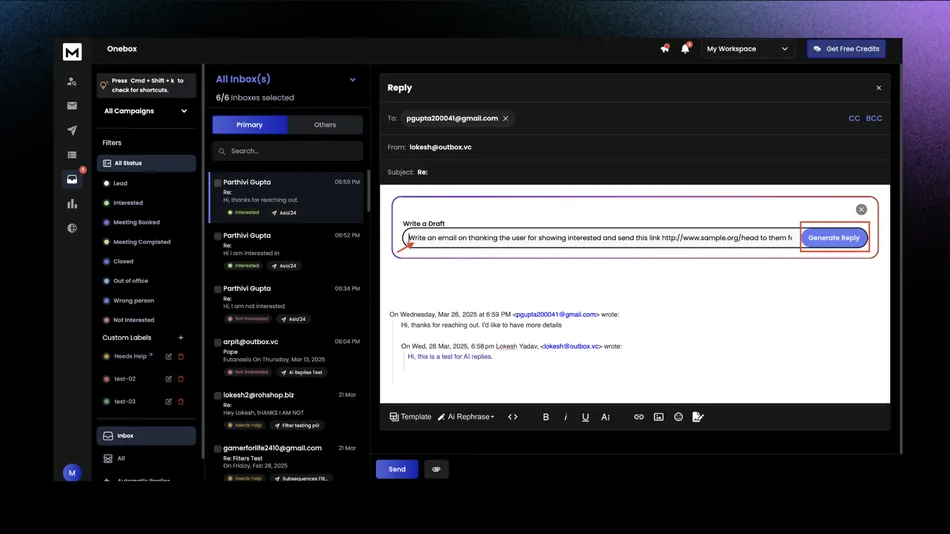
Source: ReachInbox
ReachInbox has invested heavily in Onebox. The public changelog shows consistent Onebox improvements across nearly every release from April through September 2025, making it one of the most actively developed parts of the product.
AI Lead Finder: Built-in prospect database with pay-for-verified-leads model.
AI Lead Finder is a prospect database and search tool built into ReachInbox, claiming access to 500M+ verified contacts. It is sold as a separate add-on alongside the core outreach product and can be purchased independently.
The search interface offers 10 structured filters: job title, location, department, industry, employee count, revenue, domain, management level, company name, and company location.
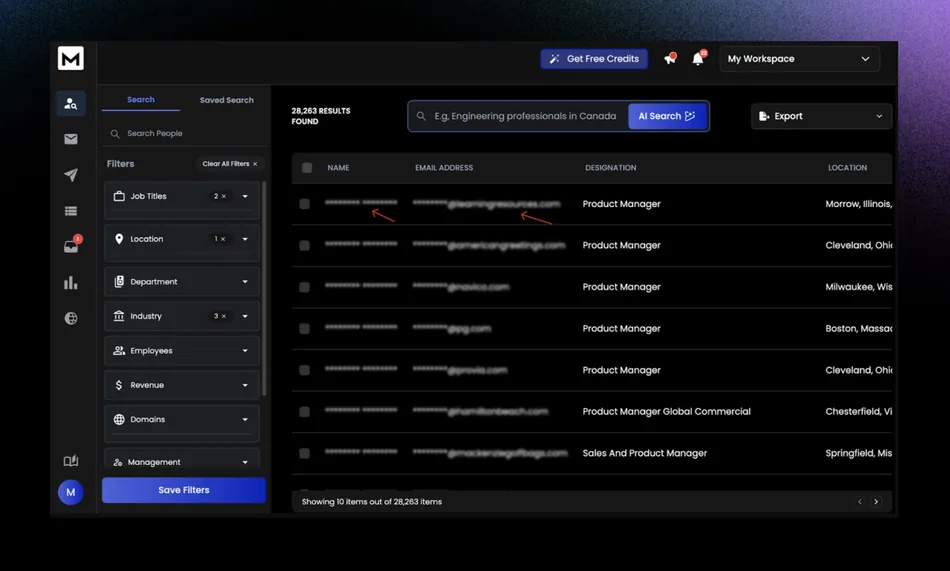
Source: ReachInbox
An AI natural-language search option lets users describe their target prospect in plain English, and the AI pre-fills the structured filter panel accordingly. Filter sets can be saved for recurring prospecting workflows.
The pricing model charges 1 credit per lead when viewing contact details. On export, the system initially deducts credits for all selected leads, then automatically refunds credits for contacts that fail real-time verification. Users only pay for leads confirmed as deliverable.
Because Lead Finder lives inside ReachInbox, users can push leads directly into a new or existing campaign from the export menu, skipping the CSV download-and-upload loop that standalone prospecting tools require.
Monthly active lead allowances scale by plan: Free gets 50, Starter gets 2,000, Growth gets 50,000, Pro gets 200,000, and Enterprise gets 500,000.
Pricing
ReachInbox uses a credit-based subscription model with four dimensions per plan: Active Leads, Emails, AI Word Credits, and Workspaces. Both monthly and annual billing are available, with annual billing offering 25% off.
All prices below reflect annual billing rates:
| Plan | Price | Active Leads/mo | Emails/mo | AI Word Credits/mo | Workspaces |
|---|---|---|---|---|---|
| Free | $0 | 50 | 250 | 500 | 1 |
| Starter | $30/mo | 2,000 | 10,000 | 5,000 | 1 |
| Growth | $75/mo | 50,000 | 250,000 | 25,000 | 20 |
| Pro | $225/mo | 200,000 | 1,000,000 | 150,000 | 50 |
| Enterprise | From $999/mo | 500,000 | 1,000,000 | 150,000 | 50 |
What changes between tiers:
- The Free plan is a permanent free tier (not a time-limited trial) with 3 email accounts, 14-day warmup only, and no access to Onebox, A/B testing, webhooks, API, or AI personalization features.
- The Starter plan ($30/month) upgrades to unlimited email accounts and unlimited AI warmup (subject to a fair use policy of 200 mailboxes), and unlocks Onebox, A/B testing, advanced subsequences, and analytics. AI personalization, webhooks, and API access remain locked.
- The Growth plan ($75/month) is the entry point for the platform’s AI capabilities: Hyper-personalization, AI Enrichment, AI Replies, webhooks, and API access all unlock here. Workspaces jump to 20, and support moves from General to Priority.
- The Pro plan ($225/month) scales everything up: 200,000 active leads, 1 million emails, 150,000 AI word credits, and 50 workspaces. The fair use mailbox cap increases to 1,000.
- The Enterprise plan (from $999/month) adds white labeling and a personal account manager, both exclusive to this tier.
Costs that sit outside the base subscription:
ReachInbox’s pricing page covers the core sending product, but several capabilities are billed separately. Lead Finder requires its own subscription with separate credits. Website Visitor Identification is another standalone add-on, currently limited to US-based visitors.
Inbox Placement Tests are available as a one-time Lifetime Deal purchase. And Done-For-You domains and mailboxes (pre-configured with SPF/DKIM/DMARC) are sold as a separate service. Add-on pricing requires a login to view.
Unused credits do not roll over between billing cycles. Paid plans carry a 7-day money-back guarantee on annual subscriptions (with a 5% processing fee). Monthly plans offer no refunds.
A startup program provides up to 9 months free for qualifying early-stage companies.
Limitations & Considerations
ReachInbox’s weaknesses reflect the trade-offs of a young platform growing quickly in a competitive market. They’re worth understanding before committing.
- Email-only outreach. ReachInbox does not support LinkedIn, SMS, phone, or any channel beyond email in its sequences.
LinkedIn automation is the highest-voted in-progress feature request on the public roadmap (30 upvotes), but it hasn’t shipped. Teams whose prospects respond to multichannel touches will need a separate tool for everything outside email.
- No native CRM integrations. There are no direct connections to HubSpot, Salesforce, Pipedrive, or any other CRM on the integrations page. CRM connectivity requires routing through Zapier, Make.com, n8n, or Pabbly, which adds workflow complexity and potential fragility.
A GoHighLevel integration is in progress but not yet live.
No attachment support in sequences. You cannot attach PDFs, case studies, proposals, or any files to emails within a campaign sequence. This is listed as an active “Under Review” feature request, meaning it’s being considered but not committed to.
Thin reporting for agencies. White-labeled client reports are planned but not shipped (23 upvotes). Account-based analytics remains under review. Bounce rates only appeared in campaign statistics in the August 2025 changelog.
Agencies that need polished, branded performance data for clients will find this gap limiting.
“Unlimited” comes with fine print. The unlimited email accounts claim on paid plans is governed by a fair use policy with provisional mailbox thresholds: 200 on Starter, 500 on Growth, and 1,000 on Pro. Exceeding these requires explicit approval. This is generous for most users, but the ceiling exists.
Product maturity. ReachInbox launched in late 2023 and has shipped features rapidly. The May 2025 changelog fixed issues like global analytics only showing the first 50 campaigns, incorrect Onebox unread counts, and DNS verification bugs.
These are the rough edges you’d expect from a platform scaling quickly with a small team. The pace of improvement is real, but so is the occasional friction.
- Lead Finder is a separate purchase. Unlike platforms that bundle a contact database into the core subscription, ReachInbox’s Lead Finder requires its own subscription with separate credits. Users who need built-in prospecting should factor this into the total cost.
These limitations don’t make ReachInbox a poor choice. They reflect a platform that chose to do email outreach at high volume and low cost first, then build outward. The question is whether that scope matches your current needs.
Who Should Use ReachInbox?
ReachInbox is a strong fit for several specific profiles:
- High-volume cold emailers who optimize for cost per send. The Growth plan at $75/month delivers 250,000 emails across 50,000 active leads with unlimited email accounts.
For teams where volume matters and email is the primary channel, the math works out favorably compared to most competitors.
- Solo founders and small B2B teams getting started with cold outreach. The free plan lets you test the platform without a credit card, the Starter plan at $30/month is an accessible entry point, and the startup program offering up to 9 months free removes the cost barrier for qualifying companies.
The 5-click campaign setup means you don’t need a dedicated ops person to get running.
- Agencies managing cold email for multiple clients. The Growth plan’s 20 workspaces and Pro’s 50 workspaces provide client separation. Unlimited email accounts mean scaling sending infrastructure across clients doesn’t add per-inbox costs.
The platform still lacks white-labeled reports, but the workspace architecture and volume limits are sized for agency operations.
Teams that have validated email as their best channel and want to go deeper. If your pipeline runs on cold email and you’ve already tested multichannel without seeing proportional returns, ReachInbox’s focused approach gives you specialized tools for that channel: A/Z testing, subsequences, provider matching, inbox placement testing, and delivery optimization modes.
Instantly or Smartlead users evaluating on price-to-volume. ReachInbox positions itself directly against these platforms (with dedicated comparison pages for both), and the volume limits at comparable price points are meaningfully higher.
If you’re hitting send limits or paying more than you’d like for your current volume, ReachInbox is worth evaluating.
Who Should Look Elsewhere?
Teams that need email, LinkedIn, and phone in a single sequence. ReachInbox is email-only. If your outreach strategy depends on multichannel cadences (cold email followed by a LinkedIn connection request followed by a call), tools like Lemlist or Reply.io support this natively.
Organizations embedded in a CRM ecosystem. If your workflow depends on two-way sync with HubSpot, Salesforce, or Pipedrive, the lack of native CRM integrations means you’ll build middleware through Zapier or Make.com. Platforms like Apollo.io or Woodpecker offer tighter CRM connectivity out of the box.
Teams that need mature, agency-grade reporting. If your clients expect branded performance reports and your leadership needs detailed analytics dashboards, ReachInbox’s current reporting is too thin. White-labeled reports and account-based analytics are on the roadmap but not yet available.
Compliance-heavy organizations. No third-party security certifications (SOC 2, ISO 27001) are publicly listed. Teams in regulated industries or enterprises with formal vendor assessment processes may find the compliance documentation insufficient.
Users who need a large built-in contact database bundled with sending. If you want prospecting and sending in one subscription without add-on costs, Apollo.io or Instantly’s lead database plans offer a more integrated approach. ReachInbox’s Lead Finder is capable but requires a separate purchase.
Final Verdict: Is ReachInbox Worth It?
For cost-conscious teams committed to email-first outreach, ReachInbox delivers real value.
The platform’s strongest argument is the volume you get for the price. At $75/month on the Growth plan, 250,000 emails across 50,000 active leads with unlimited email accounts and warmup is a generous allocation that undercuts most direct competitors at similar price points.
The deliverability toolkit (inbox placement testing, SpamAssassin scoring, provider matching, delivery optimization modes) is more thorough than what you’d expect from a platform this young.
And the Onebox unified inbox, with its AI triage and subsequence routing, is a useful operational layer for teams managing replies across many accounts.
The caveats are real but predictable for a platform founded in late 2023. No multichannel outreach, no native CRM integrations, no attachment support, and reporting that’s still catching up to what agencies need.
The product ships features quickly (the public changelog shows meaningful releases roughly every month), but you’re betting on a trajectory rather than a finished product.
If your outreach needs are strictly email-based and you don’t need detailed analytics or CRM sync today, that bet is reasonable.
For the right user (email-focused, volume-driven, price-sensitive, willing to work around current gaps) ReachInbox is one of the better values in the cold email space right now.
Get started with ReachInbox here.
ReachInbox FAQ
Is there a free version of ReachInbox?
Yes. ReachInbox offers a permanent free plan with no credit card required. It includes 3 email accounts, 14-day email warmup, 50 active leads per month, 250 emails per month, and 500 AI word credits. The free plan does not include Onebox, A/B testing, webhooks, API access, or AI personalization features.
It’s enough to explore the interface and run a small test campaign, but most users will need a paid plan for real outreach.
How many email accounts can you connect to ReachInbox?
All paid plans allow unlimited email accounts with no per-account fees. However, this is subject to a fair use policy with provisional mailbox thresholds: 200 on Starter, 500 on Growth, and 1,000 on Pro.
Exceeding these limits requires approval from the ReachInbox team. The free plan is limited to 3 email accounts.
Does ReachInbox support multichannel outreach?
No. ReachInbox currently supports email only. LinkedIn automation is the most-requested feature on the public roadmap (30 upvotes, marked as in progress), but it has not shipped.
Teams needing LinkedIn, SMS, or phone capabilities in the same sequence will need a separate tool or should consider multichannel platforms like Lemlist or Reply.io.
What does ReachInbox’s email warmup do?
The warmup feature automatically exchanges realistic emails between accounts in ReachInbox’s peer network, generating opens, replies, and positive engagement signals to build sender reputation with ESPs like Google and Outlook. ReachInbox recommends running warmup for 2-4 weeks before launching high-volume campaigns.
Warmup is unlimited on all paid plans and includes configurable settings for daily volume, reply rates, thread depth, and industry-matched content.
Does ReachInbox integrate with CRMs like HubSpot or Salesforce?
Not natively. ReachInbox does not offer direct integrations with HubSpot, Salesforce, Pipedrive, or other CRMs. CRM connectivity is possible through middleware platforms like Zapier, Make.com, n8n, or Pabbly Connect. A GoHighLevel integration is currently in progress on the public roadmap.
What is the AI Lead Finder, and is it included in the subscription?
AI Lead Finder is a built-in prospect database claiming access to 500M+ verified contacts, searchable by job title, industry, company size, location, and other filters. It is sold as a separate add-on with its own credit system, not included in the core outreach subscription.
The system charges credits per lead viewed and automatically refunds credits for contacts that fail real-time verification.
How does ReachInbox’s pricing compare to Instantly?
The Growth plan at $75/month (billed annually) offers 250,000 emails per month with unlimited email accounts. ReachInbox’s own comparison page notes this represents roughly 25 times the monthly email volume of Instantly’s comparable plan at a similar price point.
However, Instantly bundles its lead database and CRM as separate paid modules, and ReachInbox does the same with Lead Finder, so total cost depends on which add-ons each user needs.
What is the refund policy for ReachInbox?
Annual plan subscribers have a 7-day money-back guarantee from the date of initial purchase, with a 5% processing fee deducted from all refunds. After 7 days, no refunds are issued. Monthly plan subscribers receive no refunds. Lifetime Deal purchases and Done-For-You domain/mailbox purchases are non-refundable.