GMass is one of the most popular Gmail-based email platforms available. As a Chrome extension that turns Gmail into a cold email and marketing tool, it lets users run mail merges from Google Sheets, send automated follow-up sequences, verify lists, and track campaign performance, all without leaving their inbox.
With 400,000+ users and 9,000+ five-star Chrome Web Store reviews, it has become a staple for solo operators and small teams who want affordable outreach from the inbox they already know.
But as your outreach grows, GMass’s Gmail-native architecture creates friction. Its Chrome-and-Gmail dependency locks out Outlook users entirely. It lacks native CRM integrations with Salesforce or HubSpot. There’s no built-in prospect database, no multichannel sequencing across LinkedIn or phone, and no visual drag-and-drop email builder.
That’s where this guide comes in. Whether you’re looking to:
- Scale cold email beyond Gmail’s daily sending limits with dedicated infrastructure
- Reduce outreach costs as your team grows with contact-volume pricing
- Access a built-in B2B contact database to skip manual list-building
- Run multichannel sequences across email, LinkedIn, and phone from one platform
- Get native CRM integrations without relying on Zapier or manual exports
- Stand out in crowded inboxes with visual personalization
- Start with a free, privacy-first mail merge tool inside Gmail
We’ll explore alternatives that specialize in each area.
Some teams use these tools alongside GMass to fill gaps; others replace it entirely with a more specialized platform. This isn’t about finding a “better” tool. It’s about finding the right fit as your outreach requirements grow.
Let’s look at the alternatives.
Want to try GMass for yourself first? You can visit their site here. Otherwise, keep reading for our full breakdown of alternatives.
| The Best GMass Alternatives | |
|---|---|
 | Instantly Best Alternative for Scaling Cold Email Beyond Gmail’s Sending Limits We chose Instantly because its unlimited email accounts, built-in warmup network, and provider-agnostic architecture let you scale cold outreach far beyond what a Gmail extension supports. |
 | Saleshandy Best Alternative for Scaling Cold Outreach Without Per-Seat Pricing We chose Saleshandy because its contact-volume pricing, unlimited email accounts on all plans, and built-in 800M+ prospect database eliminate the cost scaling that GMass’s per-seat model creates. |
 | Apollo Best Alternative for Sales Intelligence and Multichannel Outreach We chose Apollo because it puts a 270M+ contact database, multichannel sequences, a built-in dialer, and native CRM integrations into one platform, replacing what would otherwise require multiple tools. |
 | Smartlead Best Alternative for Agency-Scale Cold Email Management We chose Smartlead because its white-label client workspaces, tiered AI warmup pools, and centralized reply management are built for agencies managing multiple client campaigns at once. |
 | Woodpecker Best Alternative for Enterprise Cold Email with CRM Integrations and GDPR Compliance We chose Woodpecker because it combines native CRM sync, Adaptive Sending technology, and EU-based GDPR-compliant hosting for teams that need compliance and CRM connectivity GMass cannot provide. |
 | Lemlist Best Alternative for Creative Multichannel Outreach with Visual Personalization We chose Lemlist because its dynamic personalized images, native LinkedIn automation, and AI voice cloning offer outreach tactics that email-only platforms cannot replicate. |
 | Mailmeteor Best Alternative for Free, Privacy-First Gmail Mail Merge We chose Mailmeteor because its permanently free tier, minimal permission model, and Google-recommended security posture make it the most accessible and privacy-conscious Gmail mail merge option. |
What is GMass?
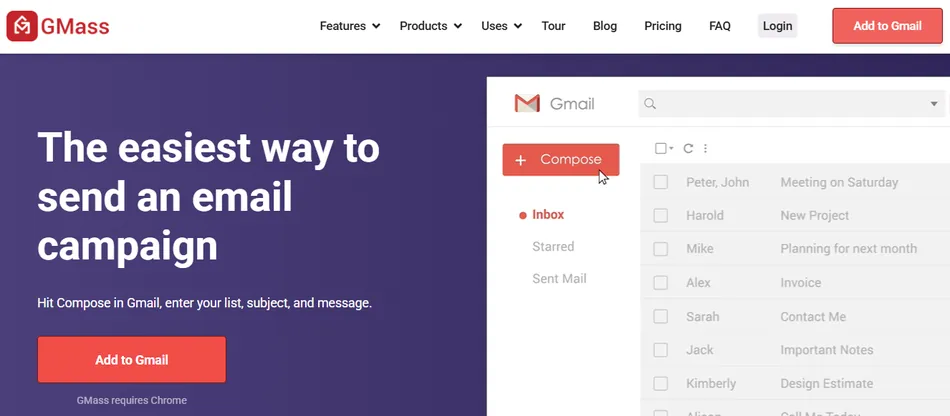
GMass is a Gmail-native email platform delivered as a Chrome extension that adds a send button alongside the native compose window. From that single interface, users run mail merges from Google Sheets, send cold email sequences with automated follow-ups, verify lists, test deliverability, and track opens, clicks, and replies.
GMass positions itself as the only email platform that spans cold email, email marketing, and mail merge from within Gmail.
Its key features include:
- Google Sheets integration with bi-directional data sync and dynamic lists
- Automated follow-up sequences with unlimited stages that stop on reply
- Spam Solver deliverability testing across 20 Gmail and Google Workspace seed accounts, with AI-powered suggestions
- SpinMax AI that generates wording variations for every email in a campaign
- Email verification with syntax and SMTP-level validation before sending
- A/B testing, campaign analytics, reply management, and email polling
- Gmail sending limit bypass via SMTP integration, ColdSMTP, and MultiSend inbox rotation
Because GMass lives inside Gmail, everything connects through the interface users already know. Composing a campaign feels like writing a regular email, and setting up a follow-up sequence takes under a minute. At $29.95/month for the Standard plan, it remains one of the lowest-priced email sending platforms available.
But as your outreach scales, you may need tools that go beyond what a Gmail extension can offer: a built-in prospect database, native CRM sync, multichannel sequences, or sending infrastructure that doesn’t depend on Gmail’s daily limits. That’s why this article focuses on specialized tools that fill the gaps where GMass users often need more.
How We Curated Our List of GMass Alternatives
After testing GMass and researching the cold email market, we focused on tools that address specific limitations GMass users hit as they grow. While GMass handles a wide range of email tasks from one inbox, some teams need more for:
- Scaling sending volume beyond Gmail’s daily caps without SMTP workarounds
- Reducing per-seat costs as the team adds sending accounts and members
- Sourcing prospects from a built-in B2B contact database instead of importing external lists
- Running multichannel outreach across email, LinkedIn, and phone in unified sequences
- Syncing outreach activity with CRMs like Salesforce, HubSpot, or Pipedrive natively
- Standing out with personalization like dynamic images and personalized landing pages
- Getting started for free with a privacy-first mail merge tool
Each tool on this list specializes in one of these areas. You might use them alongside GMass or switch entirely; it depends on where your outreach needs the most help.
| ❗DISCLAIMER: We aren’t covering every cold email tool on the market! Our focus is on the alternatives that address GMass’s limitations for specific use cases and team sizes. |
|---|
1. Instantly - Best Alternative for Scaling Cold Email Beyond Gmail’s Sending Limits
Instantly is a sales engagement platform built for high-volume cold email outreach. Where GMass operates as a Chrome extension tied to Gmail’s infrastructure and sending limits, Instantly is a standalone platform with unlimited email accounts and warmup on every paid plan. Its key capabilities include:
Unlimited email accounts and warmup with auto-rotation across connected inboxes and a warmup network of over 1,000,000 real accounts
Unibox unified inbox that consolidates replies from every sending account with AI sentiment analysis via GPT-4
Provider-agnostic sending supporting Gmail, Outlook, and any SMTP-compatible provider, plus Done-For-You account provisioning
SuperSearch B2B lead finder with access to 450M+ contacts and waterfall enrichment from 5+ providers
Deliverability tools including AI Spam Words Checker, inbox placement testing, and monitoring against 94 blacklists
Why Choose Instantly Over GMass for Scaling Cold Email
Here’s where Instantly pulls ahead:
- Unlimited Email Accounts Remove Gmail’s Volume Ceiling
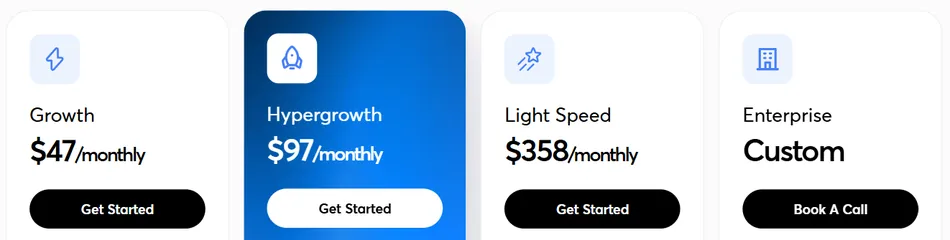
GMass runs through Gmail’s infrastructure, subject to Gmail’s daily sending limits (500 for free accounts, 2,000 for Google Workspace). Exceeding those caps requires configuring external SMTP servers or ColdSMTP add-ons. Instantly was built to solve this problem: every plan from $47/month Growth to $358/month Light Speed includes unlimited email accounts and warmup.
The campaign engine rotates sending across all connected accounts with configurable daily limits, and the warmup network of over 1,000,000 real accounts simulates human conversations to build sender reputation.
- Unified Inbox Replaces Fragmented Reply Management
Running GMass campaigns across multiple accounts scatters replies across separate Gmail inboxes. Instantly’s Unibox consolidates every reply from every connected account into one interface, with AI sorting replies into categories like Interested, Not Interested, and Out-of-Office.
The OOO Resume feature detects out-of-office responses, extracts return dates, pauses outreach, and auto-resumes. GMass’s label-based workflow cannot do this.
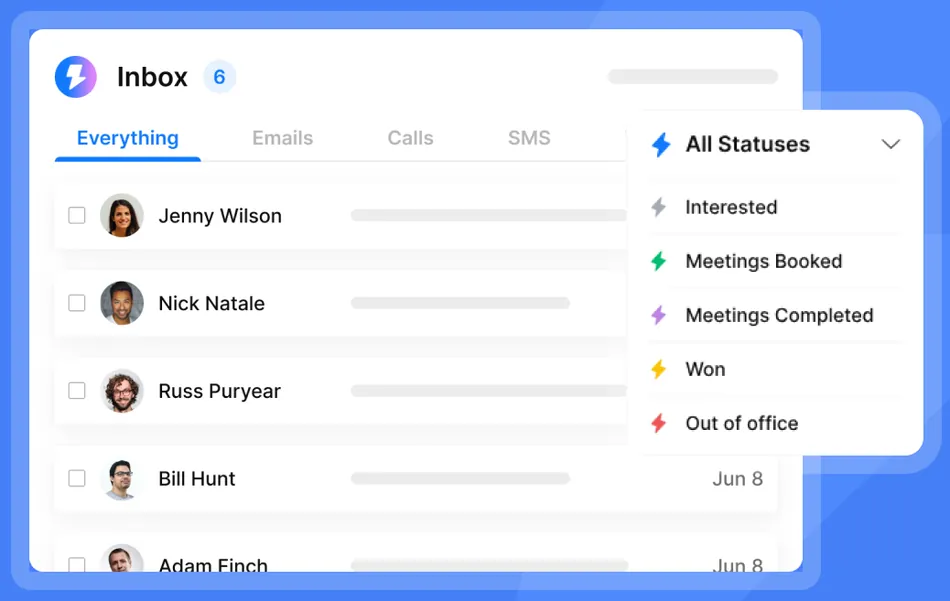
Source: Instantly Unibox
- Provider-Agnostic Architecture Removes Gmail Lock-In
GMass requires Chrome and a Gmail account. Instantly connects to any email provider via SMTP/IMAP and offers Done-For-You email provisioning with domain purchase, DNS setup, and inbox creation within 24-72 hours. Pre-Warmed Accounts arrive ready to send from day one at $10/month per account.
🏅 NOTE: We also evaluated Saleshandy and QuickMail for this slot. Saleshandy offers competitive multi-account sending with its own unified inbox, and QuickMail provides solid deliverability monitoring.
But Instantly offers the smoothest transition for GMass users because its unlimited-account model and Done-For-You infrastructure mean a solo founder or small team can move past GMass’s Gmail ceiling to high-volume sending without becoming an email infrastructure expert.
Instantly Pricing
Instantly uses a modular pricing structure where Email Outreach, Credits (lead database), and CRM are billed separately.
Email Outreach:
- Growth: $47/month ($37.60 annually) with unlimited email accounts and warmup, 1,000 uploaded contacts, 5,000 emails/month
- Hypergrowth: $97/month ($77.60 annually) with 25,000 contacts, 125,000 emails/month, Subsequences, priority support
- Light Speed: $358/month ($286.30 annually) with 100,000 contacts, 500,000 emails/month, dedicated IP infrastructure
Credits (Lead Database): Plans range from $9/month (150 credits) to $1,700/month for 200,000 credits.
Note: uploaded contacts on Outreach plans are lifetime caps, not monthly resets. The Growth plan’s 1,000 contact cap fills quickly for active senders.
Who Should Use Instantly?
Choose Instantly if:
- You’re hitting Gmail’s daily sending limits with GMass and need to scale to thousands of emails per day across multiple sending accounts without managing SMTP configurations
- You want a single platform for prospecting and outreach rather than juggling Google Sheets imports, third-party lead sources, and separate verification tools
- You’re a solo founder, freelancer, or small agency that wants to launch cold email campaigns quickly without becoming an email infrastructure specialist
2. Saleshandy - Best Alternative for Scaling Cold Outreach Without Per-Seat Pricing
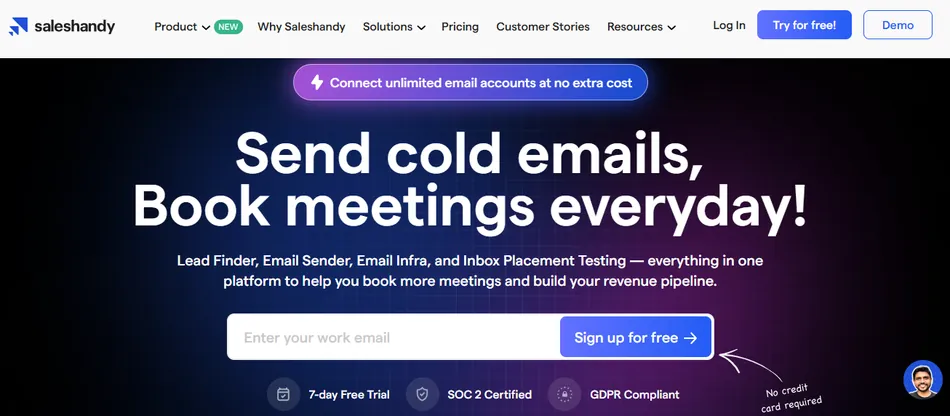
Saleshandy is a cold email outreach platform that replaces GMass’s per-user pricing with contact-volume-based tiers. Every subscription includes unlimited email accounts and unlimited team members (Pro and above), plus an integrated 800M+ B2B contact database and a built-in deliverability stack. Its key capabilities include:
Unlimited email accounts on all plans with unlimited clients and unlimited email warmup
Lead Finder with 800M+ contacts, 75+ filters, and AI-powered natural language search
Email warmup via TrulyInbox, sender rotation up to 1,000 accounts, and ESP matching
Unified inbox with AI intent categorization across all connected accounts
Gmail and Outlook support via native OAuth, plus SMTP/IMAP for other providers
Why Choose Saleshandy Over GMass for Cost-Effective Scaling
Here’s where Saleshandy pulls ahead:
- Contact-Volume Pricing Replaces Per-Seat Cost Scaling
GMass charges per user seat, so every new SDR or sending account adds to the monthly bill. Saleshandy prices around active prospect limits instead. The Outreach Starter at $25/month (annual) includes 2,000 active prospects, 6,000 emails/month, and unlimited email accounts.
A team connecting 30 email accounts pays the same as a team connecting 3. The LeadRoad case study shows this at agency scale: 75,000 emails sent monthly from a single account, booking 25-35 meetings per client per month.
- Built-In 800M+ Prospect Database Eliminates External List-Building
GMass users typically source leads externally, then import contacts via Google Sheets. Saleshandy’s Lead Finder collapses this into one interface: search the database using 75+ filters or AI-powered queries, reveal verified contacts through waterfall enrichment, and push them into email sequences with one click.
Credits follow a 7-credit flat rate for combined email and phone, with 50% of unused credits rolling over each billing cycle.
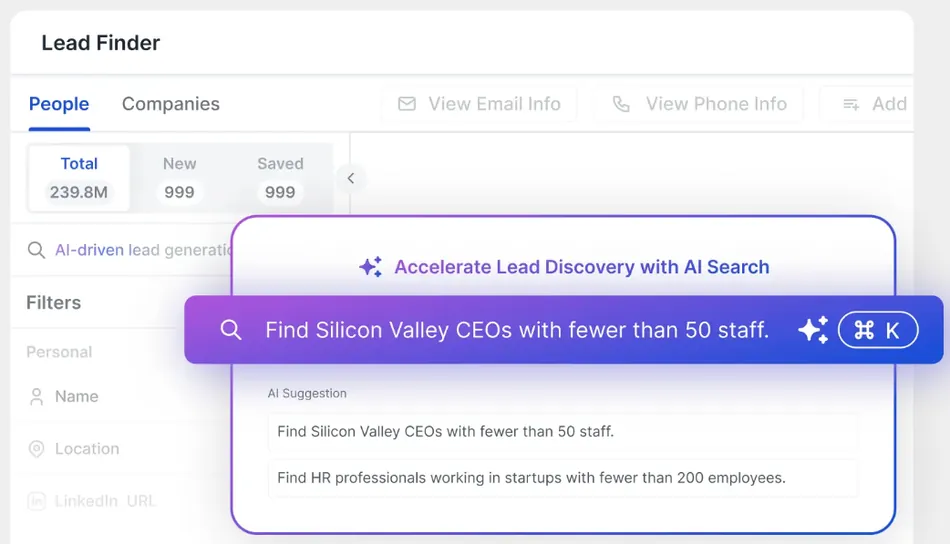
Source: Saleshandy Lead Finder
- Native Deliverability Stack Replaces SMTP Workarounds
GMass’s deliverability tooling is limited by what Gmail permits. Saleshandy bundles a complete infrastructure: email warmup via TrulyInbox on all plans, sender rotation across connected mailboxes, ESP matching that routes emails to match recipient providers, and Sequence Score that evaluates 17 campaign readiness factors before a single email sends.
🏅 NOTE: We also evaluated Woodpecker and Reply.io for this slot. Woodpecker offers deliverability-first cold email with a compliance focus, and Reply.io provides a mature multichannel sequence builder. But Saleshandy offers the most natural scaling path for teams outgrowing GMass’s per-seat economics, with costs growing alongside outreach volume rather than headcount.
Saleshandy Pricing
- Outreach Starter: $25/month (annual) / $36/month (monthly) with 2,000 active prospects, 6,000 emails/month, unlimited email accounts
- Outreach Pro: $69/month (annual) / $99/month (monthly) with 30,000 active prospects, 150,000 emails/month, unlimited team members, native CRM integrations
- Outreach Scale: $139/month (annual) / $199/month (monthly) with 60,000 active prospects, 240,000 emails/month, white-label, SSO
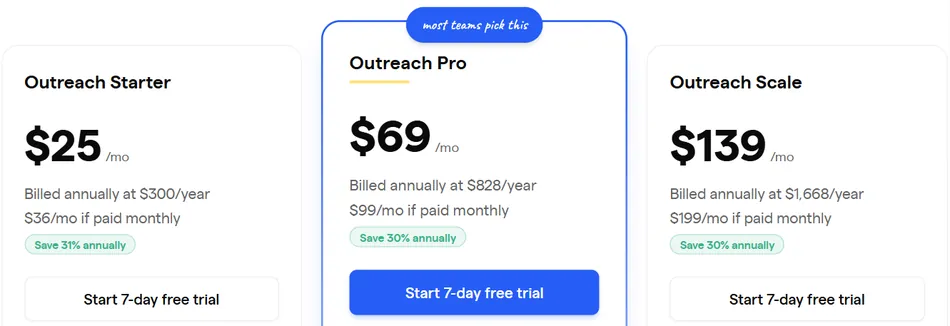
Lead Finder is priced separately: Lead Starter at $49/month (annual) for 2,500 credits/month. A 7-day free trial with no credit card is available.
Who Should Use Saleshandy?
Choose Saleshandy if:
- Your outreach costs scale linearly with team size under GMass, and you need a flat-rate model where adding sending accounts and team members doesn’t increase your subscription
- You want prospecting and sending in one platform, eliminating the CSV-export-import workflow between separate data vendors and Google Sheets
- You run a lead-generation agency managing multiple clients and need white-labeling, unlimited clients, and 1,000-account sender rotation at a predictable cost
3. Apollo - Best Alternative for Sales Intelligence and Multichannel Outreach
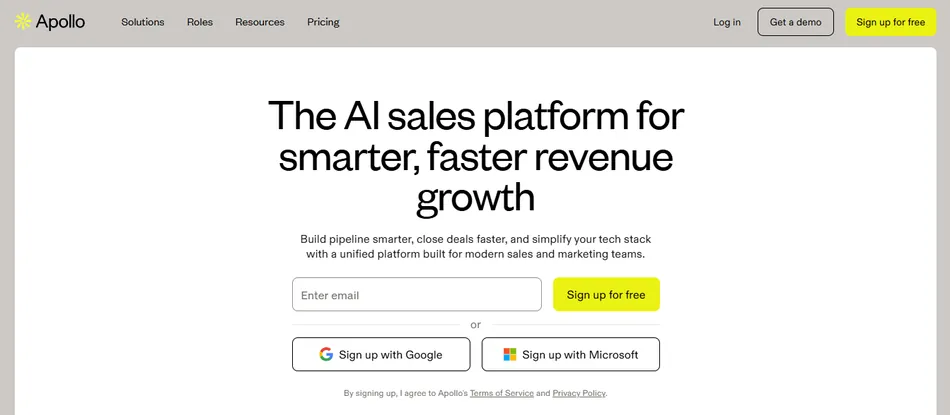
Apollo is a B2B sales platform that covers your data provider, outreach platform, dialer, and CRM in a single product. Where GMass is a Gmail plugin for mail merge and email campaigns, Apollo operates as a standalone system handling every stage of the outbound sales cycle. Its key capabilities include:
- 270M+ contacts and 70M companies searchable via 65+ filters including job title, industry, technologies, funding data, and hiring signals
- Bi-directional Salesforce and HubSpot sync where contacts, activities, and deal updates flow automatically
- Built-in dialer with Power Dialer, Parallel Dialer (connecting with 100+ prospects per hour), call recording, and AI summaries
- Buying Intent data covering 1,600+ topics included on all plans, including free
- Multichannel sequences combining emails, phone calls, LinkedIn steps, and custom tasks
Why Choose Apollo Over GMass for Sales Intelligence and Multichannel Outreach
Here’s where Apollo pulls ahead:
- A 270M+ Contact Database Eliminates External List-Building
GMass requires you to bring your own contact lists. Apollo’s B2B database contains over 270 million contacts and 70 million companies, updated via over 2 million data contributor sources. The company claims a 97% email accuracy rate backed by a 7-step verification process, verifying 72 million emails and refreshing 150 million contacts monthly.
You can search by job title, management level, department, location, industry, technologies used, and dozens of other attributes, then push those contacts into an outreach sequence.
- Native CRM Integrations Close the Gap GMass Cannot Bridge
GMass lacks native CRM integrations. Apollo offers bi-directional Salesforce integration and bi-directional HubSpot integration where contacts, activities, and deal updates flow both ways automatically. Customer testimonials document teams replacing ZoomInfo + Outreach with Apollo alone, achieving 50%+ cost savings through consolidation.
- Multichannel Outreach Beyond Email
GMass cannot make phone calls or automate LinkedIn touchpoints. Apollo’s multichannel sequences combine automatic emails, phone calls via the built-in dialer, LinkedIn connection requests and messages, and custom tasks. The Parallel Dialer dials multiple numbers simultaneously with AI-personalized call scripts, voicemail drops, and automatic CRM logging.
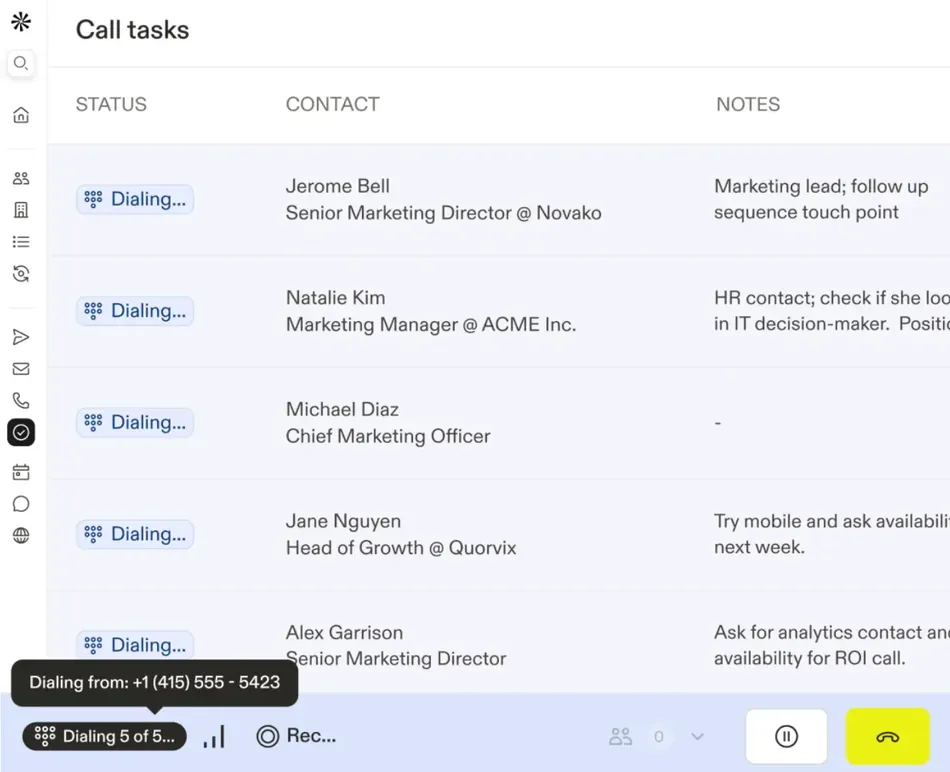
Source: Apollo Dialer
🏅 NOTE: We also evaluated HubSpot Sales Hub and Reply.io for this category. HubSpot Sales Hub excels at CRM-native sales engagement for teams already in the HubSpot ecosystem, and Reply.io provides solid multichannel sequencing.
But Apollo offers the most complete single-platform consolidation for teams that want prospecting data, multichannel outreach, dialing, intent signals, and CRM in one place.
Apollo Pricing
Apollo uses a hybrid per-seat plus credit-consumption model:
- Free (Starter): $0 per seat, forever with 900 credits/year, 2 active sequences, Gmail connection, Buying Intent data
- Basic: $49/seat/month (annual) or $59/seat/month (monthly) with 30,000 credits/year, multiple seats, 14-day free trial
- Professional: $79/seat/month (annual) or $99/seat/month (monthly) with 48,000 credits/year, CRM enrichment, unlimited sequences
- Organization: $119/seat/month (annual only, minimum 3 seats) with 72,000 credits/year, SSO, custom reporting
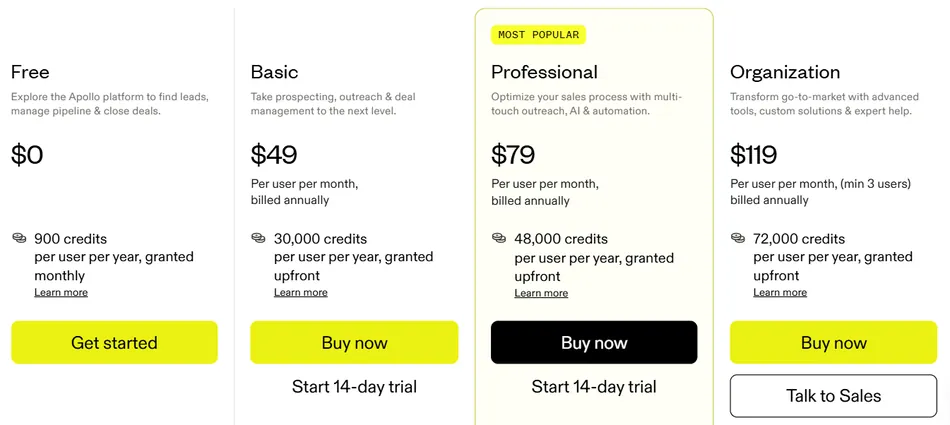
Note: the advanced dialer features require an add-on at $149/month or $119/month billed annually. Credits are consumed for retrieving contact data, AI research, and enrichment.
Who Should Use Apollo?
Choose Apollo if:
- You’ve outgrown GMass’s email-only approach and need multichannel outreach (phone, LinkedIn, email) from a single platform
- You want to eliminate separate subscriptions for a data provider, outreach tool, dialer, and CRM by consolidating into one platform
- You require bi-directional CRM sync with Salesforce or HubSpot that GMass cannot provide, including automatic activity logging and deal stage updates
4. Smartlead - Best Alternative for Agency-Scale Cold Email Management
Smartlead is a cold email platform built for agencies and high-volume B2B sales teams managing multi-client outbound campaigns. Where GMass operates inside a single Gmail inbox, Smartlead is a standalone platform with white-label client workspaces, tiered AI warmup pools, and unlimited mailboxes on every plan. Its key capabilities include:
- White-label client workspaces with branded dashboards and client-specific reply routing
- An AI-powered warmup engine with tiered pools, including an invite-only Ultra Premium tier
- Unlimited email accounts and warmup on every paid plan at no per-mailbox fees
- A Unified Master Inbox aggregating replies from all clients and campaigns with AI-powered categorization
- Optional SmartDelivery inbox placement testing and SmartInfra dedicated server infrastructure
Why Choose Smartlead Over GMass for Agency-Scale Outbound
Here’s where Smartlead pulls ahead:
- White-Label Client Workspaces for Multi-Client Management
GMass has no concept of client workspaces or white-labeled dashboards. Agencies using GMass must run separate Gmail accounts with separate subscriptions and no centralized view.
Smartlead gives each client their own workspace with campaign separation, reply routing, and tagged organization, all accessible from a single agency login. Wyngman Agency chose Smartlead for its white-label capability to provide a branded outreach experience to their clients.
- Tiered AI Warmup Infrastructure
GMass includes basic warmup within Gmail’s ecosystem. Smartlead’s warmup engine simulates real opens, reads, and replies while shuffling subject lines, copy, and send times. The Ultra Premium Warmup tier operates as a private, invite-only network with vetted senders only.
The system is also self-correcting: bounce spikes or spam flags trigger automatic pause and cool-down. AvoraGrowth’s founder called Smartlead’s warmup pools “the best he has tested”.
- Centralized Reply Management Across All Clients
GMass processes replies within Gmail using labels. For an agency managing 15 client campaigns across 60 mailboxes, this becomes unworkable.
Smartlead’s Unified Master Inbox aggregates every reply from every mailbox and campaign into one interface, with automatic sentiment classification, keyword-triggered workflows, and team member assignment. Unlock Management uses tags and labels to filter their Master Inbox by client and intent.
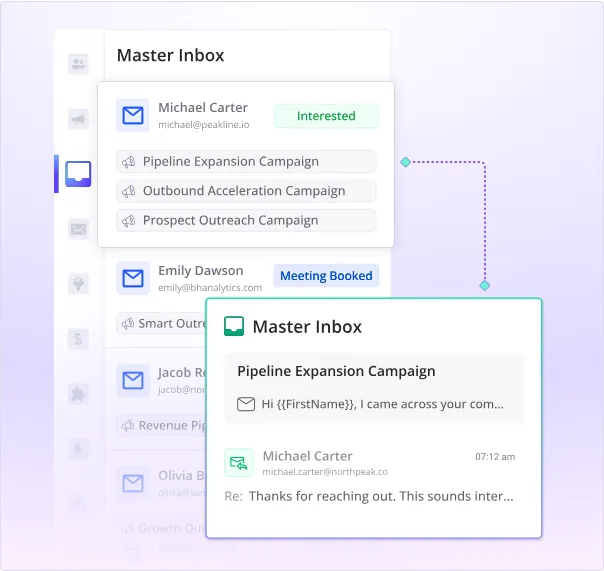
Source: Smartlead Unified Master Inbox
🏅 NOTE: We also evaluated Salesforge and ReachInbox for this category. Salesforge offers AI-powered email writing, and ReachInbox provides competitive warmup and inbox rotation. But Smartlead offers the most complete agency infrastructure with its white-label workspaces, tiered AI warmup pools, and API-first architecture.
Smartlead Pricing
All plans include unlimited email accounts and warmup. Annual billing saves 17%.
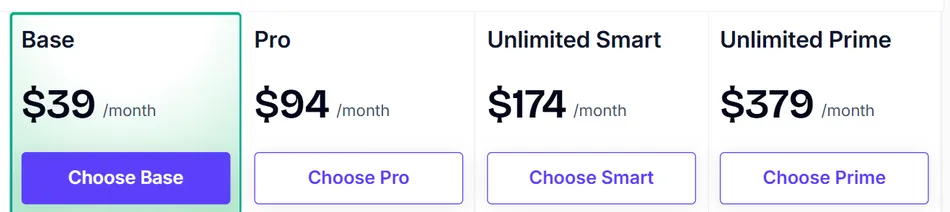
- Base: $39/month ($32/month annually) with 6,000 emails/month, 2,000 contacts, no CRM or client workspaces
- Pro: $94/month ($78/month annually) with 90,000 emails/month, 30,000 contacts, CRM access, one free client workspace (additional at $29/client/month)
- Smart: $174/month ($144/month annually) with 150,000 emails/month, unlimited contacts, premium warmup pool
- Prime: $379/month ($315/month annually) with 500,000 emails/month, 3 SmartServers included, 3+ client workspaces, dedicated manager
Add-ons include SmartDelivery (starting at $49/month) and SmartInfra dedicated servers ($39/server/month).
Who Should Use Smartlead?
Choose Smartlead if:
- You run a lead generation or cold email agency managing campaigns for 5+ clients and need white-labeled workspaces with centralized reply management
- You need to connect dozens or hundreds of sending mailboxes without per-account fees, and want warmup infrastructure that protects sender reputation automatically
- You want optional dedicated server infrastructure and inbox placement testing against 400+ blacklists for serious deliverability control
5. Woodpecker - Best Alternative for Enterprise Cold Email with CRM Integrations and GDPR Compliance
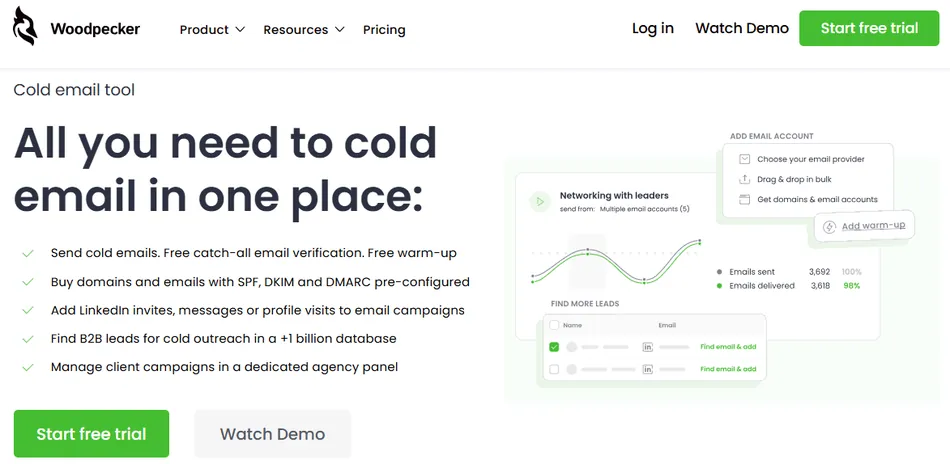
Woodpecker is a cold email platform for B2B professionals who need automated outreach with native CRM connectivity and European data compliance. Publicly traded on the Warsaw Stock Exchange, Woodpecker serves 4,500+ B2B clients across 110 countries. Its key capabilities include:
- Native integrations with HubSpot, Pipedrive, and Zoho CRM plus connectors for Clay, Persana AI, and more
- Adaptive Sending that throttles volume automatically to prevent provider-imposed blocks
- Free email verification on every send via native Bouncer integration
- GDPR-compliant infrastructure with EU-based hosting on ISO 27001-certified OVH servers in France
- A dedicated Agency Panel with white-label reporting and no per-seat charges
Why Choose Woodpecker Over GMass for Enterprise Cold Email
Here’s where Woodpecker pulls ahead:
- Adaptive Sending Automates Deliverability Protection
GMass relies on users manually configuring SMTP routing. Woodpecker built its sending engine around automated deliverability protection. Adaptive Sending monitors real-time outbound volume per mailbox and throttles sending when approaching a provider’s daily quota.

Source: Woodpecker Adaptive Sending
According to Woodpecker’s data from 2,900+ inboxes, accounts with Adaptive Sending experienced 2.4 times fewer provider-imposed blocks. This layers with inbox rotation supporting up to 100 accounts, ESP Matching, and a Domain Audit that checks SPF/DKIM automatically.
- Native CRM Integrations Without Middleware
GMass’s most cited enterprise gap is the absence of direct CRM sync. Woodpecker addresses this with native integrations for HubSpot, Pipedrive, and Zoho CRM, letting contact data and campaign results flow between systems without Zapier or manual exports. The platform also provides a RESTful API covering campaigns, prospects, mailboxes, and reports.
- EU-Based GDPR Compliance and Data Residency
GMass operates on US-only AWS hosting with no EU data residency option. Woodpecker is headquartered in Wroclaw, Poland, holds formal GDPR compliance status since 2018, and hosts data on OVH servers in France with ISO 27001 certification. Protections include 256-bit AES encryption at rest and TLS 1.3 in transit, plus GDPR encryption for unresponsive prospects.
🏅 NOTE: We also evaluated Reply.io and Outreach for this category. Reply.io excels at multichannel sequence orchestration, and Outreach leads in enterprise sales engagement. But Woodpecker offers the strongest combination of native CRM integrations, GDPR-compliant EU-based infrastructure, and automated deliverability technology for enterprise teams replacing GMass.
Woodpecker Pricing
Woodpecker uses a contact-based pricing model with no per-seat or per-user charges. Team members, email accounts, and A/B tests are all unlimited on every paid plan.
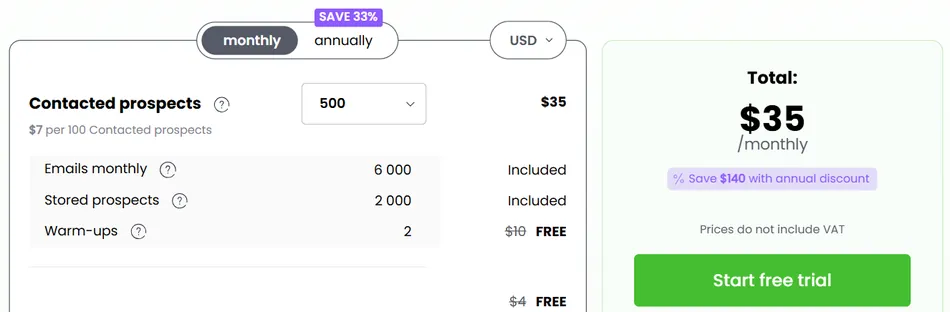
- Free Plan: $0/month with 500 contacted prospects/month, 6,000 emails/month, 2 email warm-ups, 400 Lead Finder credits/month
- Paid Plans: Starting at $35/month for 500 contacted prospects, scaling progressively. Annual plans save 33% (pay for 8 months, receive 12). 14-day free trial available.
Add-Ons: LinkedIn automation at $29/month per LinkedIn account, Agency Panel at $27/month per active client.
Who Should Use Woodpecker?
Choose Woodpecker if:
- Your team needs native CRM integrations with HubSpot, Pipedrive, or Zoho CRM and wants contact data and campaign activity to sync without Zapier or manual exports
- You operate under GDPR or European data residency requirements and need EU-based hosting with ISO 27001 certification and a named Data Protection Specialist
- You want deliverability protection automated rather than manually configured, with Adaptive Sending, free email verification, and free warm-up included
6. Lemlist - Best Alternative for Creative Multichannel Outreach with Visual Personalization
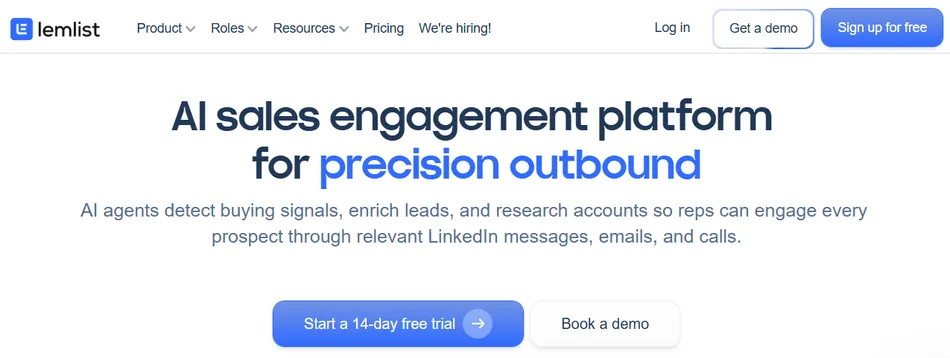
Lemlist is a multichannel sales engagement platform that combines a 600M+ B2B lead database, automated outreach across email, LinkedIn, WhatsApp, and phone, and built-in deliverability tooling. Where other cold email platforms optimize for send volume, Lemlist treats every touchpoint as a chance to stand out visually and across channels. Its key capabilities include:
Dynamic personalized images that embed each prospect’s name, company logo, or website screenshot using a custom image template editor
Native LinkedIn automation including profile visits, connection requests, direct messages, and AI-cloned voice notes
Lemwarm email warm-up included free on all paid plans, powered by a network of 10,000 users across 20,000+ domains in 150+ countries
Personalized landing pages generated per prospect with custom variables and embedded CTAs
Advanced behavioral conditions that branch sequences based on prospect interactions
Why Choose Lemlist Over GMass for Creative Multichannel Outreach
Here’s where Lemlist pulls ahead:
- Visual Personalization Beyond Text Variables
GMass personalizes with text-based merge fields. Lemlist goes further with dynamic personalized images that generate unique visuals for each prospect (a whiteboard with their name, a mock dashboard with their company logo). In inboxes full of plain-text cold emails, images get noticed.
The personalization extends to landing pages that display each recipient’s details. Lemlist also supports AI voice cloning for LinkedIn voice notes in 9 languages.
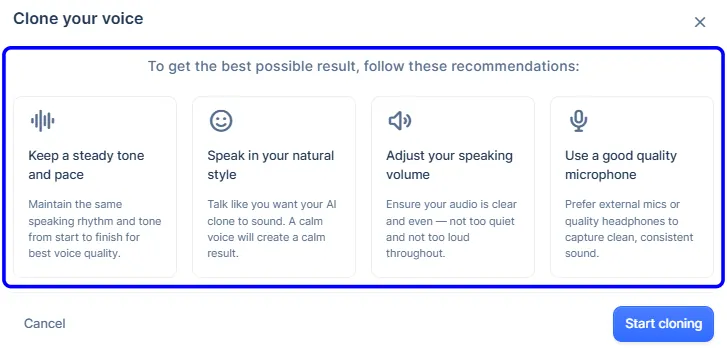
Source: lemlist AI Voice Cloning
- Native LinkedIn Automation Inside Email Sequences
GMass is email-only. Lemlist embeds five automated LinkedIn actions in the sequence builder: profile visits, connection requests, direct messages, voice notes, and feed engagement. These run natively via a Chrome extension with daily limits and human-like delays. Lemlist reports that adding LinkedIn steps generates 2.5x more replies compared to email-only sequences.
- Built-In Deliverability with Lemwarm at No Extra Cost
Lemlist includes lemwarm Essential free on every paid plan. The warm-up network spans 20,000+ domains across 150+ countries, and the platform includes a Deliverability Hub dashboard and a Matching ESP feature. Spendesk reported a 96% deliverability rate after adopting Lemlist.
🏅 NOTE: We also evaluated Mailshake and Reply.io for the creative outreach slot. Mailshake offers solid email sequences with a clean interface, and Reply.io provides multichannel capabilities with LinkedIn steps. But Lemlist offers the most differentiated creative approach, combining personalized images, AI voice cloning, dynamic landing pages, and native LinkedIn automation.
Lemlist Pricing
Lemlist uses a per-seat subscription model with monthly, quarterly (10% off), and annual (20% off) billing:
- Email Pro: $79/user/month (monthly) / $63/user/month (annual) with up to 3 sending addresses, 600M+ lead database, AI personalization, lemwarm, CRM integrations. Does not include LinkedIn automation or multichannel inbox.
- Multichannel Expert: $109/user/month (monthly) / $87/user/month (annual) adds LinkedIn automation, built-in dialer, unified multichannel inbox, and manual task steps.
- Enterprise: Custom pricing with minimum 5 seats, SSO/SAML, and dedicated account manager.
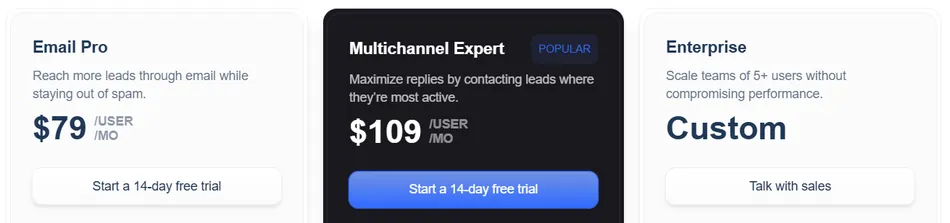
A 14-day free trial with full Multichannel Expert access is available, no credit card required.
Note: Lemlist charges per seat, while platforms like Instantly offer unlimited accounts. Teams with many senders will find per-seat pricing more expensive at high volume. Lemlist’s sending policy also prohibits third-party sending, making it unsuitable for lead generation agencies sending on behalf of clients.
Who Should Use Lemlist?
Choose Lemlist if:
- Your outreach strategy depends on standing out visually, with personalized images, dynamic landing pages, and AI voice notes that email-only platforms cannot offer
- You need LinkedIn automation integrated into your email sequences with behavioral branching that adapts steps based on prospect actions
- You are a B2B sales team running personalized outreach across multiple channels and value reply rates over raw send volume
7. Mailmeteor - Best Alternative for Free, Privacy-First Gmail Mail Merge

Mailmeteor is a Gmail-native email outreach and inbox management platform that lets users send personalized bulk emails from their existing Gmail or Outlook account. Where GMass requires a paid subscription starting at $29.95/month, Mailmeteor offers a permanently free tier with 50 emails per day.
With 7 million users and a 4.9/5 rating from over 11,698 reviews on the Google Workspace Marketplace, it has the strongest user trust of any tool in the Gmail mail merge category. Its key capabilities include:
Mail merge from Gmail, Google Sheets, Google Docs, Microsoft Excel, or the Mailmeteor Dashboard
Email tracking with open, click, reply, bounce, and unsubscribe monitoring plus bot detection
BounceShield email verification with 15+ checks per address and a 99% deliverability guarantee
Autopilot throttled sending and email warm-up via a network of 35,000+ trusted inboxes
AI Email Assistant Chrome extension with auto-labels, context-aware draft replies, and thread summaries
Why Choose Mailmeteor Over GMass for Free, Privacy-First Mail Merge
Here’s where Mailmeteor pulls ahead:
- A Free Tier That Covers Real Use Cases
GMass requires a paid subscription starting at $29.95/month for core features. Mailmeteor’s Hobby plan is permanently free with 50 emails per day and 100 emails per month, plus mail merge from Google Sheets, Gmail, Google Docs, and Excel, email templates, tracking, and scheduled sends.
For a teacher sending weekly updates, a nonprofit coordinator emailing volunteers, or a freelancer running small-batch outreach, this free allowance covers the job. Even the Starter tier at $4.99/month unlocks 250 emails/day, Autopilot sending, email verification, and reply detection. That’s $59.88/year versus $359.40/year for GMass Standard (roughly 83% less).
- A Privacy-First Permission Model
GMass and many competitors require read access to the user’s entire Gmail inbox. Mailmeteor requests only four permissions: spreadsheet access, send-email-on-behalf, Firebase connectivity, and sidebar display, and does not request permission to read, modify, or delete existing emails.
The company passes annual CASA Tier 3 security assessments (the highest tier in Google’s App Defense Alliance framework) and has been Recommended by Google for two consecutive years. For regulated industries, educational institutions, or anyone uncomfortable granting broad inbox access, this matters.
- The Highest-Rated Gmail Mail Merge Add-On
With 11,698+ reviews at 4.9/5 on the Google Workspace Marketplace and Google’s own Recommended designation, Mailmeteor has more validated user trust than any competitor in the category. Reviewers consistently cite its intuitive interface, compared to GMass’s more cluttered settings.
Source: Mailmeteor in Google Recommendation
🏅 NOTE: We also evaluated Brevo and Apollo.io for the “free alternative” slot. Brevo offers a free plan with its own sending infrastructure suited to marketing newsletters, and Apollo provides a free tier focused on prospecting and CRM. But Mailmeteor offers the most direct free Gmail mail merge experience for users who need personalized bulk email from their own inbox without a subscription.
Mailmeteor Pricing
- Hobby (Free): Permanently free with 50 emails/day, 100 emails/month, 3 campaigns, 5,000 contacts. Includes mail merge, tracking, templates, and schedule send.
- Starter: $4.99/user/month ($59.99/user billed annually) with 250 emails/day, 5,000 emails/month, Autopilot, BounceShield, reply detection, Zapier integration.
- Premium: $14.99/user/month ($179.99/user billed annually) with up to 1,000 emails/day, follow-up sequences, AI auto labels and drafts, email warm-up, CRM integration.
- Professional: $29.99/user/month ($359.99/user billed annually) with up to 2,000 emails/day, inbox rotation, dedicated onboarding, account manager.
A 30-day no-questions-asked refund policy applies to all paid subscriptions.

Who Should Use Mailmeteor?
Choose Mailmeteor if:
- You need free or affordable mail merge inside Gmail, and the permanently free Hobby tier or $4.99/month Starter plan covers your sending volume
- You are uncomfortable granting broad inbox permissions to third-party tools and want a minimal-permission add-on backed by Google’s security assessments
- Your sending volume is moderate (under 2,000 emails/day) and you want a clean interface without the complexity of a full sales engagement platform
The Final Verdict
GMass works well as an affordable, Gmail-native email platform for mail merge and cold outreach. But growing teams often need specialized tools that go beyond what a browser extension can offer. Based on our research, here are the best alternatives:
- Instantly for scaling cold email beyond Gmail’s sending limits with unlimited accounts and built-in warmup
- Saleshandy for cost-effective scaling with contact-volume pricing and an 800M+ prospect database
- Apollo for consolidating your data provider, outreach tool, dialer, and CRM into one platform
- Smartlead for agency-scale cold email with white-label client workspaces and centralized reply management
- Woodpecker for enterprise cold email with native CRM integrations and GDPR-compliant EU hosting
- Lemlist for creative multichannel outreach with personalized images, LinkedIn automation, and AI voice notes
- Mailmeteor for free, privacy-first Gmail mail merge with the strongest Google Workspace reputation in the category
You don’t have to choose between GMass and these alternatives. Many teams use GMass alongside a specialized tool to cover gaps. Consider your sending volume, team size, channel requirements, and budget when deciding which solution fits.
Most of these platforms offer free plans or free trials so you can test them before committing. Start with the alternative that addresses your biggest pain point and build from there.
GMass Alternatives FAQ
Why do businesses look for GMass alternatives?
GMass works well as a Gmail-native email tool, but teams often outgrow it as their outreach scales.
The most common reasons: Gmail’s daily sending limits constrain campaign volume, there are no native CRM integrations with Salesforce or HubSpot, there’s no built-in prospect database (requiring external list-building), the Chrome-and-Gmail-only requirement excludes Outlook users, and there’s no multichannel capability for LinkedIn automation or phone dialing.
What is the best overall GMass alternative?
There is no single best alternative because the right choice depends on your needs. Instantly is the strongest option for high-volume cold email with unlimited sending accounts. Saleshandy is ideal for teams wanting cost-effective scaling without per-seat pricing. Apollo is best for teams that need a complete sales intelligence and outreach platform with a built-in contact database and CRM.
Is there a free alternative to GMass?
Yes. Mailmeteor offers a permanently free plan with 50 emails per day and 100 emails per month, including mail merge from Google Sheets, email tracking, and scheduled sends.
Apollo also offers a free-forever plan with 900 credits per year, 2 active sequences, and access to its 270M+ contact database. Woodpecker provides a free plan with 500 contacted prospects per month and 6,000 emails per month.
Which GMass alternative is cheapest for high-volume cold email?
Saleshandy’s Outreach Starter plan at $25/month (billed annually) includes unlimited email accounts, 2,000 active prospects, and 6,000 emails per month. Smartlead’s Base plan at $39/month also includes unlimited accounts with 6,000 emails per month. Instantly starts at $47/month with unlimited accounts and 5,000 emails per month. All three provide more sending infrastructure than GMass’s Gmail-dependent approach.
Which alternative is best for agencies managing multiple clients?
Smartlead is built for agency workflows, offering white-label client workspaces, a centralized Master Inbox across all clients and campaigns, and tiered AI warmup pools. Saleshandy’s Scale plan also supports agencies with white-labeling, unlimited clients, and 1,000-account sender rotation.
Both platforms charge by usage volume rather than per seat, making them more cost-effective for agencies than GMass’s per-user pricing.
Can I use these alternatives alongside GMass?
Yes. Many teams use GMass for lightweight mail merge and newsletter sending while adding a specialized tool for high-volume cold outreach, multichannel sequences, or CRM-integrated workflows.
For example, you might keep GMass for internal communications and quick mail merges while using Instantly or Saleshandy for prospecting campaigns. The tools on this list are not mutually exclusive with GMass.
Which GMass alternative works with Outlook?
GMass requires Gmail and Chrome exclusively. Saleshandy, Instantly, Apollo, Smartlead, Woodpecker, and Lemlist all support both Gmail and Outlook (Microsoft 365) via native OAuth connections, plus SMTP/IMAP for other providers. Mailmeteor also supports Outlook in addition to Gmail. If your team includes Outlook users, any of these alternatives removes the browser and email provider restriction.
How difficult is it to switch from GMass to one of these alternatives?
The difficulty depends on your current workflow. If you primarily use GMass for mail merge from Google Sheets, Mailmeteor offers the most similar experience with minimal adjustment.
If you’re switching to a standalone platform like Instantly or Saleshandy, the main work involves connecting your email accounts, importing your contact lists, and recreating any active follow-up sequences. Most platforms offer free trials (7 to 14 days) so you can test the workflow before committing.