Choosing between Reply.io and Woodpecker comes down to five questions:
- Do you need multichannel outreach across email, LinkedIn, WhatsApp, SMS, and calls, or is email your primary channel?
- Are you a solo operator watching costs, or a growing sales team willing to pay per user for AI capabilities?
- Do you want an AI agent that prospects, writes, and replies on your behalf, or do you prefer hands-on control over every message?
- Is contact-based pricing more important to you than per-user plans with channel add-ons?
- Are you running an agency managing multiple client campaigns from one dashboard?
Here’s what we recommend:
👉 Reply.io is a multichannel platform for sales teams that want to engage prospects across email, LinkedIn, WhatsApp, SMS, and calls from a single sequence. Its standout feature is Jason AI, an autonomous SDR agent that finds prospects from a 1 billion+ contact database, personalizes messages, handles replies, and books meetings around the clock.
Reply.io serves over 3,000 companies including Adobe and Strava, and was named a G2 Top 50 Sales Product of 2024.
The downsides: per-user pricing starts at $49/user/month for email-only and climbs fast with channel add-ons, and users report a steep learning curve and occasional bugs that disrupt campaigns.
👉 Woodpecker is a cold email platform built for teams and agencies that prioritize inbox placement. It bundles free email verification, free warm-up, inbox rotation, and adaptive sending into every plan, with unlimited team members and email accounts at no extra cost.
Founded in Poland and publicly traded on the Warsaw Stock Exchange, Woodpecker serves 4,500+ B2B clients in 110 countries and offers a dedicated Agency Panel for managing client campaigns from a single dashboard.
The trade-off: no native phone or SMS channels, no built-in AI SDR agent, and add-on pricing for LinkedIn, lead finder credits, and agency features that can add up.
You can explore Reply.io or Woodpecker directly, or read on for our full comparison.
Reply.io vs Woodpecker at a glance
| Reply.io | Woodpecker | |
|---|---|---|
| Core Focus | AI multichannel sales engagement | Deliverability-first cold email |
| Starting Price | $49/user/month (email only, annual) | $35/month for 500 contacts |
| Pricing Model | Per user, per month | Per contacted prospect, per month |
| Team Members | Paid per seat | Unlimited, free |
| Connected Email Accounts | Unlimited (paid plans) | Unlimited, free |
| Channels | Email, LinkedIn, WhatsApp, SMS, Calls | Email, LinkedIn (add-on) |
| AI SDR Agent | Jason AI (autonomous prospecting + replies) | None (OpenAI writing assist only) |
| B2B Database | 1 billion+ contacts | 1 billion+ contacts (Lead Finder add-on) |
| Email Warm-up | Unlimited (paid plans) | Free (Mailivery/Warmy integration) |
| Email Verification | $5 per 1,000 validations | Free, automatic (Bouncer) |
| Agency Features | Agency plan from $210/month | Agency Panel from $27/client/month |
| Free Plan | Yes (limited, no sending) | Yes (500 contacts/month, sends included) |
| Best For | Sales teams wanting AI + multichannel | Teams and agencies prioritizing deliverability |
The core difference: AI multichannel vs deliverability-first email
Reply.io and Woodpecker started from the same premise (automating cold email follow-ups) but have grown in opposite directions.
Reply.io began in 2014 as a simple email automation tool and expanded into a multichannel sales engagement platform. The company bet on AI: its Jason AI agent can find prospects, research them, write personalized sequences across email, LinkedIn, WhatsApp, and SMS, handle replies, and book meetings.

Reply.io assumes you want to reach prospects on whatever channel they prefer, and that AI should do most of the work. The platform hit $14.7M in revenue in 2024 with roughly 105 to 112 employees and serves over 3,000 teams worldwide.
Woodpecker launched in 2015 in Wroclaw, Poland, born from an accidental pivot. Its founders built internal cold email automation while prospecting for a fitness app, then realized the automation was more valuable than the app. Woodpecker bet on deliverability.
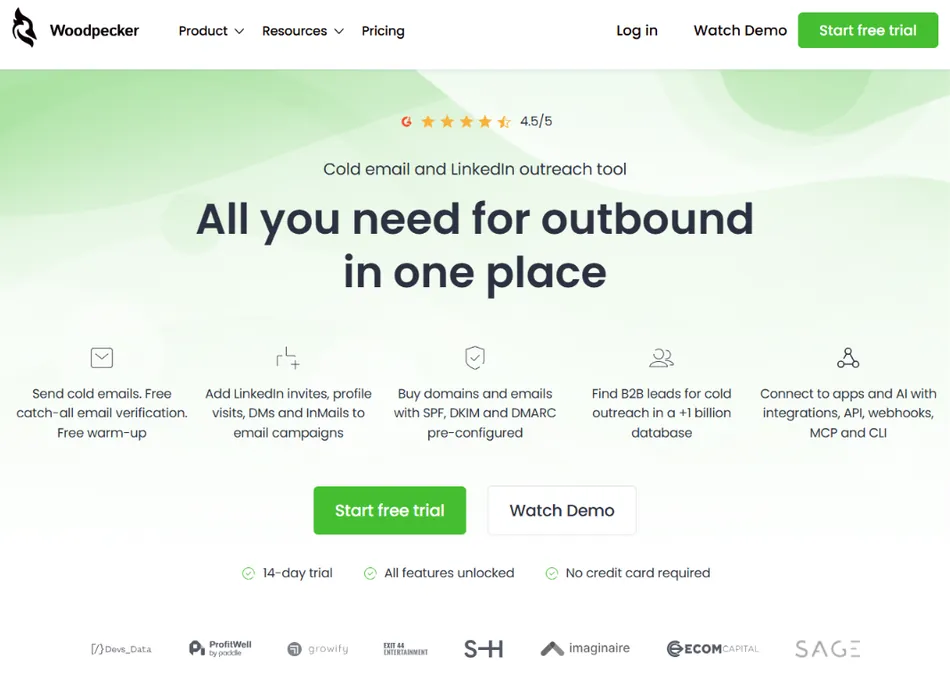
Every design decision, from Adaptive Sending (which throttles volume automatically) to free Bouncer verification on every send, is built to keep emails landing in the primary inbox.
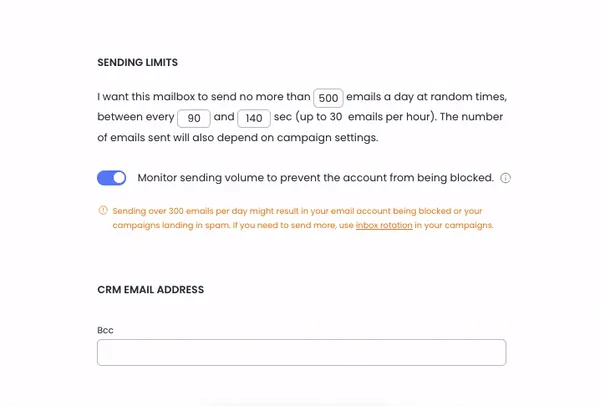
Source: Woodpecker
The company is publicly traded on the Warsaw Stock Exchange (ticker: WPR) with over 60 employees and 4,500+ B2B clients.
This split shapes what each platform does well and where each falls short. Reply.io gives you more channels and more AI but asks you to manage complexity. Woodpecker gives you fewer channels but works harder to make sure your emails reach the inbox.
Multichannel capabilities: Reply.io covers more ground
Reply.io offers multichannel sequencing across five channels: email, LinkedIn, WhatsApp, SMS, and calls. All five can be combined into a single automated sequence with conditional branching based on prospect behavior.
If a prospect opens an email but doesn’t reply, the sequence can route to a LinkedIn connection request. If they accept, it sends a DM. If they don’t, it triggers a call task. The system checks every 10 minutes for prospect actions and moves them to the next step immediately.
The catch: multichannel access costs extra. The $49/user/month Email Volume plan is email-only. The $89/user/month Multichannel plan includes base multichannel features, but LinkedIn automation adds $69/account and Calls/SMS adds $29/account.
A solo rep who needs email, LinkedIn, and SMS would pay $147/month total, more than triple the advertised base price.
Woodpecker supports email and LinkedIn. LinkedIn actions (profile visits, connection requests, direct messages, and InMail) can be embedded as steps within email sequences, with conditions that route prospects down different paths based on whether they accepted a connection request.
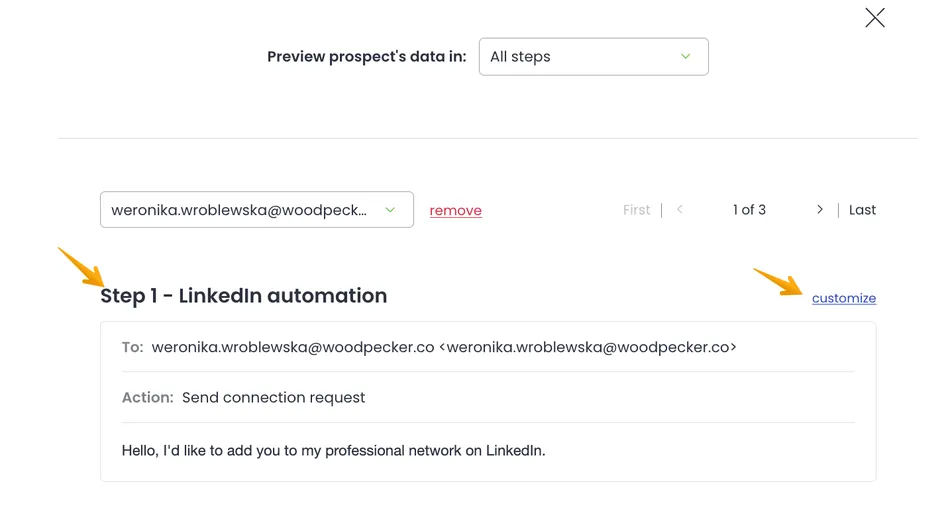
Source: Woodpecker
LinkedIn automation costs $29/month per connected LinkedIn account.
Woodpecker does not offer native phone dialing, SMS, or WhatsApp. Teams that need phone outreach will need a separate tool. An Aircall integration exists, but it’s not embedded in the sequence builder the way Reply.io’s calling is.
Reply.io wins on channel breadth. If your sales process depends on reaching prospects across multiple channels in coordinated sequences, Reply.io covers more ground.
AI capabilities: Reply.io’s Jason AI vs Woodpecker’s writing assist
This is the widest gap between the two platforms.
Reply.io has built Jason AI into a full autonomous SDR agent. Jason can find prospects from Reply’s 1 billion+ contact database, research each prospect across LinkedIn and company websites, build multichannel sequences with personalized messages, handle replies (answering questions, addressing objections, proposing next steps), and book meetings based on calendar availability.
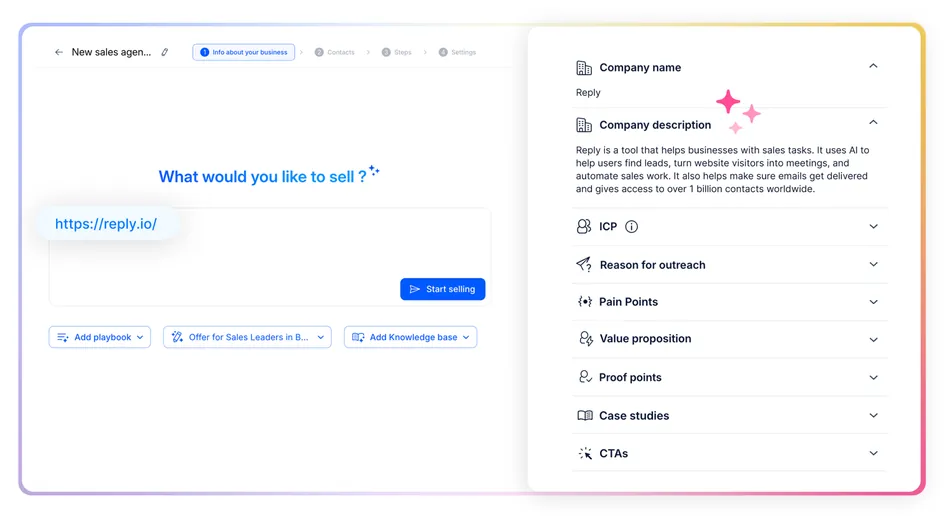
Source: Reply.io
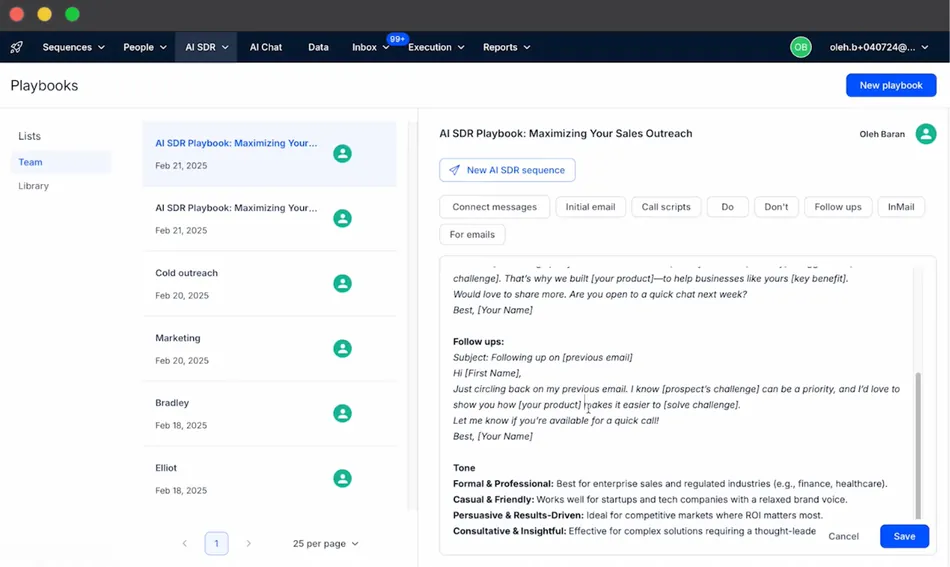
Users can upload PDFs, sales scripts, or writing samples for Jason to learn their style and tone.
Source: Reply.io
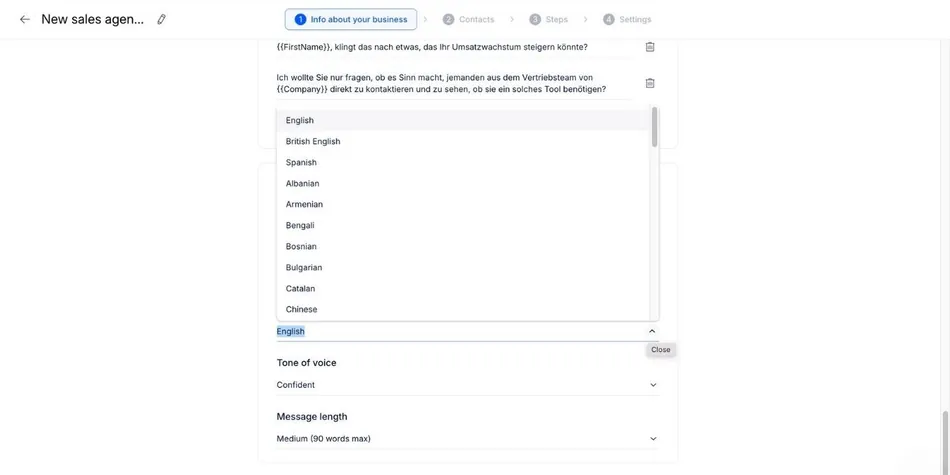
Jason operates in two modes: Approval Mode (you review every draft before sending) or Automatic Mode (Jason handles routine replies on its own). Users can choose their AI engine from Claude, Gemini, Mistral, or OpenAI, and Jason writes in 50+ languages.
Source: Reply.io
A three-level validation system checks brand voice, playbook compliance, and personalization accuracy before any email goes out.
The AI SDR plan is a separate pricing tier, starting at $500/month for 1,000 active contacts.
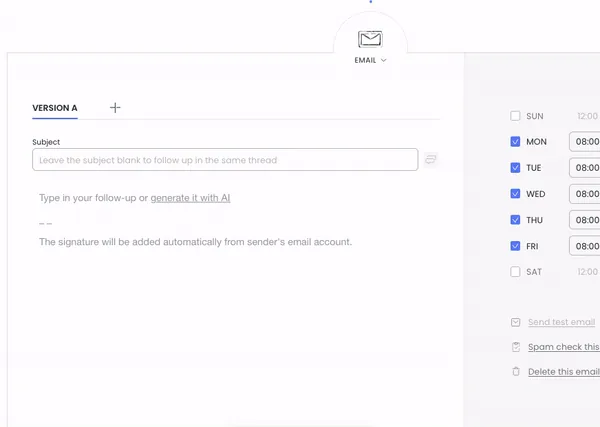
Woodpecker takes a lighter approach to AI. An OpenAI integration inside the campaign editor helps write email copy, and an AI Video product generates personalized videos. Woodpecker also offers AI-based response sentiment detection to surface hot leads.
Source: Woodpecker
But there is no autonomous AI agent that prospects, personalizes, and handles replies on its own.
Instead, Woodpecker invested in MCP Server and CLI integrations, letting AI agents built on other platforms manage Woodpecker campaigns programmatically. This positions Woodpecker as an execution layer in AI-driven stacks (where Clay handles enrichment and an external AI agent handles strategy) rather than building its own AI brain.
If you want AI to handle prospecting and reply management out of the box, Reply.io is the clear choice. If you prefer to control your outreach manually or build your own AI workflows through APIs, Woodpecker gives you the infrastructure.
Email deliverability: Woodpecker’s strongest advantage
Deliverability is where Woodpecker has invested most and where it holds a real edge.
Woodpecker bundles its entire deliverability stack at no extra cost on every plan:
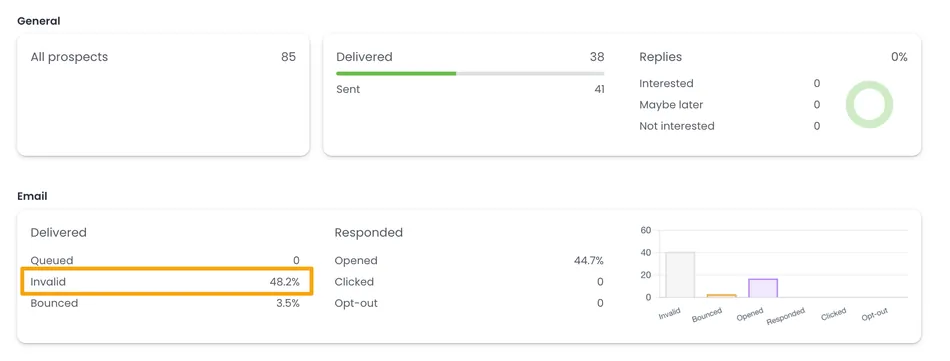
- Free email verification via Bouncer runs automatically before every send, catching invalid addresses before they inflate bounce rates. No manual action needed.
Source: Woodpecker
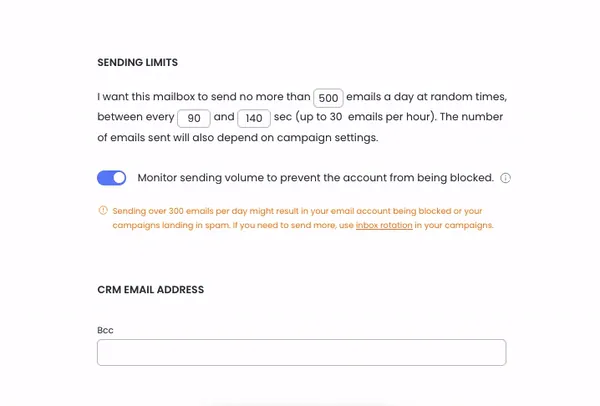
- Adaptive Sending runs in the background with no configuration, throttling volume when it approaches provider limits. Woodpecker’s data shows that Adaptive Sending produces 2.4 times fewer provider-imposed blocks.
Source: Woodpecker
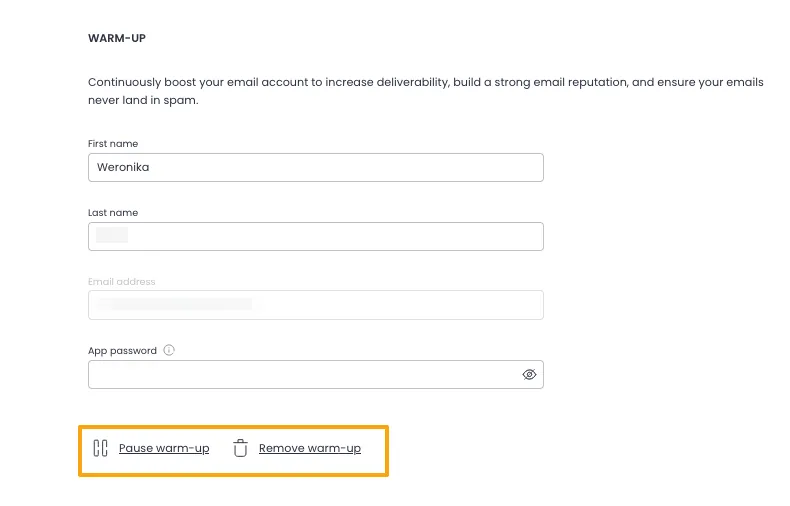
- Free warm-up via Mailivery or Warmy can seed actual campaign copy into warm-up traffic, training provider algorithms to associate your content with positive engagement before the campaign goes live.
Source: Woodpecker
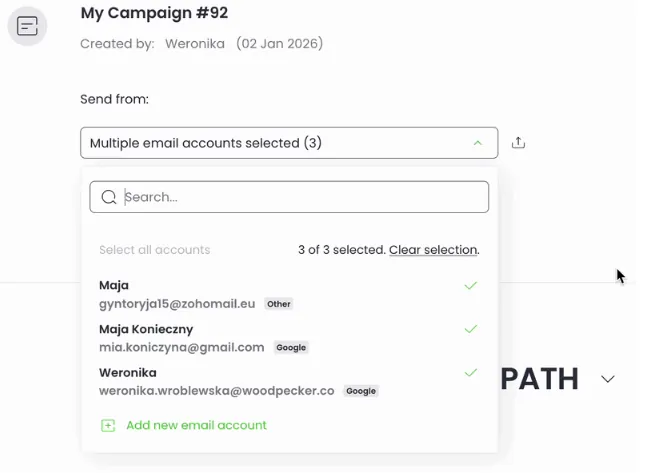
- Inbox rotation supports up to 100 email accounts per campaign, distributing prospects across mailboxes based on daily limits and current load.
Source: Woodpecker
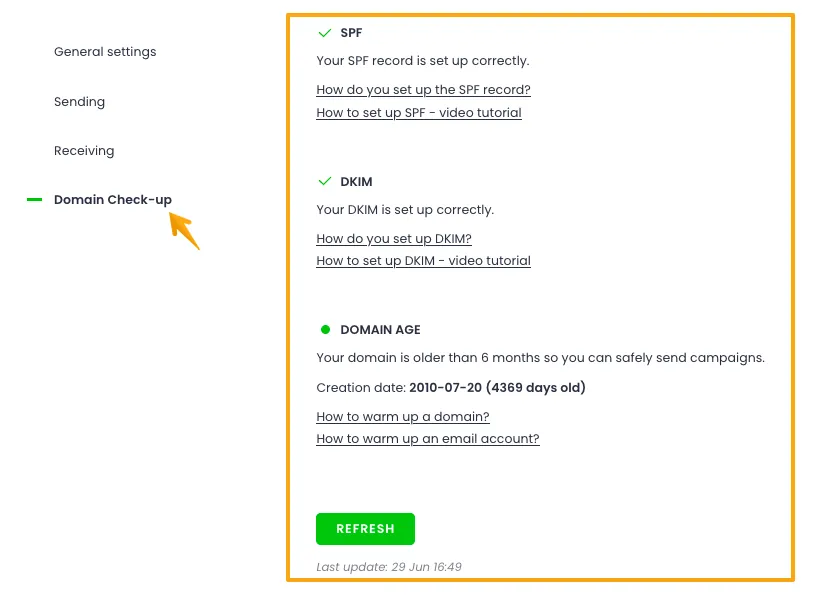
- Domain Audit checks SPF and DKIM records when an account is connected and at campaign launch.
Source: Woodpecker
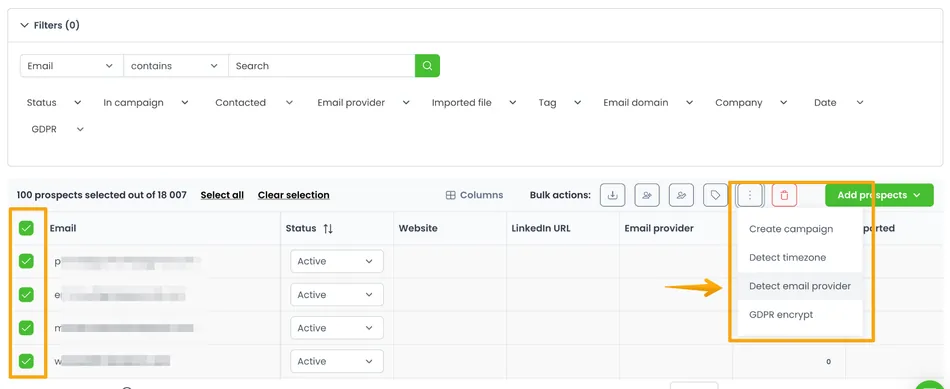
- ESP Matching matches the sending account to the recipient’s email provider.
Source: Woodpecker
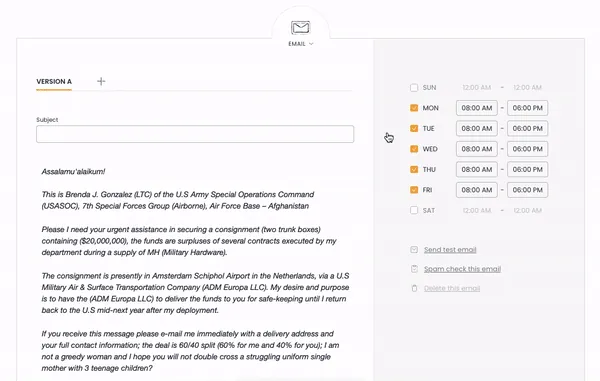
- A Spamword Finder scans email copy before launch to flag words likely to trigger spam filters.
Source: Woodpecker
Woodpecker also sells domains and email accounts directly with SPF, DKIM, and DMARC pre-configured, removing the most common setup friction for new sending infrastructure.
Reply.io offers unlimited email warm-up with every purchased mailbox, using a peer-to-peer network of real inboxes to build sender reputation.
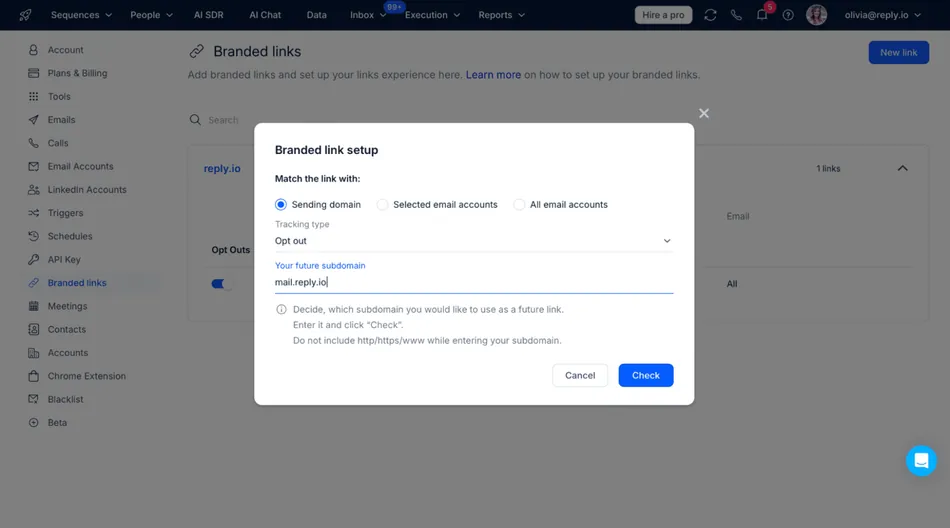
The platform supports inbox rotation to distribute volume across multiple mailboxes, plain text sending mode that strips HTML to bypass filters, and branded links that align with your sending domain.
Source: Reply.io
However, Reply.io charges $5 per 1,000 email validations as a separate cost, while Woodpecker includes unlimited verification for free. Reply.io also lacks Adaptive Sending, which throttles volume before provider limits are hit. Users have reported compliance issues leading to poor sender reputation and emails marked as spam.
For teams where inbox placement is the top priority, Woodpecker’s deliverability architecture and free infrastructure tools give it a clear advantage.
B2B data and prospecting
Both platforms offer built-in B2B databases, but they work differently.
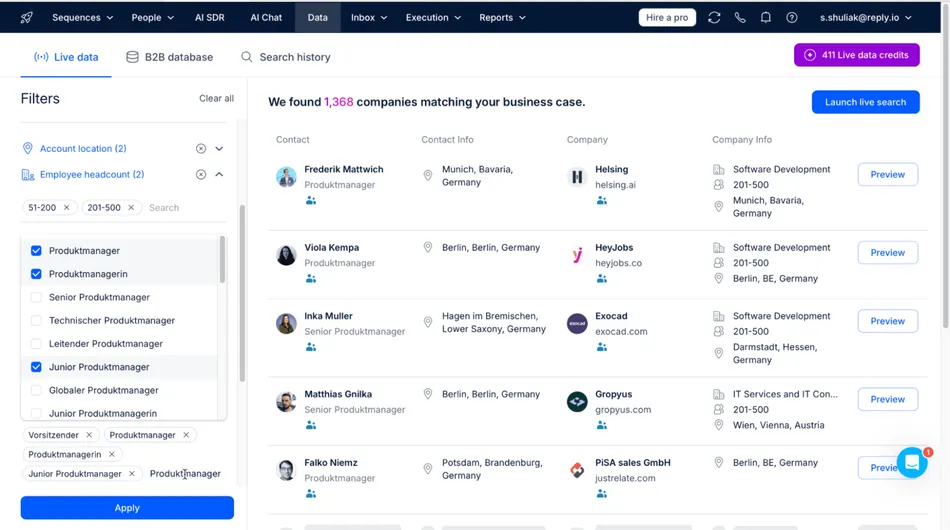
Reply.io provides access to over 1 billion contacts and roughly 60 million accounts across 150+ countries, including over 220 million U.S.-based contacts. The database searches the web in real time to keep contact information fresh.
Source: Reply.io
Users can filter by 16 criteria including industry, location, technologies used, department, seniority, and intent signals. The Findy Chrome extension lets you prospect directly from LinkedIn.
Data credits come with paid plans: 1,000 free credits on Sales Engagement and Agency plans, 200 on trial and Free plans. Credits cost 1 for viewing a contact without email, 2 for contacts with email, and 4 for intent data contacts.
Woodpecker offers a Lead Finder add-on with access to over 1 billion contacts. It has individual-level and company-level search tabs with filters for job title, country, industry, department, seniority, and company attributes. 400 credits come free per month with all plans, and additional credits start at $28/month per 2,000 credits.
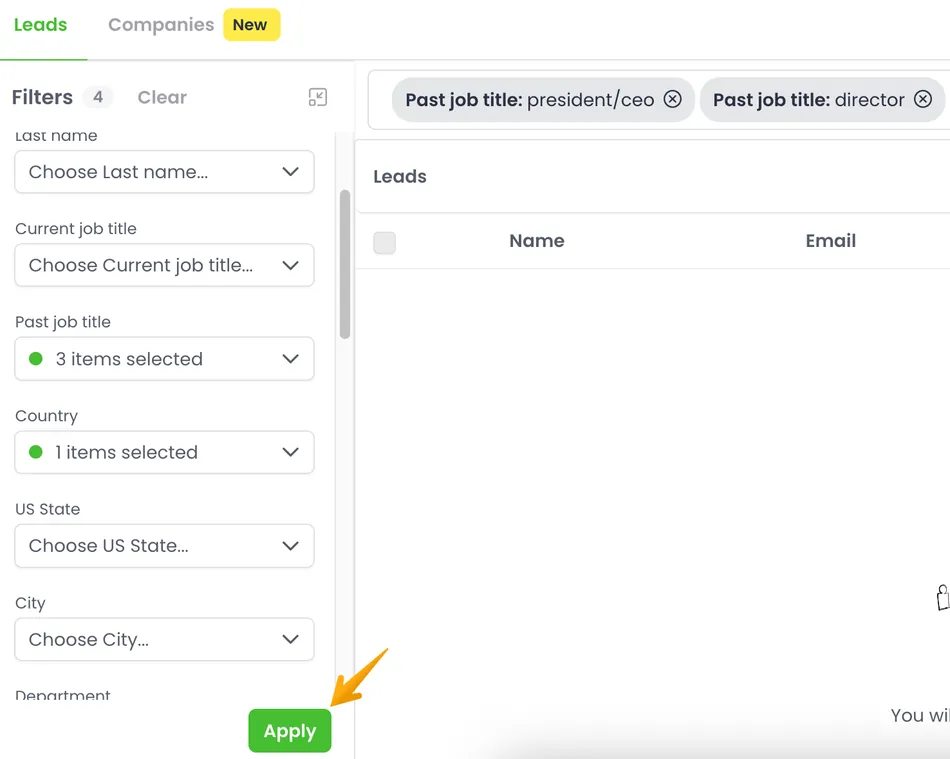
Source: Woodpecker
Neither platform offers native lead enrichment with technographic data, intent signals, or job-change alerts beyond basic filters. Both integrate with third-party enrichment tools like Clay for deeper data.
Reply.io has an edge here through its real-time data refresh and Jason AI’s ability to pull high-fit prospects by combining firmographics, hiring intent, and behavioral signals automatically. Woodpecker’s Lead Finder is more of a search engine that requires manual prospecting.
Agency features: Woodpecker’s dedicated panel
Both platforms serve agencies, but Woodpecker has invested more in the agency use case.
Woodpecker offers a dedicated Agency Panel with a two-layer system: an Agency HQ for billing and global settings, and a client management hub where all client sub-accounts live.
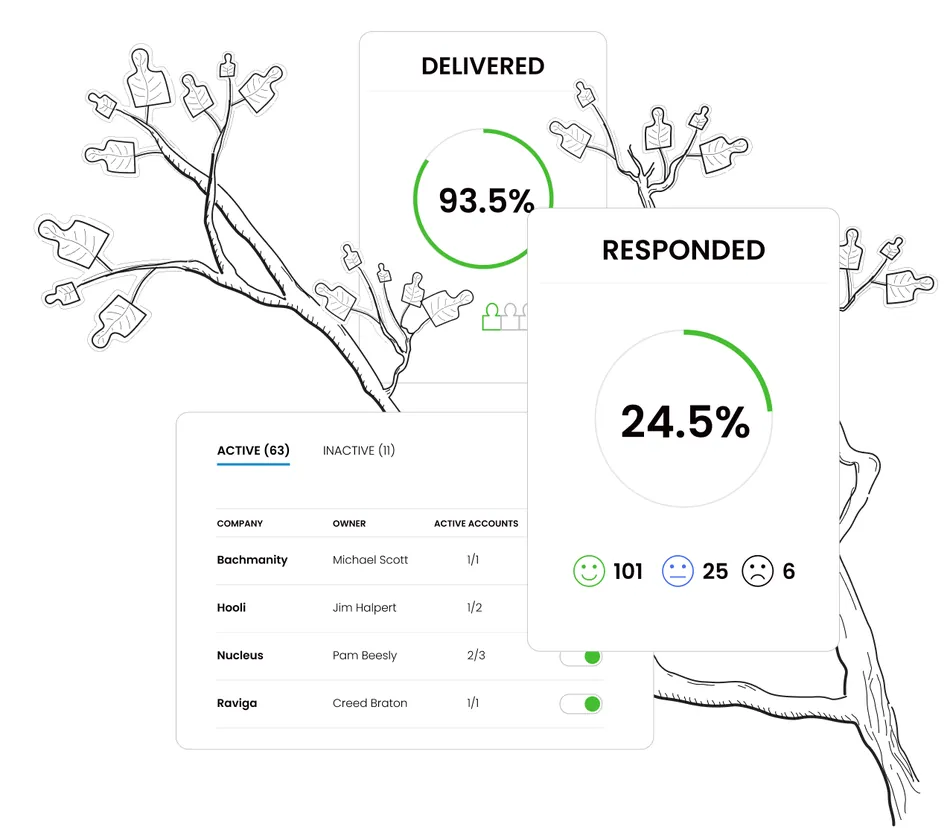
Source: Woodpecker
Key agency features include: a unified dashboard across all clients, Guest Viewer access so clients can review stats without full login credentials, global domain blacklisting across all client accounts, white-label notification emails, 24/7 deliverability monitoring with CSV/PDF exports, and unlimited team members at no per-seat cost.
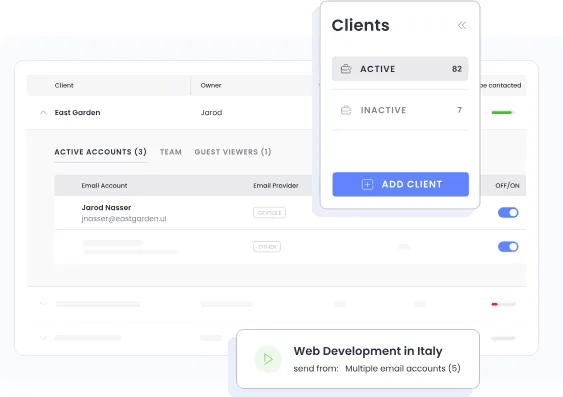
Source: Woodpecker
The Agency Panel costs $27/month per active client, with an optional White Label add-on at $5/month per client. A dedicated Agency API enables programmatic client account management.
Reply.io offers an Agency plan starting at $210/month that includes unlimited clients, unlimited users, multichannel sequences, and a dedicated support team. The plan includes 1,000 data credits per month, Jason AI, and multi-workspace management with team dashboards.
Woodpecker’s agency layer is more granular: per-client pricing, guest access for clients, global safety settings, and white-label reporting give agencies operational control that Reply.io’s flat agency plan doesn’t match. For agencies managing 10+ clients, Woodpecker’s dedicated architecture is the stronger choice.
Pricing comparison
The pricing structures differ fundamentally, making direct comparison tricky.
Reply.io charges per user, per month:
| Plan | Price (annual billing) | What’s Included |
|---|---|---|
| Free | $0 | AI sequence generator, Chrome extension, 200 data credits, no sending |
| Email Volume | $49/user/month | 1,000 active contacts, email-only automation |
| Multichannel | $89/user/month | Email + LinkedIn + WhatsApp + SMS + Calls (base) |
| AI SDR Starter | $500-$1,000/month | 1,000-3,000 contacts, Jason AI, all channels, unlimited users |
| Agency | $210/month | Unlimited clients/users, multichannel, Jason AI |
Hidden costs surface fast: LinkedIn automation adds $69/account, Calls/SMS adds $29/account, and email validation costs $5 per 1,000. A mandatory 3-month minimum commitment is reportedly not disclosed clearly during signup.
Woodpecker charges per contacted prospect, per month:
| Plan | Price | What’s Included |
|---|---|---|
| Free | $0/month | 500 contacts, 6,000 emails, 2 warm-ups, 400 Lead Finder credits |
| Paid (entry) | $35/month | 500 contacts, unlimited email accounts, unlimited team members |
| Scaled | Varies ($7 per 100 contacts) | 2,000 to 1,000,000+ contacts |
Add-ons: LinkedIn $29/month per account, extra warm-ups $5/month each, Lead Finder credits from $28/month, Agency Panel $27/month per client, API access is a separate paid add-on. Annual plans save 33%.
Woodpecker offers better contract terms: no contract required, cancel anytime, and accounts can be paused at $10/month instead of canceled. Reply.io’s cancellation process has drawn complaints, with users reporting difficulty removing credit cards and unexpected charges from auto-renewal.
For a solo operator sending email only, Woodpecker is cheaper: $35/month vs. $49/user/month. For a 5-person sales team needing multichannel outreach, costs depend on volume and channels, but Reply.io’s per-user model scales faster. Both platforms have add-on structures that can push the real cost well above the advertised base price.
Campaign building and automation
Reply.io builds sequences through a visual builder combining multiple channel touchpoints. Conditional Sequences enable branching logic based on prospect actions (email opened, LinkedIn connection accepted, link clicked).
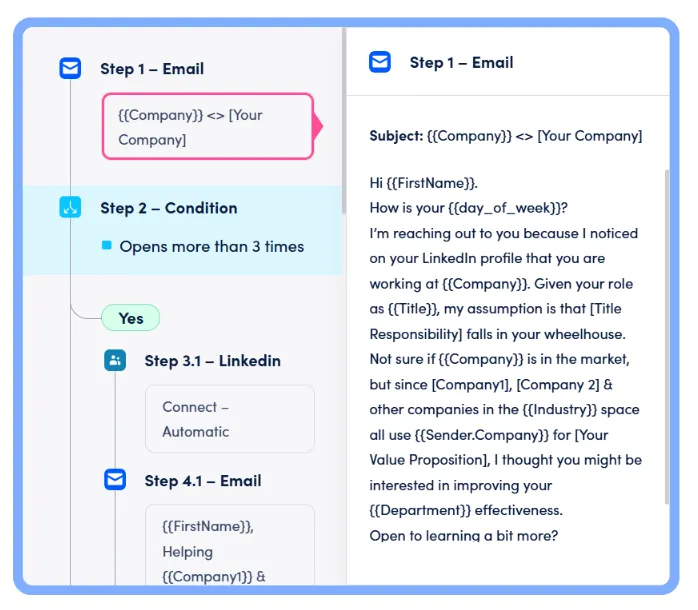
Source: Reply.io
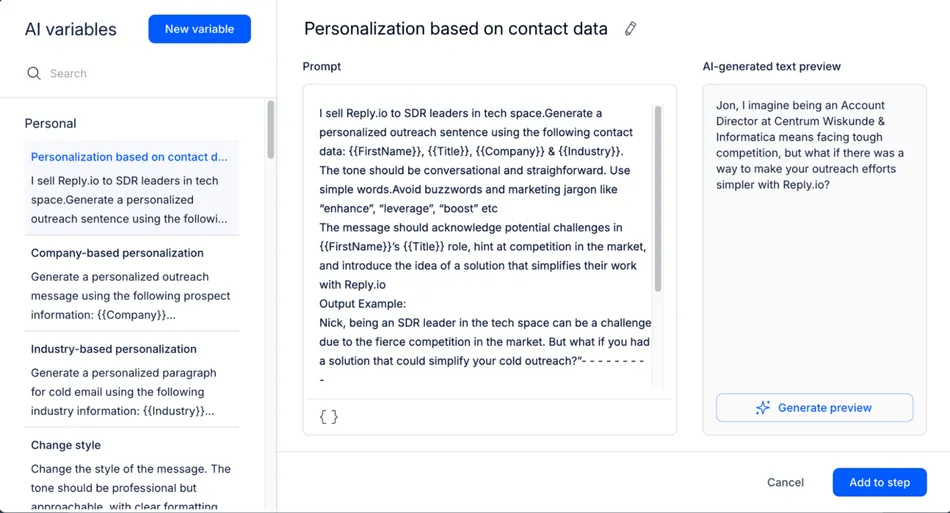
The system supports dynamic variables that generate content at send time and AI variables that create personalized content based on prompts. A/B testing launches with a single click. Sequences can run in manual, mixed, or fully automated modes.
Source: Reply.io
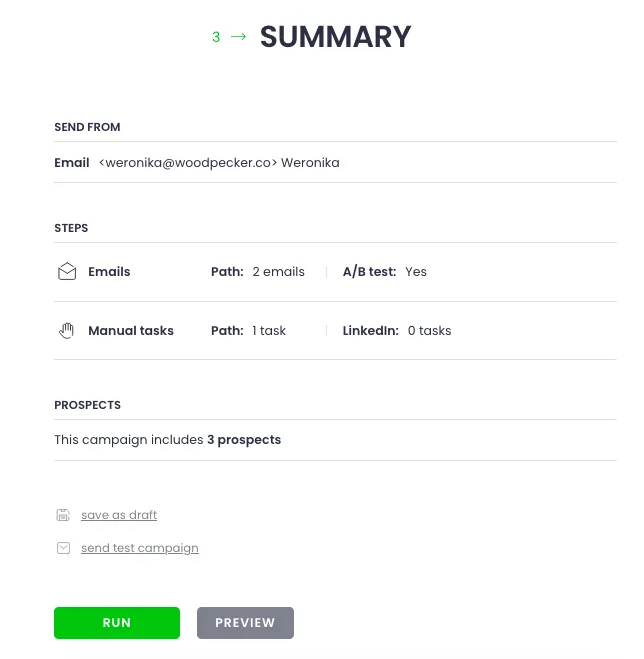
Woodpecker follows a structured 3-step editor: Path, Prospects, Summary. Condition-based campaigns split sequences into YES/NO paths based on opens, clicks, snippet values, or tasks.
Source: Woodpecker
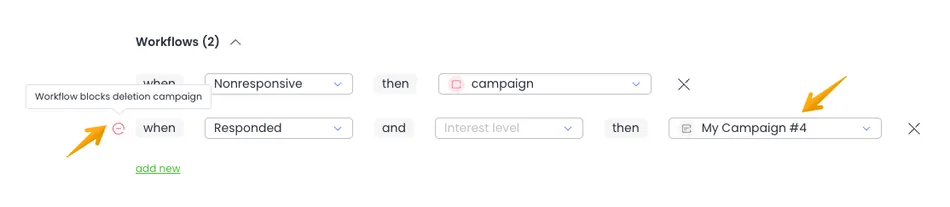
Woodpecker supports up to 5 A/B test variants per step, Spintax and Liquid Syntax for copy variations, and Workflows that move prospects between campaigns automatically based on status and AI-assigned interest level.
Source: Woodpecker
Both platforms handle the fundamentals well. Reply.io offers more channel variety within sequences and AI-generated content. Woodpecker offers more A/B test variants per step (5 vs. Reply.io’s standard split) and cross-campaign workflow automation without external tools.
One notable UX difference: multiple G2 reviewers flag Woodpecker’s lack of drag-and-drop reordering for sequence steps as frustrating. Reply.io’s interface, while more complex overall, handles sequence building more visually.
Integrations and technical infrastructure
Reply.io offers native two-way integrations with HubSpot (auto-syncs every 2 hours), Salesforce, and Pipedrive. The platform provides a full API with two versions and supports webhooks for real-time event notifications.
Third-party connections through Make, n8n, Zapier, and ApiX-Drive extend the integration ecosystem. Rate limits sit at 15,000 API calls per month per user.
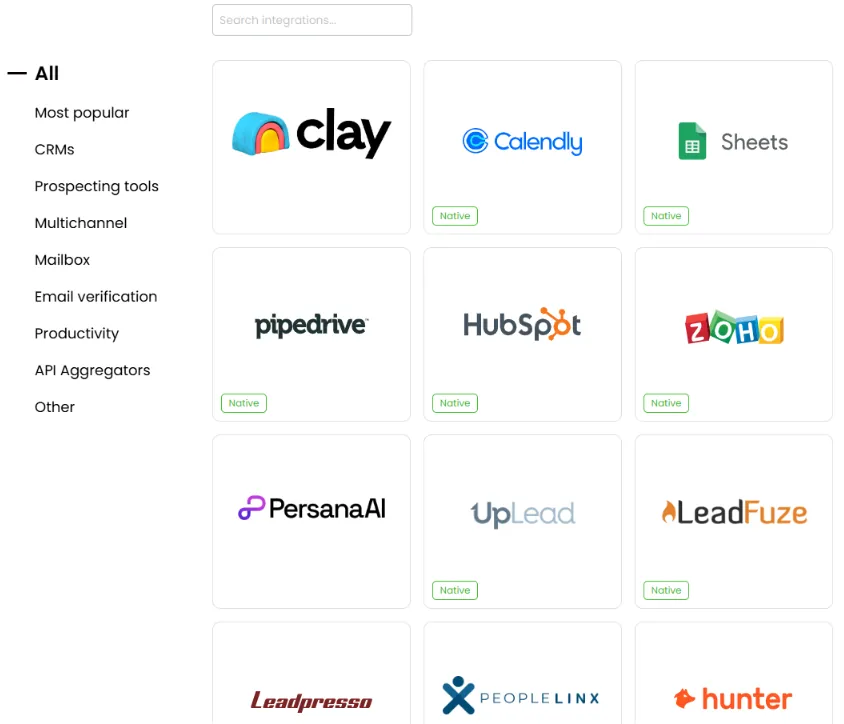
Woodpecker natively integrates with HubSpot, Pipedrive, and Zoho CRM, plus Calendly, Google Sheets, and prospecting tools like Clay and Persana AI. Zapier and Albato serve as automation bridges.
Source: Woodpecker
Woodpecker provides a RESTful API with a publicly maintained API roadmap, plus an MCP Server for AI agent control and a CLI for scriptable management. API access is a paid add-on.
Both platforms cover the major CRM integrations. Reply.io includes API access in its plans, while Woodpecker charges separately for it. Woodpecker’s MCP Server and CLI are unusual for a cold email tool and signal a developer-first approach that Reply.io matches with its broader Zapier ecosystem.
Reply.io vs Woodpecker: Which should you choose?
Choose Reply.io if:
- You need multichannel sequences across email, LinkedIn, WhatsApp, SMS, and calls in one workflow
- You want an AI SDR agent that can prospect, personalize, handle replies, and book meetings on its own
- Your team is willing to pay per-user pricing for deeper sales engagement features
- You sell into markets where prospects respond better to phone and SMS than email alone
- You need real-time intent signal monitoring and AI-driven lead discovery
- You prefer choosing your AI engine (Claude, Gemini, Mistral, or OpenAI) for message generation
- Your outreach operates in multiple languages (Jason AI supports 50+)
Choose Woodpecker if:
- Email deliverability is your top priority and you want free verification, warm-up, and adaptive sending built in
- You run a lead generation agency managing multiple client campaigns and need a dedicated agency dashboard
- You want unlimited team members and unlimited email accounts without per-seat charges
- You prefer contact-based pricing over per-user pricing
- You value contract flexibility (no minimums, pause at $10/month, cancel anytime)
- You need GDPR compliance built into the platform (EU headquarters, EU data storage)
- You want a permanent free plan that includes actual sending (500 contacts/month)
- Your team is technical and wants API, MCP Server, and CLI access for programmatic campaign management
The choice comes down to what you’re optimizing for. Reply.io gives you more channels, more AI, and more automation at the cost of complexity and higher per-user pricing. Woodpecker gives you fewer channels but better deliverability infrastructure, more transparent pricing, and dedicated agency tools.
For sales teams running coordinated multichannel campaigns with AI-assisted prospecting, Reply.io is hard to match. For agencies and teams where every email needs to land in the primary inbox and cost predictability matters, Woodpecker delivers.
Try Reply.io or Woodpecker to see which fits your outreach needs.
Reply.io vs Woodpecker FAQ
What is the main difference between Reply.io and Woodpecker?
Reply.io is a multichannel sales engagement platform covering email, LinkedIn, WhatsApp, SMS, and calls with an autonomous AI SDR agent (Jason AI).
Woodpecker is a deliverability-first cold email platform that bundles free verification, warm-up, and adaptive sending, with LinkedIn available as an add-on. Reply.io optimizes for channel breadth and AI automation; Woodpecker optimizes for inbox placement and cost transparency.
Which platform is cheaper for a small team?
Woodpecker is generally cheaper for small teams because it charges per contacted prospect rather than per user, and includes unlimited team members and email accounts for free. A solo operator on Woodpecker pays $35/month for 500 contacts with full sending capability.
On Reply.io, the email-only plan starts at $49/user/month, and adding LinkedIn or SMS pushes the cost to $147/month or more per user.
Does Reply.io or Woodpecker have better email deliverability?
Woodpecker has stronger deliverability infrastructure out of the box. It includes free automatic email verification via Bouncer on every send, Adaptive Sending that throttles volume before provider limits are hit, and free warm-up with the option to seed campaign copy into warm-up traffic.
Reply.io offers unlimited warm-up and inbox rotation but charges $5 per 1,000 email validations separately and lacks an equivalent to Adaptive Sending.
Which platform is better for agencies?
Woodpecker is better suited for agencies thanks to its dedicated Agency Panel, which provides a unified client dashboard, guest viewer access for clients, global domain blacklisting across all accounts, white-label notification emails, and per-client pricing starting at $27/month per active client.
Reply.io offers an agency plan starting at $210/month with unlimited clients and users, but lacks the granular per-client management features that Woodpecker provides.
Can Reply.io’s Jason AI really replace an SDR?
Jason AI can handle many SDR tasks on its own: finding prospects from a 1 billion+ database, researching them, writing personalized multichannel sequences, handling replies, and booking meetings. It operates 24/7 and supports 50+ languages.
However, the AI SDR plan starts at $500/month, and quality depends on how well you configure playbooks, tone, and ICP settings. Most teams use Approval Mode initially to verify output quality before switching to fully automatic operation.
Does Woodpecker support phone calls or SMS?
No. Woodpecker supports email and LinkedIn outreach only. It has no native phone dialing or SMS capabilities. An Aircall integration exists for phone outreach, but calls and SMS are not embedded in the sequence builder the way they are in Reply.io. Teams running phone-heavy outreach workflows will need a separate tool alongside Woodpecker.
How do the free plans compare?
Woodpecker’s free plan is more functional for actual outreach: it includes 500 contacted prospects per month, 6,000 emails, 2 warm-ups, and 400 Lead Finder credits with full sending capability.
Reply.io’s free plan includes an AI sequence generator, Chrome extension, and 200 data credits, but cannot send automated emails.
Woodpecker lets you run real campaigns on the free tier; Reply.io’s free plan is limited to prospecting and planning.
Which platform has better contract flexibility?
Woodpecker offers more flexibility: no contract required, cancel anytime directly in the app, and a $10/month pause option that retains all account data.
Reply.io has a mandatory 3-month minimum commitment (which users report is not disclosed clearly during signup), auto-renewal enabled by default, and a cancellation process that multiple reviewers describe as difficult to navigate.