HeyReach has become one of the most talked-about tools in LinkedIn outreach. Founded in 2023 in Skopje, North Macedonia, the platform went from zero to $10M in revenue with a 23-person team by letting agencies and sales teams connect unlimited LinkedIn accounts under one roof for a flat monthly fee. Where most LinkedIn automation tools charge per seat and cap your sending accounts, HeyReach built its model around removing those constraints.
The result is a platform that works well if you’re scaling LinkedIn outbound across multiple accounts, but offers less if you’re a solo operator or need multichannel outreach in a single tool.
After analyzing the platform in detail, we believe HeyReach is the right choice if:
- You manage LinkedIn outreach across 5 or more sender accounts
- You’re an agency running campaigns for multiple clients and need workspace separation
- You want native integrations with Clay, Instantly, or Smartlead as part of your outbound stack
- You need a unified inbox to manage replies across dozens of LinkedIn accounts
- Account safety and sender rotation are top priorities for your outreach operation
However, HeyReach is not a good choice if:
- You only need one or two LinkedIn accounts for personal outreach
- You want a multichannel platform that handles email, SMS, and LinkedIn natively in one sequence
- You need CRM functionality beyond basic lead tagging and export
- You’re looking for a free plan to test with before committing
- Your outreach strategy doesn’t center on LinkedIn
If you’re ready to try it, you can get started with HeyReach here. Otherwise, keep reading for our full breakdown.
What is HeyReach?
HeyReach is a cloud-based LinkedIn automation platform built for agencies, sales teams, and outbound operators who need to run outreach at scale across multiple LinkedIn accounts.
Co-founders Nikola Velkovski (CEO) and Stefan Kotevski (CTO) previously built Howitzer, a Reddit DM automation tool. When Reddit’s policies and API limitations made that product unsustainable, they pivoted to LinkedIn automation and positioned HeyReach as “the first agency-friendly LinkedIn outreach tool”.
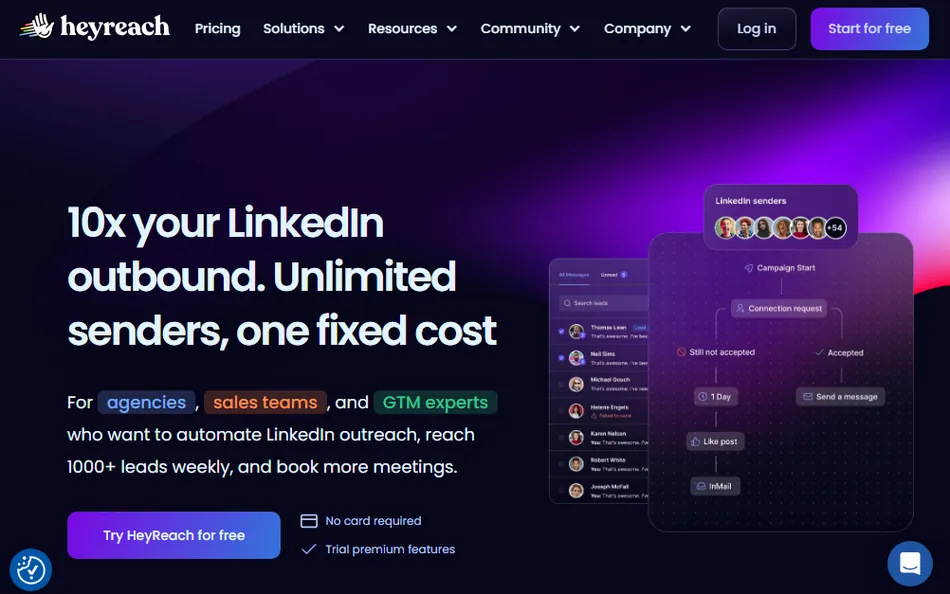
The core pitch is simple: connect unlimited LinkedIn sender accounts for one flat fee, automatically rotate outreach between them, and stay within LinkedIn’s daily limits while increasing total volume. HeyReach reports being trusted by 5,000+ companies and was named a 2026 Fastest Growing Product by G2.
HeyReach targets a specific buyer: the outbound operator managing LinkedIn campaigns across multiple accounts or clients who needs centralized control, workspace separation, and flat-rate pricing that doesn’t penalize scaling.
HeyReach Pros & Cons
| Pros | Cons |
|---|---|
| Unlimited LinkedIn sender accounts on Agency/Unlimited plans | No free plan (14-day trial only) |
| Flat-rate pricing favors teams with 5+ accounts | LinkedIn-only (email requires Instantly/Smartlead integration) |
| Unified inbox across all connected accounts | Attachment sending not yet supported in Unibox |
| Native Clay, Instantly, and Smartlead integrations | Reporting updates can lag by a few hours |
| Whitelabel and workspace separation for agencies | Growth plan pricing climbs steeply per additional sender |
| Account safety with dedicated residential proxies | All fees are non-refundable per terms of service |
| MCP server for AI workflow automation | Higher-tier plans required for whitelabel and dedicated onboarding |
Who Is HeyReach Best For?
HeyReach’s design favors teams scaling LinkedIn outreach across multiple accounts over individuals running personal campaigns. The platform works best where sender rotation, centralized inbox management, and workspace separation are operational requirements, not nice-to-haves.
It fits well for:
Outbound agencies managing multiple client accounts. The flat-rate pricing for 50 senders at $999/month or unlimited senders at $1,999/month makes economic sense when you’re running campaigns across 10, 20, or 50 LinkedIn accounts. Workspace separation, whitelabel branding, and the unified inbox eliminate the pain of logging in and out of client profiles.
Sales teams with 5 or more LinkedIn accounts. As ColdIQ’s CEO noted after reviewing 36 LinkedIn outreach solutions, if you plan to use 5+ accounts, the flat-rate model becomes a clear cost advantage over per-seat competitors. Leoron’s 50-person sales team is the kind of organization that benefits from centralized sending and reply management.
Growth and RevOps teams running Clay workflows. The native Clay integration lets enriched prospect data (AI-generated icebreakers, company research, custom variables) flow directly into LinkedIn sequences without manual CSV handling. If Clay is already central to your prospecting, HeyReach plugs in as the sending layer.
Teams combining LinkedIn and email outreach across separate tools. The native Instantly and Smartlead integrations let you route prospects between LinkedIn and email based on behavior (ignored connection request triggers email sequence, email reply pauses LinkedIn actions). This isn’t multichannel in a single tool, but it’s a practical coordination layer.
Organizations where LinkedIn account safety is a hard requirement. HeyReach provides dedicated static residential proxies per account, automatically freezes accounts approaching LinkedIn’s connection request limits, and respects LinkedIn’s 200-action-per-day limit. For teams whose LinkedIn accounts are business-critical, these guardrails matter.
Solo practitioners running outreach from a single LinkedIn account will find the pricing disproportionate to the value. The platform’s strengths only show up at scale.
HeyReach Review: How It Works & Key Features
Multi-Sender Campaign Management: HeyReach lets you connect unlimited LinkedIn accounts and auto-rotate sending between them.
This is the feature HeyReach was built around. When LinkedIn limited connection requests to 20-40 per day in May 2023, the only way to maintain high outreach volume was to distribute sending across multiple accounts. HeyReach treats this as a core feature rather than a workaround.
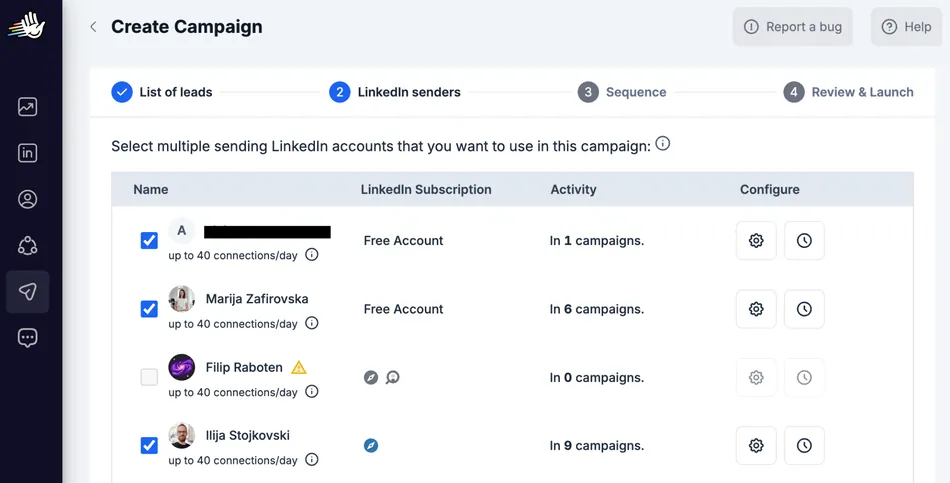
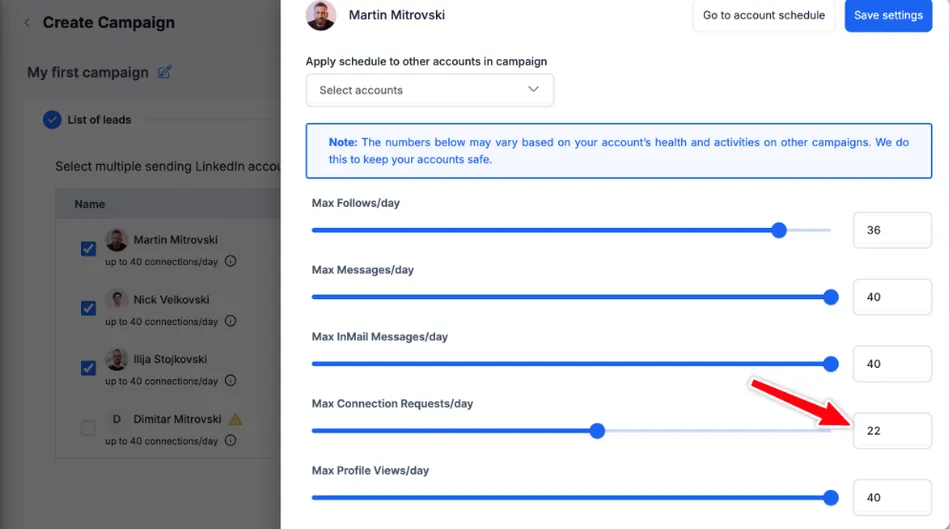
When creating a campaign, you select multiple LinkedIn senders and assign them to that campaign. The platform rotates outreach between them automatically, with daily limits set per sender, not per campaign. If a sender has a limit of 20 connection requests per day and is active in 3 campaigns, those limits are shared proportionally across all 3 campaigns.
Source: HeyReach
The system includes anti-duplication by design, preventing the same lead from being contacted by multiple senders in your organization. This works at the organizational level, not just within individual campaigns, which matters for agencies running overlapping client campaigns.
HeyReach recommends setting limits for each sender to 20-25 connection requests per day and states that it “will never ever try to bypass them or put your LinkedIn account at risk”. For campaigns using InMails, all selected senders must have LinkedIn Sales Navigator or Recruiter subscriptions.
Source: HeyReach
Campaign Sequencing: A visual workflow builder with conditional branching based on prospect behavior.
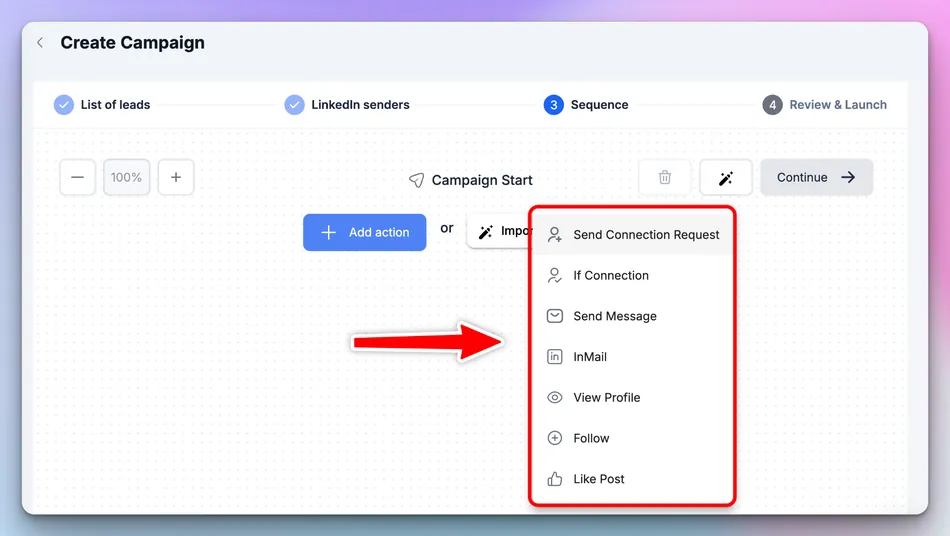
HeyReach’s sequence builder supports seven action types: Send Connection Request, If Connection (conditional branching), Send Message, InMail, View Profile, Follow, and Like Post. These actions chain together in a branching workflow with two paths: a “success branch” for positive outcomes (like accepted connection requests) and a left-side branch for when the desired response doesn’t come.
The “If Connected” conditional logic is useful for mixed lead lists. It routes leads who are already 1st-degree connections straight into messaging, while sending new prospects through the connection request flow first.
Source: HeyReach
All message actions support custom variables, fallback messages, and A/B testing with multiple variations. Connection requests can include ChatGPT-generated personalized notes created for each lead based on their LinkedIn profile.
The builder also includes validation rules that prevent common mistakes. For example, the Follow action can’t be placed after Send Connection Request because sending a connection request already makes the sender a follower. Send Message actions will fail on 2nd and 3rd degree connections, so the builder flags this before you launch.
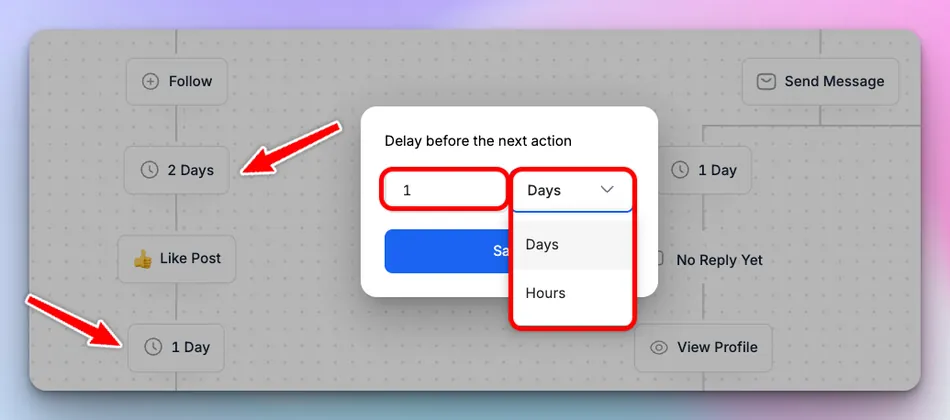
For active campaigns, you can modify delay times and message content without stopping the campaign, with changes applying only to future leads. Structural changes (adding or removing steps) require duplicating the campaign, which protects leads already in progress.
Source: HeyReach
Unified Inbox: Manage all LinkedIn conversations from every connected account in one place.
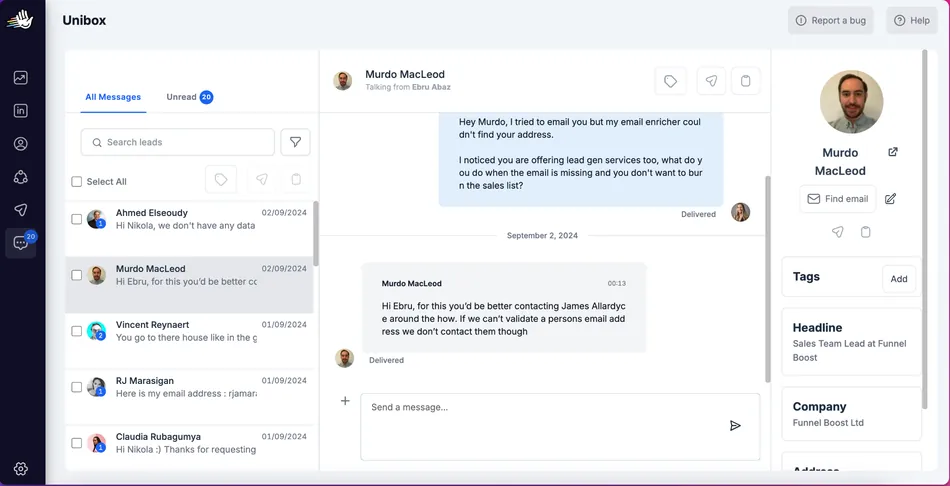
The Unibox pulls messages from all your connected LinkedIn accounts into one interface. For agencies or VAs managing 10, 20, or more LinkedIn profiles, this eliminates the constant logging in and out that makes multi-account management tedious.
The inbox has three panels: a conversation list with filters and search, a central messaging area, and a lead information panel for tagging and data management. You can filter by senders, campaigns, tags, message type, and answered vs. unanswered status.
Source: HeyReach
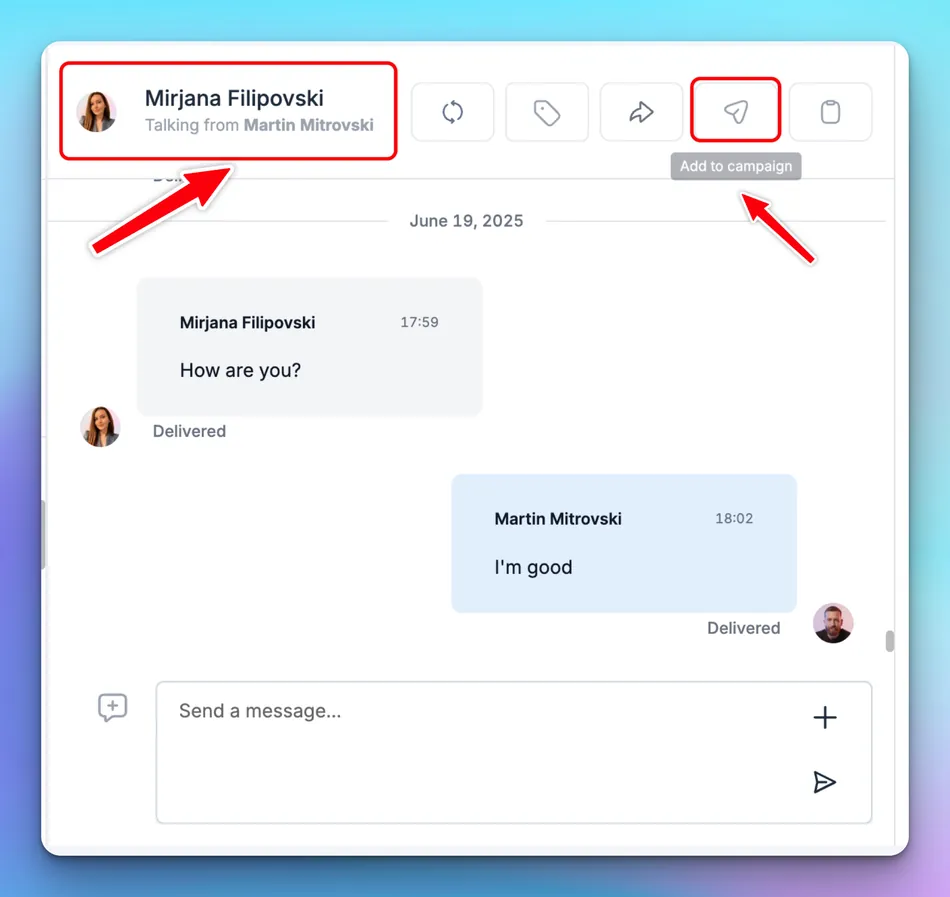
A notable feature is on-behalf-of messaging. Team members can reply from colleagues’ LinkedIn accounts without needing their LinkedIn credentials, controlled through role-based permissions where administrators grant specific inbox access levels.
Privacy controls let you choose at account connection time whether to import all LinkedIn conversations from the last 30 days or track only conversations started from HeyReach campaigns. This keeps personal LinkedIn messages separate from outreach conversations.
The inbox also supports canned messages, bulk actions (tag multiple leads, add them to campaigns, or export to CRM), and lead-to-campaign transfers from conversation views.
Source: HeyReach
One limitation: attachments cannot be sent through the Unibox yet, though this is listed as in progress. Message delivery also has a slight delay of a few seconds due to proxy processing.
Integrations & Multichannel Coordination: Native connections to Clay, Instantly, Smartlead, and 20+ other tools.
HeyReach offers native integrations with 23+ platforms spanning data enrichment (Clay, RB2B, Trigify, Persana), email sequencing (Instantly, Smartlead), automation platforms (n8n, Make, Zapier, Pabbly, Albato), CRMs (HubSpot, Attio, Breakcold), and notifications (Slack).
The Clay integration is worth highlighting.
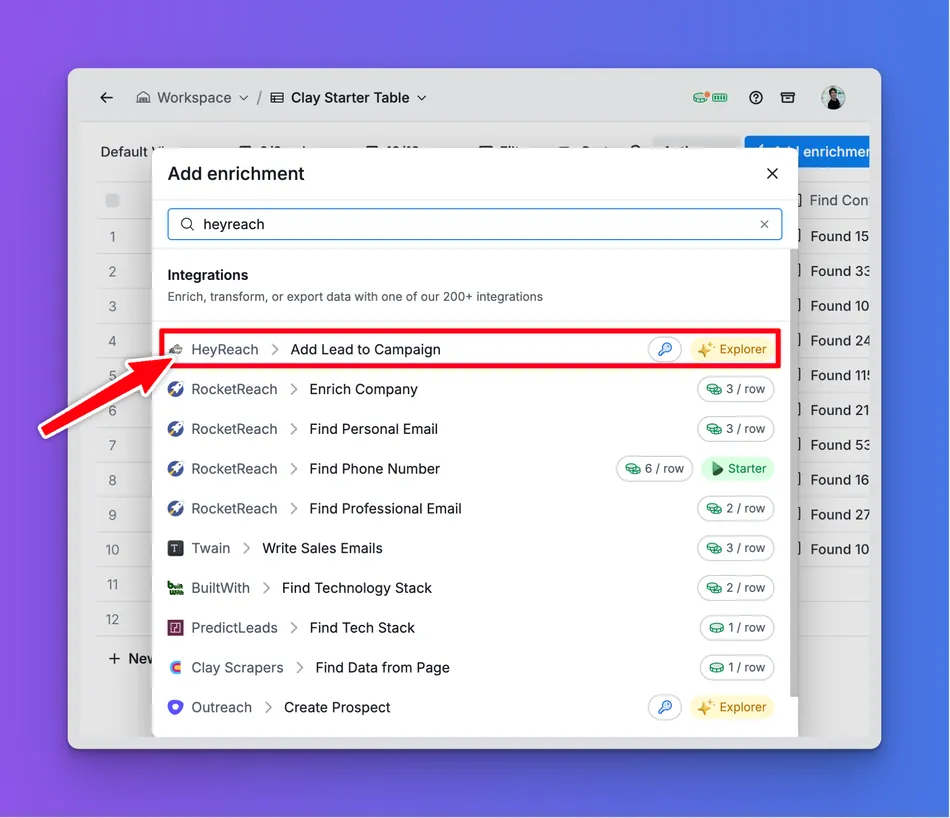
You authenticate via API key, then use Clay’s “Add Lead to Campaign” enrichment to push prospects into HeyReach campaigns with custom personalization variables (formatted as {variable_name}). When Clay’s auto-update is enabled, new rows automatically trigger lead additions without manual intervention.
Source: HeyReach
For multichannel outreach, HeyReach relies on integrations rather than building email natively. You can add an “Add to Instantly” or “Add to Smartlead” step anywhere in LinkedIn sequences, routing prospects to email when LinkedIn outreach stalls. A built-in Find Email action looks up verified email addresses within campaigns (1 credit per lookup), with conditional branches routing leads based on whether an email was found.
Cross-channel coordination includes automatic overlap prevention: when a lead replies on LinkedIn, email sequences pause automatically, and vice versa.
The platform also supports webhooks with 20+ event triggers, a REST API with a 300 requests per minute rate limit, and an MCP (Model Context Protocol) server that lets AI tools like Claude and ChatGPT control HeyReach actions through plain English commands.
Lead Import & Management: Multiple import pathways with deduplication and list operations.
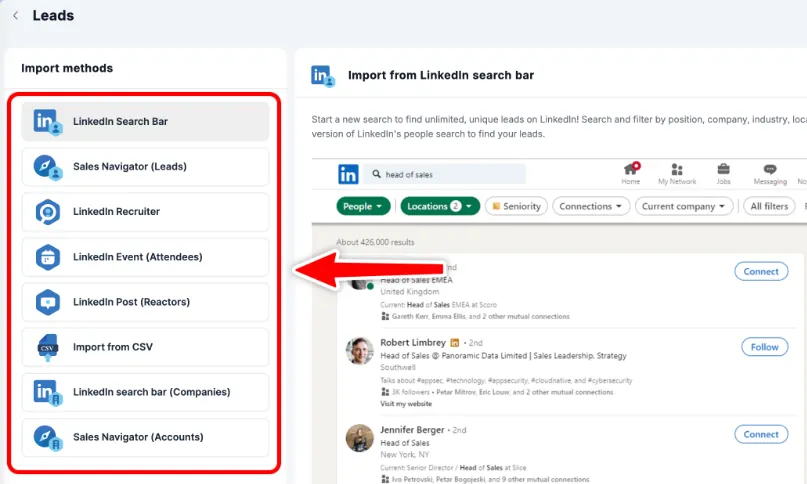
HeyReach supports six import methods: LinkedIn Search Bar, Sales Navigator, LinkedIn Recruiter, LinkedIn Event attendees, LinkedIn Post reactors, and CSV import. For Sales Navigator imports, you paste the search URL directly into HeyReach and the system pulls leads without manual export.
Source: HeyReach
The RB2B integration enables inbound automation: website visitors identified by RB2B get pushed to HeyReach campaigns automatically via webhook, connecting website intent signals to LinkedIn outreach.
List management lets you combine, intersect, exclude, export, rename, and delete lists within the platform. The system automatically prevents duplicate lead entry across all import methods, showing exactly how many new leads were added versus how many already existed.
You can also transfer leads between campaigns from the analytics view, which is useful for moving connected prospects into nurture sequences or routing engaged responders to different campaign types.
Pricing
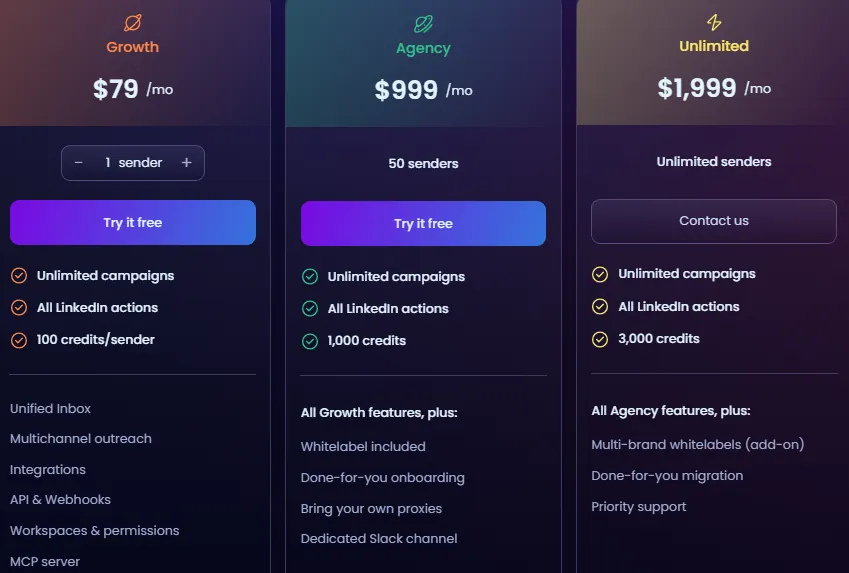
HeyReach uses per-sender pricing with flat-rate tiers at the upper end. All plans include unlimited campaigns, all LinkedIn actions, Unified Inbox, multichannel outreach integrations, API & webhooks, workspaces & permissions, and MCP server access. Quarterly billing saves 15%, yearly saves 25%.
Growth Plan ($79/month for 1 sender):
Variable pricing by sender count: $395/month for 5 senders, $590/month for 10 senders
All core features included
No whitelabel, no dedicated onboarding, no custom proxies
Agency Plan ($999/month for 50 senders):
Everything in Growth
Whitelabel branding (custom domain, logo, colors)
Done-for-you onboarding with a dedicated session
Bring your own proxies
Dedicated Slack channel for support
Unlimited Plan ($1,999/month for unlimited senders):
- Everything in Agency
- Unlimited sender accounts (fair-use policy capped at 500 senders; contact support for more)
Additional costs to note:
- Email credits for the Find Email action are purchased separately as one-time, non-recurring bundles (1 credit per successful lookup). Credits never expire and are shared across all workspaces.
- All fees are non-refundable except in limited circumstances (unresolvable service issues or objections to modified terms).
- A 14-day free trial is available with no credit card required, though trial functionality may not include all paid features.
The inflection point is clear: at $79/month per sender on the Growth plan, costs add up fast if you need more than a few accounts. But the Agency plan at $999/month for 50 senders works out to roughly $20 per sender, which undercuts most competitors charging $39-$139 per seat. The math favors teams at scale.
Source: HeyReach
Limitations & Considerations
HeyReach’s limitations reflect its focus on LinkedIn-first, multi-sender outreach. They’re worth understanding before committing.
LinkedIn-only outreach.
HeyReach does not send emails natively. Its multichannel approach works through integrations with Instantly and Smartlead, which means you coordinate across separate tools rather than run unified sequences.
For teams whose prospects respond primarily on LinkedIn, this is fine. For teams that need tightly integrated email, phone, and social sequences in one workflow, the integration approach adds complexity.
Growth plan pricing scales steeply.
While the Agency and Unlimited plans offer good per-sender economics, the Growth plan at $79/month per sender gets expensive fast. Five senders cost $395/month, ten cost $590/month. If you’re in the 5-to-50 sender range, the jump to the Agency plan at $999/month is worth calculating carefully.
No free plan.
HeyReach offers a 14-day free trial but no permanent free tier. Each email address can only be used for one trial, and accounts that have previously used a trial cannot register for another. If you need more time to evaluate, you’ll need to commit to a paid plan.
Reporting latency.
HeyReach’s analytics may take a few hours to update, particularly for metrics like total LinkedIn replies. For teams that need real-time campaign monitoring, this lag frustrates optimization of active campaigns.
Inbox attachment limitation.
The Unified Inbox cannot send attachments yet. If your outreach workflow involves sharing documents, case studies, or proposals through LinkedIn messages, you’ll need to handle those outside HeyReach.
LinkedIn platform risk.
Like all LinkedIn automation tools, HeyReach operates outside LinkedIn’s official API for outreach actions. HeyReach is not associated with or endorsed by LinkedIn Corporation. The platform’s safety features (dedicated proxies, automatic freezing, action limits) reduce risk, but any third-party automation tool carries some degree of platform risk.
CRM sync is one-directional.
When exporting leads to CRM systems via the Unibox, the sync goes one way (HeyReach to CRM only) and triggers manually on click. There’s no bidirectional sync that pulls CRM updates back into HeyReach.
These aren’t flaws in the traditional sense. They’re the natural consequences of a platform that chose to go deep on LinkedIn sender rotation and agency workflows rather than broad on channel coverage. The question is whether LinkedIn-first outreach at scale matches your actual workflow.
Who Should Use HeyReach?
- Agencies running LinkedIn outbound for 5+ clients who need workspace separation, whitelabel branding, and a pricing model that doesn’t penalize adding sender accounts
- Sales teams with multiple SDRs who want centralized inbox management and sender rotation without per-seat costs eating into the budget
- Growth teams using Clay for prospecting who need a LinkedIn sending layer that integrates natively with their enrichment pipeline
- Organizations combining LinkedIn and email outreach through Instantly or Smartlead and wanting automated lead routing between channels
- Teams where LinkedIn account safety is non-negotiable and who value dedicated proxies, automatic freezing, and conservative daily limits
Who Should Look Elsewhere?
- Solo operators or freelancers running outreach from a single LinkedIn account. At $79/month for one sender, HeyReach doesn’t offer enough value over cheaper alternatives.
- Teams needing native multichannel sequences. If you want LinkedIn, email, phone, and SMS steps in a single sequence builder, tools like Lemlist or La Growth Machine handle this natively rather than through integrations.
- Budget-conscious users who need a free plan. The 14-day trial is the only free option, and it’s one-time use per email address.
- Organizations needing deep CRM integration. HeyReach’s CRM sync is one-directional and triggered manually. Teams with complex CRM workflows may find the integration too shallow.
- Businesses where LinkedIn isn’t the primary outreach channel. If email drives your pipeline and LinkedIn is supplementary, a platform like Apollo.io or Instantly that centers on email with LinkedIn as an add-on will likely serve you better.
Final Verdict: Is HeyReach Worth It?
For teams scaling LinkedIn outreach across multiple accounts, yes.
HeyReach does one thing well: it removes the cost and complexity of managing LinkedIn outreach at scale. The unlimited sender model, centralized inbox, workspace separation, and native integrations with Clay and email platforms make it a capable LinkedIn automation platform for agencies and sales teams.
The account safety measures (dedicated proxies, automatic freezing, conservative limits) reassure teams whose LinkedIn accounts are business assets. And the 4.7 G2 rating and growth from $0 to $10M in revenue with a 23-person team suggest the platform delivers real value.
The caveats are straightforward.
If you’re running fewer than 5 LinkedIn accounts, the pricing advantage over per-seat competitors disappears. If you need native multichannel sequences, you’ll be stitching tools together through integrations rather than running everything from one builder. And the lack of a free plan means you’re evaluating on a 14-day clock.
For the right user (agency, multi-account sales team, Clay-powered growth operation), HeyReach is one of the strongest options in the LinkedIn automation category. For everyone else, the market offers tools better matched to smaller-scale or multichannel workflows.
Get started with HeyReach here.
HeyReach FAQ
Is HeyReach safe to use with LinkedIn?
HeyReach takes several technical measures to protect LinkedIn accounts.
Each account gets a dedicated static residential proxy that is never shared between accounts. The platform automatically freezes accounts approaching LinkedIn’s weekly connection request limit (approximately 100 per week) and respects LinkedIn’s 200-action-per-day limit.
That said, HeyReach is not endorsed by LinkedIn, and using any third-party automation tool carries platform risk.
How much does HeyReach cost?
HeyReach starts at $79/month for 1 LinkedIn sender on the Growth plan, with pricing scaling based on sender count ($395/month for 5 senders, $590/month for 10). The Agency plan covers 50 senders for $999/month, and the Unlimited plan provides unlimited senders for $1,999/month. Quarterly billing saves 15%, yearly saves 25%. Email credits for the Find Email feature are purchased separately.
Does HeyReach offer a free trial?
Yes, HeyReach offers a 14-day free trial with no credit card required. However, each email address can only be used for one trial, and accounts that have previously used a trial cannot register for another. There is no permanent free plan.
Can HeyReach send emails?
HeyReach does not send emails natively. It handles multichannel outreach through native integrations with Instantly and Smartlead, letting you route leads between LinkedIn and email platforms based on prospect behavior. A built-in Find Email action can look up verified email addresses within campaigns at 1 credit per lookup.
How does sender rotation work in HeyReach?
When you assign multiple LinkedIn accounts to a campaign, HeyReach automatically rotates outreach between them. Daily limits are set per sender, not per campaign, and shared proportionally across all campaigns a sender is active in.
The system includes anti-duplication protection at the organizational level, preventing the same lead from being contacted by different senders.
What integrations does HeyReach support?
HeyReach offers native integrations with 23+ platforms including Clay, Instantly, Smartlead, HubSpot, Slack, RB2B, Trigify, Zapier, Make, and n8n. It also provides a REST API, webhooks with 20+ event triggers, and an MCP server for AI agent integrations with tools like Claude and ChatGPT.
Who is HeyReach best suited for?
HeyReach fits best for agencies managing multiple client LinkedIn accounts, sales teams with 5+ senders, and growth teams using Clay-powered prospecting workflows. The flat-rate pricing on Agency and Unlimited plans provides clear cost advantages over per-seat competitors at these scales.
Solo operators or teams running fewer than 5 accounts may find better value with simpler tools.
What is HeyReach MCP?
HeyReach MCP (Model Context Protocol) is a feature that lets AI tools like Claude, ChatGPT, and other LLM platforms interact with HeyReach using plain English commands.
Instead of writing API calls, users can instruct an AI agent to create campaigns, draft personalized messages, tag replies by sentiment, or segment leads, and the agent executes those actions through HeyReach’s MCP server.