SalesRobot is a LinkedIn and cold email automation platform for teams that want to run personalized outreach at volume without getting their accounts banned. Founded in 2020, it serves 4,100+ users across 45 countries with a bootstrapped team of 28. It stands out from other LinkedIn automation tools by combining cloud-based account safety, native AI voice and video messaging, and an AI agent that handles reply conversations through to a booked meeting.
After analyzing the platform, we believe SalesRobot is the right choice if:
- You rely on LinkedIn as your primary outreach channel and want to automate it safely
- You want to combine LinkedIn and cold email in a single coordinated sequence
- AI voice notes and video messages are part of your outreach strategy
- You manage outreach for multiple clients and need a white-label option
- You want an AI agent that handles replies and books meetings without human involvement
SalesRobot might not be the right choice if:
- Cold email is your primary channel and you need dedicated deliverability infrastructure
- You require strict LinkedIn Terms of Service compliance
- You need native CRM integrations beyond webhooks or Zapier
- You’re an AppSumo lifetime deal holder expecting feature parity without additional cost
- You need email warmup, domain health monitoring, or inbox placement tools
If you’re ready to try it, you can get started with SalesRobot here. Otherwise, keep reading for our full breakdown.
What is SalesRobot?
Source: SalesRobot
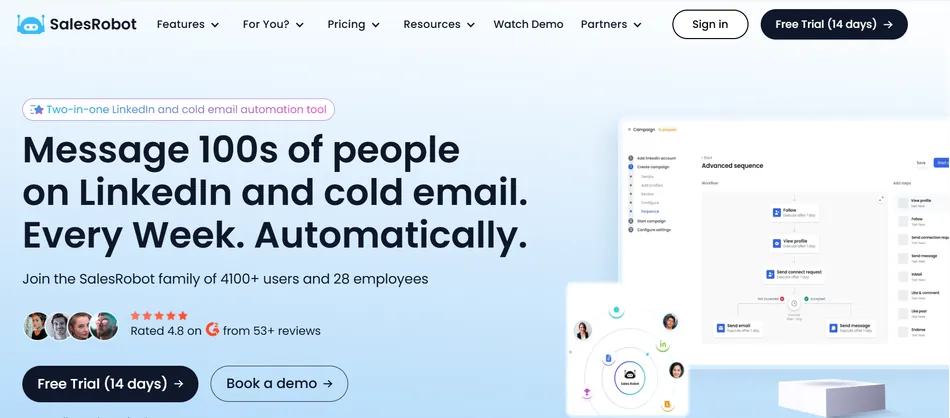
SalesRobot is a cloud-based LinkedIn and email outreach automation platform founded in May 2020 by Saurav Gupta. Gupta, an IIT Delhi engineering graduate who previously built an AI startup and worked as a data scientist, designed SalesRobot to solve a specific problem: LinkedIn automation tools that relied on browser extensions kept getting users’ accounts flagged or banned.
Instead of injecting scripts into your browser, SalesRobot runs in the cloud using residential IP addresses and LinkedIn’s mobile app APIs. Each account gets a dedicated residential IP, so automated activity looks like a real person using LinkedIn on their phone. The result, according to SalesRobot and its customers, is that accounts stay safe even after months of continuous automated outreach.
The platform serves two audiences: B2B sales teams looking to book more meetings through LinkedIn, and lead generation agencies managing outreach across multiple client accounts. For agencies, SalesRobot offers a white-label program used by over 110 agencies.
The company holds a 4.8/5 rating on G2 from 53+ reviews and claims a 55% average reply rate across its user base, with 76% of free trial users getting their first lead within 2 days.
SalesRobot Pros & Cons
| Pros | Cons |
|---|---|
| ✅ Cloud-based with dedicated residential IPs for account safety | ❌ Email deliverability weaker than dedicated cold email tools |
| ✅ Native AI voice notes and video messages at scale | ❌ Daily LinkedIn limits sometimes fall below stated maximums |
| ✅ AI Appointment Setter included on all paid plans | ❌ Polarized AppSumo reviews from lifetime deal controversy |
| ✅ LinkedIn + email combined in unified sequences | ❌ UI and campaign creation flow still maturing |
| ✅ White-label and volume discounts for agencies | ❌ Uses LinkedIn in ways that violate LinkedIn’s ToS |
| ✅ Works without LinkedIn Premium or Sales Navigator | ❌ CRM connections rely on webhooks/Zapier, not native integrations |
| ✅ 9.5/10 G2 quality-of-support score | ❌ No native email warmup or domain health monitoring |
Who is SalesRobot Best For?
SalesRobot’s features and pricing favor specific buyer profiles. The platform works best when LinkedIn is the primary outreach channel and email serves as a supporting touchpoint, not the other way around.
It fits well for:
- Lead generation agencies managing 10+ client LinkedIn accounts.
The unified dashboard, white-label option, volume pricing (33% off for 10+ accounts, 45% off for 20+), and multi-account campaign management serve this use case directly. Agency customers like The Growth Agency and GrowRevenue Media run 50+ accounts through the platform.
- B2B sales teams that want to automate LinkedIn outreach without risking account bans. The residential IP and mobile API approach makes SalesRobot safer than browser-extension tools. Teams that have had accounts restricted on Dux-Soup, Waalaxy, or similar tools will find the safety architecture worth the switch.
- Solo founders and small teams who need a fast first lead.
SalesRobot claims setup in under 2 minutes, and the SalesGPT AI builder can generate a full campaign from a plain-English description. For founders without outbound copywriting experience, this lowers the barrier.
- Teams experimenting with AI voice and video in outreach.
If you want to send personalized voice notes or AI-generated video messages through LinkedIn at scale, SalesRobot is currently the only tool offering this natively (not as a third-party link).
- Agencies that want to resell outreach automation under their own brand.
The white-label program includes a custom domain, no SalesRobot branding, and branded support, with deployment reportedly in under 7 days.
SalesRobot is not the right tool for teams whose outreach is primarily email-driven. Its email capabilities work for multichannel coordination, but it lacks the warmup infrastructure, domain health monitoring, and deliverability optimization that tools like Instantly or Smartlead provide. If email is your main channel, SalesRobot’s email features will feel like a supplement, not a primary tool.
SalesRobot Review: How It Works & Key Features
LinkedIn Automation: SalesRobot automates the full LinkedIn outreach workflow with 15+ action types in a single sequence.
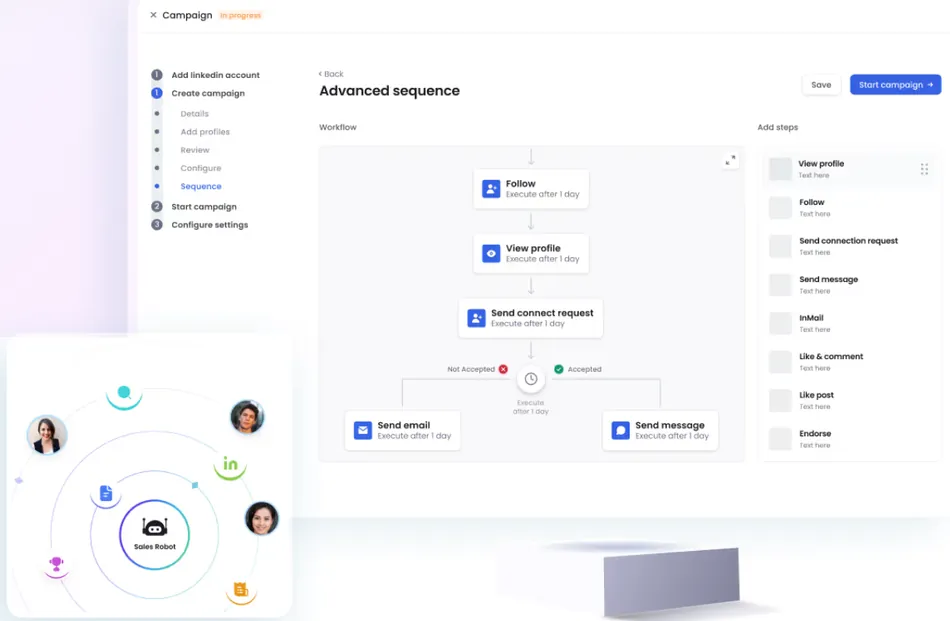
SalesRobot’s campaign engine lets users chain together profile views, post likes, AI-generated comments, follows, connection requests, direct messages, InMails, voice notes, video messages, and email steps into a single drip sequence.
The visual sequence builder supports conditional branching: if a prospect hasn’t accepted a connection request after a set delay, the sequence can fork to email follow-up instead.
Source: SalesRobot
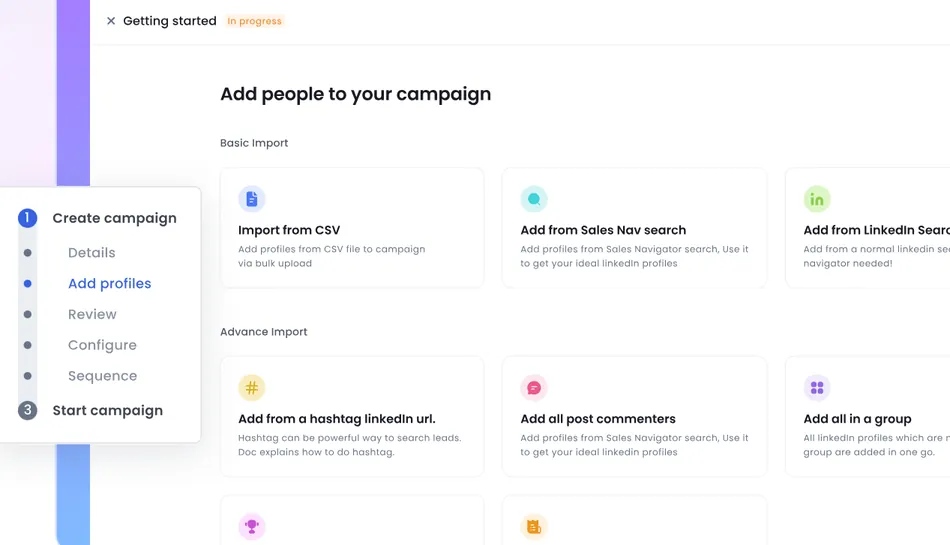
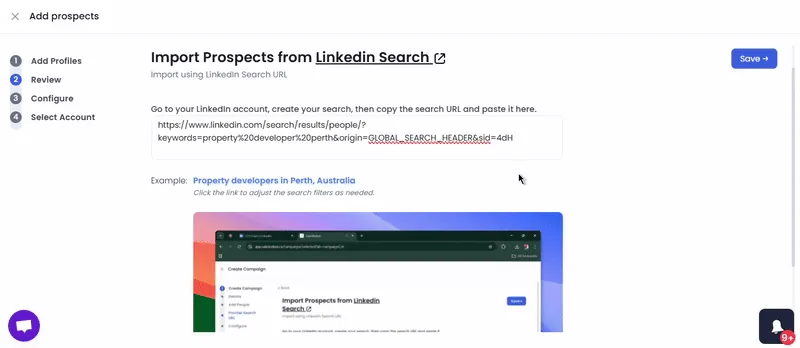
Lead sourcing is flexible. Users can import prospects by pasting a LinkedIn Search URL, Sales Navigator search, or CSV file.
SalesRobot also lets you import all commenters on a specific LinkedIn post as a warm prospect list, or target LinkedIn group members and event attendees. None of this requires LinkedIn Premium; SalesRobot works with a free LinkedIn account.
Source: SalesRobot
Daily limits cap at up to 75 connection requests and up to 40 InMails to open profiles per day, with InMails sent to open profiles consuming no InMail credits. A central Prospect Pool deduplicates across campaigns, preventing the same person from receiving outreach from multiple sequences.
Source: SalesRobot
Account safety is the foundation. Each account gets a dedicated residential IP address, and all activity routes through LinkedIn’s mobile app APIs rather than browser emulation. Random delays between actions mimic human behavior, and Smart Reply Detection pauses all follow-up the moment a prospect responds on any channel. Multiple customers report zero LinkedIn account bans after extended use.
AI Voice Notes & Video Messages: SalesRobot sends AI-cloned audio and video natively through LinkedIn, not as external links.
This is SalesRobot’s most distinctive feature. Users record a 20-30 second voice sample, and SalesRobot trains a voice clone from it. Campaign sequences can then include a “Send Voice Note” step where personalization variables (first name, company, job title) generate a unique audio message in the user’s cloned voice for each prospect. The voice notes arrive natively within LinkedIn’s messaging system.
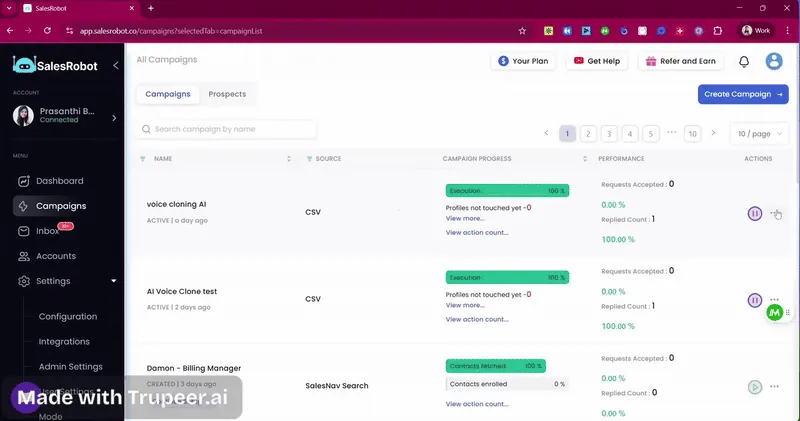
Source: SalesRobot
The video feature works similarly. Users record a 30-45 second reference video, which SalesRobot converts into a reusable AI avatar. Personalized scripts render per-recipient with lip-synced voice and likeness. Videos support durations from 3 seconds to 5 minutes at 720p or 1080p resolution, sent natively within LinkedIn.
SalesRobot states that no other tool does this at scale, and the claim holds up. HeyReach lacks AI voice personalization entirely; Expandi offers it only as a paid add-on. SalesRobot’s data shows campaigns using voice and video averaging 40%+ reply rates, and agency customer The Growth Agency reported a 66% reply rate and 51% acceptance rate using these features across 50 clients.
AI Inbox Manager & Appointment Setter: An AI agent that reads replies, follows your playbook, and books meetings on its own.
Most outreach tools stop at the send. SalesRobot’s AI Inbox Manager picks up where campaigns leave off: it reads incoming replies, follows a user-defined SOP, and continues conversations through to a booked meeting.
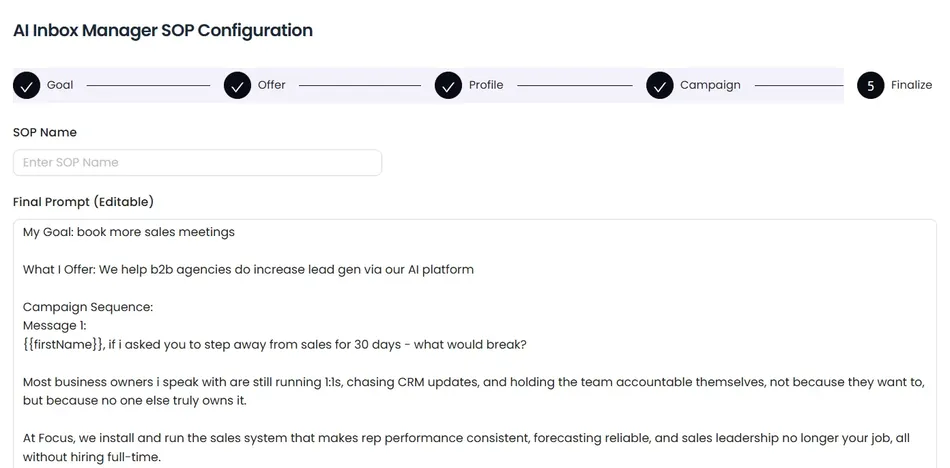
Source: SalesRobot
Setup involves configuring a Company Profile (your business description, ideal customer profile, and offer) and a Response SOP covering how to qualify leads, handle objections, and insert a calendar booking link. SalesRobot can auto-generate the SOP from these inputs. Once activated, the AI operates in two modes: CoPilot (you review the AI’s draft reply before sending) or Autopilot (fully autonomous).
The AI Appointment Setter is included on all paid plans starting at $39/month per LinkedIn account (annually), not locked behind a premium tier. G2-verified reviewer Flora R. reported gaining 95 customers in three months using this feature.
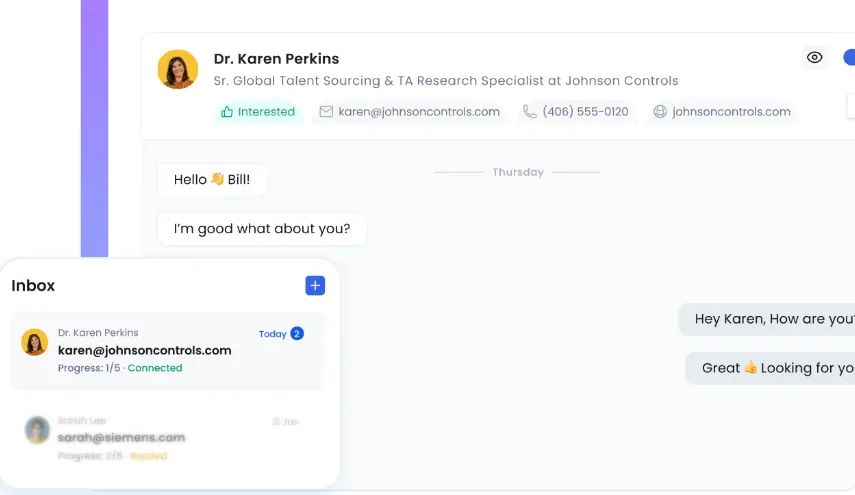
The Unified Smart Inbox consolidates all LinkedIn and email conversations across connected accounts into a single view, with AI-powered auto-tagging that labels conversations the moment a prospect replies. For agencies juggling dozens of accounts, this saves real time.
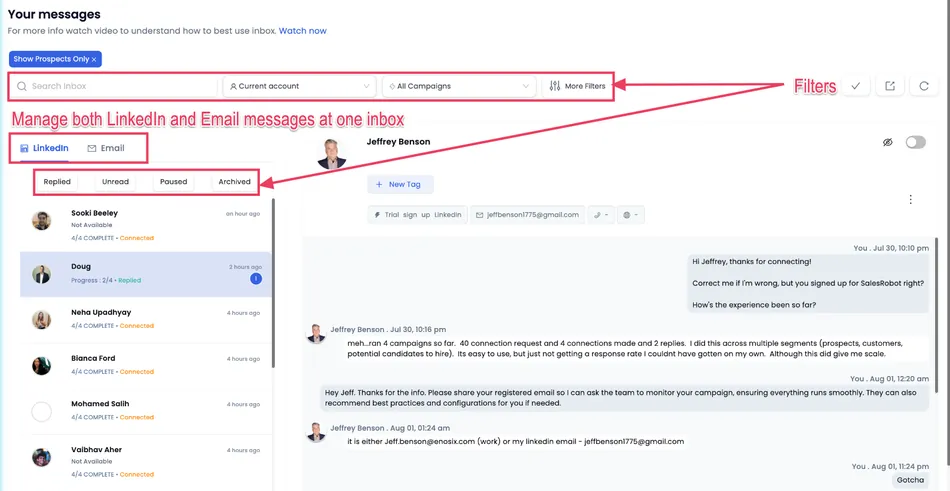
Source: SalesRobot
Email Outreach: LinkedIn and email steps in one coordinated sequence with cross-channel reply detection.
SalesRobot’s email feature isn’t a standalone cold email tool. It works alongside LinkedIn outreach in a single, coordinated sequence. Users connect email accounts via Gmail OAuth, Outlook OAuth, or manual SMTP/IMAP setup, then add email steps into LinkedIn drip campaigns.
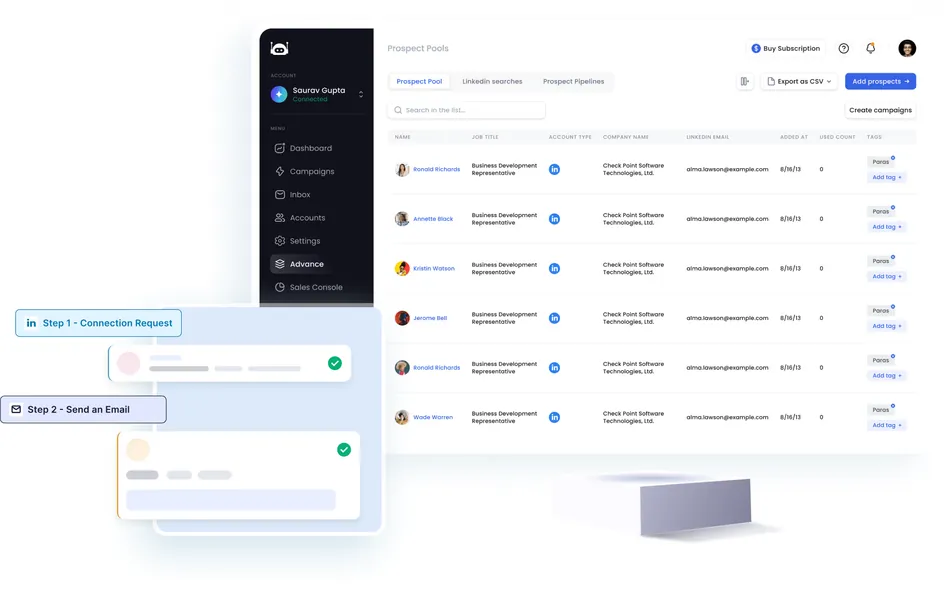
Source: SalesRobot
Cross-channel coordination is the key value. Smart Reply Detection monitors both LinkedIn and email simultaneously: if a prospect replies on either channel, all automated follow-up stops on both. This prevents the common problem where tools running LinkedIn and email independently keep messaging a prospect who already responded on the other channel.
Source: SalesRobot
Email enrichment runs through an embedded LeadMagic integration that discovers prospect email addresses from LinkedIn lead lists without leaving the platform. SalesRobot also offers AI-written email copy and supports attachments (PDFs, documents, GIFs).
SalesRobot claims combining LinkedIn and email more than triples response rates compared to LinkedIn-only outreach. For teams that want multichannel coordination, this is a real advantage. For teams that need high-volume cold email with dedicated deliverability infrastructure, the email component is a secondary feature, because that’s what it was built to be.
A separate Bulk Email plan is available for teams wanting email-only automation, and a cold email add-on costs $15/month per email account for users on LinkedIn plans.
Pricing: Per-account tiers starting at $39/month with volume discounts for agencies.
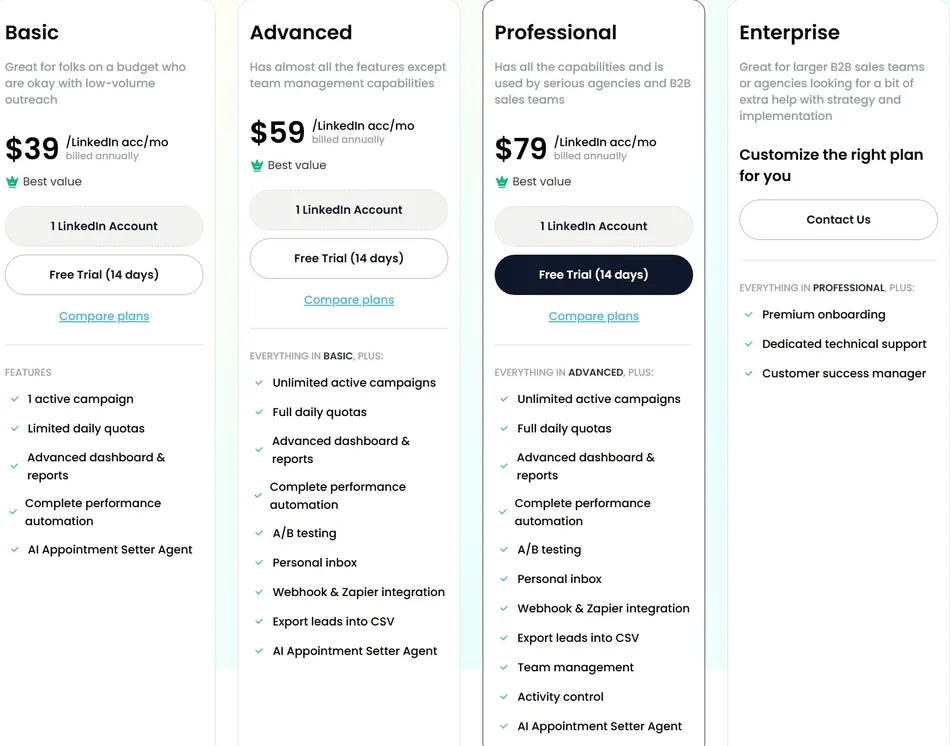
SalesRobot prices per LinkedIn account per month, with four tiers:
Basic ($39/month annually, $59/month monthly):
- 1 active campaign
- Limited daily quotas
- Dashboard and reports
- AI Appointment Setter included
- No webhook/Zapier integration
Advanced ($59/month annually, $79/month monthly):
- Unlimited active campaigns
- Full daily quotas
- A/B testing
- Personal inbox access
- Webhook and Zapier integration
- CSV lead export
Professional ($79/month annually):
- Everything in Advanced
- Team management and activity control
- Required for multi-seat team features
Enterprise (custom pricing):
- Onboarding support
- Dedicated technical support
- Dedicated Customer Success Manager
 Source: SalesRobot
Volume discounts apply at scale: 33% off for 10+ accounts and 45% off for 20+ accounts. The platform advertises “best value” at 4 LinkedIn accounts. A 14-day free trial requires no credit card and does not auto-charge when it ends.
LinkedIn Premium or Sales Navigator is not required, which saves $79-$99/month compared to tools that depend on it. Cold email is priced separately: $15/month per email account as an add-on to LinkedIn plans, or available via a standalone Bulk Email tab.
At $39/month per account annually, SalesRobot undercuts several competitors. Expandi charges about $99/month; Dripify ranges from $59-$99/month. For agencies running 20+ accounts, the 45% volume discount brings the per-account cost to roughly $21/month annually, making multi-client management more affordable.
Where SalesRobot Falls Short
SalesRobot’s strengths are real, but so are its limitations. Most reflect deliberate choices about what the platform prioritizes.
Email deliverability is not its strength. G2 reviewers note “diminished email response rates compared to dedicated cold email platforms like Lemlist or Instantly.” There is no native email warmup or domain health monitoring. SalesRobot built its email feature for multichannel coordination, not high-volume cold email.
Teams whose outreach is primarily email-driven will find the email capabilities insufficient as a primary tool.
Daily LinkedIn limits don’t always match the marketing. G2 reviewers report connection request caps “frequently plateau at 40-41 instead of the promised 50 daily maximum”. The stated limit is up to 75 connection requests per day, but real-world performance varies. This gap between marketing claims and actual behavior frustrates buyers, even when the limits remain usable.
AppSumo lifetime deal controversy. SalesRobot’s AppSumo rating is 2.9/5 from 47 reviews, split between enthusiastic users and lifetime deal buyers who feel their purchases were not honored through the V2 transition.
Some reviewers report being required to purchase subscriptions despite holding lifetime deals. This remains an ongoing brand issue in the SMB and agency communities where SalesRobot competes.
UI and campaign flow still maturing. G2 reviewers cite that “the UI could be improved, and the campaign creation flow could benefit from additional AI assistance.” Some reviews reference feature instability during the V1-to-V2 transition. The platform works, but the interface doesn’t yet match the polish of more established competitors.
LinkedIn Terms of Service risk is inherent. SalesRobot’s own FAQ states: “Using SalesRobot may not comply with LinkedIn’s User Agreement, and you use it at your own discretion and risk.” The safety infrastructure minimizes practical ban risk, but the underlying terms-of-service exposure cannot be eliminated. This is true of every LinkedIn automation tool, but it’s worth acknowledging.
CRM integrations are indirect. SalesRobot connects to CRMs like HubSpot, Salesforce, Pipedrive, Zoho, and Copper through webhooks or Zapier rather than native integrations. For teams with complex CRM workflows or those needing two-way sync, deal stage triggers, or revenue attribution, this may not be enough.
These limitations are the trade-offs of a platform built around LinkedIn outreach safety and AI personalization. If those are your priorities, the constraints are manageable. If they’re not, the tool isn’t the right fit.
Who Should Use SalesRobot?
- Lead gen agencies running LinkedIn outreach for multiple clients.
The white-label option, volume discounts, unified inbox, and multi-account campaign management are built for this segment.
- B2B sales teams where LinkedIn is the primary prospecting channel.
Automated connection requests, follow-up sequences, and the AI Appointment Setter cut manual work.
- Teams that want to stand out with voice and video.
AI-cloned voice notes and video avatars sent natively through LinkedIn are unique to SalesRobot at the time of writing.
- Founders and small teams who need fast setup with minimal configuration.
The SalesGPT campaign builder and 2-minute setup make it accessible for non-technical users.
- Agencies that want to resell outreach automation as their own product.
The white-label program with full branding control serves this niche directly.
Who Should Look Elsewhere?
- Teams whose outreach is primarily cold email.
Instantly, Smartlead, or Lemlist offer dedicated warmup, deliverability monitoring, and higher-volume email infrastructure that SalesRobot doesn’t match.
- Organizations that require strict LinkedIn ToS compliance.
No LinkedIn automation tool fully complies, but if your legal or compliance team has a zero-tolerance policy, SalesRobot (or any tool in this category) isn’t an option.
- Enterprise teams needing native CRM sequencing.
Platforms like Salesloft or Outreach are built around CRM integration, multi-step revenue workflows, and enterprise reporting that SalesRobot doesn’t target.
- Teams focused on inbound or content-led growth.
SalesRobot is an outbound tool. It doesn’t include LinkedIn content scheduling, posting automation, or inbound lead capture.
- Budget-conscious buyers expecting a full email + LinkedIn stack in one price.
LinkedIn and email are priced separately, and adding email accounts at $15/month each on top of LinkedIn tier costs means the total adds up for teams running both channels at scale.
Final Verdict: Is SalesRobot Worth It?
For LinkedIn-first outreach teams, yes.
SalesRobot does the hard part of LinkedIn automation well: it keeps accounts safe through residential IPs and mobile API routing, it lets you build multi-step sequences with conditional branching, and it includes AI capabilities (voice, video, appointment setting) that competitors either don’t offer or charge extra for. The AI Appointment Setter comes with the $39/month Basic plan, not locked behind an enterprise tier.
The platform works best for lead gen agencies and B2B sales teams that treat LinkedIn as their primary outreach channel and want email as a coordinated supplement. The white-label program, volume discounts, and unified inbox make multi-client management practical at a price point below most competitors.
The caveats center on what SalesRobot isn’t. It’s not a cold email platform. Its CRM integrations are functional but shallow. The UI is still catching up to the feature set. And the AppSumo controversy is a stain on an otherwise strong customer reputation.
If your outreach strategy is email-first, or if you need the deliverability infrastructure that dedicated cold email tools provide, SalesRobot’s email features won’t be enough on their own.
For the right buyer (LinkedIn-focused, values account safety, interested in AI personalization, and willing to accept the inherent LinkedIn ToS risk that comes with any automation tool), SalesRobot offers a combination of safety, AI features, and agency-friendly pricing that’s hard to find in a single platform.
Get started with SalesRobot here.
SalesRobot FAQ
Does SalesRobot offer a free trial?
Yes. SalesRobot offers a 14-day free trial with no credit card required. The trial does not auto-convert to a paid plan, so you won’t be charged if you don’t subscribe. The company also extends trials on a case-by-case basis if you contact support. All features are accessible during the trial period.
Is SalesRobot safe for my LinkedIn account?
SalesRobot uses dedicated residential IP addresses and LinkedIn’s mobile app APIs to make automated activity look like a real user on the LinkedIn mobile app. This is safer than browser-extension tools that inject scripts LinkedIn actively detects. Multiple customers report zero account bans after months of continuous use.
That said, SalesRobot’s own FAQ states that using the tool may not comply with LinkedIn’s User Agreement, so the risk, while minimized, is not eliminated.
Does SalesRobot require LinkedIn Premium or Sales Navigator?
No. SalesRobot works with a free LinkedIn account. You can import leads from a standard LinkedIn search URL, CSV upload, LinkedIn group members, event attendees, or post commenters. Sales Navigator is optional and provides more advanced search filters, but it is not required.
How much does SalesRobot cost?
Plans start at $39 per LinkedIn account per month on annual billing ($59/month on monthly billing) for the Basic tier. The Advanced tier is $59/month annually, and Professional is $79/month annually. Volume discounts bring costs down further: 33% off for 10+ accounts and 45% off for 20+ accounts. Cold email is an additional $15/month per email account.
White-label and Enterprise pricing require contacting the sales team.
Can SalesRobot send cold emails too?
Yes. SalesRobot supports Gmail, Outlook, and custom SMTP/IMAP email accounts. You can add email steps to LinkedIn drip sequences, and Smart Reply Detection monitors both channels simultaneously. However, SalesRobot lacks dedicated email warmup and domain health monitoring, so it works best as a multichannel complement to LinkedIn outreach rather than a standalone cold email tool.
What is the AI Appointment Setter?
The AI Appointment Setter is an agent included on all paid plans. It reads incoming prospect replies, follows a user-defined conversation playbook, handles objections, and works toward booking a meeting. It operates in two modes: CoPilot (you review the AI’s draft before it sends) and Autopilot (fully autonomous).
The playbook is generated from your business description, ideal customer profile, offer, and campaign context.
What CRM integrations does SalesRobot support?
SalesRobot connects to HubSpot, Salesforce, Pipedrive, Zoho, and Copper through webhooks or Zapier. It also integrates with Make and n8n for workflow automation, and offers a REST API for custom integrations. These connections require the Advanced plan or higher. Native CRM integrations with two-way sync are not currently available.
What are the best SalesRobot alternatives?
The closest alternatives depend on your priorities. HeyReach is LinkedIn-focused but lacks native email and AI voice/video features. Expandi offers LinkedIn automation with AI voice as a paid add-on. Dripify provides simpler LinkedIn automation at a mid-range price.
For teams prioritizing cold email over LinkedIn, Instantly, Smartlead, and Lemlist are stronger choices with dedicated deliverability infrastructure. The right fit depends on whether LinkedIn or email is your primary channel and how much you value AI personalization.