GMass turns Gmail into a campaign tool. It installs as a Chrome extension, adds a send button next to Compose, and lets you run mail merges, cold outreach sequences, and HTML newsletters without leaving your inbox. Your contacts live in Google Sheets. Your campaigns send through Google’s servers. Your replies land where they always have.
That simplicity is the pitch, and for 400,000+ users it works. But GMass is also making a less obvious bet: that one tool can handle both cold email and email marketing, two jobs most platforms treat as separate products. Whether that breadth is a strength or a compromise depends on what you need.
After analyzing the platform, we believe GMass is the right choice if:
- You already live in Gmail and want to send campaigns without learning new software
- You need both cold outreach and email marketing from one tool
- You manage contacts in Google Sheets and want direct integration
- You’re a solo operator or small team looking for affordable per-seat pricing
- You value deliverability through Google’s infrastructure over third-party sending servers
However, GMass is not a good choice if:
- You use Outlook, Apple Mail, or any email client other than Gmail
- You need a visual drag-and-drop email builder with pre-made templates
- You require native CRM integrations with Salesforce or HubSpot
- You’re sending to millions of recipients and need enterprise-scale infrastructure
- You want phone or live chat support when issues arise
If you’re ready to try it, you can get started with GMass here. Otherwise, keep reading for our full breakdown.
What is GMass?
GMass is a Gmail-native email platform that runs entirely as a Chrome extension, turning Gmail’s compose window into a campaign builder. Ajay Goel founded it in 2015 in Dayton, Ohio. He was building another product and couldn’t find a simple way to send personalized bulk emails from Gmail.
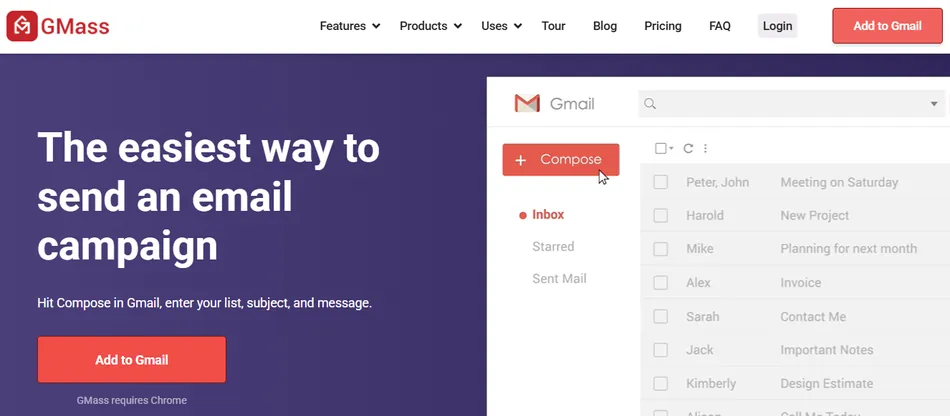
Google had just released the Gmail API, so he built one himself. What started as a side project grew into a platform with over 100,000 users and more than $1 million in annual revenue, and it has grown considerably since.
Goel wasn’t new to email software. He had founded JangoMail in 2002, a web-based email marketing platform he ran for over a decade and sold in 2013. Those proceeds funded GMass’s bootstrap period. The company has remained self-funded with no outside investors.
Today, GMass positions itself as the only email platform that spans cold email, email marketing, and mail merge from a single interface. The team is lean: 7 people distributed across the US and internationally. Users have sent more than 9 billion emails since launch, and the platform holds a 4.7-star rating from 1,270+ verified reviews on G2.
GMass Pros & Cons
| Pros | Cons |
|---|---|
| ✅ Lives entirely inside Gmail with no new interface to learn | ❌ Requires Gmail/Google Workspace and Chrome browser |
| ✅ Spans cold email, email marketing, and mail merge in one tool | ❌ No visual drag-and-drop email builder |
| ✅ Google Sheets integration with bi-directional data sync | ❌ Gmail sending limits require SMTP workarounds at scale |
| ✅ Deliverability tools including Spam Solver with AI analysis | ❌ Interface can feel cluttered in the settings panel |
| ✅ Unlimited follow-up stages with auto-stop on reply | ❌ No native Salesforce or HubSpot integration |
| ✅ Per-seat pricing starting at $29.95/month | ❌ No phone or live chat support |
| ✅ AI features (SpinMax, ChatGPT campaign builder) included in all plans | ❌ Not designed for campaigns targeting millions of addresses |
Who is GMass Best For?
- Solo operators and small sales teams running cold outreach from Gmail. GMass’s familiar setup, automated follow-up sequences, and pricing make it practical for individuals and small groups who need to send hundreds of personalized prospecting emails per day without switching to a dedicated sales engagement platform.
- Small businesses and freelancers who need both newsletters and outreach. If you send a monthly HTML newsletter to subscribers and also run cold outreach to prospects, GMass handles both from the same Gmail account. Most tools force you to choose one or the other.
- Google Sheets-first organizations. Teams that already manage contacts, leads, and member lists in Google Sheets get direct integration without importing data into a separate CRM. GMass reads from Sheets, personalizes based on any column, and writes campaign performance data back to the Sheet automatically.
- Link builders, recruiters, and PR professionals. These roles share a common workflow: personalized outreach to a curated list, with follow-ups that stop when someone replies. GMass’s dedicated use-case pages cover each of these, and its personalization and automated follow-up sequences fit these jobs well.
- Budget-conscious senders who find dedicated cold email tools expensive. At $29.95/month for the Standard plan, GMass undercuts most competitors that charge $50 to $100+ per month for similar functionality, particularly platforms that charge per email account or per lead.
- Community and membership organizations. Churches, HOAs, sports clubs, schools, and associations that communicate with members through Gmail can send personalized announcements to their entire list without moving to a formal ESP.
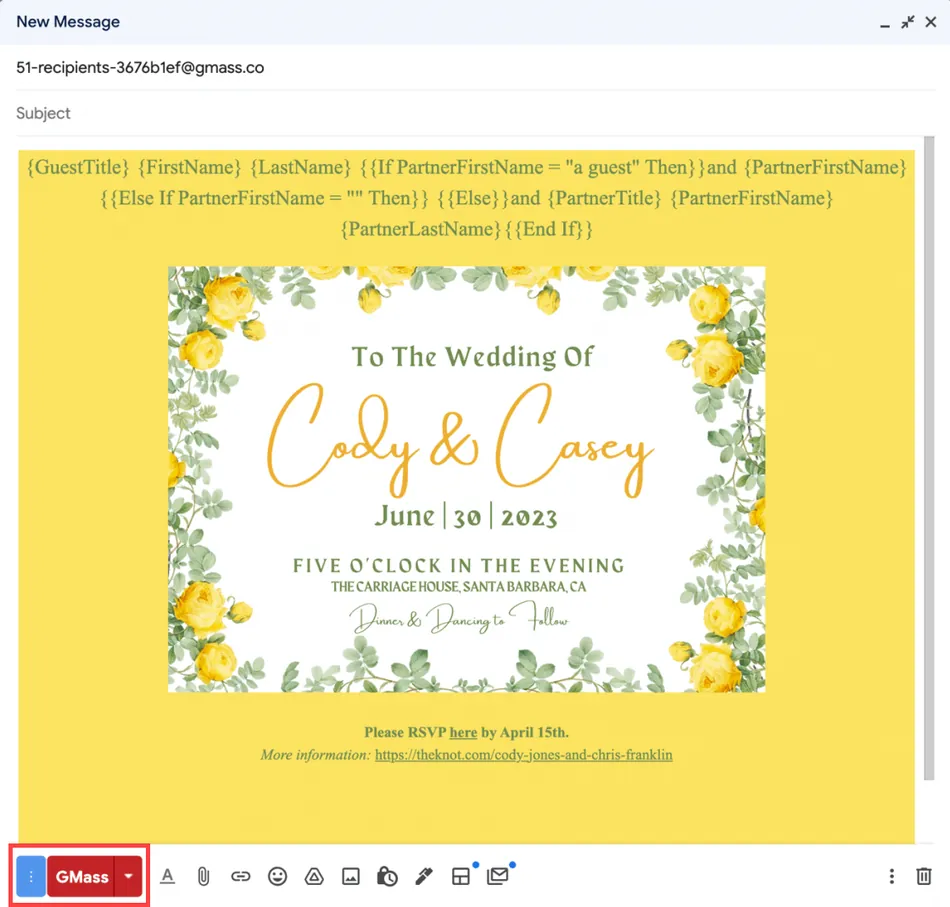
GMass markets itself broadly, and its use cases span from wedding invitations to political campaigns. But the platform works best when the sender already lives in Gmail, manages data in Sheets, and needs to send personalized email at moderate scale (hundreds to tens of thousands of recipients, not millions).
Source: GMass Wedding Invitations
GMass Review: How it Works & Key Features
Mail Merge & Google Sheets Integration: GMass connects your spreadsheet to your inbox with no export step.
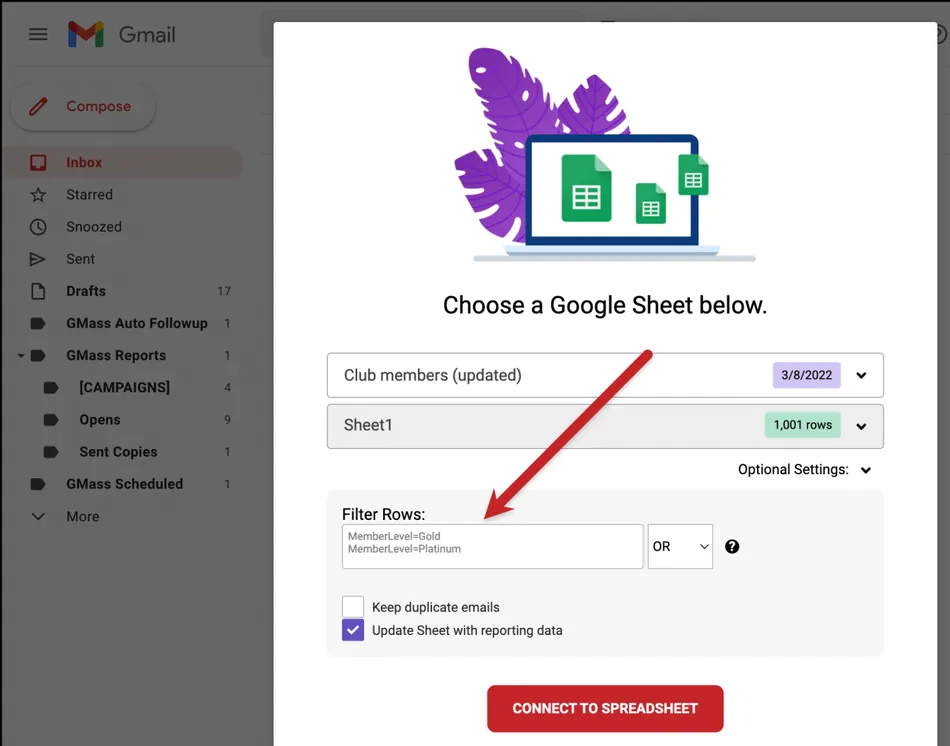
The foundation of GMass is its Google Sheets integration. You click a spreadsheet icon in the Gmail compose toolbar, select a Sheet, and every column becomes a merge field. Typing { in the compose window triggers a dropdown of available columns, so personalization is built into the writing process.
What makes the integration useful beyond basic mail merge is the bi-directional data flow. After sending, GMass writes four columns back to the Sheet: Opened, Clicked, Replied, and Bounced. The spreadsheet becomes a live campaign tracker without any third-party tool.
For ongoing campaigns, the “Repeat” option tells GMass to monitor the Sheet for new rows and auto-send to contacts added since the last run. Row filtering supports ColumnName=Value notation with operators for greater-than and contains, so you can target segments without altering the underlying data.
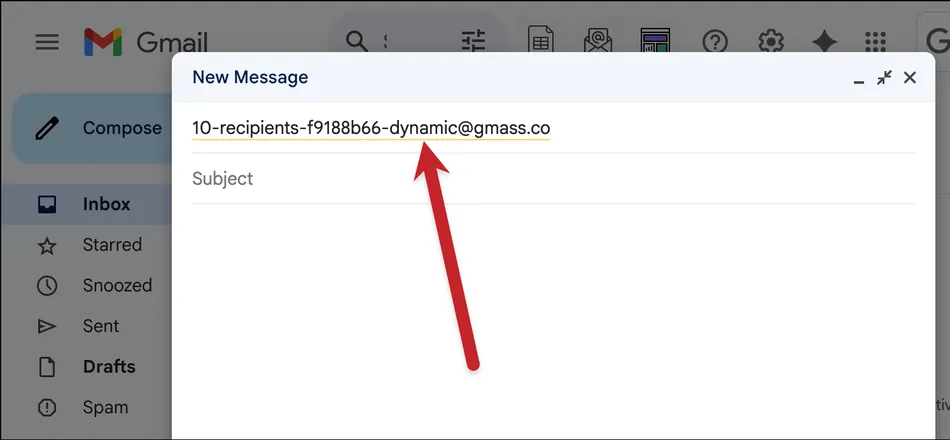
Dynamic lists take this further. Adding “-dynamic” to the campaign alias means additions or removals to the Sheet propagate to the campaign in real time, including follow-up sequences. Remove someone from the Sheet, and they stop receiving follow-ups automatically.
Source: GMass Dynamic
Personalization & AI Features: From merge fields to AI-generated variation, GMass adds personalization at every level.
Basic personalization starts with merge fields from Google Sheets columns. Any field can include a fallback value using a pipe character (e.g., {FirstName|there}), so missing data never produces blank gaps. Conditional if/then logic lets senders change entire paragraphs based on contact attributes, and personalized attachments and images can be served per recipient via URLs stored in the Sheet.
When no name column exists, GMass detects first names from email address patterns without calling external APIs.
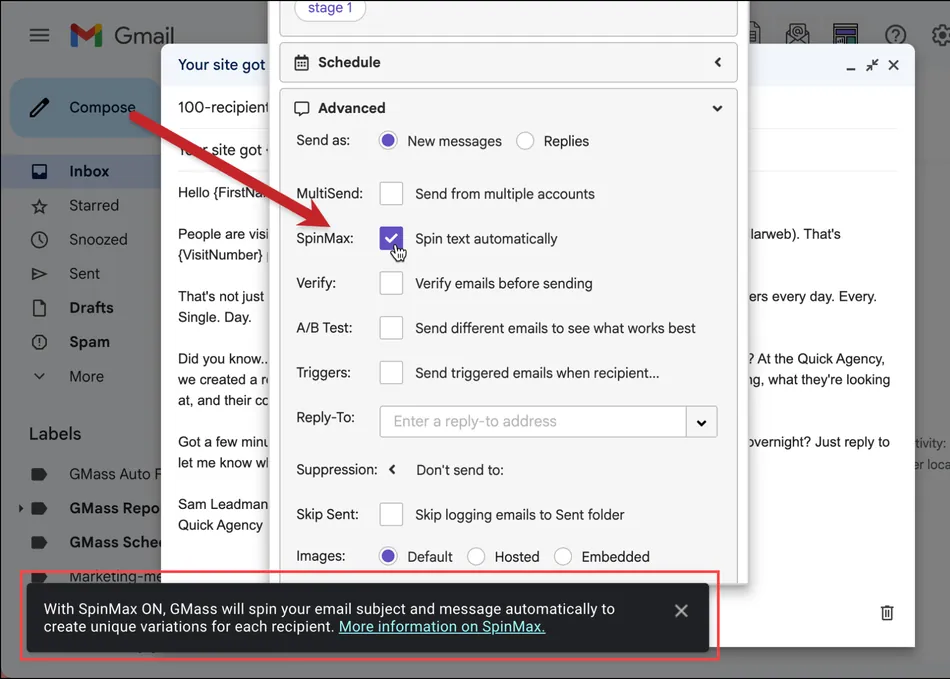
The AI layer adds three capabilities. SpinMax is the main one: a single checkbox in the settings panel that generates wording variations for every email in a campaign and its follow-ups, making each message slightly different to avoid spam filters.
Source: GMass SpinMax
ChatGPT campaign generation lets users describe a campaign in one sentence and receive a complete multi-email sequence with subject lines, body copy, and scheduling settings. And ChatGPT-powered spintax generation creates word-level variations at any cursor position.
All AI features are included in every plan with no API key required. GMass absorbs the OpenAI cost.
Deliverability Tools: A diagnostic suite for landing in the inbox, not the spam folder.
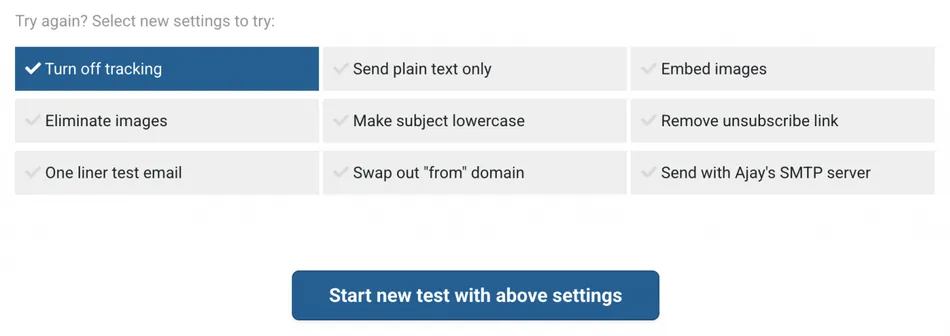
GMass includes deliverability tools that go beyond basic tracking. The centerpiece is Spam Solver: after composing a draft, you click a button and GMass sends test versions to 20 Gmail and Google Workspace seed accounts, including accounts behind enterprise filters from Barracuda, Sophos, and ProofPoint.
It reports Inbox, Promotions, or Spam placement for each, then runs nine variation modes (disabling tracking, stripping images, swapping the from domain, and more) to isolate the cause. As of May 2025, Spam Solver also generates AI-powered suggestions with specific recommended changes.
Source: GMass Suggestions
Email verification validates recipient addresses before sending via syntax checking and SMTP server-level validation, handling up to 5,000 addresses per hour.
Bounce management categorizes bounces separately from blocks and auto-suppresses bad addresses from future campaigns.
Delivery routes let senders adjust sending method and tracking on a per-domain basis, useful when security providers like Mimecast block tracked emails.
A free Email Tester checks SPF, DKIM, DMARC, and blacklist status for any email address.
Follow-up Sequences & Scheduling: Automated multi-stage sequences that stop when someone replies.
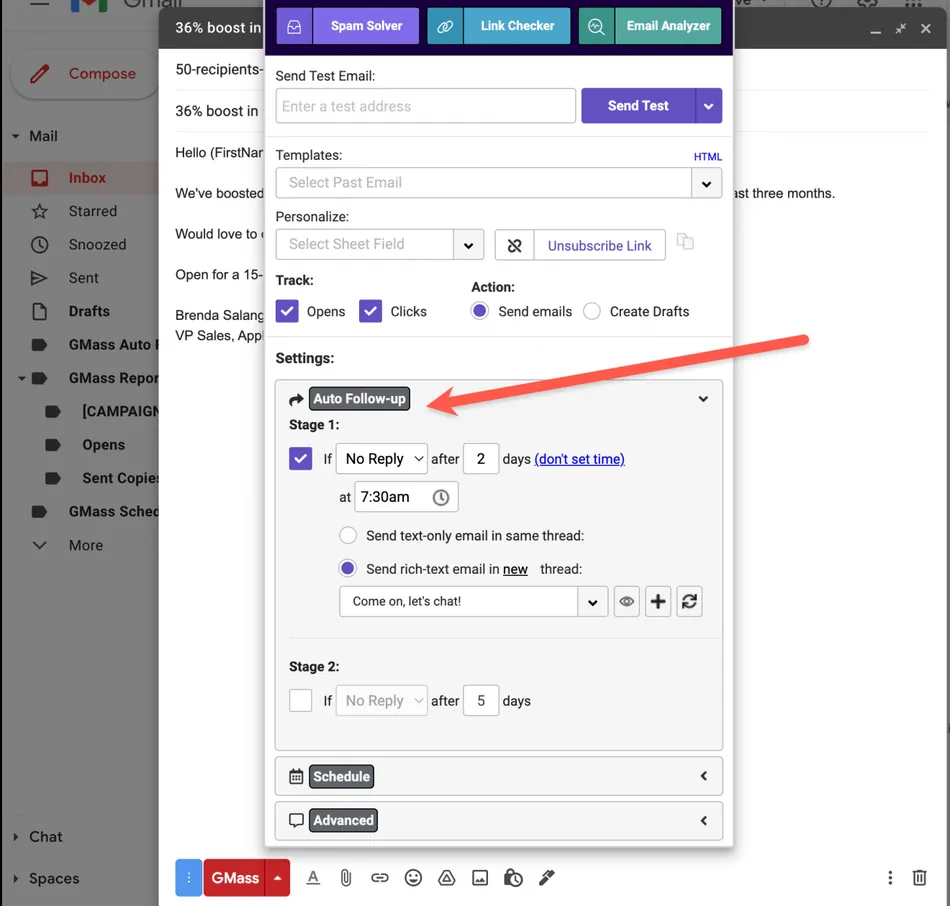
Follow-up sequences are configured in the Gmail compose window. After writing the initial email, you add each follow-up stage with a time delay and a specific send time. Stopping conditions include: a reply, an open, a click, a combined “reply or click,” or no stopping at all for drip campaigns where every contact should receive every message.
As of July 2025, GMass supports unlimited follow-up stages per sequence, up from a previous cap of eight. Follow-ups appear in the same email thread as the original message, mimicking how a real person would follow up.
Domain-level stopping is a useful detail: if one person at a company replies, all contacts at that domain are removed from remaining stages.
Scheduling options include recurring sends (hourly, daily, weekly, or monthly), a daily end time that restricts campaigns to business hours, a skip weekends setting, and per-recipient time zone sending that delivers at the same local time regardless of geography.
Source: GMass Auto Follow Up
Sending Beyond Gmail’s Limits: Seven mechanisms to scale past Gmail’s daily caps.
Gmail caps free accounts at 500 emails per day and Google Workspace accounts at 2,000. For senders who need more, GMass offers seven mechanisms to exceed those limits.
The simplest is automatic multi-day distribution: GMass spreads the campaign across consecutive days until all recipients are covered.
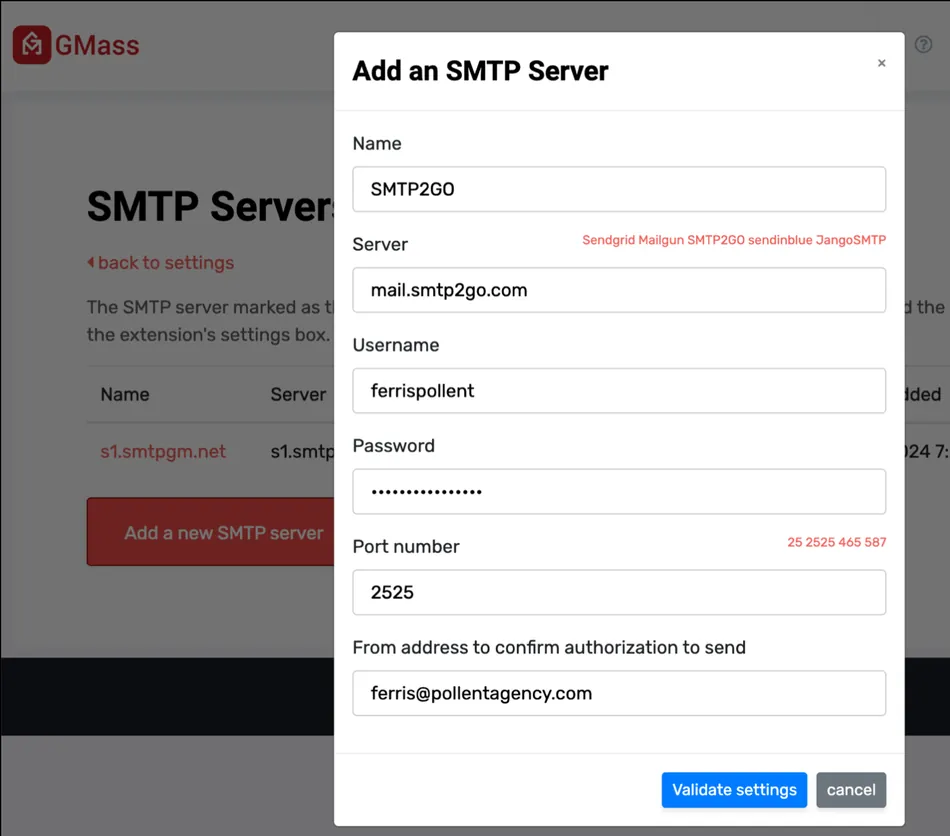
For faster delivery, users can connect third-party SMTP services (SendGrid, Mailgun, Amazon SES, and others) and have GMass reroute overflow automatically. As of November 2024, multiple SMTP servers per account are supported, so senders can assign different servers to different campaign types.
Source: GMass Multiple SMTP Servers
GMass also offers its own sending infrastructure. When a campaign hits Gmail limits mid-send, AI evaluates the account’s history and approves or rejects a switch to GMass’s internal server. Users without DKIM authentication get a from-address replacement that preserves their sender identity without requiring technical setup.
For cold email volume, ColdSMTP (launched December 2024) is a pre-warmed managed server built for high-volume cold outreach. It eliminates the need to purchase multiple domains, run warmup sequences, or manage inbox rotation manually.
MultiSend offers another path: distributing a single campaign across multiple Gmail or Google Workspace accounts, multiplying daily capacity by the number of connected inboxes.
All SMTP-routed messages still appear in the Gmail Sent folder, and open tracking, click tracking, bounces, and auto follow-ups continue to work normally.
GMass Pricing
GMass uses a flat-fee per-seat subscription with no per-email charges in the base plan. All tiers include unlimited emails, contacts, and campaigns, constrained only by Gmail’s daily sending limits.
Individual Plans (Monthly Billing):
| Plan | Price | Key Features |
|---|---|---|
| Standard | $29.95/month | Mail merge, unlimited contacts/campaigns, email verification, Spam Solver, A/B testing, sequences, API + Zapier |
| Premium | $39.95/month | Everything in Standard plus triggered emails, MultiSend inbox rotation |
| Professional | $59.95/month | Everything in Premium plus high-priority support |
Individual Plans (Annual Billing):
| Plan | Monthly Equivalent | Annual Total |
|---|---|---|
| Standard | $20.75/month | $249/year |
| Premium | $29.08/month | $349/year |
| Professional | $49.92/month | $599/year |
Annual billing saves roughly 17 to 30% depending on the tier.
Team Plans scale from 5 to 100 users, with per-user monthly rates declining as team size increases: $35/user for a 5-person team down to $22/user for a 100-person team (monthly billing). Annual team pricing drops further, reaching $18.33/user/month for 100 users. Team plans include all Professional-tier features plus shared unsubscribe/bounce lists, team template sharing, and multi-level dashboard access.
Free plan: GMass offers a free tier with no credit card required and a 30-second install. Treat it as a trial for evaluating the interface and basic functionality.
Additional costs to know about: Emails sent through SMTP (GMass’s server or third-party) include the first 10,000 per billing period free, then $5 per 10,000 additional emails. Google Workspace subscriptions (which raise the daily sending limit from 500 to 2,000) are billed separately by Google.
The January 2026 price increase was only the third in GMass’s 10-year history. Goel positioned the platform as “one of the lowest-priced complete email sending platforms on the market”.
Where GMass Falls Short
GMass’s limitations follow from its core design choice: building everything inside Gmail rather than as a standalone platform. That choice delivers simplicity and deliverability advantages, but it creates real constraints worth understanding before you commit.
Gmail and Chrome are hard requirements. GMass requires a Gmail or Google Workspace account and the Chrome browser. Outlook users, Apple Mail users, and anyone on Firefox or Safari cannot use it. For mixed-environment teams, this disqualifies at least some members.
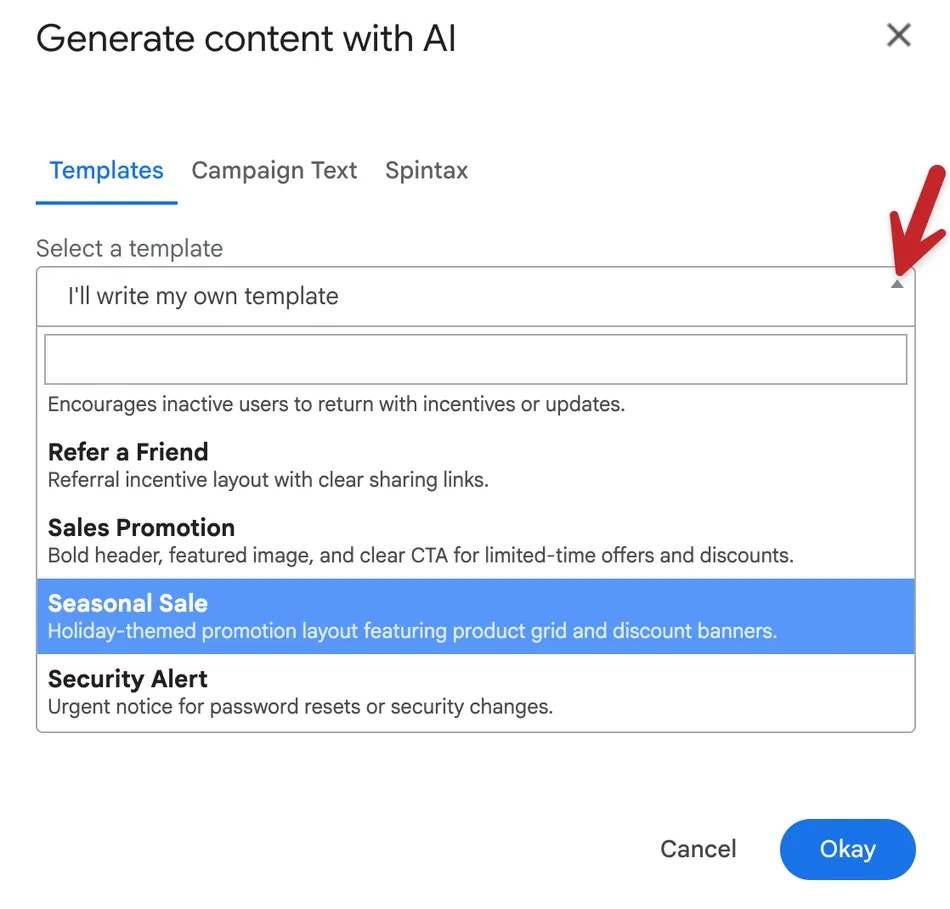
No visual email builder. GMass composes emails in Gmail’s native text editor. There is no drag-and-drop builder, no template gallery, and no visual design tools of the kind found in Mailchimp or Constant Contact. The AI Template Builder generates HTML from prompts, but it targets users comfortable with HTML, not visual designers. Capterra reviewers flag this as a gap.
Source: GMass AI Template Builder
Sending limits add complexity at scale. Gmail caps daily sends at 500 (free) or 2,000 (Workspace). GMass provides workarounds (SMTP routing, MultiSend, ColdSMTP), but managing those adds configuration overhead. Capterra reviewers note Gmail’s limits remain a real constraint, and GMass is not designed for campaigns targeting millions of addresses.
Settings interface can feel crowded. All campaign configuration happens in a single settings panel overlaid on Gmail’s compose window. Capterra reviewers describe it as “quite cluttered compared to other email marketing software”. Users accustomed to step-by-step wizards may find the all-at-once approach disorienting at first.
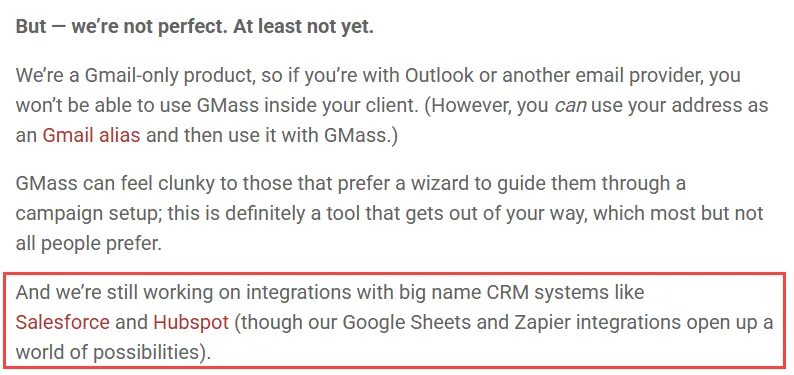
No native CRM integrations. GMass acknowledges it is “still working on integrations with big name CRM systems like Salesforce and HubSpot”. Zapier and Google Sheets fill the gap for technical users, but teams that depend on direct CRM sync will find this frustrating.
Support is self-service by design. There is no phone support or live chat. The team of 7 routes support through a Zendesk form, and GMass’s documentation states it does not answer all support requests. A knowledge base and external freelancer community on Fiverr and Upwork provide alternatives, but for urgent issues, the lack of live support is a real limitation.
Deliverability can cut both ways for heavy senders. Sending through Google’s servers helps deliverability at reasonable volumes, but G2 reviewers report that heavy senders have had accounts flagged or emails blocked by Google. Google controls the infrastructure and will throttle accounts it considers abusive.
Who Should Use GMass?
Gmail power users who want campaign capabilities without leaving their inbox. If Gmail is already your primary workspace and you don’t want to learn or pay for a separate platform, GMass adds campaign features to what you already know.
Solo SDRs and small sales teams doing cold outreach on a budget. Personalized sequences, automated follow-ups with domain-level stopping, and Spam Solver’s deliverability testing cover the core cold email workflow at a price well below dedicated sales engagement platforms.
Marketers who need both newsletters and outreach. Most platforms are either an ESP (newsletters to opted-in subscribers) or a cold email tool (outreach to prospects). GMass handles both from the same Gmail account, which is unusual.
Organizations that run on Google Sheets. If your contact data lives in Sheets and you don’t use a CRM, GMass’s bi-directional sync, row filtering, and dynamic lists make the spreadsheet the system of record for both contacts and campaign performance.
Source: GMass with Google Sheets
Cost-sensitive teams. At $29.95/month per seat with no per-email charges, GMass is one of the cheapest full-featured options in the category, particularly for users who don’t need lead database access or a built-in CRM.
Who Should Look Elsewhere?
Outlook or non-Gmail users. This is a binary filter. GMass only works inside Gmail on Chrome. No exceptions, no workarounds.
Teams needing a visual email design experience. If your workflow depends on drag-and-drop editors, pre-built template libraries, and visual A/B testing of layouts, GMass’s plain-text-first approach will feel limiting.
Enterprise organizations requiring CRM integration. Without native Salesforce or HubSpot sync, GMass creates friction for teams whose sales process runs through a CRM. Zapier bridges the gap partially, but it’s not equivalent to native integration.
Source: GMass Blog
High-volume senders targeting millions of contacts. GMass handles campaigns of up to a few hundred thousand recipients with SMTP workarounds, but it’s not built for the scale that dedicated ESPs like Mailchimp, SendGrid, or Brevo handle natively.
Users who need live support. If your work depends on getting help quickly when something breaks, the absence of phone and chat support is a real drawback.
Multi-channel outreach teams. GMass is email-only. If your sequences need LinkedIn touches, SMS follow-ups, or phone calls in the same workflow, platforms like Lemlist or Apollo.io are better suited.
Final Verdict: Is GMass Worth It?
For Gmail users who need campaign capabilities without a separate platform, yes.
GMass does something uncommon: it turns the email client you already use into a campaign tool covering cold outreach, newsletters, mail merges, and automated sequences from a single compose window. The Google Sheets integration is practical and well-built.
The deliverability toolkit (particularly Spam Solver) is more thorough than what most competitors at this price offer. And the AI features, included in all plans at no extra cost, add real value without requiring technical setup.
The caveats are structural. You need Gmail and Chrome. You won’t get a visual email builder. CRM integration requires workarounds. And if you push volume hard enough, you’ll hit Gmail’s limits and need to manage SMTP routing. These aren’t oversights. They’re the trade-offs of building inside Gmail rather than outside it.
For the right user (Gmail-native, moderate volume, values simplicity and affordability over feature breadth), GMass is hard to beat at its price. For everyone else, the Gmail requirement alone may be the answer.
GMass FAQ
Is there a free version of GMass?
Yes. GMass offers a free plan that requires no credit card and installs in about 30 seconds. The free tier works best as a way to evaluate the interface and core functionality before committing to a paid plan. Paid plans start at $29.95/month for the Standard tier or $249/year with annual billing.
Does GMass work with Outlook or other email clients?
No. GMass is a Gmail Chrome extension. It requires a Gmail or Google Workspace account and the Google Chrome browser. Users on Outlook, Apple Mail, Yahoo Mail, or non-Chromium browsers cannot use GMass.
How does GMass handle Gmail’s daily sending limits?
Gmail caps daily sends at 500 for free accounts and 2,000 for Google Workspace accounts.
GMass provides seven mechanisms to exceed these limits, including automatic multi-day distribution, third-party SMTP integration (SendGrid, Mailgun, Amazon SES), GMass’s own internal SMTP server with AI-powered approvals, MultiSend inbox rotation across multiple accounts, and ColdSMTP, a pre-warmed managed server for cold email. All SMTP-routed emails still appear in the Gmail Sent folder with full tracking.
What AI features does GMass include?
GMass includes SpinMax (automatic wording variations for every email in a campaign), ChatGPT campaign generation (describe a campaign in one sentence and receive complete multi-email sequences), ChatGPT spintax generation for word-level variation, AI-powered reply drafting in The Reply Project, and AI deliverability analysis in Spam Solver.
All AI features are included in every plan tier with no personal API key required.
Does GMass integrate with CRMs like Salesforce or HubSpot?
Not natively. GMass has acknowledged it is still working on direct integrations with major CRM platforms. Currently, users connect GMass to CRMs through Zapier or by using Google Sheets as an intermediary data layer. For teams whose workflows depend on direct CRM sync, this is a notable gap.
How much does GMass cost for teams?
Team plans range from $35/user/month for a 5-person team to $22/user/month for a 100-person team on monthly billing. Annual billing reduces these further, down to $18.33/user/month for 100 users.
Team plans include all Professional-tier features plus shared unsubscribe and bounce lists, template sharing, and multi-level dashboard access. Emails routed through SMTP beyond the first 10,000 per billing period cost an additional $5 per 10,000 emails.
What deliverability tools does GMass provide?
GMass includes Spam Solver (tests campaigns against 20 seed accounts including enterprise-filtered accounts, with AI-powered improvement suggestions), email verification (syntax and SMTP-level validation for up to 5,000 addresses per hour), automatic bounce management with suppression, delivery routes for per-domain sending configuration, a free Email Tester for SPF/DKIM/DMARC checks, custom tracking domains with SSL, and a Deliverability Portal showing aggregate statistics.
What are the best GMass alternatives?
For cold email, Instantly and Smartlead offer dedicated platforms with unlimited email accounts and built-in warm-up networks.
For email marketing with visual design tools, Mailchimp, Brevo, and MailerLite provide drag-and-drop builders and pre-built templates.
For multi-channel outreach combining email with LinkedIn and phone, Lemlist and Apollo.io cover those workflows. The best alternative depends on whether you need multi-channel support, visual design, enterprise CRM integration, or higher sending volume than Gmail allows natively.