Saleshandy started as an email tracking tool a decade ago and evolved into a cold email platform. Today it combines a B2B lead database of 800M+ contacts, automated email sequences, deliverability tools, and a unified inbox, all under one subscription. Find prospects, email them, manage replies without switching tools. For teams that run on cold email, that consolidation matters. But so do the trade-offs.
After reviewing the platform, we think Saleshandy is a good fit if:
- You need unlimited email accounts at a flat monthly rate
- You run a lead-generation agency managing multiple clients from one dashboard
- You want prospecting, sequencing, warm-up, and inbox management in a single tool
- You prefer self-serve setup and a fast path to your first campaign
- You’re scaling cold email volume without wanting per-seat or per-inbox fees
Saleshandy might not be the right fit if:
- You need bidirectional CRM integration with Salesforce or HubSpot as your system of record
- Multi-channel outreach (LinkedIn, SMS, calling) is central to your sales process
- You need customizable reporting dashboards and revenue attribution
- You’re sending 500K+ emails monthly and need enterprise infrastructure guarantees
- Personalization beyond merge tags and spintax is critical to your workflow
If you’re ready to try it, get started with Saleshandy here. Otherwise, keep reading for the full breakdown.
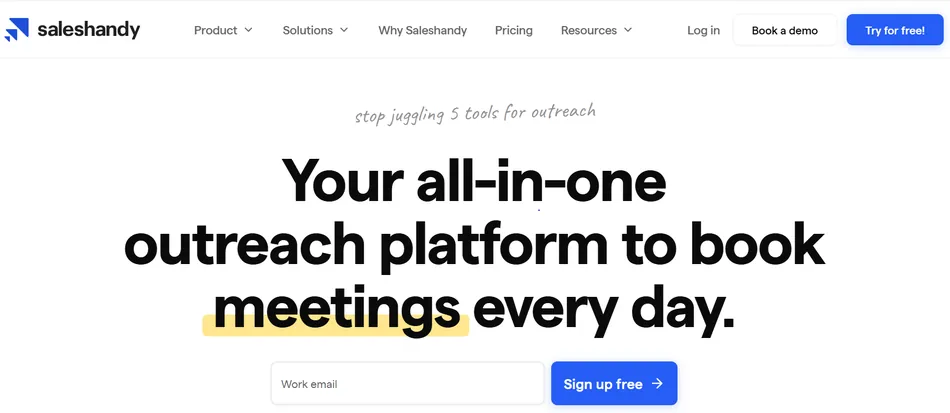
What is Saleshandy?
Source: Saleshandy
Saleshandy is a cold email platform founded in 2015 in Ahmedabad, India by Dhruv Patel and Piyush Patel. The legal entity, Ikigai Infotech LLP, was incorporated in December 2016.
The product reinvented itself several times: a Chrome extension for mail merge in 2017, automated email sequences in 2018, a full platform rewrite in 2020 that shifted toward dedicated cold email, and a B2B Lead Finder launch in 2023 that added prospecting.
The company is bootstrapped. It serves 10,000+ businesses globally and holds a 4.6/5 rating on G2 from 634+ reviews. Customers include Cloudflare, Gartner, GoDaddy, NetApp, Colliers, and Marsh.
The main differentiator is pricing. All paid plans include unlimited email accounts, unlimited clients, and unlimited team members (on Pro and above) at a flat rate. Where competitors charge per inbox or per seat, Saleshandy stays cheaper at scale, particularly for agencies and teams running outreach across many domains.
Security credentials include SOC 2 Type II certification (February 2025), ISO 27001:2022 (December 2024), and GDPR compliance (October 2025).
Saleshandy Pros & Cons
| Pros | Cons |
|---|---|
| ✅ Unlimited email accounts on all paid plans | ❌ Warm-up quality concerns at high inbox counts |
| ✅ Built-in Lead Finder with 800M+ contacts | ❌ Basic reporting, no customizable dashboards |
| ✅ Deliverability toolkit (warm-up, sender rotation, ESP matching, inbox testing) | ❌ CRM integrations are shallow, gated to Pro+ |
| ✅ Agency-friendly pricing with white-labeling on Scale | ❌ Tracking accuracy affected by pixel-blocking (Gmail, Apple Mail) |
| ✅ AI Sequence Copilot and A/Z testing (up to 26 variants) | ❌ Advanced personalization requires external tooling |
| ✅ 7-day free trial, no credit card required | ❌ No direct document attachments in emails |
| ✅ SOC 2 Type II, ISO 27001, GDPR certifications | ❌ Inconsistent customer support |
Who is Saleshandy Best For?
- Cold email and lead-generation agencies.
Unlimited email accounts, unlimited clients, white-labeling, and multi-client dashboards on the Scale plan at $139/month (annual) cost less than per-seat tools at volume. The LeadRoad case study shows one agency booking 25-35 meetings per client per month, sending 75,000 emails monthly from a single account.
- Small and mid-market B2B sales teams doing outbound.
Teams of 5-50 people benefit from having prospecting, sequencing, warm-up, and a basic CRM in one subscription rather than stitching together three or four tools. Fewer integrations to maintain, fewer invoices to manage.
- Bootstrapped founders and solo operators.
At the Starter plan ($25/month annual), a founder gets AI-powered sequences, unlimited email accounts, and 2,000 active prospects. Features that used to cost $200-300/month across multiple tools, available in one place.
- Recruiters sourcing candidates through cold email.
Saleshandy targets recruiters as a use case, and the Lead Finder’s filters (job titles, company size, career transition data) fit candidate sourcing well.
- IT services and consulting firms building outbound pipeline.
Case studies from Sedin Technologies ($15M revenue pipeline over 4 years) and BraevenSolutions (40% improvement in meetings per BDR) illustrate this profile.
Saleshandy lists six personas on its website, but its strongest fit is agencies and SMBs where cold email is the primary channel. Larger organizations with complex CRM needs or teams that require native multi-channel sequences will find the platform too shallow.
Saleshandy Review: How it Works & Key Features
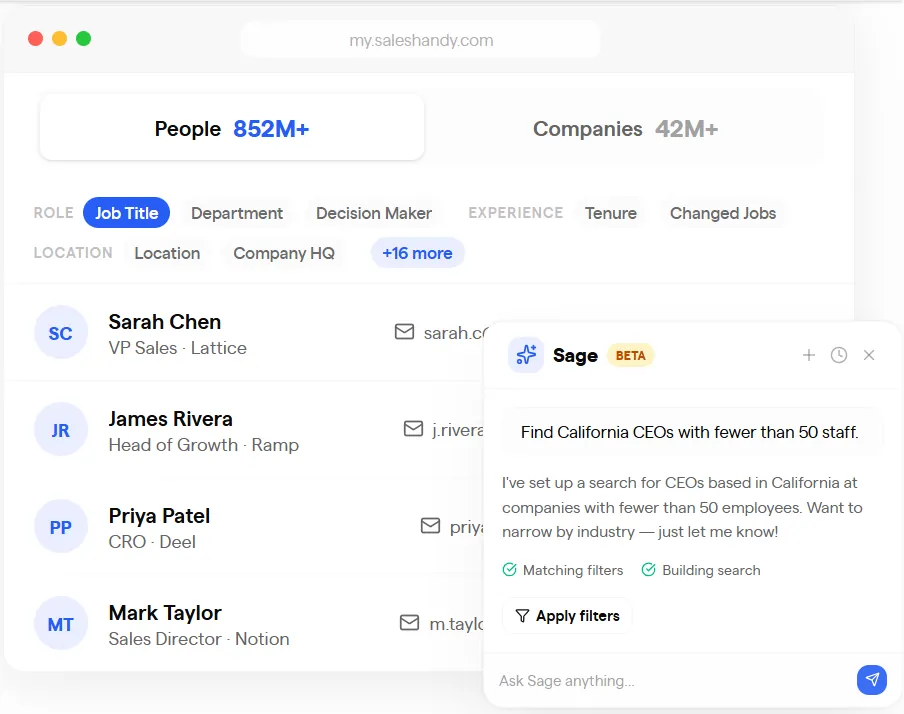
Lead Finder: A built-in prospecting database with 800M+ contacts and AI-powered search.
Saleshandy’s Lead Finder closes the gap between finding prospects and emailing them. Instead of buying data from a separate vendor, exporting CSVs, cleaning lists, and re-importing into your outreach tool, you search, reveal, and push contacts into sequences without leaving the platform.
Source: Saleshandy
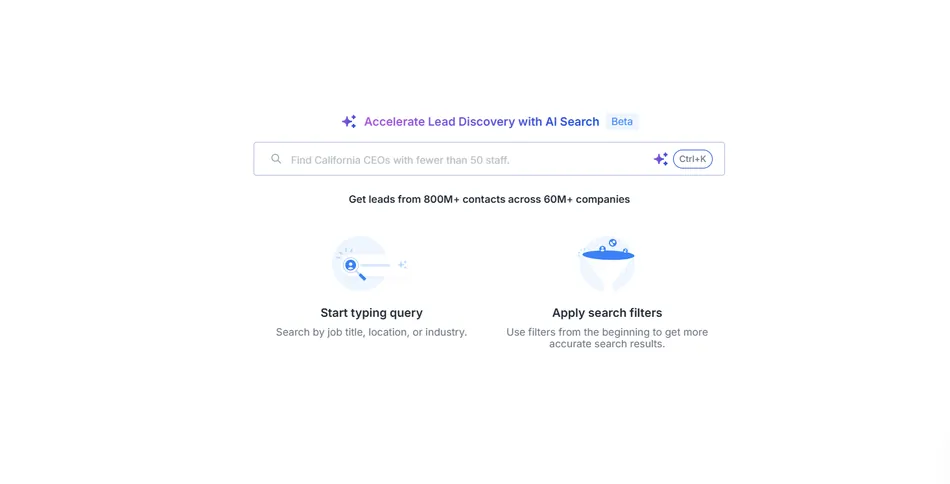
The database covers 800M+ contacts and 60M+ companies, searchable in two ways. Manual search uses 75+ filters across job title, company size, industry, revenue, tech stack, and buying signals.
AI Search lets you describe your target in plain language (“CEO in the UAE in the software industry with less than 100 employees”), and the system translates that into structured filters. Both modes support Bulk Search with up to 100 values per parameter.
Source: Saleshandy
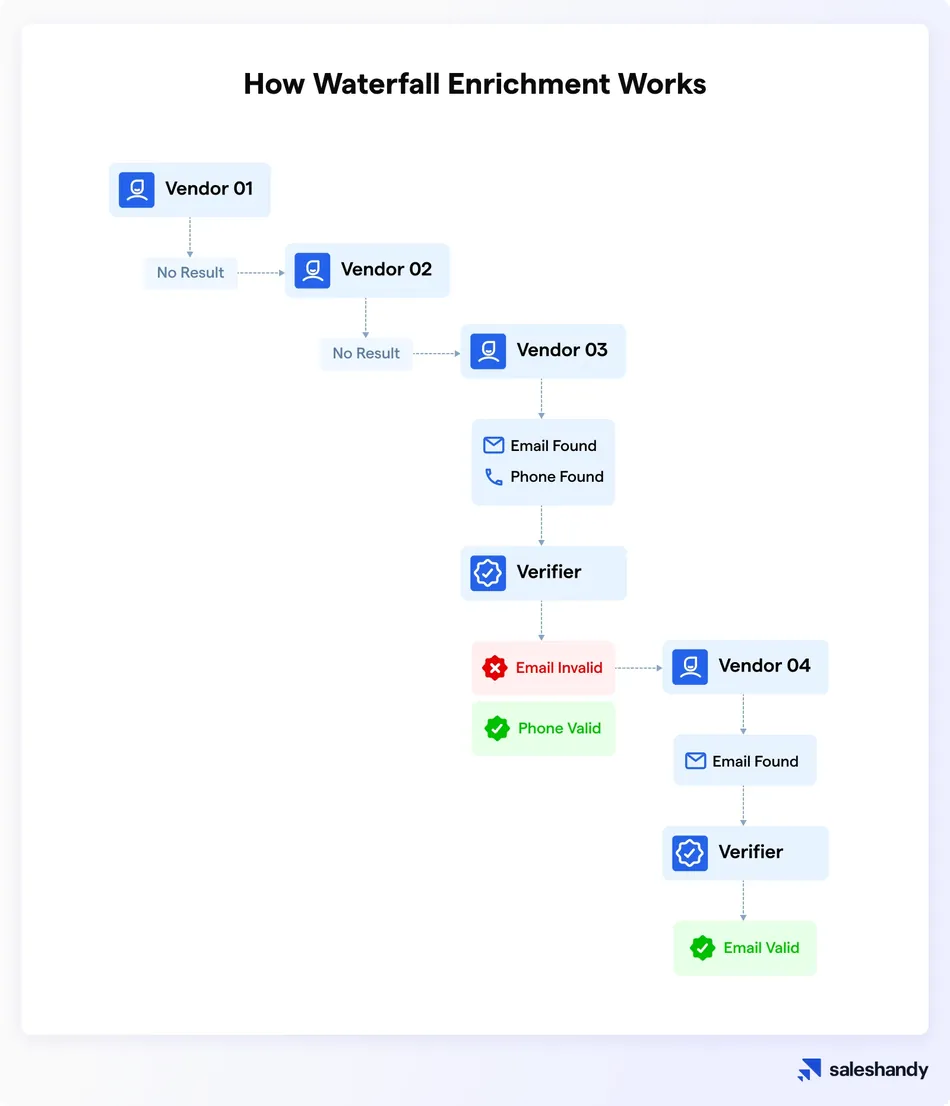
Contact details are hidden by default and revealed through a credit system. Waterfall Enrichment queries multiple data providers in sequence to fill missing fields, with real-time email verification at the point of reveal.
Source: Saleshandy
An email-plus-phone reveal costs 7 credits, and 50% of unused credits roll over each billing cycle. Revealed prospects can be exported in bulk (up to 10,000 at once) or added directly to email sequences.
The Saleshandy Connect 2.0 browser extension brings Lead Finder to LinkedIn and company websites.
Cold Email Sequences: Automated multi-step campaigns with AI generation and A/Z testing.
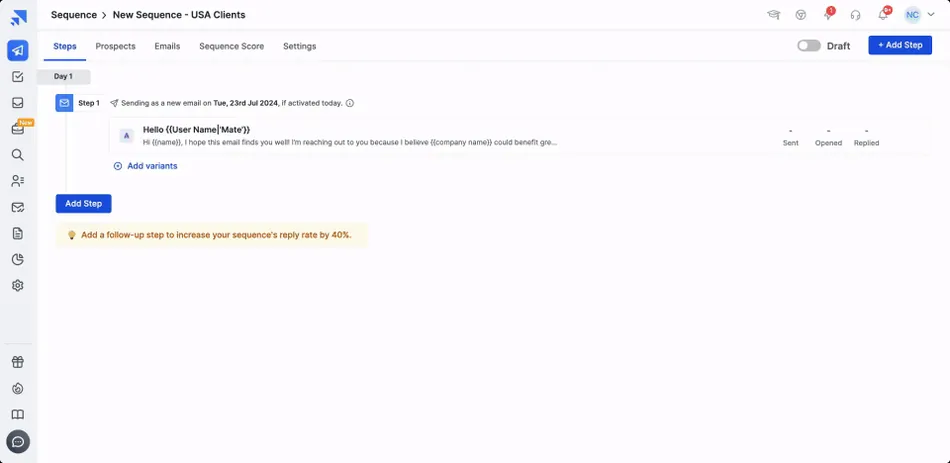
The sequence builder is Saleshandy’s core outreach engine. The workflow: create a sequence, draft email steps with merge tags and spintax, add follow-ups with configurable delays, add A/Z variants, configure sending settings, import prospects, and activate.
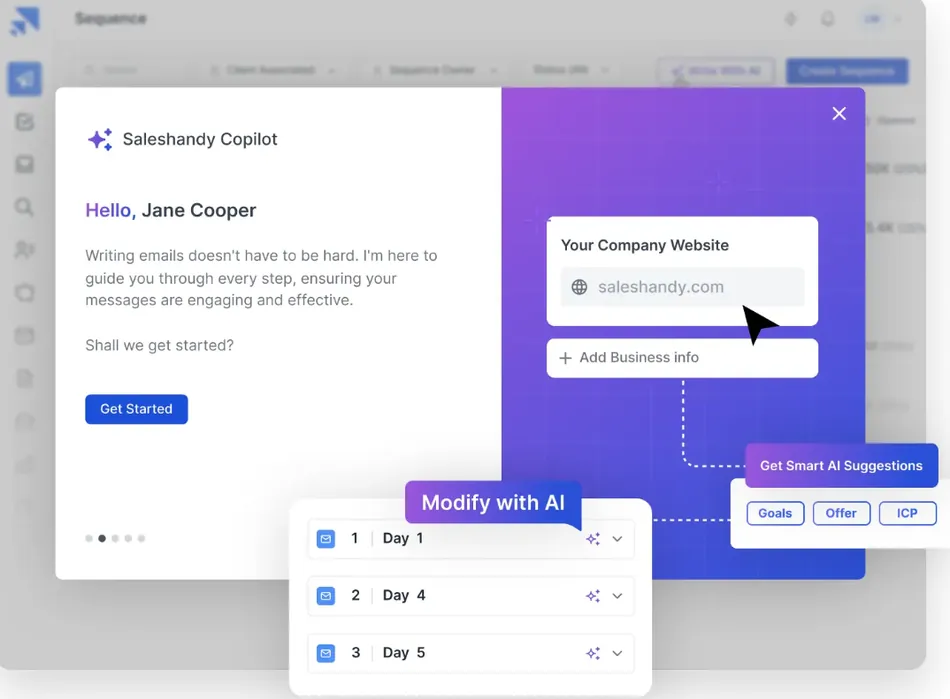
The AI Sequence Copilot generates multi-step sequences by scanning your website to extract your industry, value proposition, tone, and target audience. It grounds output in your business context rather than producing generic templates. You can request AI refinements without rewriting manually.
Source: Saleshandy
Each step supports up to 26 email variants (A through Z) for split testing, compared to the two-variant A/B testing most competitors offer. Personalization tools include merge tags, spintax, preheaders, image personalization via Google Drive, and video personalization.
On Pro plans and above, Subsequences add conditional branching: when a prospect opens an email a certain number of times, clicks a URL, or receives a specific tag, they move into a different follow-up flow automatically.
Sender Rotation distributes sends across multiple email accounts within a single sequence. Limits scale by plan: 10 accounts per sequence on Starter, 100 on Pro, and 1,000 on Scale. Follow-ups always send from the same account that sent the initial email.
Source: Saleshandy
Email Infrastructure & Deliverability: Everything from domain purchase to inbox monitoring, in one place.
Cold email at volume requires secondary domains, configured authentication, warm-up, and ongoing monitoring. Saleshandy handles all of it inside the platform.
Users can purchase secondary domains ($14/year) and mailboxes ($4/account/month) directly within Saleshandy, with SPF, DKIM, DMARC, and custom tracking domains configured automatically. No external registrar or DNS setup required.
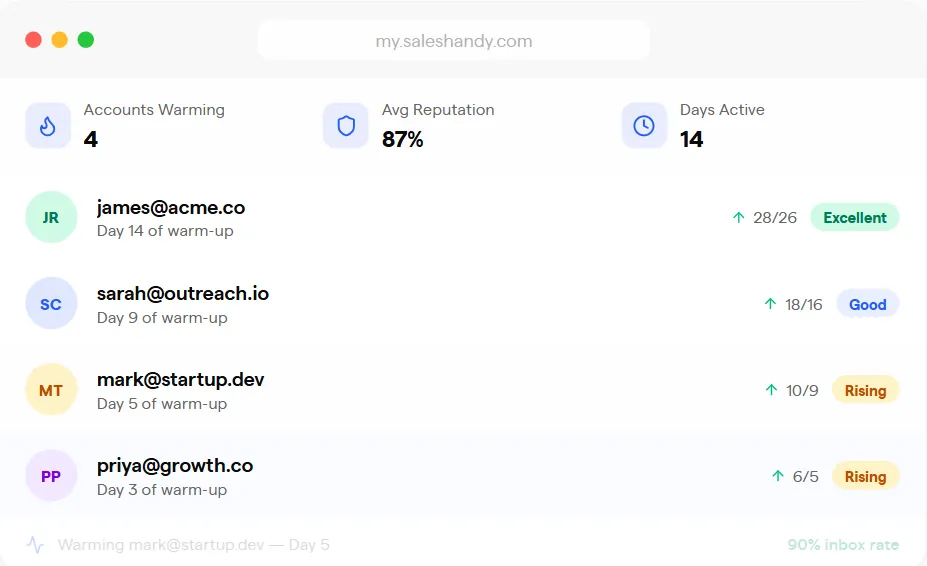
New mailboxes connect automatically to TrulyInbox, Saleshandy’s warm-up partner, which builds sender reputation through human-like inbox interactions. Warm-up is included on all plans at no extra cost.
Source: Saleshandy
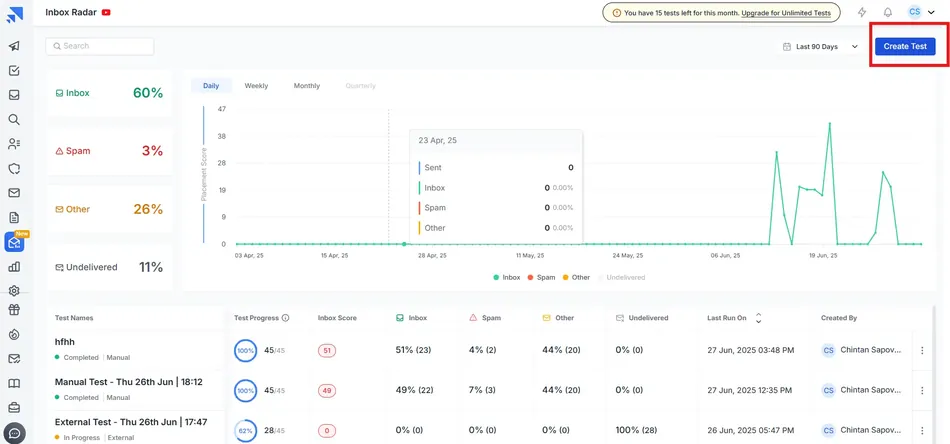
Before launching a campaign, Inbox Radar tests where your emails land across Gmail, Outlook, Yahoo, Zoho, and other providers, returning an inbox/promotions/spam breakdown per provider. The platform also checks SPF/DKIM/DMARC, flags spam-trigger words, and cross-checks sending IPs against blacklists.
Source: Saleshandy
During live campaigns, Sender Rotation distributes volume across connected accounts. ESP Matching routes outbound emails through the right account type (Google, Microsoft, or other) to match the prospect’s email provider, which tends to improve deliverability.
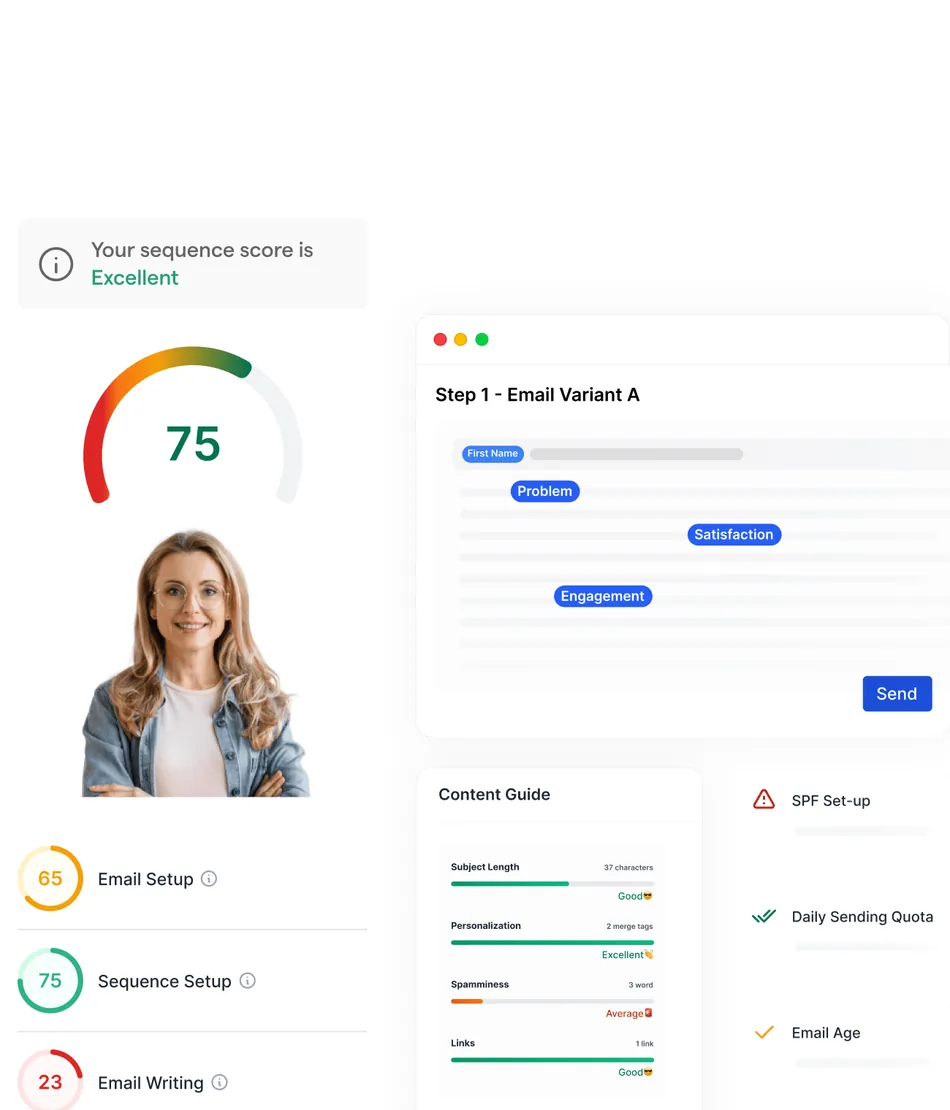
Sequence Score evaluates campaign readiness across 17 factors covering email account health, sequence setup, and writing quality. It catches problems before you send rather than after. Bounce Guard automatically pauses sequences when high bounce rates appear.
Source: Saleshandy
Unified Inbox: Centralized reply management with AI-powered intent categorization.
Managing replies across dozens or hundreds of email accounts is the bottleneck of scaled cold email. Saleshandy’s Unified Inbox pulls all prospect replies from every connected account and every active sequence into a single interface.
When a reply arrives, AI scans the content and assigns an outcome: Interested, Not Interested, Meeting Booked, Automatic Response, Closed, Not Now, Do Not Contact, or Uncategorised. You can create custom outcomes with user-defined sentiment tagging. Deal values can be assigned to outcomes like Interested or Meeting Booked, giving you pipeline revenue visibility directly from inbox actions.
Enhanced Reply Tracking catches replies that would normally be missed: forwarded emails where a third party responds from a different address, replies in new threads, and reply-to address mismatches. Reps can reply within threads, schedule responses with timezone override, and save drafts.
The Unified Inbox is available on iOS and Android. One limitation: only sequence owners can view prospect replies, and trial and Starter plan users can only see the first 10 email threads.
Pricing: Tiered plans based on active prospect limits, with separate modules for leads and infrastructure.
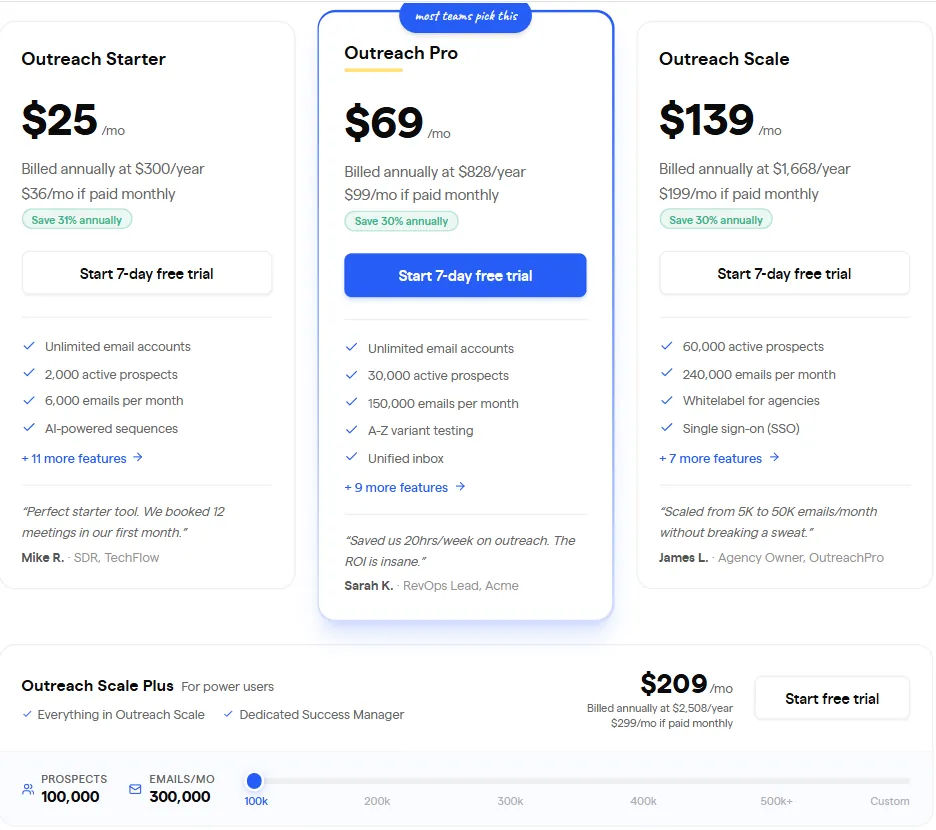
Saleshandy uses a flat-fee, tier-based model organized around active prospect limits (prospects simultaneously in live sequences) rather than per-seat charges. The core outreach plans:
Outreach Starter ($36/month, or $25/month billed annually):
- 2,000 active prospects; 6,000 emails per month
- Unlimited email accounts, unlimited clients, unlimited warm-up
- Sender Rotation: 10 accounts per sequence
- AI Sequence Copilot
- 50 Lead Finder Credits, 100 AI Credits, 1,000 Email Verification Credits (one-off)
- No team members, no CRM integrations, no subsequences
Outreach Pro ($99/month, or $69/month annual) (Most Popular):
- 30,000 active prospects; 150,000 emails per month
- Unlimited team members
- Sender Rotation: 100 accounts per sequence
- Subsequences, unlimited AI Variants, MCP Access
- CRM integrations (Salesforce, HubSpot, Pipedrive, Zoho), API, and webhooks
- 1 Inbox Placement Test per month
- 100 Lead Finder Credits, 200 AI Credits, 5,000 Email Verification Credits (one-off)
Outreach Scale ($199/month, or $139/month annual):
- 60,000 active prospects; 240,000 emails per month
- Unlimited teams, white-label solution, SSO
- Sender Rotation: 1,000 accounts per sequence
- 2 Inbox Placement Tests per month
- 100 Lead Finder Credits, 500 AI Credits, 10,000 Email Verification Credits (one-off)
Outreach Scale Plus (from $209/month annual):
- 100K-400K active prospects; 300K-1.2M emails per month
- Dedicated Success Manager
- Customized warm-up on 200K+ tiers
Source: Saleshandy
Lead data is priced separately. The Lead Starter plan runs $59/month ($49/month annual) for 2,500 credits per month; Lead Pro is $99/month ($79/month annual) for 4,000 credits per month. One credit reveals an email; 7 credits reveal email plus phone.
Additional costs: Email Infrastructure at $4/account/month and $14/domain/year, AI Credits add-ons at $10 per 5,000, Email Verification at $79 per 25,000 credits, and Lead Finder top-ups at $13 per 500 credits.
All plans offer a 7-day free trial with no credit card required. Annual billing saves 30%.
Check Saleshandy’s current pricing here.
Where Saleshandy Falls Short
Saleshandy’s limitations follow from being a bootstrapped, SMB-focused platform that chose breadth and aggressive pricing over depth in any single area.
Warm-up quality at scale. Multiple G2 and Capterra reviewers report that the warm-up service (powered by TrulyInbox) becomes less effective past 50 inboxes. Per-account volume limits may not keep pace with aggressive scaling. Dedicated warm-up tools offer more control at that volume.
Basic reporting. TrustRadius reviewers note that analytics lack customizable dashboards, attribution depth, and multi-channel reporting. Sequence Score is a useful pre-send diagnostic, but post-campaign analytics stay limited to open/click/reply metrics without custom views. Teams needing funnel attribution or custom KPIs will need to export data.
Shallow CRM integrations, gated to higher plans. Native integrations with HubSpot, Salesforce, Pipedrive, and Zoho are only available on Outreach Pro ($69/month annual) and above. Starter users rely on Zapier. Even on connected plans, TrustRadius reviewers describe limited depth. Teams that use Salesforce as their system of record may find the sync insufficient.
Tracking accuracy limitations. Capterra reviewers flag that opening your own sent email on mobile triggers a false “opened” event on the prospect’s record. Open tracking relies on pixel loading, which Gmail Image Proxy and Apple Mail Privacy Protection increasingly block. The platform does not prominently communicate these limitations.
No direct document attachments. Capterra reviewers note that files cannot be attached directly to emails. Documents must be uploaded and linked instead. For outreach that includes proposals or collateral, this adds a step.
Inconsistent customer support. TrustRadius reviewers describe mixed experiences: responsive help for some, slow responses or communication difficulties for others. Capterra reviews note there is no phone support. For a platform handling revenue-generating outreach, inconsistent support matters.
Modular pricing adds up. The unlimited email accounts headline is compelling, but outreach plans, lead data, email infrastructure, AI credits, and verification credits are all billed separately. A team on Outreach Pro ($69/month annual) that also needs Lead Pro ($79/month) and 10 infrastructure mailboxes ($40/month) pays nearly $190/month before add-ons. That’s competitive, but calculate the full stack cost rather than focusing on the base price alone.
Who Should Use Saleshandy?
- Agencies running cold email for multiple clients who need unlimited accounts, white-labeling, and flat-rate pricing
- SMB sales teams (5-50 people) whose primary channel is cold email and want prospecting, sequences, and deliverability in one tool
- Solo founders and bootstrapped operators who need a capable outreach platform at $25-69/month
- Recruiters sourcing candidates through cold email at scale
- Teams moving from manual outreach to automation who want a short learning curve and fast setup
Who Should Look Elsewhere?
- Enterprise sales organizations with complex Salesforce workflows, bidirectional CRM needs, and compliance requirements beyond Saleshandy’s integration depth
- Teams whose outreach depends on multi-channel sequences combining email, LinkedIn, SMS, and calls in one workflow. Saleshandy’s LinkedIn steps require a Chrome extension and don’t sequence like email
- Revenue operations teams needing conversation intelligence, deal forecasting, pipeline health scoring, or custom dashboards
- Organizations that need phone support and guaranteed SLA response times
- Teams sending 500K+ emails monthly with complex compliance requirements and enterprise infrastructure needs
Final Verdict: Is Saleshandy Worth It?
For teams where cold email is the primary channel, Saleshandy offers one of the most affordable combinations of prospecting, sequencing, and deliverability tools available. Unlimited email accounts at a flat rate is a real structural advantage.
Agencies in particular get pricing that scales without punishing growth. The platform’s range (Lead Finder, AI Sequence Copilot, warm-up, inbox placement testing, sender rotation, ESP matching, unified inbox) means most cold email workflows can live inside a single subscription.
The caveats are about depth, not breadth. Reporting is basic. CRM integrations work but don’t go deep. Warm-up quality drops at high inbox counts. Support is uneven. And the modular pricing, while individually reasonable, adds up once you stack lead data, infrastructure, and credits on top of the base plan.
If cold email is your channel and you want one tool that covers most of the workflow at a price that doesn’t scale linearly with team size, Saleshandy is a strong choice. If you need tight CRM integration, multi-channel sequences, or enterprise analytics, evaluate the alternatives first.
Get started with Saleshandy here.
Saleshandy FAQ
Is there a free trial for Saleshandy?
Yes. Saleshandy offers a 7-day free trial on all paid outreach plans with no credit card required. Trial limits include 100 total emails, 50 emails with Sender Rotation, 10 conversations in the Unified Inbox, 2,000 total prospects, and 50 email verification credits. Inbox Radar also has a free tier with 2 tests per month.
How many email accounts can you connect to Saleshandy?
All paid plans include unlimited email accounts at no extra per-account fee, from Starter through Scale Plus. Accounts connect via Google and Microsoft OAuth, SMTP/IMAP, or bulk CSV import (up to 100 accounts per file). The limit that varies by plan is Sender Rotation: 10 accounts per sequence on Starter, 100 on Pro, and 1,000 on Scale.
How much does Saleshandy cost?
Outreach plans start at $25/month (annual) for Starter with 2,000 active prospects and 6,000 monthly emails. Pro is $69/month (annual) with 30,000 active prospects and 150,000 emails. Scale is $139/month (annual) with 60,000 active prospects and 240,000 emails. Lead Finder, email infrastructure, AI credits, and inbox placement testing cost extra.
Does Saleshandy integrate with CRMs?
Native integrations with Salesforce, HubSpot, Pipedrive, and Zoho CRM are available on Outreach Pro and above. The Salesforce integration syncs bidirectionally, pushing email events and prospect outcomes to CRM records. Starter users connect through Zapier. Additional middleware options include Make, n8n, and Clay.
What is Saleshandy’s Lead Finder?
Lead Finder is a built-in B2B prospecting database with 800M+ contacts and 60M+ companies. Search using 75+ filters or describe your target in plain language with AI Search. Revealing contact details uses credits (1 for email, 7 for email plus phone). Waterfall Enrichment queries multiple data providers to fill gaps, and 50% of unused credits roll over each billing cycle.
Does Saleshandy support multi-channel outreach?
Saleshandy focuses on email. LinkedIn steps, calls, and manual tasks can be added to sequences, but LinkedIn automation requires a Chrome extension rather than native integration. SMS and WhatsApp are available as manual task types within the CRM. Teams needing fully automated multi-channel sequences should look at alternatives with native support for those channels.
Is Saleshandy good for agencies?
Agencies are one of Saleshandy’s strongest use cases. The Scale plan ($139/month annual) includes unlimited email accounts, unlimited clients, unlimited team members, white-labeling, and up to 1,000 accounts per sequence in Sender Rotation. Case studies show agencies booking 25-35 meetings per client per month and sending 75,000+ emails monthly from a single account.
What are the best Saleshandy alternatives?
The closest alternatives depend on your priorities.
Instantly takes a similar email-focused approach with a large warm-up network and simpler pricing. Smartlead adds multi-channel outreach (email, SMS, WhatsApp, Twitter) with dedicated IP servers per campaign. Lemlist focuses on personalization, including custom images and landing pages. Apollo.io combines a large contact database with email, calling, and LinkedIn outreach. Woodpecker offers strong deliverability features and tighter native CRM integration.