Woodpecker has been in the cold email space since 2015, longer than most of its competitors. Cousins Mateusz Tarczyński and Maciej Cieśla built it in Wroclaw, Poland as a tool for automating follow-up emails. It has since expanded into a cold outreach platform that bundles email sending, warm-up, verification, domain purchasing, LinkedIn automation, and a B2B lead database.
What sets Woodpecker apart is its focus on deliverability. Features like Adaptive Sending, free email verification via Bouncer, and inbox rotation across up to 100 accounts per campaign come with every plan, not just premium tiers. It’s also the only cold email platform publicly listed on a stock exchange (Warsaw Stock Exchange, ticker: WPR), which means audited financials and disclosure obligations that no competitor offers.
Woodpecker is a good choice if:
- You need a deliverability-focused cold email tool with warm-up and verification included free
- You run a lead generation agency managing multiple client accounts
- You want unlimited team members and email accounts without per-seat fees
- You value GDPR compliance and European data residency
- You prefer contact-based pricing over per-seat billing
However, Woodpecker might not be the right choice if:
- You need detailed analytics and conversion attribution reporting
- You want native lead enrichment with intent signals and technographic data
- You need a built-in phone dialer or SMS channel
- You’re looking for the lowest entry price with no add-on costs
- You need CRM functionality beyond basic sync
If you’re ready to try it, you can get started with Woodpecker here. Otherwise, keep reading for the full breakdown.
What is Woodpecker?
Woodpecker is a cold email outreach platform for B2B professionals who send personalized, automated email sequences from their own inboxes. Founded in 2015, the company serves over 15,000 professionals across 101 countries, processing 9 million emails per month and starting 260,000 sales conversations monthly.
The origin story matters.
The founders built cold email automation as an internal tool while hunting for beta testers for a fitness app. The fitness app failed. The email tool became the product. That accidental beginning shaped Woodpecker as a practitioner’s tool, built by people who needed it themselves.
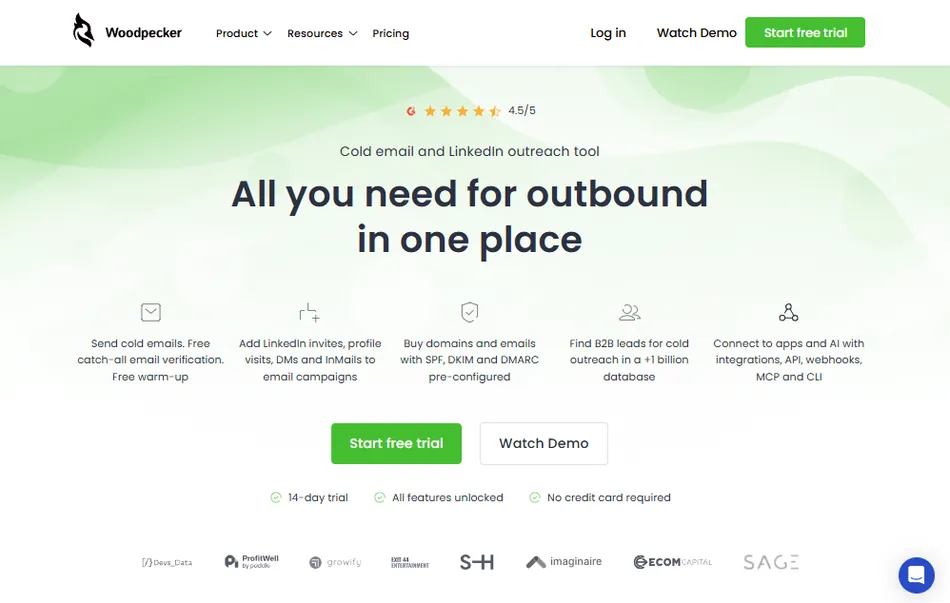
Today, Woodpecker targets five buyer segments: sales teams, lead generation agencies, recruiters, business owners, and cold email marketers. The agency use case is well-developed, with a dedicated Agency Panel for managing multiple client campaigns from a single dashboard.
The company employs more than 60 people and generated PLN 22.1 million (approximately $5.4 million USD) in revenue in 2024. Leadership changed in June 2024 when Dr. Malgorzata Sikora became CEO, with co-founder Tarczyński moving to the Supervisory Board.
Woodpecker Pros & Cons
| Pros | Cons |
|---|---|
| Free email verification (Bouncer) on every plan | LinkedIn automation requires separate $29/month add-on per account |
| Adaptive Sending reduces inbox blocks by 2.4x | Reporting and analytics lack depth |
| Unlimited team members and email accounts included | Add-on costs accumulate quickly |
| Dedicated Agency Panel for multi-client management | No native lead enrichment (technographic/intent data) |
| GDPR-compliant with EU data residency | No built-in phone dialer or SMS channel |
| Condition-based campaign branching built in | Sequence editor lacks drag-and-drop reordering |
| Permanent free plan with 500 contacts/month | API access requires a paid add-on |
Who is Woodpecker Best For?
Woodpecker’s features and pricing favor specific use cases. The platform works best when cold email is your primary outreach channel and deliverability is the top priority.
- Lead generation agencies managing multiple client accounts.
The Agency Panel is Woodpecker’s main advantage. It lets agencies manage all client campaigns from one dashboard, with guest-viewer access for clients, global domain blacklisting across accounts, and white-label notification emails. Veth Group uses it to book roughly 1,000 client appointments per month, reporting SDR-cost savings of 50%.
- B2B sales teams at small and mid-sized companies.
Teams doing outbound prospecting without a full SDR team benefit from the unlimited email accounts and team members included in every plan. Ecom Capital went from zero meetings to 2 qualified sales calls per day within 21 days of launching campaigns.
- Recruiters running candidate sourcing and business development outreach.
Woodpecker offers a dedicated solution for recruiters, with sequences that combine email steps and LinkedIn actions for reaching passive candidates and hiring managers at the same time.
- European businesses that need GDPR compliance by default.
Founded in Poland with formal GDPR compliance since May 2018, Woodpecker stores EU customer data on OVH servers in France. A named Data Protection Specialist and a published Data Processing Addendum make compliance documentation straightforward.
- Solo founders and owner-operators validating new offers.
The permanent free plan (500 contacts per month) and quick setup let founders test messaging and validate demand before committing a budget. ProfitWell’s Patrick Campbell has stated: “We couldn’t have built ProfitWell without Woodpecker.”
Woodpecker Review: How it Works & Key Features
Email Deliverability: Woodpecker treats inbox placement as a core product feature, not an upsell.
Deliverability is where Woodpecker invests most of its engineering effort, and the feature depth shows it.
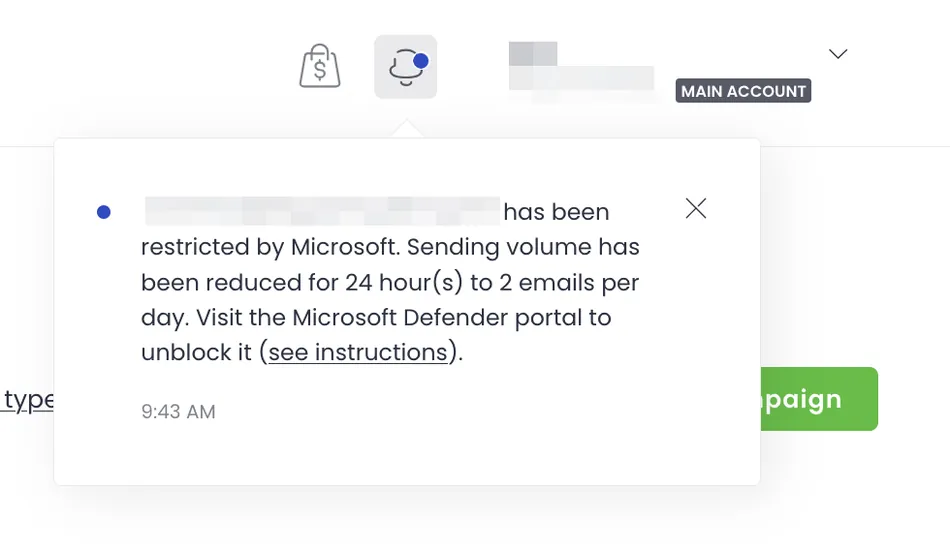
Adaptive Sending runs on every plan at no extra cost. It monitors outbound volume per mailbox and automatically cuts sending by 50% for 24 hours (or 10% for 10 days) when a mailbox approaches a provider’s daily limit. Woodpecker’s internal data from 2,900+ inboxes shows that accounts with Adaptive Sending enabled saw 2.4 times fewer provider-imposed sending blocks and a 59% drop in account block risk.
Source: Woodpecker
Email verification via Bouncer runs automatically every time you launch a campaign. No manual action or third-party account needed. If Bouncer flags an address as undeliverable, the prospect gets marked “INVALID” and the email is withheld. This is free on every plan, including the free tier, and extends to catch-all email verification.
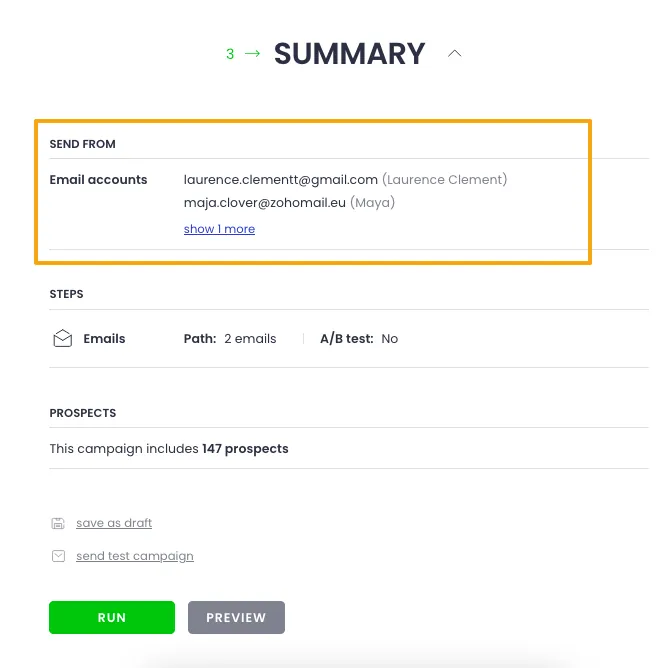
Inbox Rotation distributes prospects across up to 100 sending accounts per campaign. Woodpecker weights distribution by each mailbox’s daily sending limits and current usage across other active campaigns. Email signatures automatically match whichever mailbox sends. If a mailbox shows bounce spikes, a single toggle pulls it from all active campaigns and reassigns its prospects to the remaining mailboxes.
Source: Woodpecker
Warm-up uses native integrations with Mailivery or Warmy, included in every plan (with 2 free warm-up slots on the free plan). The system gradually ramps sending to 50 emails per day, targeting a reply rate of up to 55%. You can also seed your actual campaign copy into the warm-up process, teaching email provider algorithms to associate your messaging with positive engagement before the campaign goes live.
A Domain Audit checks SPF and DKIM records automatically when you connect an email account and again at campaign launch. You can also purchase domains and email accounts directly through Woodpecker with SPF, DKIM, and DMARC pre-configured, removing the most common technical setup friction.
Cold Email Campaigns: A structured sequence builder with condition-based branching and up to 5 A/B test variants per step.
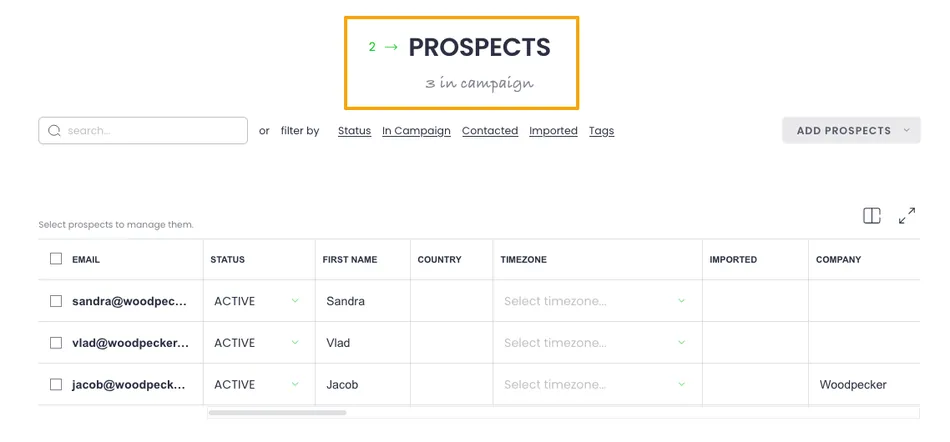
Campaign creation follows a three-step editor: Path, Prospects, Summary. In the Path step, you write your opening email, add follow-ups, set delays, and optionally insert branching conditions. The Prospects step handles contact imports (CSV or integrations). The Summary step previews everything before launch.
Source: Woodpecker
What distinguishes the campaign builder is condition-based branching.
At any point in a sequence, you can split prospects into a YES path and a NO path based on four condition types: email opens, link clicks, snippet values, or task completion. If a prospect opens your first email, they get one follow-up; if they didn’t, they get a different one. This runs natively inside the campaign editor with no external automation tools required.
A/B testing supports up to 5 variants per step, covering subject lines, body copy, or entire email structures. Combined with Spintax and Liquid Syntax for message-level variation, you can optimize messaging systematically without creating separate campaigns.
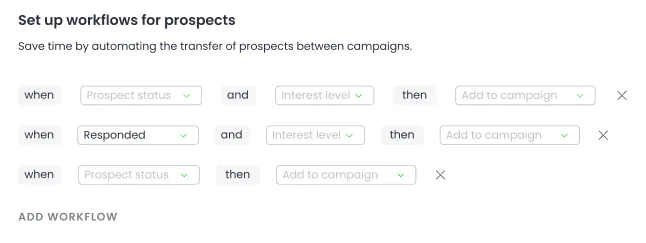
Workflow automation moves prospects between campaigns automatically based on their status (Responded, Autoreplied, Paused, Nonresponsive) and AI-assigned interest level. This removes the need for Zapier or CRM automation to handle post-campaign routing.
Source: Woodpecker
Other capabilities worth noting: delivery time scheduling by prospect timezone, a Spamword Finder that scans copy before launch, an OpenAI integration for AI-assisted email writing, custom tracking domains, and a centralized inbox that collects replies from all sending accounts in one place.
Lead Finder: A built-in B2B contact database with over 1 billion records.
Woodpecker’s Lead Finder gives you access to over 1 billion contacts inside the application. The workflow is straightforward: search for contacts, enrich their email addresses, and push them into a campaign without exporting a CSV or switching tools.
The tool runs on a credit-based model: viewing a company costs 2 credits, viewing a lead costs 1 credit, and finding an email address costs 1.5 credits. Every plan includes 400 free credits per month, enough for roughly 266 leads depending on usage. Additional credits start at $28 per month for 2,000 credits.
Two search modes are available.
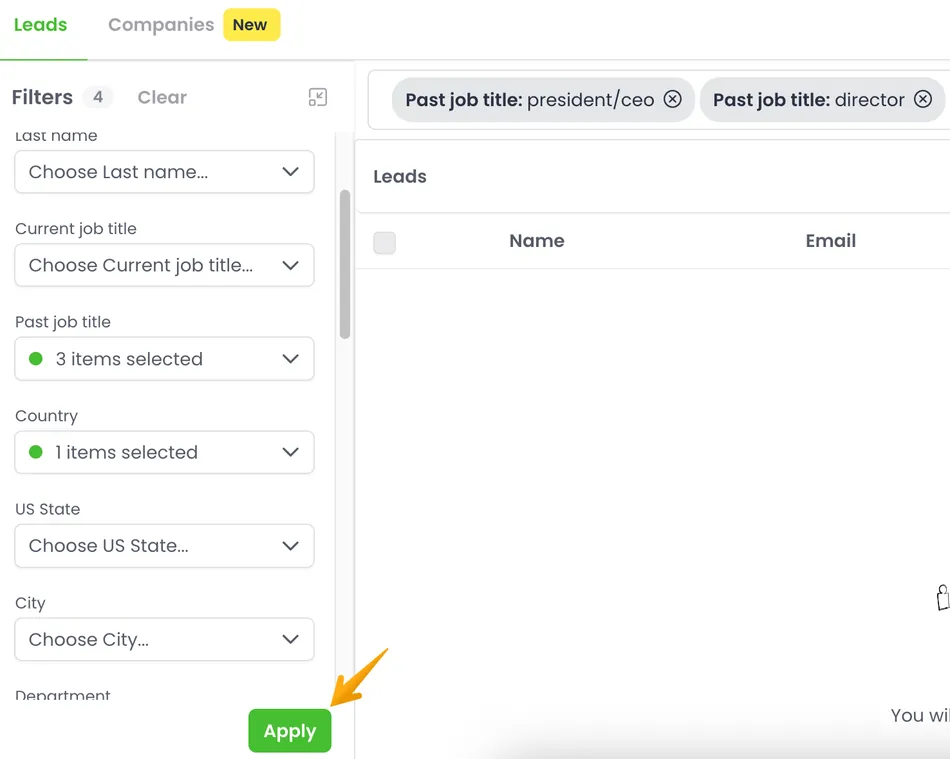
The Leads tab filters by job title, country, industry, department, and seniority, with include and exclude logic (for example, find Sales professionals who have never held a Copywriter title). The Companies tab lets you search at the organizational level first, filtering by industry, employee count, founding year, and location, then drill into individual contacts.
Source: Woodpecker
A few details worth noting: credits do not roll over between billing cycles, so unused credits are lost. Duplicate protection prevents re-adding leads already in your database and won’t charge credits for them. Leads added through Lead Finder automatically receive a “Lead Finder” source tag for tracking where contacts came from.
Agency Panel: A multi-client management layer built for lead generation agencies.
The Agency Panel is one of Woodpecker’s differentiators. It operates as a two-layer system: an Agency HQ (where billing, global settings, and notification templates live) and the client management hub where all client sub-accounts sit.
The advantages for agencies are specific.
Four role types (Admin, Owner, Authorized Team Member, and Guest Viewer) let you give clients read-only access to their campaign stats without sharing login credentials. Clients connect their own mailboxes via invitation links, so the agency never handles client email passwords.
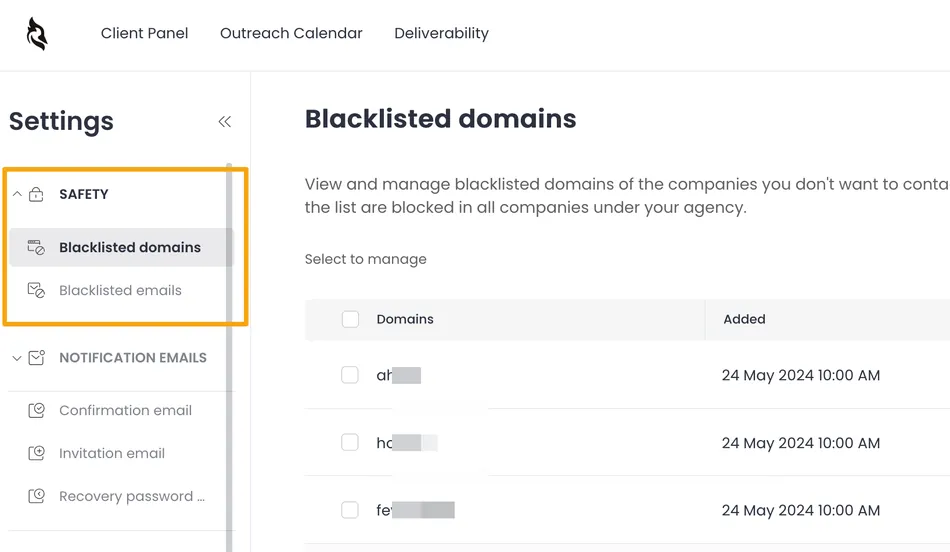
Global domain blacklisting lets you block domains or addresses across every client account at once. The campaigns tab aggregates all campaigns across all clients in one view, with filtering by client name and bulk status changes. A “To be contacted” pipeline bar per client shows when a campaign is about to run out of prospects, color-coded to flag it before results suffer.
Source: Woodpecker
White-label notification emails come included by default. Confirmation, invitation, and password recovery emails sent to clients don’t mention Woodpecker unless you want them to. A separate white-label reporting add-on ($5 per month per active client) lets agencies host client-facing reports on their own domain with their own branding.
The Agency Panel costs $27 per month per active client. As agency user Doug Puccetti put it: “No other tool has such a clear and explicit agency panel!”
LinkedIn Outreach: Multichannel sequences combining email and LinkedIn actions in one campaign flow.
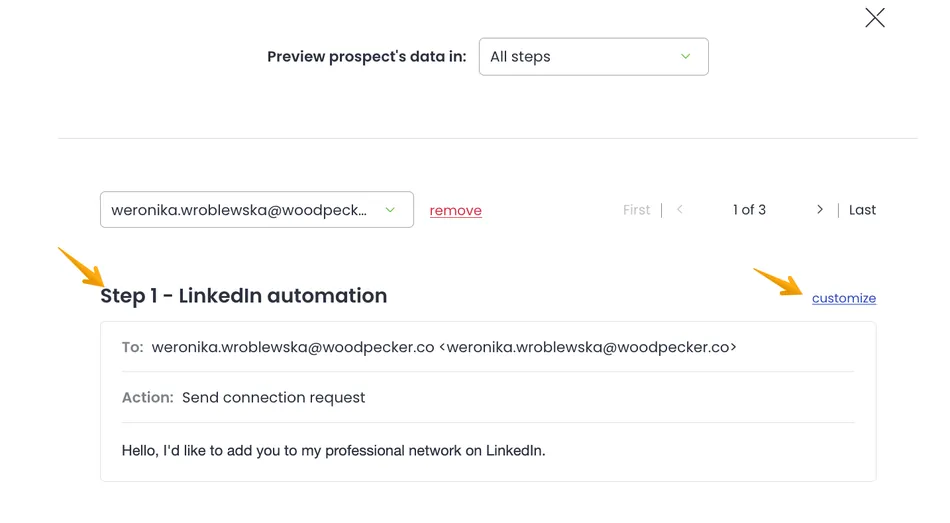
Woodpecker’s LinkedIn Outreach Automation adds LinkedIn profile visits, connection requests, direct messages, and InMail as step types within email campaign sequences. Instead of running LinkedIn outreach in a separate tool, you interleave email and LinkedIn steps in a single timeline.
The feature includes a connection request condition for branching: if a prospect accepts your LinkedIn invitation, the sequence routes them to a direct message; if they don’t, it routes them back to an email step or a different path. A/B testing supports up to 5 message variants for connection requests and direct messages.
Source: Woodpecker
Daily limits depend on your LinkedIn account type. A Basic account allows up to 80 profile visits per day and 50 direct messages. Sales Navigator raises those limits to 500 profile visits and 250 direct messages per day. Connection requests are capped at roughly 25 per day on Basic accounts, with LinkedIn recommending no more than 100 per week.
LinkedIn Outreach costs $29 per month per LinkedIn account connected and is not available during the free trial. Replies to LinkedIn direct messages appear in Woodpecker’s inbox under a dedicated LinkedIn tab.
Pricing
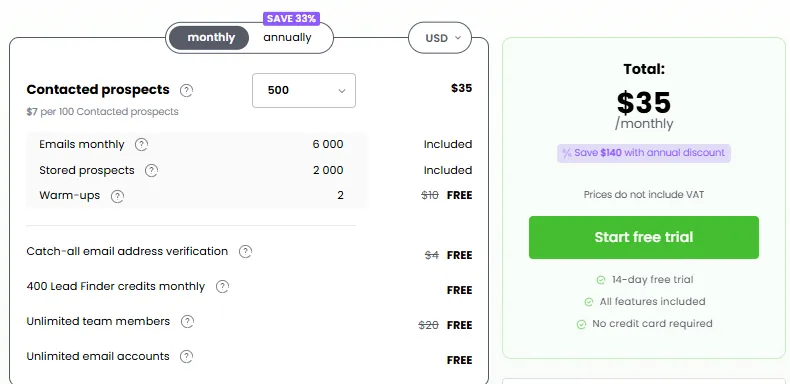
Woodpecker uses contact-based pricing built around two metrics: contacted prospects (those who receive any action within a campaign per month) and stored prospects (the total records in your database). There are no per-seat charges. Team members, email accounts, and A/B tests are all unlimited and free.
Free Plan ($0/month, permanent):
- 500 contacted prospects per month
- 6,000 emails per month
- 2,000 stored prospects
- 2 warm-up slots
- 400 Lead Finder credits per month
- Unlimited team members and email accounts
Paid Plans:
Paid tiers scale by contacted prospects per month, starting at $35 per month for 500 contacted prospects and moving through multiple volume tiers (2,000, 4,000, 8,000, 10,000, up to 1,000,000 and beyond). The rate works out to approximately $7 per 100 contacted prospects on monthly billing. Annual plans save 33%, giving you 12 months for the price of 8.
All paid plans include: unlimited email accounts, unlimited team members, inbox rotation, Adaptive Sending, condition-based campaigns, centralized inbox, domain audit, free email verification, catch-all verification, and warm-up.
Source: Woodpecker
Key Add-On Costs:
LinkedIn outreach: $29/month per LinkedIn account
Additional warm-up slots: $5/month per email account
Lead Finder credits beyond free allowance: starts at $28/month for 2,000 credits
Agency Panel: $27/month per active client
Agency White Label: $5/month per active client
API access and integrations: listed as a separate paid add-on (price not publicly disclosed)
Account pausing: You can pause your account at any time for $10 per month. Sending stops, but all data stays.
Refund policy: Refunds are only available within three days of a charge and only if the account hasn’t been used.
The base price looks modest, but add-ons change the math. An agency running 5 client accounts with LinkedIn outreach on 2 accounts and extra Lead Finder credits could pay well above $250 per month before touching the base prospect volume. The pricing is transparent, but you need to map out which add-ons you’ll actually use before comparing costs with competitors.
Limitations & Considerations
Woodpecker’s limitations reflect its design choices. They’re worth understanding before committing, not because the tool is poor, but because they define who it serves best.
Reporting stays shallow.
Multiple users on G2 and Capterra describe Woodpecker’s analytics as adequate but thin. The platform shows open rates, reply rates, and basic campaign statistics, but lacks conversion-to-meeting attribution, pipeline-level reporting, A/B test statistical significance indicators, and account-level performance views.
If your team makes decisions based on campaign analytics, you’ll likely need to export data and build reports elsewhere.
Add-on costs change the price math.
The base pricing looks clean, but the real cost depends on how many add-ons you need. LinkedIn outreach ($29/month per account), Lead Finder credits ($28+/month), extra warm-up slots ($5/month each), Agency Panel ($27/month per client), and API access (separately priced) all sit outside the base subscription. Capterra reviewers describe the model as “more expensive than it first appears.”
No native lead enrichment.
Woodpecker’s Lead Finder provides a large contact database, but has no built-in enrichment for technographic data, intent signals, or job change triggers. Teams that rely on enriched data for personalization will need third-party tools like Clay or Persana AI, adding cost and complexity.
LinkedIn automation has constraints.
The LinkedIn integration requires users to enter their LinkedIn credentials directly. G2 reviewers flag limitations in the multichannel experience compared to competitors with more native LinkedIn support. Two-factor authentication must be temporarily disabled during setup, and connection requests with a message are capped at 5 per month on Free and Premium LinkedIn accounts.
No phone or SMS channel.
Woodpecker covers email and LinkedIn only. Teams running phone-heavy SDR sequences or SMS follow-ups will need a separate tool. There’s no public indication of phone or SMS on the product roadmap.
Sequence editor could be more visual.
G2 reviewers have noted the absence of drag-and-drop reordering for email sequence steps. The editor works, but managing complex multi-step sequences with branching conditions would benefit from a more visual interface.
Who Should Use This Platform?
Woodpecker works best for a specific set of users:
- Lead generation agencies managing 5 or more client accounts who need a unified dashboard, client-facing reporting, and global safety controls
- B2B sales teams at SMBs that rely on cold email as their primary prospecting channel and want deliverability protections on every plan
- Recruiters running parallel candidate sourcing and business development outreach who need email and LinkedIn in one sequence
- European companies that need GDPR compliance, EU data residency, and a Data Processing Addendum without negotiation
- Founders testing new markets or offers who want to validate demand through cold outreach before hiring salespeople
- Technical teams building AI-driven or API-first outreach workflows using Woodpecker’s MCP Server, CLI, or REST API
Who Should Look Elsewhere?
Woodpecker is not the right fit for every outreach use case:
- Teams that need detailed analytics and revenue attribution. If your sales leadership requires pipeline-level reporting, conversion attribution, or AI-driven performance recommendations, Woodpecker’s reporting will feel thin. Look at platforms with stronger analytics.
- Organizations that need a full sales engagement platform. If you need territory management, enterprise SSO, call recording, and native CRM workflows in one tool, you want Outreach or Salesloft, not a cold email point solution.
- Budget-sensitive buyers who won’t use add-ons. The free plan is useful, but if you need LinkedIn outreach, extra Lead Finder credits, and API access, the add-on costs will outpace some competitors’ all-inclusive pricing.
- Teams running phone-first or SMS-heavy outreach. Without a built-in dialer or SMS, Woodpecker requires a separate tool for any channel beyond email and LinkedIn.
- Marketing teams sending newsletters or broadcast emails. Woodpecker is built for one-to-one cold outreach, not mass email marketing. The sending architecture, pricing model, and feature set all assume personalized, low-volume-per-mailbox sending.
Final Verdict
Woodpecker earns its reputation on the thing that matters most in cold email: getting into the inbox. Adaptive Sending, free verification via Bouncer, inbox rotation across up to 100 accounts, and campaign-copy warm-up form a thorough deliverability toolkit. That these features come with every plan, not just premium tiers, is a differentiator.
The Agency Panel gives Woodpecker an advantage for lead gen agencies that no competitor fully matches. Multi-client management, guest-viewer access, global blacklisting, and white-label notifications solve operational problems that agencies face at scale.
The trade-offs are clear: reporting lacks depth, the add-on pricing model can surprise you, and teams needing phone, SMS, or enrichment will need to look elsewhere.
But for email-first outreach teams (especially agencies and SMB sales teams) that prioritize deliverability and map out add-on costs upfront, Woodpecker is a solid, mature choice in a category full of newer alternatives still proving their reliability.
Get started with Woodpecker here.
Woodpecker FAQ
Is there a free version of Woodpecker?
Yes. Woodpecker offers a permanent free plan that includes 500 contacted prospects per month, 6,000 emails per month, 2,000 stored prospects, 2 warm-up slots, and 400 Lead Finder credits. Unlimited team members and email accounts are included. This is a fully functional plan, not a time-limited trial. A separate 14-day free trial is also available with access to all features except LinkedIn slots.
How does Woodpecker’s pricing work?
Woodpecker charges based on contacted prospects per month, not per user seat. Paid plans start at $35 per month for 500 contacted prospects and scale through multiple volume tiers. Annual billing saves 33%.
All paid plans include unlimited email accounts, unlimited team members, inbox rotation, Adaptive Sending, email verification, and warm-up. LinkedIn outreach, extra Lead Finder credits, and the Agency Panel are priced as separate add-ons.
What deliverability features does Woodpecker include?
Every plan includes Adaptive Sending (automatic volume throttling that reduces inbox blocks by 2.4x), free email verification via Bouncer (runs automatically on every send), catch-all verification, inbox rotation across up to 100 accounts per campaign, warm-up via Mailivery or Warmy, a Domain Audit for SPF/DKIM checking, and a Spamword Finder.
You can also purchase domains with SPF, DKIM, and DMARC pre-configured directly through the platform.
Does Woodpecker support LinkedIn outreach?
Yes. Woodpecker offers LinkedIn automation as a paid add-on at $29 per month per LinkedIn account.
It supports profile visits, connection requests, direct messages, and InMail as steps within email campaign sequences. Branching logic based on connection request acceptance is available, and A/B testing supports up to 5 message variants. Daily action limits depend on your LinkedIn account type.
Is Woodpecker good for agencies?
Woodpecker is a strong option for lead generation agencies.
The Agency Panel ($27 per month per active client) provides a dashboard for managing all client accounts, campaigns, and reports. It includes guest-viewer access for clients, global domain blacklisting, white-label notification emails, and deliverability monitoring with CSV and PDF exports. A white-label reporting add-on is available for $5 per month per client.
What integrations does Woodpecker support?
Woodpecker integrates natively with Calendly, Google Sheets, Pipedrive, HubSpot, Zoho CRM, Clay, Persana AI, UpLead, LeadFuze, Hunter.io, and Aircall, among others. Zapier and Albato serve as API bridges for additional connections. A REST API, MCP Server, and CLI are available for custom integrations. Note that API access is a paid add-on.
How does Woodpecker compare to Instantly?
Both platforms target cold email outreach, but they differ in structure.
Woodpecker includes free email verification and warm-up on every plan and offers a dedicated Agency Panel, while Instantly charges separately for its CRM and lead database access. Instantly claims a larger warm-up network and currently serves more customers, while Woodpecker has a longer track record (founded 2015 vs. 2021), public company transparency, and stronger GDPR compliance features. Woodpecker uses contact-based pricing; Instantly uses email-volume-based pricing.
Is Woodpecker GDPR compliant?
Yes. Woodpecker has held formal GDPR compliance status since May 25, 2018.
The company is headquartered in Poland (EU jurisdiction), stores EU customer data on OVH servers in France, employs a named Data Protection Specialist, and publishes a Data Processing Addendum and a Processors’ List. GDPR encryption for unresponsive prospects is built into the platform.